Disconnecting the battery on your Jeep Compass is a simple but important job. Whether you need to replace the battery, reset the electronics, or do some repairs, knowing how to disconnect it safely protects both you and your vehicle. Many beginners worry about making mistakes, but with clear steps and a little care, you can do this job in less than 15 minutes.
Why Disconnect The Battery?
Modern vehicles like the Jeep Compass rely on many electronic systems. Disconnecting the battery is often needed when:
- Installing new parts (like radios or sensors)
- Resetting error codes
- Doing repairs on electrical systems
- Replacing the battery itself
By cutting power, you avoid short circuits and protect sensitive electronics from damage.

What You Need Before Starting
Preparation helps avoid surprises. Here’s what you’ll need:
- Safety gloves — Protects your hands from acid and sharp parts.
- Safety glasses — Shields your eyes from sparks or debris.
- 10mm wrench or socket — Most Jeep Compass batteries use this size.
- Memory saver tool (optional) — Keeps radio presets and clock settings.
If you don’t use a memory saver, your car’s electronics may reset. This is normal, but some beginners find it annoying.

Locating The Jeep Compass Battery
The battery sits under the hood, usually near the front left (driver’s side). Here’s a quick comparison of battery locations for different Jeep Compass model years:
| Model Year | Battery Location | Cover Present? |
|---|---|---|
| 2017-2020 | Front left, under hood | Yes |
| 2021-2024 | Front left, under hood | No (usually exposed) |
Always check your owner’s manual if the battery isn’t visible.
Step-by-step: Disconnecting The Jeep Compass Battery
Follow these steps for a safe, successful disconnect.
1. Turn Off The Ignition
Make sure the engine and all accessories (lights, radio, AC) are off.
2. Open The Hood
Pull the release lever inside the car, then lift the hood. Secure it with the prop rod.
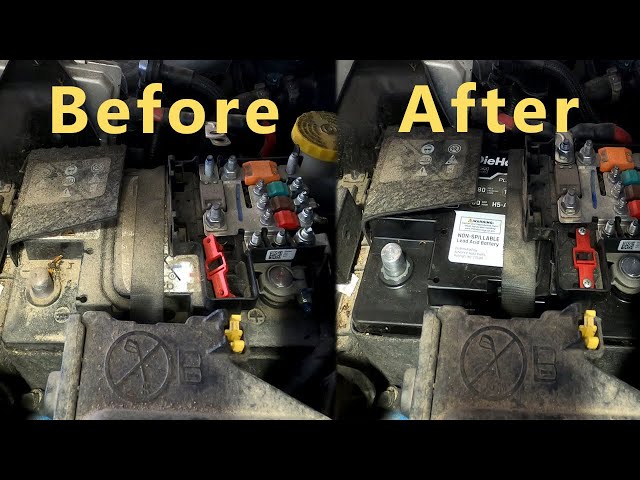
3. Locate The Battery Terminals
Find the negative terminal (usually marked with a minus sign or black cover) and the positive terminal (plus sign or red cover).
4. Put On Safety Gear
Gloves and glasses reduce risk.
5. Loosen The Negative Terminal First
Use your 10mm wrench to loosen the nut on the negative terminal.
*Why negative first? * It prevents accidental short circuits.
6. Lift Off The Negative Cable
Gently wiggle and pull the cable off. Move it aside so it doesn’t touch the battery.
7. Repeat For The Positive Terminal
Loosen the nut, remove the cable, and move it aside.
8. Secure The Cables Away From The Battery
Tuck the cables so they won’t accidentally touch the terminals.
Here’s a quick table comparing which terminal to disconnect first for safety:
| Terminal | Recommended Order | Risk Level |
|---|---|---|
| Negative | First | Low |
| Positive | Second | Medium |
Remember: Always disconnect negative first, reconnect positive first.
Common Mistakes And How To Avoid Them
Beginners often make small errors that can cause problems. Here are two non-obvious tips:
1. Don’t Let Tools Touch Both Terminals At Once
This can cause a spark or short circuit. Work slowly and carefully.
2. Avoid Touching The Battery With Wet Hands
Moisture increases the risk of electrical shock and corrosion.
A common mistake is forgetting to secure the cables away from the battery after disconnecting. If the cable slips back, it can reconnect power unexpectedly.
After Disconnecting: What Happens Next?
When the battery is disconnected:
- All electronic systems turn off.
- You may lose radio presets, clock settings, and trip data.
- Security systems may reset.
If you plan to leave the battery disconnected for a long time, consider removing it from the vehicle and storing it in a cool, dry place.
Reconnecting The Battery Safely
When you’re ready to reconnect:
- Attach the positive cable first, then the negative.
- Tighten both nuts securely.
- Check for any warning lights or error messages.
- Start the vehicle and test basic systems (lights, radio, AC).
If your Jeep Compass shows error messages, don’t panic. Many will disappear after driving for a few minutes. For detailed information about vehicle electronics, visit Jeep Official Site.
How The Jeep Compass Battery Differs From Other Cars
Some vehicles hide the battery under seats or covers. The Jeep Compass keeps it accessible, making disconnecting easier. Here’s a comparison with other common SUVs:
| Vehicle | Battery Access | Disconnect Difficulty |
|---|---|---|
| Jeep Compass | Under hood, easy | Low |
| Honda CR-V | Under hood, easy | Low |
| Chevy Equinox | Under hood, with cover | Medium |
| Toyota RAV4 | Under hood, easy | Low |
This makes the Compass a good choice for DIY maintenance.

Frequently Asked Questions
How Long Does It Take To Disconnect The Jeep Compass Battery?
Most people finish in 10–15 minutes. If you’re new, take your time and follow each step.
Can Disconnecting The Battery Reset Error Codes?
Yes, disconnecting the battery for at least 15 minutes can reset some error codes. However, deeper issues may need a mechanic’s help.
Will I Lose My Radio And Clock Settings?
If you don’t use a memory saver tool, your radio presets and clock will reset. This is normal and easy to fix.
Is It Safe To Disconnect The Battery Myself?
Yes, as long as you follow safety steps. Always wear gloves, remove the negative cable first, and avoid touching both terminals.
What Should I Do If The Car Won’t Start After Reconnecting?
Check that both cables are tight and secure. If the car still won’t start, check the battery charge or consult a mechanic.
Disconnecting the Jeep Compass battery is a basic task that helps with many repairs and resets. With the right tools and careful steps, even beginners can do it safely. If you need more help, your owner’s manual or official resources are always available. Taking control of small maintenance jobs builds confidence and keeps your Jeep running strong.


















