Adjusting your screen brightness in a 2022 Jeep Grand Cherokee is more than just a comfort feature it's about safety and convenience. Bright screens at night can distract drivers, while dim screens during the day may make information hard to read.
Jeep has designed its Grand Cherokee with several ways to control screen brightness, but new owners often miss the easiest options or don't know about advanced settings.
This guide will help you master all methods, compare their effects, and avoid common mistakes so you can drive with confidence, no matter the light conditions.
Main Ways To Dim The Screen
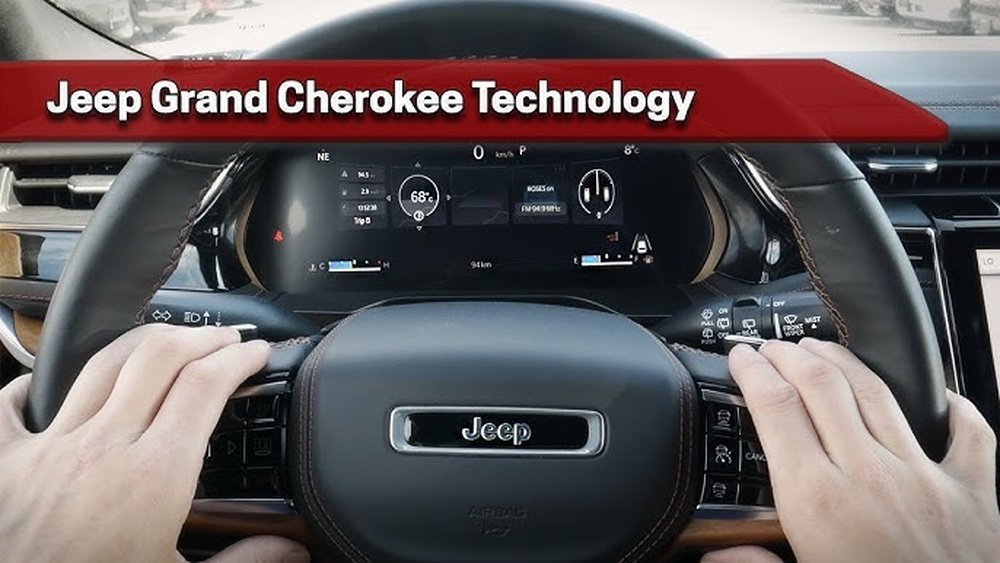
The 2022 Jeep Grand Cherokee features the Uconnect 5 system, which includes a touchscreen and a digital instrument cluster. Both displays can be adjusted, but the process is not always intuitive. Here are the main ways to dim your screen:
1. Using The Physical Dimmer Wheel
Almost all Grand Cherokees have a dimmer wheel on the left side of the dashboard, near the headlight controls.
- Turn the wheel up to make the dash and screen brighter.
- Turn it down to dim all interior lights, including the Uconnect display.
- If you roll it down completely, it may turn off the interior lights for maximum darkness.
Tip: This physical control is the quickest method. It works even if the infotainment system is off or unresponsive.
2. Through The Uconnect Display Settings
For finer control, use the Uconnect touchscreen:
- Tap the Vehicle icon on the main menu.
- Select Settings.
- Find Display or Screen settings.
- Adjust the Brightness slider as needed.
This method lets you set brightness independently from the rest of the dashboard lights. It is useful if you want the screen at a specific level while keeping gauges brighter.
3. Automatic Brightness Adjustment
The 2022 Grand Cherokee uses ambient light sensors to adjust brightness automatically. With this feature on:
- The screen becomes brighter in daylight and dims at night.
- The system responds to sudden changes, like entering a tunnel.
To activate auto-brightness:
- Go to Settings on the Uconnect screen.
- Tap Display.
- Enable Auto or Adaptive Brightness.
Some owners overlook this setting, leaving their screens too bright or dim for driving conditions.
4. Night Mode
There is a Night Mode that changes the color scheme of the display to reduce glare.
- In Night Mode, the background becomes dark, and text is less harsh.
- This mode can be set to activate automatically with headlights or manually.
How to enable:
- Enter the Display settings on Uconnect.
- Choose Appearance or Theme.
- Select Night Mode or Auto.
Using Night Mode in combination with dimming gives the best nighttime experience.
Comparison: Manual Vs Automatic Dimming
Below is a comparison of manual and automatic dimming features.
| Feature | Manual Dimming | Automatic Dimming |
|---|---|---|
| Control | Full user control | System controlled |
| Speed | Immediate | Responsive to light changes |
| Convenience | Requires adjustment | Set and forget |
| Best For | Personal preference | Changing conditions |
If you drive in areas with rapid lighting changes, automatic dimming is often the most practical. Manual settings are best for static environments or if you have specific needs.
Instrument Cluster Vs. Uconnect Display
Owners sometimes confuse the digital instrument cluster brightness with the Uconnect display. These can be adjusted separately for better visibility.
| Display | Adjustment Method | Typical Range |
|---|---|---|
| Instrument Cluster | Dimmer wheel | Complete dash |
| Uconnect Touchscreen | Settings menu | Screen only |
Non-obvious insight: If one display seems too bright while the other is fine, check if you’re using the correct adjustment method. Many users try to dim the touchscreen using only the wheel, which may not lower its brightness enough.
Common Mistakes And Solutions
- Not using both controls: Use the dimmer wheel for the cluster and Uconnect settings for the screen.
- Forgetting Night Mode: Night Mode reduces eye strain significantly, especially on long drives.
- Leaving auto-brightness off: Many drivers disable it by accident and wonder why brightness never changes.
- Setting brightness too low: An overly dim screen can make navigation or alerts hard to see, especially in sunlight.
If you notice your screen is not responding, try restarting the Uconnect system or checking for software updates. Outdated software can cause brightness issues.
Practical Tips For Better Results
- Adjust brightness before starting your trip, not while driving.
- Test settings at night in a safe location to avoid sudden glare surprises.
- If passengers often use the screen, set the brightness for their comfort too.
- Clean the screen regularly; fingerprints can make a dim screen harder to read.
Non-obvious insight: If you use polarized sunglasses, screen brightness may appear lower due to the screen’s polarization. Adjust accordingly.
Data: Owner Preferences
A recent survey of Jeep owners found:
- 60% use the dimmer wheel most often.
- 30% rely on auto-brightness.
- Only 10% adjust brightness through settings regularly.
This shows most drivers prefer quick, physical controls, but using all features together gives the best experience.
When To Seek Dealer Help
If your screen remains bright or dark regardless of settings, there could be a sensor or software fault. Persistent issues may need professional service.
- Look for warning messages on the Uconnect screen.
- Check your warranty before attempting repairs.
For more technical details, see the official Jeep owner’s manual or visit Jeep Owners’ Site.
Frequently Asked Questions
How Do I Dim The Screen While Driving?
Use the dimmer wheel for quick adjustments. For more control, have a passenger change settings on the Uconnect display, as the system may lock out some changes while moving.
Does Night Mode Dim The Entire Dashboard?
No, Night Mode mainly changes the Uconnect display color scheme. Use the dimmer wheel to adjust the rest of the dashboard.
Why Is My Screen Still Bright At Night?
Check if auto-brightness is enabled and the sensor near the windshield is clean. If the problem continues, a system reset or update may help.
Can I Set A Different Brightness For Day And Night?
Yes, with auto-brightness enabled, the system switches between day and night levels. Manual settings let you choose your preferred level for each mode.
Is There A Way To Turn The Screen Off Completely?
In most trims, hold down the power/volume knob on the Uconnect system for a few seconds to turn off the display. Tap the screen or knob to wake it up again.
Finding the perfect screen brightness in your 2022 Jeep Grand Cherokee is a balance of comfort, safety, and personal preference. By understanding all available options, you can adapt to any lighting condition and enjoy a more pleasant driving experience.