Getting into your Jeep Wrangler at night and fumbling with the dome light can be frustrating. Whether you want the light to come on automatically, stay off, or stay on, knowing how to control it can make a big difference. Many Jeep owners struggle with their dome light settings, especially after removing the doors or installing aftermarket parts. This article gives you clear steps and practical advice to take full control of your Jeep Wrangler’s dome light, covers common mistakes, and answers the most frequent questions.
Understanding The Jeep Wrangler Dome Light
The dome light in a Jeep Wrangler is more than just a light overhead. It helps you see inside your vehicle at night, can act as a safety feature, and adds comfort for passengers. But Jeep Wranglers are unique vehicles. Their doors and roof can be removed, which can sometimes confuse the dome light system. Knowing how it works is important before you start making changes.
Basic Functions
Your Wrangler’s dome light usually has three main modes:
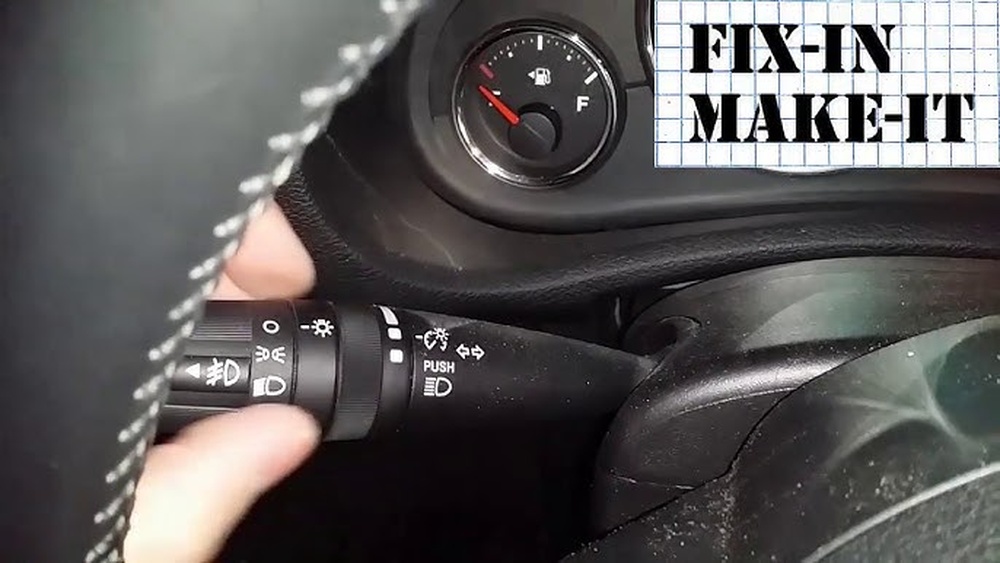
- Door: Light turns on when a door is opened and off when closed.
- On: Light stays on, regardless of doors.
- Off: Light stays off, even if doors open.
Some models use a manual switch. Others use the vehicle’s multifunction stalk or Uconnect system (for newer models).
Why Control Matters
Controlling the dome light saves battery, increases privacy, and prevents accidental draining if you leave doors off. Many Jeep owners are surprised to find their battery dead after a night with the dome light stuck on.
Manual Controls: Switches And Stalks
Older Jeep Wranglers (like TJ and some JK models) have simple manual switches. Newer Wranglers (JL and Gladiator JT) use electronic controls.
Manual Switch
Look for a small switch right on the dome light. It often slides or toggles between three positions:
- Door (center position)
- On (one side)
- Off (other side)
- Flip to “On” for constant light.
- Flip to “Off” to keep it off.
- Use “Door” to let it respond to door status.
Multifunction Stalk
Some models let you control the dome light from the multifunction stalk (the stick near your steering wheel). Usually, twisting the end all the way up turns the dome light on, and turning it all the way down turns it off.
Uconnect Settings
If your Wrangler has the Uconnect touchscreen system (common in JL and JT), you can adjust dome light settings through the menu:
- Tap Settings
- Choose Lights
- Adjust Interior Light settings
Pro tip: On newer Wranglers, using the Uconnect system gives you more options, such as dimming the dome light or setting a delay timer.
Keeping The Dome Light Off When Doors Are Removed
One unique feature of the Jeep Wrangler is the ability to remove the doors. But when you do, the dome light often stays on, since it thinks the doors are open. This can drain your battery fast.
Door Jamb Switches
Each door has a jamb switch that senses if the door is closed. When you remove the door, the switch stays “open,” so the Jeep thinks the door is always open.
How To Solve This:
1. Use The Dome Light Switch
If your Wrangler has a manual dome light switch, flip it to “Off” before removing the doors.
2. Use Door Jamb Plugs
Plastic plugs or “dummy switches” fit into the door jamb to trick the system. They are cheap and easy to install.
3. Pull The Fuse
For older Wranglers, you can pull the dome light fuse under the hood. This disables the dome light completely, but also turns off other interior lights.
4. Uconnect Settings
For newer models, turn off the interior lights in the Uconnect menu.
Comparing Methods
Here’s a quick comparison of common methods to keep the dome light off when doors are removed:
| Method | Difficulty | Effect on Other Features | Cost |
|---|---|---|---|
| Dome Light Switch | Easy | Only Dome Light | Free |
| Jamb Plugs | Easy | Only Door Lights | Low ($5-10) |
| Pulling Fuse | Medium | All Interior Lights | Free |
| Uconnect | Easy | Customizable | Free |
Non-obvious insight: Many Jeep owners forget that pulling the fuse also disables the glove box and cargo lights, which might be inconvenient.
Customizing Dome Light Behavior
You can do more than just turn the dome light on or off. Customizing how and when it operates can make your Wrangler more comfortable.
Adjusting Dome Light Delay
Most Wranglers let you set a delay timer for the dome light. This means the light stays on for a set time after you close the doors, then turns off automatically.
- Manual models: Some switches have a delay option, or the light fades automatically.
- Uconnect: Set the delay time (e.g., 10, 30, 60 seconds) in the menu.
Dimming The Light
For Wranglers with dimmer controls, you can adjust the brightness of the dome and dashboard lights. Usually, this is a rolling knob near the steering wheel.
- Rolling it up brightens lights.
- Rolling it down dims or turns off the dome light.
Adding Aftermarket Dome Lights
If the factory dome light is too dim, consider an aftermarket LED upgrade. These are brighter and use less power. But make sure the new light is compatible with your Wrangler’s electrical system.
Tip: Some aftermarket dome lights include a built-in switch, giving you more control even if your Jeep’s factory switch is limited.
Troubleshooting Common Dome Light Problems
Sometimes the dome light doesn’t do what you want. It might stay on, not turn on at all, or flicker. Here’s how to fix common problems.
Dome Light Won’t Turn Off
- Check the switch position: Make sure it’s not stuck in the “On” position.
- Inspect door jamb switches: A stuck switch can fool the system.
- Look for wiring problems: After off-road trips, wires can get loose.
- Check the Uconnect settings: For JL/JT models, make sure the interior light timer is not set to “infinity.”
Dome Light Won’t Turn On
- Burned-out bulb: Replace with the correct type (usually 578 or 211-2 for older models).
- Blown fuse: Check the interior fuse panel.
- Switch problem: Try toggling through all positions.
- Faulty wiring: Especially after water crossings or heavy off-roading.
Dome Light Flickers
- Loose bulb: Reseat or replace the bulb.
- Wiring issue: Check connectors above the dome light.
- Corroded contacts: Clean contacts with electrical cleaner.
Step-by-step: Changing Dome Light Bulb In A Jeep Wrangler
If your dome light is dim or not working, changing the bulb is simple. Here’s how you do it:
- Turn off the vehicle and make sure lights are off.
- Pry off the dome light cover gently with a flat tool.
- Remove the old bulb (use gloves to avoid oil from your skin).
- Install the new bulb (check your manual for the right type).
- Test the light before replacing the cover.
- Snap the cover back on.
Pro tip: Use an LED bulb for longer life and less power draw. But check compatibility—some cheap LEDs can confuse the Jeep’s system and cause flickering.

Advanced Dome Light Modifications
Some Wrangler owners want even more control. Here are a few advanced options:
Adding A Dome Light Kill Switch
Install a simple toggle switch in the dome light circuit. This gives you full manual control, perfect for off-roading or camping.
Installing Programmable Controllers
Some aftermarket modules let you program when and how the dome light works. For example, you can set it to only come on when the ignition is off, or to fade up/down.
Integrating With Remote Start
For Wranglers with remote start, you can wire the dome light to flash or fade when remote starting or stopping. This requires some electrical knowledge.
Warning: Advanced modifications can void your warranty or cause electrical issues. If you’re not sure, consult a Jeep specialist.
Comparing Dome Light Controls By Wrangler Generation
Different Wrangler generations handle dome lights differently. Here’s a quick overview:
| Model | Manual Switch | Stalk Control | Uconnect Control | Common Issues |
|---|---|---|---|---|
| TJ (1997-2006) | Yes | No | No | Stuck with doors off |
| JK (2007-2018) | Yes | Some | No | Flicker after mods |
| JL (2018+) | Yes | Yes | Yes | Settings confusion |
| JT Gladiator | Yes | Yes | Yes | Uconnect delay |
Insight: Many JL and JT owners don’t realize their Uconnect system can fully control dome light timing and brightness, making manual adjustments unnecessary in most cases.

Practical Tips For Everyday Use
- Check your dome light before leaving the vehicle to avoid dead batteries.
- Keep spare bulbs and fuses in your glove box, especially for long trips.
- Test dome light settings after removing doors to be sure you’re not draining your battery.
- Avoid cheap LED bulbs—they can cause system errors.
- Clean dome light covers regularly for maximum brightness.
Why Does My Jeep Wrangler Dome Light Stay On After I Close The Doors?
This usually means the dome light switch is in the “On” position, a door jamb switch is stuck, or the Uconnect system’s interior light timer is set too long. Check the switch and settings first.
How Do I Turn Off My Jeep Wrangler Dome Light When The Doors Are Off?
Use the manual switch to turn it off, install door jamb plugs, or adjust the settings in Uconnect (for newer models). If these don’t work, you can pull the dome light fuse as a last resort.
Can I Upgrade My Wrangler’s Dome Light To Led?
Yes, you can upgrade to an LED bulb for brighter light and less power use. Make sure the LED is compatible with your Jeep’s system to avoid flickering or errors. Choose a quality brand for best results.
Will Pulling The Dome Light Fuse Affect Other Lights?
Yes, pulling the fuse will usually turn off all interior lights, including the glove box and cargo area. Only use this method if you’re okay with losing those features.
Where Can I Find Official Instructions For My Specific Wrangler Model?
The best source is your Jeep owner’s manual. You can also find detailed guides on the official Jeep website.
Controlling your Jeep Wrangler dome light is simple once you know where to look and what options you have. Whether you want to keep your battery safe, improve comfort, or add new features, there’s a solution for every need. With the right approach, you can make your Wrangler’s lighting work perfectly for any adventure.