Changing the time in your Jeep Wrangler may seem like a small detail, but it can make a big difference in your daily driving experience. Whether you’re adjusting for daylight saving time or have just replaced your battery, setting the correct time helps keep you on schedule and avoids confusion. The process can vary based on the Wrangler’s model year and the type of infotainment system installed. If you’ve ever felt lost in the menus or wondered why your clock keeps resetting, this guide will walk you through every step clearly and simply.
Understanding Your Jeep Wrangler’s Clock System
Not all Jeep Wranglers have the same clock setup. Over the years, Jeep has updated the infotainment systems and dashboard displays. Knowing which system your vehicle uses is the first step.
| Model Year | Main Clock Control | Display Type |
|---|---|---|
| 2007-2010 | Manual (Buttons) | Basic Digital/Analog |
| 2011-2017 | Uconnect Buttons/Menu | Touchscreen or Button Display |
| 2018-Present | Uconnect Touchscreen | Large Touchscreen |
A 2018 or newer Jeep Wrangler uses a large Uconnect touchscreen with easy-to-navigate menus. Older models rely on manual buttons or smaller digital displays.
Steps To Change The Time In Jeep Wrangler
The way you set the clock depends on the Wrangler’s year and its infotainment system. Here’s how to adjust the time for the most common setups.
For 2007-2010 Jeep Wrangler (manual Clock)
Find the small “H” (hour) and “M” (minute) buttons on the radio or dashboard.
2. Turn On The Ignition
The vehicle must be in accessory or run mode, but the engine does not need to be started.
3. Adjust Hours
Press and hold the “H” button. Each press increases the hour by one. Stop when the correct hour appears.
4. Adjust Minutes
Use the “M” button to set the minutes. Each press adds one minute.
Pro Tip: If your clock resets after turning off the car, check your battery connections. Weak or loose connections can cause the clock to lose time.
For 2011-2017 Jeep Wrangler (uconnect Or Standard Radio)
Press the “Menu” or “Clock” button on your radio.
2. Find Clock Settings
Use the tuning knob or arrow buttons to scroll through the options until you find “Set Time. ”
3. Set The Hour And Minutes
Adjust the hours and minutes using the tuning knob or the up/down arrow keys.
4. Save The Settings
Usually, pressing the “Menu” or “Clock” button again will save your changes.
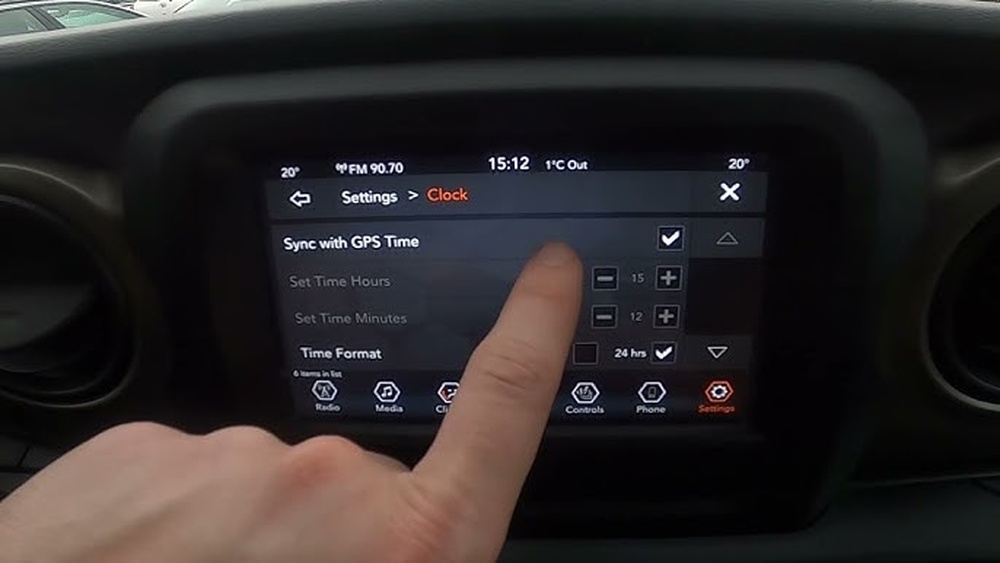
For 2018-present Jeep Wrangler (uconnect Touchscreen)
1. Turn On The Infotainment System
Press the power button or tap the screen to wake it up.
Tap “Settings” on the main menu.
3. Go To Clock & Date
Find And Select “clock & Date” Or Just “clock.”
4. Set The Time
Tap the hour or minute box to adjust. Enter the correct time using the touchscreen.
5. Choose Am/pm Or 24-hour Format
Some versions allow you to pick between 12-hour and 24-hour display.
6. Save And Exit
Confirm changes by tapping “Save” or simply backing out of the menu (the system often auto-saves).
| System | Steps | Time Format Options |
|---|---|---|
| Manual (2007-2010) | Physical Buttons | 12-hour only |
| Uconnect (2011-2017) | Menu & Knob | 12-hour or 24-hour |
| Uconnect Touchscreen (2018+) | Touchscreen | 12-hour or 24-hour |

Common Issues When Setting The Time
Some owners run into simple problems that can be frustrating. Here are the most frequent ones and how to fix them:
- Clock Resets Every Time: This usually means the battery is weak or not connected well.
- Buttons Not Working: Dirt or spilled drinks can block button contacts. Clean with a soft cloth.
- Menu Option Missing: If you can’t find the time setting, your radio may have a software glitch. Try restarting the system or consult your manual.
- Time Keeps Drifting: In some models, a failing radio or head unit can cause the clock to lose time.
A non-obvious insight: Some Wranglers with GPS or satellite radio can set the time automatically if the feature is enabled. If you see an “Auto Set” option in the clock menu, try turning it on for less hassle.
Tips For Keeping Your Jeep Wrangler’s Clock Accurate
- Enable Automatic Time Updates: On newer models with GPS, enable auto time sync. This keeps your clock correct even when you cross time zones.
- Check After Battery Replacement: Always reset the clock after changing or disconnecting the battery.
- Look for Software Updates: Sometimes, updating your Uconnect system fixes clock issues or adds new features. Visit the official Jeep site for updates.
- Don’t Ignore Small Glitches: If your clock changes on its own, it could signal bigger electrical problems.
Another tip beginners miss: If you frequently drive in areas without GPS signal (like underground parking or remote places), your clock may not update automatically. In this case, set it manually for the most accurate time.
Frequently Asked Questions
How Do I Set The Time In My Jeep Wrangler If The Screen Is Frozen?
If the touchscreen is unresponsive, try restarting the system by turning off the ignition and waiting a minute before restarting the car. If the problem continues, a soft reset (holding the power and volume buttons together for 10 seconds) may help on newer Uconnect systems.
Why Does My Jeep Wrangler Clock Keep Losing Time?
A clock that resets often points to a weak battery, poor connections, or possible radio unit problems. Double-check the battery terminals and consider visiting a mechanic if the issue remains.
Can I Switch Between 12-hour And 24-hour Time Formats?
Yes, most Uconnect systems from 2011 onward allow you to choose between 12-hour (AM/PM) and 24-hour (military) formats in the clock settings menu.
Is There A Way To Sync My Jeep Wrangler Clock With Gps?
If your Wrangler is equipped with GPS or satellite radio, go to the clock menu and look for an “Auto Set” or “Sync with GPS” option. This will keep your clock accurate without manual changes.
Where Can I Find Official Instructions For My Model?
You can always find up-to-date, model-specific instructions at the official Jeep Owner’s Manual site, which covers every model year and infotainment system.
Taking a few minutes to set your Jeep Wrangler’s clock correctly makes every drive smoother. Whether you use buttons or a modern touchscreen, the steps are straightforward once you know your system. Paying attention to small details—like enabling auto-sync or checking battery health—saves you time and prevents future headaches. Stay punctual and enjoy your drives with confidence.


















