Changing the distance unit from kilometers to miles on your Jeep Compass can make a big difference, especially if you drive across countries or buy a used car from another region. If you’re used to miles but your dash shows kilometers—or the other way around—it can be confusing to read your speed and understand trip data. Luckily, Jeep has made this change simple, but there are still a few things to know before you start.
Many Jeep Compass owners aren’t aware that this feature exists, or they miss out on shortcuts that save time. In this guide, you’ll learn how to switch from km to miles (and back), get troubleshooting tips, and see how the Compass compares to other SUVs for unit changes.
Let’s make your driving experience more comfortable and clear.
Why Change The Units On Your Jeep Compass?
The unit setting on your dashboard affects your speedometer, trip meter, fuel economy readout, and sometimes your GPS. Using the unit you’re familiar with helps prevent mistakes, such as speeding or misjudging distances.
Here are a few common reasons people want to switch:
- You bought a used Jeep Compass imported from another country.
- You drive across borders (for example, between the US and Canada).
- You want to match your GPS or navigation app, which displays miles or kilometers.
- You prefer one unit system for easier math on trips.
Step-by-step: How To Change Km To Miles
The process is almost the same on most Jeep Compass models from 2017 to present. However, the interface may look a little different depending on your year and trim.
- Turn on the ignition but do not start the engine. The display should light up.
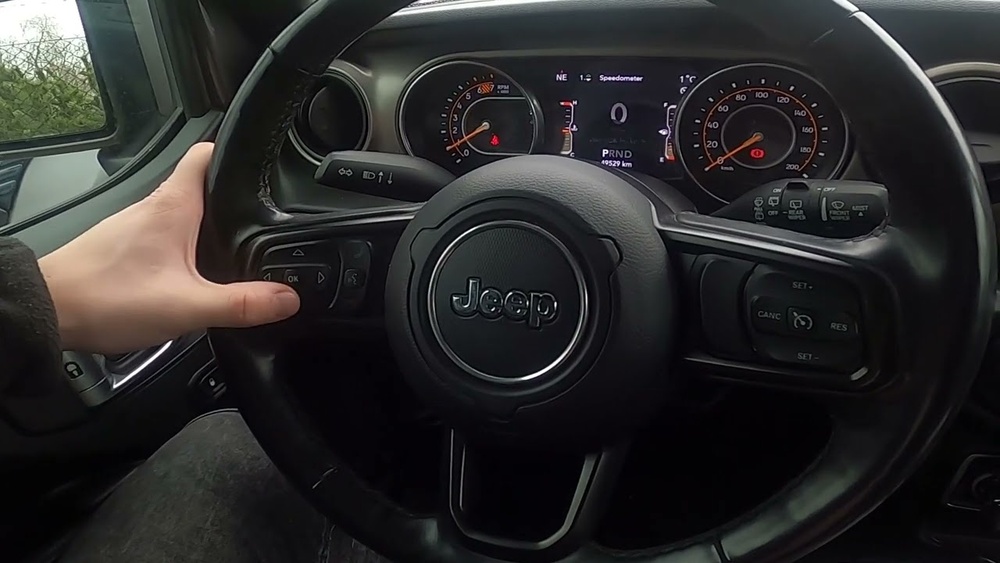
- Find the steering wheel buttons—usually on the left side (up, down, left, right arrows and OK).
- Use the up/down arrows to scroll through the menu until you find “Settings” or a gear icon.
- Press OK to enter the Settings menu.
- Scroll to “Units” or “Display Units.” This may be under “Display” or “Personal Settings.”
- Press OK. You will see options like “km” and “mi.”
- Use the arrows to select Miles (mi).
- Press OK to confirm.
The dashboard should now show miles instead of kilometers.
Changing Units With The Uconnect Touchscreen (if Available)
Some newer Compass models let you change units using the Uconnect system:
- Tap the Settings icon on the main screen.
- Choose “Units & Language.”
- Tap on “Units.”
- Select “Miles” or “Kilometers” as needed.
Not all trims have this feature. If your vehicle doesn’t, use the instrument cluster buttons.
Quick Reference: Common Locations For Unit Settings
Here’s a comparison of where you’ll usually find unit settings based on your model year:
| Model Year | Unit Setting Location | Method |
|---|---|---|
| 2017-2019 | Instrument Cluster | Steering Wheel Buttons |
| 2020-2022 | Uconnect & Cluster | Touchscreen or Buttons |
| 2023+ | Uconnect | Touchscreen |
What If The Units Don’t Change?
Sometimes, the setting may not switch as expected. Here are solutions for common issues:
- Make sure the ignition is on and the vehicle is in Park.
- Wait a few seconds after confirming the change.
- If using Uconnect, try restarting the system by turning the car off and on.
- For older models, disconnecting and reconnecting the battery can reset stubborn displays (only as a last resort).
If you’re still having trouble, check your owner’s manual or contact a Jeep dealer. Some imported vehicles or rare trims might have locked settings.
How The Jeep Compass Compares To Other Suvs
Not every SUV makes it as simple to change units. Here’s a quick comparison of popular compact SUVs:
| Vehicle | Unit Change Method | Time Required |
|---|---|---|
| Jeep Compass | Buttons or Touchscreen | 1-2 minutes |
| Honda CR-V | Menu Buttons | 2-3 minutes |
| Toyota RAV4 | Cluster Menu | 2-3 minutes |
| Ford Escape | Settings > Units | 1-2 minutes |
As you can see, the Jeep Compass is among the easiest for this task.

Extra Tips Most Owners Miss
- Trip Data Resets: Changing units does not reset your trip odometer or average fuel economy. But the numbers will be recalculated in the new unit.
- Navigation Consistency: If your GPS still shows kilometers after you switch to miles (or vice versa), check the GPS settings separately. Many built-in nav systems have their own unit controls.
- Voice Prompts: In some newer models, even voice-guided directions will use the unit you select for your dash—making it less confusing during navigation.
- Dealer Lock: Some imported or fleet vehicles might have settings locked. A dealer can unlock them, but there may be a small fee.
- Legal Requirements: In some countries, you are required by law to display your speed in local units. Make sure to check local regulations if you travel internationally.
When Should You Not Change Units?
There are cases when it’s better to leave the units as they are:
- If you plan to sell your car in the country of import, buyers may prefer the original setting.
- When sharing the vehicle with someone who uses the default system.
- If you want to match all your vehicles (for fleet owners).

Summary Table: Pros And Cons Of Changing Units
| Pros | Cons |
|---|---|
| Easier to read speed and distance | May confuse other drivers using the car |
| Matches GPS and maps | Some settings may not sync (e.g., GPS unit) |
| Improves driving accuracy | Legal issues in some countries |
Switching your Jeep Compass from kilometers to miles is fast, easy, and reversible. Whether you’re driving across borders or just want more comfortable driving data, you can make the change in minutes.
If you run into problems, the owner’s manual and your local Jeep service center can help.
For more information on Jeep vehicle features, you can check the official Jeep website.
Frequently Asked Questions
How Do I Know If My Jeep Compass Supports Changing Units?
Most Compass models from 2017 onward support this feature, either through the instrument cluster or Uconnect. Check your owner’s manual for your specific year.
Will Changing From Kilometers To Miles Affect My Odometer Reading?
No, your total odometer reading remains accurate. The display only changes how numbers are shown, not the actual distance tracked.
Can I Switch Back To Kilometers Later?
Yes, you can switch back and forth between kilometers and miles anytime using the same process.
Why Does My Gps Still Show Kilometers After I Change The Dash To Miles?
Many navigation systems have separate unit settings. Check your GPS or infotainment menu and change units there as well.
Is It Safe To Change Units While Driving?
It’s best to change settings when the vehicle is parked. Some options may be locked while driving for safety reasons.
Now, you’re ready to make your Jeep Compass display the units that make sense for you enjoy the ride with confidence!



















