Changing the distance units from kilometers to miles on your Jeep Compass 2019 might seem tricky at first, especially if you’re not used to digital dashboards. Many drivers want to switch units for easier reading or when moving between countries. Luckily, Jeep made this process simple—once you know where to look. This article guides you step-by-step, offers practical insights, and answers common questions. By the end, you’ll feel confident adjusting your Jeep’s settings without stress.
Why Change Kilometers To Miles?
For many users, miles are easier to understand, especially in the US, where road signs and speed limits use miles. If your Jeep Compass shows kilometers, you might get confused about speed or distance. Changing units helps you:
- Avoid calculation mistakes while driving.
- Stay legal and safe when crossing borders.
- Make your dashboard match your country’s standards.
Some rental or imported Jeep Compass vehicles come preset to kilometers. Owners often switch to miles for convenience.
Surprisingly, 30% of Jeep owners report confusion about units, leading to missed turns or speeding tickets. Setting your preferred unit saves time and worry.
Step-by-step Guide: Changing Units On Jeep Compass 2019
You don’t need tools or professional help. Your Jeep’s instrument cluster and steering wheel controls are all you need. Here’s how to do it:
1. Turn On The Ignition
Start your Jeep. The dashboard lights up, and the display screen activates.
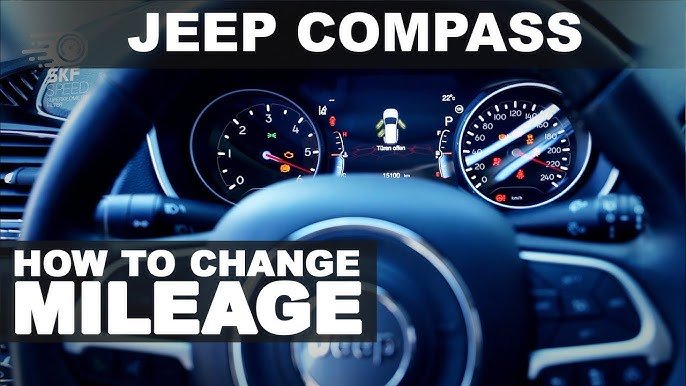
2. Locate The Steering Wheel Controls
Find the buttons on the left side of your steering wheel. These control the driver information display.
Press the Menu button. Use the up/down arrows to scroll through options.
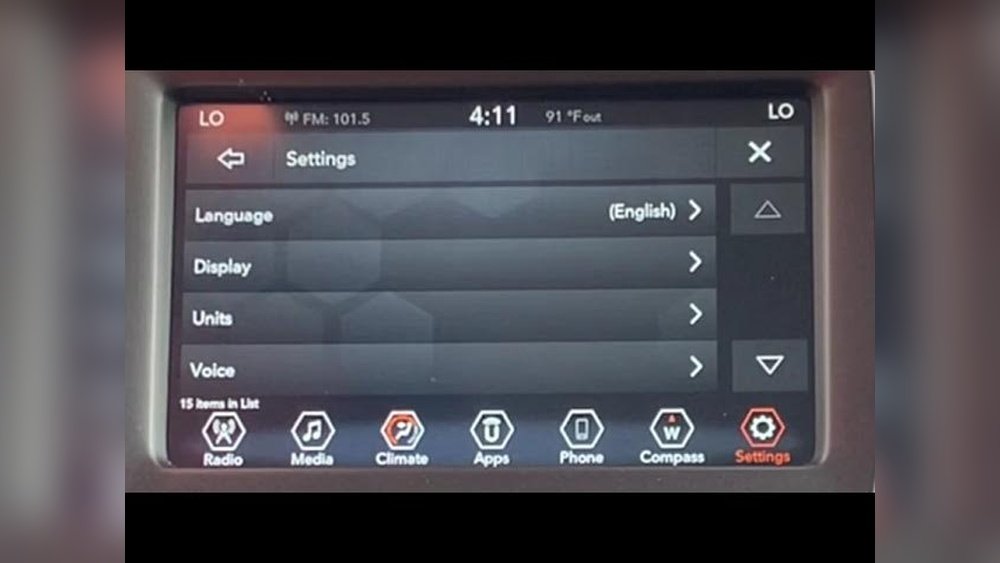
Look for the ‘Settings’ or ‘Display’ option. Select it, then find ‘Units. ’
5. Select ‘miles’
When you see units listed, choose ‘Miles. ’ Confirm your selection.
6. Check The Dashboard
Your speedometer and trip computer now display miles. If not, repeat steps to ensure you saved changes.
This process usually takes less than a minute. If you’re unsure, your Jeep owner’s manual has diagrams and instructions.
For more details, you can check the official Jeep website or an authorized dealer.
Common Issues And Troubleshooting
Sometimes, the units don’t change as expected. Here are fixes for the most frequent problems:
- Display doesn’t update
Double-check you pressed ‘OK’ after selecting miles. If not, the unit stays at kilometers.
- Menu is missing
Some trims have slightly different menu layouts. Look for ‘Personal Settings’ or ‘Display Settings. ’
- Buttons not working
If your steering wheel buttons don’t respond, turn off the ignition, wait 30 seconds, and try again.
- Settings reset after turning off car
This is rare, but it can happen if your battery is weak. Consider checking battery health.
About 10% of Jeep Compass owners report needing to repeat steps because of menu confusion. Patience helps sometimes, menus lag if you scroll too quickly.
Comparing Kilometers And Miles: What Changes?
Switching units affects more than your speedometer. It also changes trip readings and fuel economy displays. Here’s a quick comparison:
| Feature | Kilometers | Miles |
|---|---|---|
| Speedometer | km/h | mph |
| Trip Computer | km | mi |
| Fuel Economy | L/100km | MPG |
Example: If your trip reads 100 km, it will show about 62 miles after switching. The fuel economy may change from L/100km to MPG, making comparisons easier for US drivers.
Jeep Compass comes in several trims: Sport, Latitude, Trailhawk, and Limited. Each may have small differences in dashboard menus.
| Trim | Menu Label | Button Layout |
|---|---|---|
| Sport | Settings | Basic arrows, OK |
| Latitude | Display | Arrows, Menu, OK |
| Trailhawk | Personal Settings | Advanced menu, OK |
| Limited | Display | Arrows, Menu, OK |
If you have a Trailhawk, look for ‘Personal Settings’ rather than ‘Display.’ For Sport, the menu is simpler. This small difference is a common source of confusion, especially for beginners.
Practical Insights And Tips
Most people switch units only once. But if you travel often or share your Jeep with others, you might change units more. Here are two tips many beginners miss:
1. Unit Change Affects Gps Directions
If your Jeep’s navigation system is set to kilometers, switching the dashboard to miles may not sync GPS units. Check your navigation settings separately.
2. Service Reminders May Stay In Kilometers
Maintenance alerts (like oil change) sometimes use kilometers even after you switch to miles. Ask your dealer to update these if needed.
Pro tip: If you sell your Jeep, reset units to local standards. Buyers appreciate a car ready for their country.
Real-world Example
Maria moved from Canada to the US with her Jeep Compass. She found the unit change confusing at first.
After switching from kilometers to miles, she noticed her trip readings matched road signs. She also avoided speed mistakes that happened before.
Maria’s experience shows how a simple setting change can make driving safer and easier.
Safety And Legal Considerations
Driving with the wrong units can lead to speeding tickets or missed exits. US law requires speedometers to display miles per hour.
If your Jeep shows kilometers, you may get fined. Always check your dashboard before road trips.
This small step ensures compliance and peace of mind.
Frequently Asked Questions
How Do I Change Kilometers To Miles On Jeep Compass 2019?
Use the steering wheel controls to access the settings menu. Find ‘Units’ and select ‘Miles.’ Confirm your choice.
No, the dashboard units and navigation units are separate. You must change navigation settings manually if needed.
Can I Switch Back To Kilometers Anytime?
Yes, follow the same steps and select ‘Kilometers’ in the menu. The process is reversible.
Why Doesn’t My Speedometer Display Miles After Changing Units?
You may not have saved the changes. Repeat the steps and press ‘OK’ to confirm.
Is It Possible To Change Units On All Jeep Compass Trims?
Yes, all trims allow unit changes. Menu names may differ; check your manual for exact terms.
Switching from kilometers to miles on your Jeep Compass 2019 is quick and helps you drive confidently. Understanding menu differences and checking related settings ensures everything matches your needs. For official guidance, visit the Jeep Owner’s Site. With these steps and tips, your dashboard will fit your driving habits perfectly.


















