Many Jeep Cherokee owners find themselves puzzled by the car’s lighting system, especially when the lights stay on after parking. Whether you have a newer or older model, knowing how to turn off the lights in your Jeep Cherokee can save your battery and keep you from unnecessary stress.
In this guide, you’ll learn practical steps, understand common mistakes, and discover the unique features of your Cherokee’s lighting controls.
Understanding Jeep Cherokee Lighting Systems
The Jeep Cherokee has two main types of lighting systems: manual and automatic. Most models from 2014 onward include an automatic headlights feature, while older versions rely on a traditional manual control.
Key Differences By Model Year
Here’s a quick comparison of lighting features based on Cherokee generation:
| Model Year | Headlight Controls | Automatic Lights | Daytime Running Lights |
|---|---|---|---|
| 2010-2013 | Manual switch | No | No |
| 2014-2021 | Rotary dial | Yes | Yes |
| 2022-present | Electronic dial | Yes (enhanced) | Yes (LED standard) |
If you’re unsure about your model, check your owner’s manual or look at the headlight control dial near your steering wheel.
How To Turn Off Headlights
Turning off the headlights depends on your model year and trim. Here are the main steps for most Jeep Cherokees:
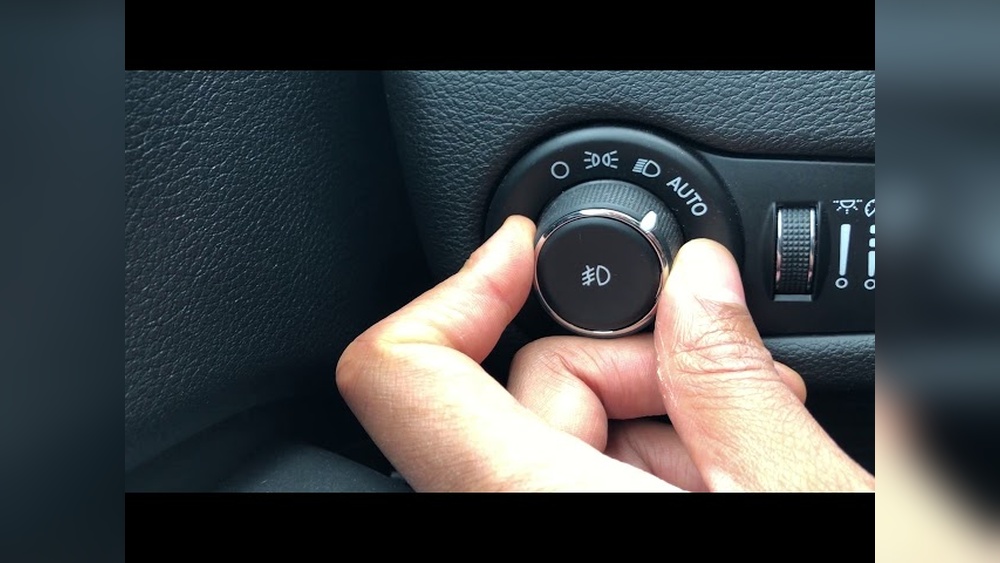
- Locate the Headlight Control Dial: Usually found on the left side of the steering wheel.
- Identify the Settings: You’ll see symbols for Off (O), Auto, Parking, and Headlights.
- Manual Mode: Turn the dial to the Off (O) position. In some models, you must press the dial in and rotate.
- Automatic Mode: If the dial is on Auto, the lights will turn off once you lock the car and walk away, or after a short delay.
- Parking Lights: If the dial is on the parking light symbol, rotate it to Off.
Turning Off Automatic Headlights
Recent Cherokees have auto-on headlights. To disable them temporarily:
- Turn the dial from Auto to Off.
- Some trims require holding the dial in the Off position for 2-3 seconds.
- Note: In some 2022+ models, you can’t completely turn off the headlights while driving for safety reasons.
Insight: Many owners overlook the delay timer. If your lights stay on after turning off the engine, they may have a built-in delay (10-90 seconds). This is normal and adjustable through the vehicle’s menu.
Interior And Dome Lights
Interior lights can also stay on longer than expected. Here’s how to control them:
- Manual Switch: Use the buttons near each light to turn them off.
- Dimmer Control: There’s a dimmer wheel next to the headlight dial. Rolling it all the way down usually turns off all dome lights.
- Door Switches: Make sure all doors are fully closed. A slightly open door will keep the interior lights on.
Quick Reference: Interior Light Control
| Light Type | Control Location | Turn Off Method |
|---|---|---|
| Dome lights | Overhead console | Press individual button or use dimmer wheel |
| Map lights | Front roof area | Press to toggle |
| Cargo light | Rear hatch area | Close hatch fully |
Fog Lights And Daytime Running Lights
Fog lights and daytime running lights (DRL) are common on newer Cherokees. Here’s what you need to know:
- Fog Lights: These use a separate switch, usually a pull-out on the headlight dial. Push in or pull out to turn off.
- DRL: On some trims, DRL cannot be turned off unless you set the parking brake. However, in the vehicle settings menu, you may find an option to disable DRL temporarily.
Practical Tip: If your DRL won’t turn off, engage the parking brake before starting the engine. This often disables DRL until the brake is released.

Common Mistakes And How To Avoid Them
Many drivers make these mistakes:
- Leaving the control dial in the wrong position (such as Parking instead of Off)
- Forgetting about delayed shutoff for automatic headlights
- Not closing a door fully, which keeps interior lights on
- Trying to turn off DRL while the car is in gear
Non-obvious Insight: Some aftermarket remote starters or alarm systems can override factory settings and keep lights on. If you recently installed such a system, check its settings.
Adjusting Lighting Settings With The Infotainment System
Modern Cherokees (especially 2019+) let you adjust some light functions through the Uconnect touchscreen:
- Tap Settings on the main menu.
- Go to Lights or Vehicle Settings.
- Adjust options like Headlight Off Delay and DRL.
This helps customize how and when lights turn off. However, not all trims offer full control.
When To Check For Problems
If your lights won’t turn off no matter what you do, check for:
- Stuck headlight or interior light switches
- Faulty door sensors
- Software glitches (try restarting the car)
- Blown fuses
If the problem continues, visit a certified Jeep service center for diagnosis.
Quick Troubleshooting Table
Here’s a helpful summary for common issues:
| Problem | Likely Cause | What To Do |
|---|---|---|
| Headlights stay on after car is off | Delay timer active | Wait 30-90 seconds or adjust timer |
| Interior lights won’t turn off | Door not closed | Check all doors and dimmer wheel |
| Fog lights stay on | Switch still pulled out | Push switch back in |
| DRL can’t be turned off | Design feature | Set parking brake before starting |
Extra Tips For Saving Battery Life
- Always double-check that all exterior and interior lights are off before leaving your vehicle.
- In cold weather, batteries drain faster if lights are left on.
- Regularly inspect your light switches for wear, especially in older Cherokees.
For more detailed information, the official Jeep website is a reliable resource: Jeep Owners.
Frequently Asked Questions
How Do I Turn Off The Automatic Headlights In My Jeep Cherokee?
Turn the headlight dial from Auto to Off. In some models, you need to hold it in the Off position for a few seconds. If the lights still stay on, check your headlight delay settings in the infotainment menu.
Why Do My Interior Lights Stay On After I Exit The Vehicle?
This usually happens if a door is not fully closed or the dimmer wheel is rolled up. Check every door and lower the dimmer wheel until you hear a click.
Can I Turn Off The Daytime Running Lights (drl) Completely?
In most Cherokee models, DRL are a safety feature and cannot be turned off while driving. However, setting the parking brake before starting the car may disable them temporarily.
What Should I Do If The Lights Won’t Turn Off At All?
First, check all switches and doors. If everything looks correct, try turning the car off and on again. If the issue continues, contact a Jeep dealer or mechanic for help.
Is There A Way To Change The Headlight Delay Timer?
Yes, on newer Cherokees, go to the Uconnect settings menu, find the Lights section, and adjust the Headlight Off Delay as needed.
Turning off the lights in your Jeep Cherokee is straightforward once you know where to look and what each setting means. With these steps and tips, you’ll avoid draining your battery and keep your Cherokee running smoothly.