Changing the display from kilometers to miles on your Jeep Wrangler 2018 is a practical feature, especially if you drive across countries or regions with different measurement systems. Many people struggle with this setting or worry they might accidentally change something important. The good news is, switching between km and miles is not difficult—if you follow the right steps. Let’s walk through the process and answer the most common questions about it.
Why Switch From Kilometers To Miles?
If you recently bought a Jeep Wrangler 2018 from another country or travel between the US and Canada, you’ll notice the odometer and speedometer can show kilometers (km) or miles (mi). Using the correct unit makes it easier to read road signs, avoid speeding tickets, and understand your car’s maintenance schedule.
Understanding The Jeep Wrangler 2018 Dashboard
The Jeep Wrangler 2018 uses a digital instrument cluster. The display shows speed, odometer, trip meters, and other vehicle information. All key settings are controlled through the steering wheel buttons and dashboard menu.
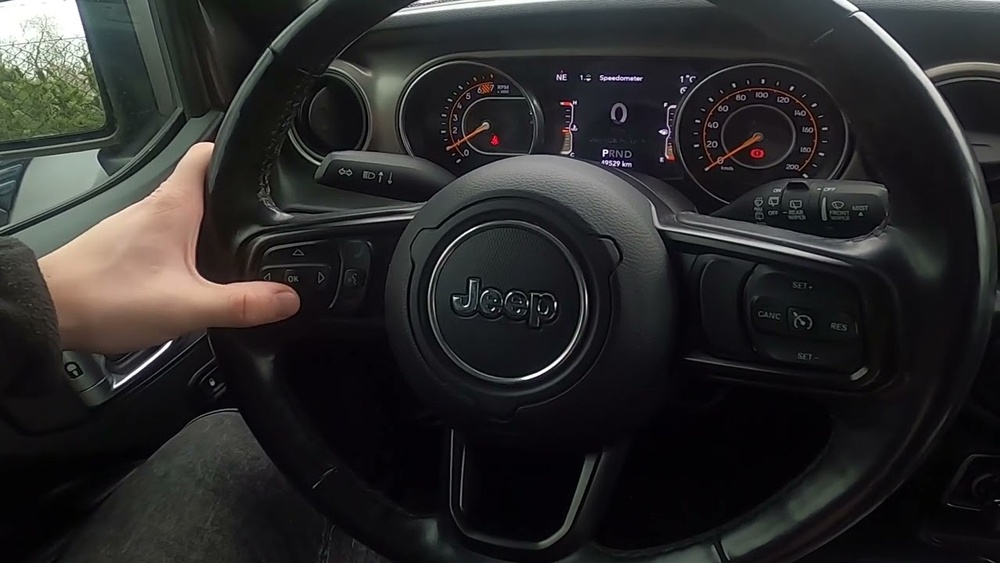
Here’s a quick comparison of what you’ll see with each unit:
| Display Setting | Speed Readout | Odometer | Trip Meter |
|---|---|---|---|
| Kilometers (km) | e.g., 100 km/h | e.g., 52,000 km | e.g., 120 km |
| Miles (mi) | e.g., 62 mph | e.g., 32,300 mi | e.g., 75 mi |
Switching units does not change your actual distance driven—it just changes how the numbers are shown.

Step-by-step: How To Change Km To Miles
Follow these steps to switch your Jeep Wrangler 2018 from kilometers to miles:
1. Turn On The Ignition
Start your Jeep or switch to “Run” mode without starting the engine. The dashboard display will light up.
2. Locate The Steering Wheel Controls
On the left side of your steering wheel, you’ll find arrow buttons. These control the instrument cluster menu.
Press the up or down arrows until you see the main menu. Look for options like “Settings,” “Screen Setup,” or “Units.”
4. Find The ‘units’ Or ‘display’ Section
Use the arrow buttons to scroll to “Units. ” Sometimes, you may need to enter “Settings” first.
5. Select Your Preferred Unit
Once you find the “Units” menu, press the OK or right arrow button. You’ll see options for “km/h” or “mph.”
6. Choose Miles (mph)
Highlight “mph” and press OK. The display will now show miles instead of kilometers.
7. Confirm The Change
Check your speedometer and odometer. They should now display in miles.
This process takes less than a minute. If your menu looks different, check your owner’s manual for specific terms, as wording may vary between trims or software updates.
Common Issues And Solutions
Some Jeep owners run into problems when switching units. Here’s how to handle them:
The ‘units’ Option Is Missing
If you don’t see a “Units” or “Display” menu, the software version might be different or locked. Try these tips:
- Fully turn off the car, wait 30 seconds, and restart.
- Make sure the car is in “Park.”
- Double-check your menu. Sometimes, “Units” is under “Screen Setup.”
If you still can’t find it, your dealer can help update your software or show you the exact steps.
Units Change Back Automatically
Rarely, the display may return to kilometers after you switch off the car. This usually happens if the battery was disconnected, or there’s a fault in the instrument cluster. If this happens, reset the units again. If the problem continues, have a technician check for software updates.
Units Change Only On Some Screens
Some Jeep Wranglers show miles on the main display but keep km on trip meters or navigation. Make sure you change units in all related menus. If the GPS system has its own settings, adjust those separately.
Converting Between Kilometers And Miles
It’s helpful to know the conversion rates, especially when comparing previous readings or trip logs.
| Kilometers | Miles |
|---|---|
| 1 km | 0.621 miles |
| 10 km | 6.21 miles |
| 100 km | 62.1 miles |
| 1000 km | 621 miles |
To convert km to miles, multiply by 0.621. For miles to km, multiply by 1.609.
What If Your Jeep Has An Analog Display?
Most 2018 Wranglers have a digital cluster, but some base models have analog dials. For these, the inner ring of the speedometer shows km/h and the outer ring shows mph (or vice versa). You cannot change the physical dial units, but you can still adjust the trip computer and odometer display using the steps above.

Why The Unit Setting Matters
Choosing the right unit does more than make driving easier:
- Avoids mistakes: Reading the wrong unit can lead to speeding.
- Accurate maintenance: Service schedules use miles or kilometers. Use the right one for your region.
- Resale value: When selling, buyers prefer the familiar unit.
Tips For A Smooth Change
- If you buy a used Jeep, always check the display units before your first drive.
- Take a photo of your odometer before and after switching units, so you don’t lose track.
- If you’re renting a Jeep, ask staff to show you the setting.
When To Get Help
If you can’t change the units or your cluster menu looks strange, contact your local Jeep dealer. Software updates are sometimes needed, especially if the car was imported. You can also check the official Jeep Owners website for more guidance.
Frequently Asked Questions
How Do I Know If My Jeep Wrangler 2018 Can Switch Between Km And Miles?
All 2018 Wranglers with a digital instrument cluster support this feature. If your menu looks different, check your owner’s manual or ask your dealer.
Will Changing The Unit Affect My Car’s Mileage Or Warranty?
No, switching between kilometers and miles only changes the way information is displayed. Your Jeep’s mileage history and warranty coverage are not affected.
Can I Change The Units While Driving?
It’s safer to switch units while the car is parked. Some menus may lock while driving for safety reasons.
Most built-in navigation systems follow the main cluster setting, but some may have separate unit controls. Check the navigation menu to confirm.
What If My Speedometer Shows Both Km/h And Mph?
If you have an analog speedometer, both units are shown at once. You can still change the digital odometer and trip meter units as described above.
Switching from kilometers to miles on your Jeep Wrangler 2018 is a simple but important task for comfort and safety. Taking a few minutes to set it up correctly ensures your drive is stress-free, no matter where your journey takes you.