Changing the time on a Jeep Wrangler might sound simple, but many drivers struggle with the steps, especially if they’re new to the vehicle or English. Knowing how to set the clock correctly is important for daily driving, road trips, and even keeping track of maintenance schedules.
In this guide, you’ll learn how to change the time on different Jeep Wrangler models, understand why clock accuracy matters, and avoid mistakes that can make the process harder. Whether your Wrangler is old or new, you’ll find clear instructions, helpful comparisons, and extra tips that most beginners miss.
Understanding Jeep Wrangler Clock Systems
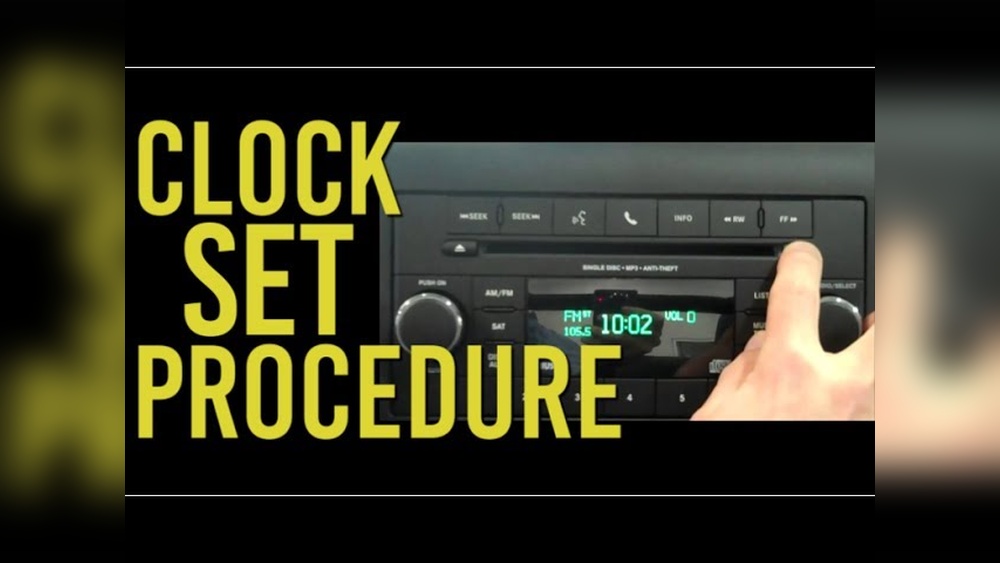
Jeep Wranglers have used different clock systems over the years. Older models have basic manual clocks, while newer ones use digital displays and touchscreen interfaces. Before you start, check which system your Jeep uses. This helps you follow the correct steps and avoid confusion.
Here’s a quick comparison of clock systems across popular model years:
| Model Year | Clock Type | Adjustment Method | Common Issues |
|---|---|---|---|
| 2007–2010 | Manual (radio) | Radio buttons | Button wear, unclear labels |
| 2011–2017 | Digital (radio) | Menu navigation | Hidden menu, slow response |
| 2018–present | Touchscreen (Uconnect) | Touchscreen settings | Software lag, update issues |
Knowing your Wrangler’s clock type saves time and helps you avoid the wrong instructions.
Why Accurate Time Matters
Having the correct time in your Jeep Wrangler is more than just convenience. Here are a few reasons:
- Navigation accuracy: GPS systems use time for route planning.
- Scheduled maintenance: Time helps track when you last serviced your vehicle.
- Safety: Accurate time helps you stay aware of changing daylight and avoid night driving if you prefer.
- Syncing devices: Bluetooth and phone connections often rely on matching times.
Some owners ignore their vehicle’s clock, but this can cause confusion, missed appointments, and even trouble syncing electronic devices.
How To Change The Time: Step-by-step For Every Model
Changing the time depends on your Wrangler’s year and clock system. Here’s a detailed guide for the three main groups:
1. 2007–2010 Jeep Wrangler (manual Radio Clock)
Many drivers find the older manual systems tricky. Here’s how to set the time:
- Turn the ignition ON. The radio must be powered.
- Locate the ‘Clock’ button. It’s usually marked as ‘CLK’ or ‘Clock’ on the radio panel.
- Press and hold ‘Clock’ until the time display starts to blink.
- Adjust hours and minutes:
- Press ‘Seek’ or ‘Tune’ to change the hour.
- Press ‘AM/FM’ or another button to change the minutes (depends on radio type).
- Press ‘Clock’ again to save the new time.
Tip: If buttons are worn or labels are faded, check your owner’s manual or use a flashlight to spot the right ones.
2. 2011–2017 Jeep Wrangler (digital Radio Clock)
Digital radios require menu navigation. Here’s the process:
- Turn ignition ON and switch the radio ON.
- Press ‘Menu’ on the radio face.
- Use arrow buttons to find ‘Clock Settings’ or ‘Time Setup’.
- Select ‘Clock Settings’ and use the arrow or rotary knob to change the hour.
- Press ‘OK’ or ‘Save’ to confirm.
Insight: Some models hide the ‘Clock’ option under sub-menus. If you don’t see it immediately, try pressing ‘Menu’ multiple times or check for a ‘Settings’ button.
3. 2018–present Jeep Wrangler (uconnect Touchscreen)
New Wranglers use Uconnect, a touchscreen system. The steps are:
- Turn ignition ON and activate the touchscreen.
- Tap ‘Settings’ on the main menu.
- Select ‘Clock & Date’.
- Tap ‘Set Time’. Use the plus (+) and minus (–) icons to adjust hours and minutes.
- Choose AM/PM if needed.
- Tap ‘Save’ or just exit (Uconnect usually saves automatically).
Extra Tip: If your Uconnect is set to sync with GPS, it may update the time automatically. If the time is wrong, check your location setting or turn off automatic sync.
Common Mistakes And How To Avoid Them
Many Jeep owners make simple mistakes when changing the time:
- Ignoring the manual: Each model can be slightly different. If you don’t check the manual, you might press the wrong buttons.
- Skipping ignition: The clock won’t adjust if the vehicle isn’t in the right ignition mode.
- Not saving changes: Some radios require you to press ‘Save’ or ‘Clock’ again. If you skip this, the old time stays.
- Touchscreen confusion: On Uconnect, tapping ‘back’ instead of ‘save’ can cause the new time to disappear.
Example: One Jeep owner spent 20 minutes pressing buttons, only to realize the radio was off. Always check power first.
Comparing Jeep Wrangler Clock Adjustment With Other Vehicles
Jeep Wranglers are popular, but their clock adjustment isn’t always the easiest. Here’s how they compare with other SUVs:
| Vehicle | Clock Adjustment | Ease of Use | Common Problems |
|---|---|---|---|
| Jeep Wrangler | Radio/Touchscreen | Medium | Hidden menus, button confusion |
| Toyota RAV4 | Dashboard button | Easy | Physical button wear |
| Ford Explorer | Touchscreen | Medium | Software lag |
| Honda CR-V | Radio/Menu | Medium | Complex menu |
Wrangler’s system is not the hardest, but knowing the steps helps avoid frustration.
How Automatic Time Sync Works
Some modern Jeep Wranglers have automatic time sync features. If your vehicle has GPS or is connected to your phone, it can adjust the clock by itself. Here’s what you need to know:
- GPS sync: Uses satellite data to set the time.
- Bluetooth sync: Matches the clock to your phone’s time.
- Software updates: Sometimes a software update can fix time errors.
Insight: If your Jeep’s clock is always wrong, check if automatic sync is enabled. Sometimes, a bad GPS signal or wrong location can cause errors.

What To Do If The Clock Won’t Change
If you follow all the steps and the time still won’t update, try these troubleshooting tips:
- Check power: Make sure the radio or touchscreen is ON.
- Inspect buttons: Old models may have sticky or broken buttons.
- Reset the radio: Some radios have a reset button or can be reset by disconnecting the battery for a minute.
- Update software: For Uconnect systems, check for updates.
- Consult a dealer: If nothing works, your Jeep dealer can help.
Tip: Never force a button. If it’s stuck or feels loose, get it checked to avoid bigger repairs.
Extra Tips For Jeep Wrangler Owners
- Keep your manual handy: The owner’s manual has model-specific instructions and diagrams.
- Update your software: Newer Uconnect systems often need updates for bug fixes.
- Use the Jeep app: Some newer Wranglers let you set the time using the Jeep app on your phone.
- Check for recalls: If your radio or clock system is faulty, check if there’s a recall or service bulletin.
- Record your settings: If you travel across time zones, write down your steps to change the time quickly.
Real-world Example: Changing Time After A Battery Swap
When you replace your Jeep Wrangler’s battery, the clock usually resets. Here’s how to restore the correct time:
- Wait for power restoration: After installing the new battery, turn the ignition ON.
- Follow your model’s steps: Use the instructions above to set the clock.
- Check other settings: Sometimes, radio presets and Bluetooth settings also reset.
Tip: Battery swaps are a common reason for clock errors. Always check the time after any major electrical work.
Data: How Often Drivers Change Their Jeep Clock
According to a survey by AAA, about 35% of drivers adjust their vehicle clock at least once a year. Most changes happen after daylight saving time or battery replacement. Only 12% use automatic sync features regularly.
This shows most Jeep owners need to know the manual process, not just rely on automatic updates.

Frequently Asked Questions
If your radio buttons are worn, try using a small flashlight to see the labels. You can also check your owner’s manual for diagrams. If the buttons don’t work, visit your dealer for repair.
Why Does My Jeep Wrangler Clock Keep Resetting?
Clock resets are usually caused by battery disconnection, software errors, or faulty wiring. If your clock keeps resetting, check the battery terminals and radio connections. For Uconnect systems, look for software updates.
Can I Set The Time Using My Phone?
New Jeep Wranglers with Uconnect and Bluetooth may sync time automatically with your phone. Check the ‘Clock Settings’ menu for a sync option. If your Wrangler is older, manual adjustment is required.
If the clock menu doesn’t show, make sure the ignition is ON and the radio is powered. Try pressing the ‘Menu’ button several times. If you still can’t find it, check your owner’s manual or contact a Jeep dealer.
Is There An Official Guide For Changing The Time?
Yes, Jeep provides official guides in owner’s manuals and online. For more details, visit the Jeep Owners Site.
Changing the time on a Jeep Wrangler isn’t hard if you know your vehicle’s system and follow the right steps. With these clear instructions, helpful comparisons, and practical tips, you can set your clock accurately and avoid common mistakes. Keeping your Wrangler’s time correct helps with navigation, safety, and staying organized on the road.