Getting into your Jeep Grand Cherokee and seeing the speedometer in the wrong units can be frustrating—especially if you’re driving through a new country or want to keep an eye on your speed more comfortably. Many drivers, especially those who travel across borders or buy used Jeeps, find themselves wondering how to change the speedometer display between miles per hour (MPH) and kilometers per hour (KPH). The good news is, most modern Jeep Grand Cherokees let you switch the speedometer display quickly from the dashboard, but the method can differ depending on the model year and trim.
This guide will walk you through the process step by step, highlight differences based on year, and cover common questions and issues that might surprise you. Whether you own a recent model with a digital display or an older Grand Cherokee with an analog dash, you’ll find actionable advice here.
Understanding The Speedometer Display
The speedometer display is the instrument cluster feature showing how fast your vehicle is moving. In the Jeep Grand Cherokee, the speed is typically shown in either MPH or KPH. Many models also allow you to switch other units—like temperature or fuel economy—but this article focuses on the speedometer.
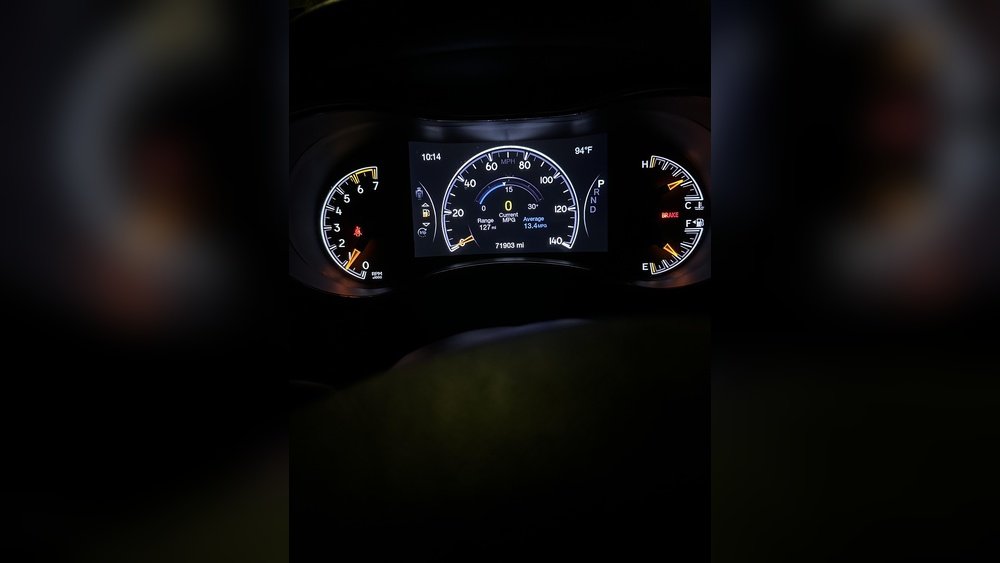
Modern Grand Cherokees (2014 and newer) usually have a digital instrument cluster that displays speed in the center, while older models use analog dials or a combination of analog and digital. Knowing your model year is key to using the right method.
Why Change Speedometer Units?
Changing your speedometer units can help in several situations:
- Traveling internationally where speed limits use a different system (e.g., Canada uses KPH, the US uses MPH).
- Buying a used Jeep from a different country.
- Personal preference for easier reading and better understanding of speed limits.
Failing to switch units in a new region can lead to speeding tickets or unsafe driving.

How To Change Speedometer Display: Step-by-step
The steps depend on your Jeep Grand Cherokee’s model year and type of dashboard. Below are the instructions for various setups.
For 2014 And Newer (digital Instrument Cluster)
Most 2014+ Grand Cherokees have a customizable digital display in the center of the dash.
- Turn on the ignition: Press the start button without starting the engine (accessory mode).
- Navigate the menu: Use the arrow buttons (up, down, left, right) on your steering wheel to scroll through the dashboard menu.
- Find ‘Settings’: Scroll until you see the gear icon labeled “Settings”.
- Select ‘Units’: Enter the Settings menu and look for “Units”.
- Choose Speed Unit: Under “Units,” select “Speed”. You’ll usually see options for MPH or KPH.
- Confirm Selection: Press “OK” or the center button to confirm. The display should immediately update.
Example
If you’re driving a 2022 Grand Cherokee, you’ll notice the digital speed in the middle of your dash changes from, for example, 60 MPH to 97 KPH.
For 2011-2013 (early Digital/analog Hybrid)
Some Grand Cherokees from 2011-2013 have a simpler, less customizable digital display.
- Turn the key to ON: Do not start the engine.
- Press ‘Menu’ Button: Look for a “Menu” button on the left side of the steering wheel.
- Scroll to ‘Units’: Use the up/down arrows to find “Units”.
- Switch Units: Press “OK” or “Enter” to switch between MPH and KPH.
For Models Before 2011 (analog Dash)
Earlier Grand Cherokees (pre-2011) rarely offer a way to change the speedometer display electronically. The dash uses a fixed analog dial, often with both MPH and KPH printed on the same face.
- Check for a secondary scale: Look for small numbers in KPH inside the larger MPH numbers (or vice versa).
- No menu option available: If you need to change, you may have to replace the speedometer faceplate or use a conversion sticker.
Non-obvious Insight
Many drivers don’t realize that even if the main numbers are in MPH, the smaller numbers on the analog dial are KPH. For some trips, you can simply use these without changing the display.
Comparison Of Speedometer Display Change Methods
Here’s a quick reference for how different Jeep Grand Cherokee models handle the speedometer display change.
| Model Year | Cluster Type | Change Method | Units Available |
|---|---|---|---|
| 2014–Present | Digital | Menu via steering wheel | MPH, KPH |
| 2011–2013 | Digital/Analog Hybrid | Menu button on dash | MPH, KPH |
| Pre-2011 | Analog | Manual (read small scale) | MPH, KPH (printed) |
Common Issues When Changing Speedometer Display
Changing the speedometer isn’t always smooth. Here are some potential problems:
- Menu option missing: Sometimes, the “Units” option isn’t visible. This might mean your model doesn’t support switching, or there’s a software glitch.
- Units revert after restart: In rare cases, the units switch back after turning the car off. This can be due to a software bug—updating your vehicle’s Uconnect system may help.
- Secondary display not updating: Some Grand Cherokees show speed in two places (main dash and heads-up display). Make sure both are set to the same unit.
If you run into these issues, check your owner’s manual or contact a Jeep dealer for support.
Speedometer Display And Legal Requirements
In some countries, the law requires your main speedometer to match local speed limits. For example, in Canada, the main display must be in KPH. If your Jeep only shows MPH, you may need to use a conversion sticker or digital HUD (heads-up display).
Tip: Always check local regulations before driving in a new country.

Other Instrument Cluster Customizations
Switching the speed units is often just one of several customizable settings in your instrument cluster. You might also be able to change:
- Temperature units (Fahrenheit/Celsius)
- Fuel economy (MPG, L/100km)
- Tire pressure units (PSI, kPa)
These are usually found in the same “Units” menu as the speed setting.
Using Uconnect For Speedometer Settings
The Uconnect system is the infotainment and vehicle control center in most modern Jeep Grand Cherokees. Some settings, including speedometer units, may be accessible through the Uconnect touchscreen, especially in higher trims.
Steps For Uconnect:
- Turn on your Jeep and wait for the Uconnect screen to load.
- Tap ‘Settings’ from the main menu.
- Select ‘Units & Language’.
- Choose speed units (MPH/KPH) under the Units section.
If your vehicle supports this, the dash and Uconnect screen will match.
| Method | Models Supported | Speed Units Changed? | Other Units Changed? |
|---|---|---|---|
| Uconnect Screen | 2017–Present (select trims) | Yes | Yes |
| Steering Wheel Menu | 2011–Present | Yes | Some |

Aftermarket Solutions For Older Models
If you drive a pre-2011 Jeep Grand Cherokee and need a more prominent speed display in a different unit, consider these options:
- Stick-on Conversion Decals: Simple, cheap, and available online. Place them over your analog speedometer for quick reference.
- Digital HUDs: Portable heads-up displays can show your speed in either MPH or KPH. Many plug into your OBD2 port and are easy to install.
- Instrument Cluster Swap: For advanced users, it’s possible to swap the entire instrument cluster for a unit with your preferred display, but this requires reprogramming and is best left to professionals.
Non-Obvious Insight: Many drivers overlook the convenience of a plug-in HUD. These devices are especially helpful for cross-border travel and avoid any dashboard modification.
Keeping Speedometer Accurate After Changing Units
Switching from MPH to KPH (or vice versa) simply changes how the speed is displayed. It does not affect the actual speed your vehicle travels. However, if you change tire size, gear ratios, or replace the speed sensor, you might need to recalibrate the speedometer.
How to check accuracy:
- Use a GPS app on your phone to compare actual speed with your dashboard reading.
- If there’s a big difference, have your Jeep checked by a dealer or trusted mechanic.
Quick Troubleshooting Guide
Here are some practical tips if you’re having trouble:
- Display won’t change: Make sure you’re following the steps for your correct model year.
- No ‘Units’ option: Your model may not support this feature.
- Display stuck after change: Try restarting your Jeep. If the problem continues, consider a software update.
If you’re still stuck, your local Jeep dealer can help diagnose the issue.
Model Year Summary
Here’s a handy reference for which Jeep Grand Cherokee models support easy speedometer display changes.
| Model Year | Can Change Units? | Main Method |
|---|---|---|
| 2014–Present | Yes | Steering wheel/Uconnect |
| 2011–2013 | Yes | Menu button |
| Pre-2011 | Rarely | Manual workaround |
Frequently Asked Questions
How Do I Know If My Jeep Grand Cherokee Supports Changing Speedometer Units?
Check your owner’s manual for details under “Instrument Cluster” or “Settings. ” Most 2011+ models support this feature, but some base trims may not.
Can Changing The Display Units Affect My Odometer?
No, changing the speed display from MPH to KPH only changes what you see. The odometer (which records total distance) will keep working as normal, and its unit will usually match the selected speed display.
What If My Display Changes Back To The Old Unit After Restarting?
This can happen if there’s a software glitch. Try updating your vehicle’s Uconnect system or resetting the dash settings. Persistent issues may require dealer service.
Is It Legal To Drive With The Speedometer In The ‘wrong’ Units?
This depends on local laws. Some countries require the main speedometer to match speed limits (e.g., KPH in Canada). When in doubt, ask local authorities or visit an official source like the US Department of Transportation.
Will Using A Plug-in Hud Or Phone App For Speed Affect My Warranty?
In most cases, using a portable HUD or a phone app to display speed will not void your warranty, as these do not modify the vehicle. However, replacing the dashboard or rewiring the cluster could affect warranty coverage—check with your dealer first.
Switching the speedometer display on your Jeep Grand Cherokee is a quick way to make driving easier and safer when switching countries or simply for your own comfort. With the right method for your model year and a few simple steps, you’ll stay on the right side of the law and enjoy your Jeep’s advanced features even more.