If your 2018 Jeep Grand Cherokee radio suddenly freezes, refuses to connect to Bluetooth, or just won’t play sound, you’re not alone. Many drivers experience glitches with their Uconnect radio system. The good news? You don’t need a trip to the dealer for a simple reset. With a few easy steps, you can often restore your radio to normal and get back to enjoying your music or navigation.
This guide walks you through the main ways to reset your 2018 Grand Cherokee radio, explains when each method is best, and shares practical tips to avoid common mistakes. You’ll also find some quick troubleshooting comparisons to help you decide if a reset is really the answer.
When Should You Reset Your Jeep Grand Cherokee Radio?
Resetting the radio can solve a variety of issues, but it’s not always the best first step. Try a reset if you notice:
- The screen freezes or becomes unresponsive
- Bluetooth won’t connect or drops calls
- Audio cuts out or won’t play at all
- Navigation system lags or malfunctions
- The radio randomly restarts
If your radio shows a “software update required” message, or if there’s a physical issue (like a cracked screen), resetting won’t help. For those cases, a professional inspection is a better choice.
Quick Comparison: Soft Reset Vs. Hard Reset
Before jumping in, it helps to know the difference between the two main reset types. Here’s a simple comparison:
| Reset Type | What It Does | Best For | Data Loss |
|---|---|---|---|
| Soft Reset | Restarts radio software | Minor glitches | No |
| Hard Reset | Restores factory settings | Major problems | Yes (all settings lost) |
A soft reset is quick and safe. Try it first. Use a hard reset only if the soft reset doesn’t solve your problem.
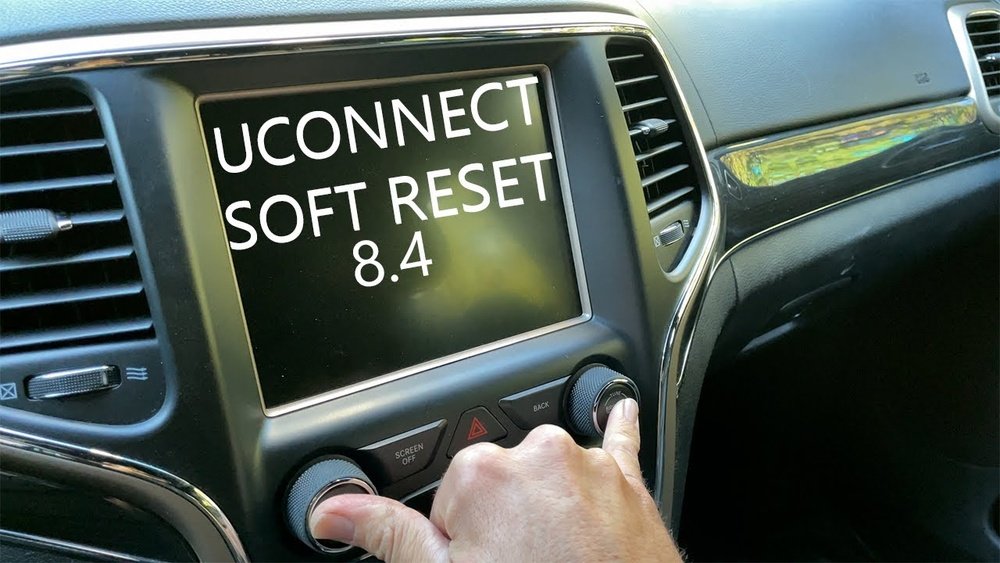
How To Soft Reset Your 2018 Jeep Grand Cherokee Radio
Most radio issues are fixed by a soft reset. Here’s how to do it step-by-step:
- Turn the ignition to RUN (engine on or accessories mode).
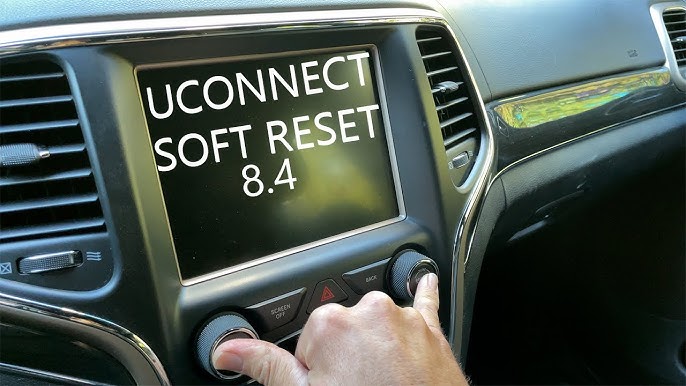
- Press and hold the Mute and Browse/Enter knob (the volume and tune knobs) at the same time.
- Hold both knobs for about 10–20 seconds.
- The screen will go black and then show the Jeep logo as the system restarts.
After the radio reboots, check if your issue is gone. This process doesn’t erase any of your saved settings or paired devices.
Tip: If your radio is frozen and won’t respond to button presses, wait 30 seconds after the reset before touching the screen again.
How To Hard Reset (factory Reset) The Uconnect Radio
If a soft reset doesn’t help, you may need a factory reset. This will erase all personal data, settings, and paired devices. Only use this if your radio is still misbehaving.
- With the vehicle in PARK, turn the ignition ON.
- Press the Settings button on the radio touchscreen.
- Scroll down and select System Information or Reset (menu names may vary).
- Tap Restore Factory Defaults.
- Confirm your choice when prompted.
The radio will restart and return to its original factory state. You’ll need to set up everything again, including Bluetooth pairing, favorite stations, and custom settings.
Practical Insight: Many owners forget to remove their phone from the Bluetooth list before a factory reset. If you don’t, your phone may have trouble reconnecting after the reset. Always “forget” the Jeep from your phone’s Bluetooth menu first.
Troubleshooting Tips Before You Reset
Sometimes the issue isn’t with your radio at all. Here’s how to check for simple fixes before doing a reset:
- Make sure your phone’s Bluetooth is on and discoverable.
- Try another phone or device to see if the problem is with your phone.
- Check if the radio volume is just turned down or muted.
- Inspect the radio’s fuse in the fuse box (under the hood or under the dash).
If these checks don’t help, go ahead with a reset.
Table: Common Radio Problems And Best Solutions
Here’s a handy reference:
| Problem | Best Solution | Reset Needed? |
|---|---|---|
| Screen freezing | Soft reset | Yes |
| Bluetooth won’t connect | Forget and re-pair device | Maybe |
| No sound output | Check volume, soft reset | Maybe |
| Navigation errors | Soft reset, check updates | Maybe |
| System won’t boot | Hard reset, dealer visit | Yes |
What To Do If The Radio Still Doesn’t Work
If both soft and hard resets fail, there may be a deeper problem. Here are your next steps:
- Check for Uconnect software updates. Sometimes, bugs are fixed with new software. Visit the official Jeep website for update instructions.
- Visit a certified Jeep dealer if your radio stays dead or keeps restarting. There could be a hardware issue, such as a damaged screen or faulty wiring.
- Keep your radio serial number and vehicle information handy. The dealer may need these details for troubleshooting.
Non-obvious insight: Some 2018 Grand Cherokee radios are covered by specific technical service bulletins (TSBs) for known issues. Ask your dealer if your radio qualifies for a free repair or replacement.
Preventing Future Radio Problems
A little care can help your radio last longer:
- Keep your radio software updated for the latest features and bug fixes.
- Avoid plugging in unsupported USB devices or using cheap charging cables, which can cause glitches.
- Don’t press too many screen buttons at once, especially during system startup.
- If you live in a very hot or cold area, give your radio a minute to adjust after starting the car.
Frequently Asked Questions
How Often Can I Reset My 2018 Jeep Grand Cherokee Radio?
You can perform a soft reset as often as needed. It won’t harm the system. But avoid doing a factory reset frequently, as it erases all your settings and can be inconvenient.
No. A soft reset keeps all your maps and updates. A factory reset restores the radio to default, but your maps and major software updates usually remain unless you reload the entire system.
Can I Reset The Radio While Driving?
It’s not safe. Always reset your radio with the vehicle parked. Some features may disable during motion, and you could be distracted from driving.
Why Does My Radio Keep Freezing After A Reset?
If issues return after a reset, your radio might have a deeper software or hardware problem. It could be a sign of a failing Uconnect module. Contact your dealer for advanced diagnostics.
Where Can I Find Official Update Instructions For My Radio?
The official Jeep and Uconnect sites offer update guides and troubleshooting. For the latest info, check the Jeep Uconnect support page.
Resetting your 2018 Jeep Grand Cherokee radio is usually quick and easy if you follow these steps. Take your time, and remember: most problems have a simple fix. But if all else fails, don’t hesitate to get help from a certified Jeep technician. That way, you’ll get back to your music and navigation with less stress and more confidence.