Many Jeep owners want more control and convenience in their driving experience. The Uconnect app offers just that, letting you connect your phone and your Jeep in smart ways. With this app, you can remotely start your car, check fuel levels, find your parked Jeep, and even send directions to your navigation system. But using Uconnect for the first time can be confusing if you don’t know the steps. This guide will show you how to set up and use the Uconnect app, avoid common mistakes, and get the most from this helpful tool.
What Is The Uconnect App?
The Uconnect app is a mobile application that links your smartphone to your Jeep’s Uconnect infotainment system. It works with many Jeep models (usually from 2018 onward) and offers features like remote vehicle start, door lock/unlock, vehicle locator, and more. The app is free to download, but some features may require a subscription or a trial period.
Jeep drivers love Uconnect because it makes daily tasks faster and adds peace of mind. For example, you can warm up your Jeep on a cold morning without stepping outside or check if you locked your doors from anywhere.

How To Set Up The Uconnect App
Getting started is simple, but you need to follow a few steps:
- Download the app: Find “Uconnect” in the Apple App Store or Google Play Store. Install it on your phone.
- Create an account: Open the app and tap “Sign Up.” Enter your name, email, and a password.
- Add your Jeep: You’ll need your Jeep’s Vehicle Identification Number (VIN), which you can find on the dashboard or your insurance card.
- Verify ownership: The app may send a code to your email or phone. Enter this code to prove you own the vehicle.
- Pair your phone: Sit in your Jeep with the engine on. Follow the app’s instructions to pair your phone to the Jeep’s Uconnect system via Bluetooth or USB.
Common Setup Mistakes
- Using the wrong VIN: Double-check every digit.
- Not connecting to Bluetooth: Make sure Bluetooth is ON in both your phone and Jeep.
- Skipping app permissions: The app needs access to your location and notifications.

Main Features And How To Use Them
Uconnect’s features are what make it powerful. Here’s how to use the most popular ones:
Remote Start And Stop
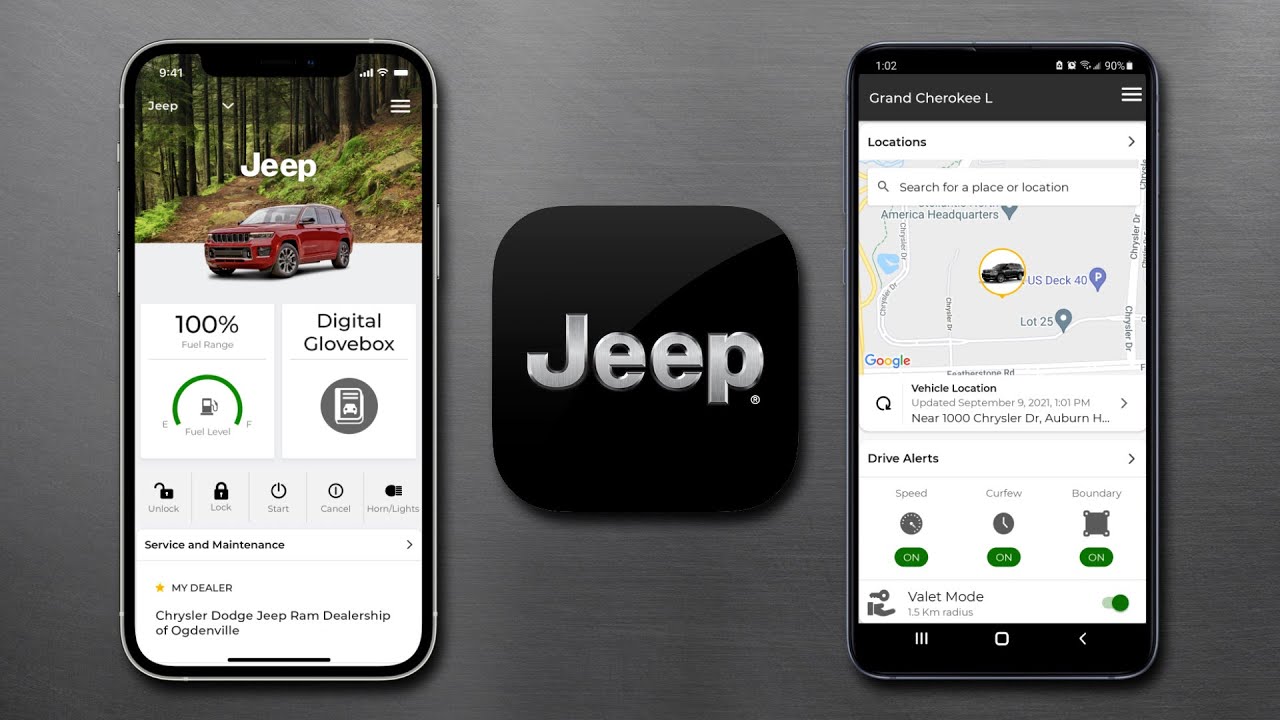
With one tap, you can start your Jeep’s engine or turn it off. This is useful for heating or cooling your cabin before you drive.
- Open the app and find the “Remote Start” button.
- Tap to start or stop the engine.
- You’ll get a confirmation on your phone.
Lock And Unlock Doors
If you forget to lock your Jeep, just use the app.
- Tap the “Lock” or “Unlock” button.
- Wait for the confirmation message.
Vehicle Finder
Can’t remember where you parked? The Vehicle Finder shows your Jeep’s location on a map.
- Go to the “Vehicle Finder” section.
- The map will show your Jeep’s current GPS position.
You can send a destination from your phone to your Jeep’s built-in navigation.
- Enter an address or pick a place on your phone.
- Tap “Send to Vehicle.”
- The route appears on your Jeep’s screen when you start driving.
Vehicle Health Report
Check your Jeep’s battery, fuel, tire pressure, and more.
- Tap “Vehicle Health Report.”
- Read the latest status and alerts.
- Schedule service if something needs attention.
Comparing Uconnect App Features
See how the main features compare in terms of usefulness and which require a paid subscription.
| Feature | Basic (Free) | With Subscription |
|---|---|---|
| Remote Start/Stop | No | Yes |
| Lock/Unlock | No | Yes |
| Vehicle Health Report | Yes | Yes |
| Vehicle Finder | No | Yes |
| Send & Go | Yes | Yes |
Non-obvious insight: Some features are only available on certain Jeep models or in specific regions. Always check your Jeep’s manual or ask your dealer which Uconnect services you can access.

Uconnect App Vs. Built-in Uconnect System
The app extends what you can do with your Jeep, but it does not replace the main Uconnect screen inside your vehicle. Here’s a side-by-side look:
| Action | Uconnect App | In-Car Uconnect |
|---|---|---|
| Remote Start | Yes | No |
| Media Control | Limited | Full |
| Navigation | Send Destination | Full Use |
| Vehicle Health | Yes | Yes |
Tips To Get The Most From Your Uconnect App
- Keep your app updated: Updates fix bugs and add new features.
- Set up notifications: Get alerts for service reminders, theft attempts, or low fuel.
- Try voice commands: On compatible Jeeps, you can use your phone’s voice assistant through Uconnect for hands-free help.
- Use Send & Go before trips: Save time by planning your route before you enter the car.
A mistake many users make is not exploring all the app’s settings. Some helpful options, like valet mode or custom alerts, are hidden under “Settings. ” Take a few minutes to look around.
Troubleshooting Common Problems
If Uconnect is not working as expected, try these steps:
- Restart your phone and Jeep.
- Check your internet connection: The app needs mobile data or Wi-Fi.
- Update your app: Outdated versions may not work with new Jeep software.
- Re-pair your device: Go to Bluetooth settings and remove/re-add your Jeep.
- Contact support: If problems continue, call Jeep’s Uconnect support line.
Many issues come from poor phone signal or using the app in a region where some services are restricted.
Privacy And Security
Your data is safe if you follow best practices:
- Use a strong password for your Uconnect account.
- Never share your login info.
- Log out if you sell your Jeep or change devices.
Jeep uses encryption to protect commands sent from your app to your vehicle. For more details, you can check the Jeep Uconnect official page.
Frequently Asked Questions
Can I Use The Uconnect App On Any Jeep?
Most Jeep models from 2018 or newer support the Uconnect app. However, features may vary by model and trim. Always check your owner’s manual.
Is The Uconnect App Free?
The app is free to download. Some basic features are free, but remote start, lock/unlock, and similar tools often require a paid subscription after a trial period.
What Should I Do If The App Won’t Connect To My Jeep?
Make sure your Jeep is compatible, the VIN is correct, and your phone has a good internet connection. Try restarting both your phone and vehicle.
Can I Add More Than One Jeep To The App?
Yes, you can add multiple Jeeps to one Uconnect account. Just repeat the setup process with each VIN.
Is My Personal Information Safe With Uconnect?
Jeep uses encryption to protect your data. Use a strong password and log out if you stop using the app or sell your Jeep.
Using the Uconnect app for Jeep makes everyday driving easier, safer, and more enjoyable. Once you set it up, take a few minutes to explore every feature—there’s a good chance you’ll find new ways to make your driving life smoother.