Connecting your phone to your Jeep Patriot 2016 can make driving safer and more enjoyable. With hands-free calling, music streaming, and navigation, your journeys become easier and less distracting. However, many owners find the setup process confusing, especially if they haven’t used a car Bluetooth system before. This guide breaks down each step, highlights common mistakes, and provides real-life tips to help you connect your device smoothly—even if you’re not a tech expert.
Understanding Your Jeep Patriot’s Bluetooth System
The 2016 Jeep Patriot typically comes with the Uconnect system. This system allows you to pair your smartphone for calls, music, and more. However, not all trims include Bluetooth—some base models lack this feature. Before starting, check if your car’s radio interface mentions “Uconnect” or shows a phone symbol. If it doesn’t, your model may not support Bluetooth, and you’ll need other solutions (like an auxiliary cable or Bluetooth adapter).
Common Uconnect Features
- Hands-free calling
- Audio streaming (music, podcasts)
- Voice commands
Most users are unaware that some early 2016 Patriots only support calls, not music streaming. Always check your specific model’s manual or try pairing to see available options.
Preparing Your Phone
Before connecting, ensure your phone’s Bluetooth is turned on and visible. Go to your phone’s settings and look for “Bluetooth.” Make sure it’s set to “discoverable” or “visible to all nearby devices.”
Remove old car connections if you have paired your phone with other vehicles before. Too many saved connections can cause pairing errors.
Quick Preparation Steps
- Charge your phone above 20%—low battery can disrupt Bluetooth.
- Update your phone’s software for best compatibility.
- Disable “Airplane Mode” and any battery-saving features.
These small checks prevent most connection failures.
Step-by-step: Pairing Your Phone With Jeep Patriot 2016
Follow these steps to connect your phone to your Jeep Patriot 2016 Bluetooth system.
1. Start Your Vehicle
Turn on your Jeep and keep it in park. The Uconnect system only allows pairing when the car isn’t moving, for safety reasons.
2. Access Uconnect
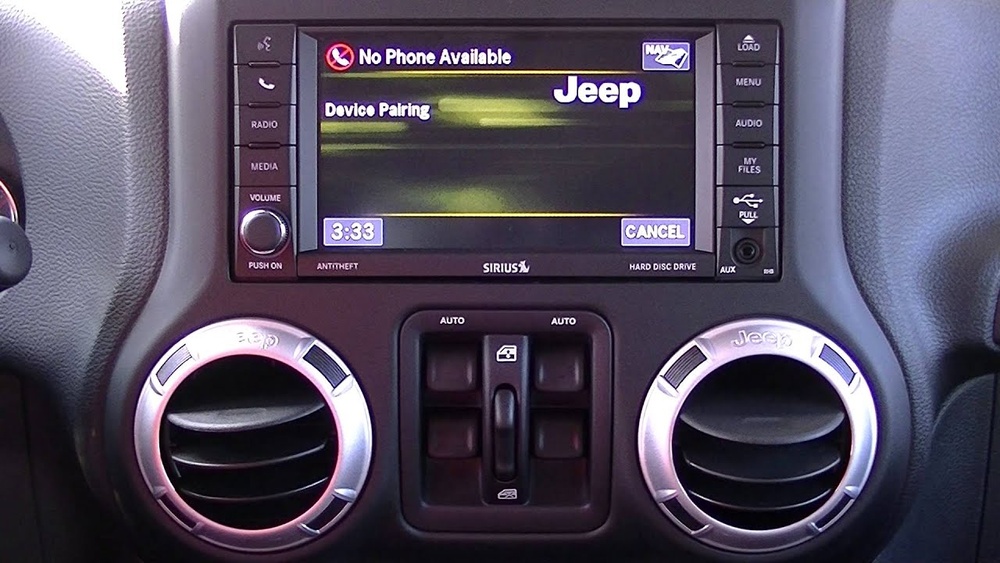
Press the “Phone” button on your car’s dashboard or radio. If you see “No phone connected” or “Ready,” you’re in the right menu.
3. Begin Pairing Mode
If it’s your first time, Uconnect should prompt, “Would you like to pair a phone? ” Use the radio buttons to select “Yes. ” If you don’t see this, press “Menu,” then navigate to “System Setup,” and choose “Pair a Device.
”
4. Find Uconnect On Your Phone
On your phone, scan for new Bluetooth devices. Look for “Uconnect” in the list. Tap it.
5. Enter The Pin
Uconnect will show a 4-digit PIN on the car display. Enter this PIN on your phone when prompted.
6. Confirm Connection
Both your phone and car should confirm the pairing. You might be asked to allow contacts and messages—choose “Allow” for full hands-free features.
If done correctly, you’ll see your phone’s name on the Uconnect display.
7. Test The Connection
Make a test call or play music (if supported by your Uconnect version).
Example:
If you own a Jeep Patriot Latitude, you’ll likely have full audio streaming. In a Sport trim, you may only get calls.
Troubleshooting Common Problems
Even with the right steps, pairing can fail. Here’s how to solve typical issues:
Bluetooth Not Found
- Restart both your phone and the car.
- Check for software updates on both devices.
- Try deleting old pairings from Uconnect (Menu > System Setup > Bluetooth Devices > Remove Device).
Calls Work But Music Doesn’t
This often means your Uconnect supports only hands-free calling, not audio streaming. Check your trim level or consult your manual.
Connection Drops Frequently
- Turn off Wi-Fi on your phone (it sometimes interferes).
- Ensure your phone is within three feet of the Uconnect system during pairing.
- Delete and re-pair the device.

Audio Quality And Feature Comparison
The features you get depend on your Jeep Patriot trim and Uconnect version. Here’s a quick comparison:
| Trim Level | Bluetooth Calls | Music Streaming | Voice Commands |
|---|---|---|---|
| Sport | Yes | No | Basic |
| Latitude | Yes | Yes | Full |
| High Altitude | Yes | Yes | Full |
This table helps you set the right expectations before troubleshooting.
Using Alternative Connection Methods
If your Jeep Patriot 2016 doesn’t have Bluetooth, or if you want better audio quality, you have other options.
Auxiliary Cable
Plug a 3. 5mm cable from your phone’s headphone jack to the car’s AUX input. Select “AUX” from the car’s radio menu.
Usb Connection
Some Patriots have a USB port. Connect your phone with a USB cable—this can charge your phone and sometimes allows music playback.
Bluetooth Adapter
You can buy a simple Bluetooth-to-AUX adapter for under $30. It plugs into your AUX port and lets you pair your phone wirelessly.
| Method | Audio Quality | Cost | Ease of Use |
|---|---|---|---|
| Built-in Bluetooth | Good | Free | Easy |
| Aux Cable | Excellent | Low | Simple |
| Bluetooth Adapter | Very Good | Low | Easy |
Many drivers find the Bluetooth adapter solution surprisingly effective, especially when their Uconnect is limited or unreliable.

Tips For A Smooth Experience
- Pair your phone only once; it should reconnect automatically in the future.
- Limit the number of paired phones—too many can cause confusion.
- Keep your phone’s Bluetooth name simple (no symbols or emojis).
- If switching phones, always delete the old one from Uconnect.
One often-missed tip: After major phone updates, unpair and re-pair for best performance.
Frequently Asked Questions
How Many Phones Can I Pair With My Jeep Patriot 2016?
You can pair up to seven devices, but only one can be active at a time. Too many devices can slow down or confuse the system.
Can I Play Spotify Or Apple Music Through Uconnect?
If your Uconnect supports A2DP audio streaming, you can play any music app, including Spotify and Apple Music. Base models may only allow calls.
My Uconnect Asks For A Pin But Pairing Fails. What Should I Do?
Make sure you enter the exact 4-digit PIN shown on your Jeep’s display. If pairing fails, restart both devices and try again. Delete old pairings if needed.
Is Bluetooth Connection Safe While Driving?
Yes, hands-free Bluetooth is safer than handling your phone. However, always set up your phone before driving. Learn more about safe driving at the National Highway Traffic Safety Administration.
What If My Jeep Patriot Doesn’t Have Bluetooth?
You can use an auxiliary cable or a Bluetooth adapter in the AUX port. These solutions offer good audio quality and are affordable.
Connecting your phone to your Jeep Patriot 2016 doesn’t need to be difficult. With the right steps and a little patience, you’ll enjoy safe, hands-free driving and better in-car entertainment every time you hit the road.