Connecting your phone to your Jeep Wrangler 2014 can make your driving experience smoother and safer. Hands-free calls, music streaming, and navigation become easier when your phone is synced with your car’s system. But for many owners, the setup process can be confusing, especially if you’re not familiar with car infotainment systems. This guide will show you simple, step-by-step instructions for connecting your smartphone to your Jeep Wrangler 2014, highlight common issues, and share practical tips to get the most out of your system.
Understanding Jeep Wrangler 2014’s Connectivity
The 2014 Jeep Wrangler usually comes with the Uconnect system, which manages audio, phone, and navigation features. Not every Wrangler has the same features, so it’s important to know what your trim level offers.
Here’s a quick comparison of common Jeep Wrangler 2014 audio systems:
| System | Bluetooth | USB/AUX Input | Voice Command |
|---|---|---|---|
| Basic Audio | No | Yes | No |
| Uconnect 130 | No | Yes | No |
| Uconnect 430/430N | Yes | Yes | Yes |
If your Jeep has Uconnect 430 or 430N, you’ll be able to connect your phone via Bluetooth. Otherwise, you can use the USB or AUX input for music only.
How To Connect Your Phone Via Bluetooth
Most drivers want to use Bluetooth for hands-free calling and wireless music. Here’s how to connect:
- Turn On Your Jeep: Switch on your ignition and keep your car in park.
- Enable Bluetooth on Your Phone: On your smartphone, go to settings and make sure Bluetooth is turned on and discoverable.
- Access Uconnect Phone Menu: Press the “Phone” button on the Jeep’s dashboard or steering wheel.
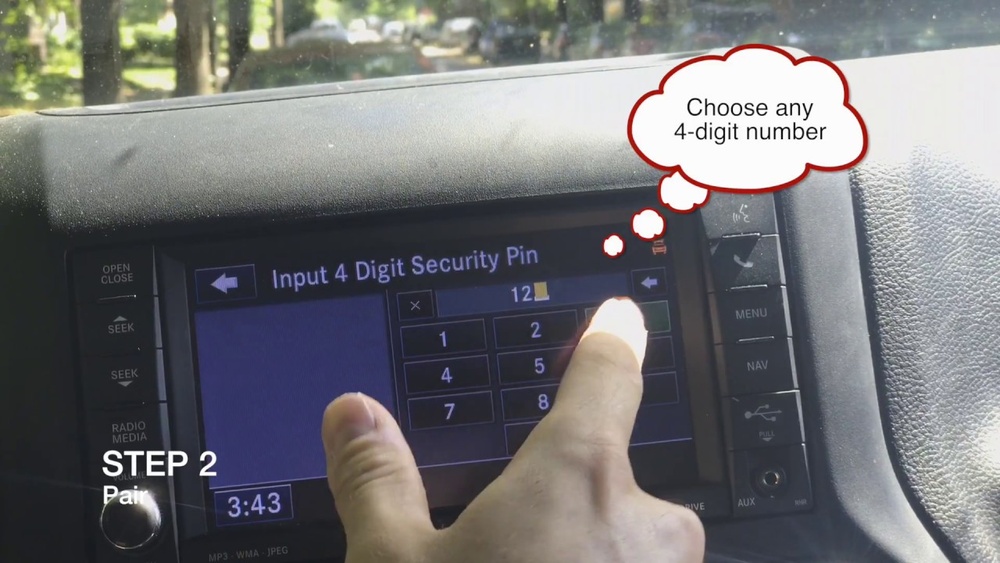
- Pair a New Device: Select “Add Device” or “Pair a Device” on the Uconnect screen.
- Select Jeep on Your Phone: Your phone will show a list of available devices. Tap “Uconnect” or “Jeep.”
- Enter the PIN: The system will display a PIN code. Make sure it matches the one on your phone, then confirm on both devices.
- Finalize Connection: Wait for the pairing to finish. The system will let you know when your phone is connected.
What Can You Do With Bluetooth?
Once paired, you can:
- Make and receive calls hands-free
- Stream music from apps like Spotify or Apple Music
- Access your contacts and call history
Some phones may ask for permission to share contacts. Allow this for full functionality.

Connecting With Usb Or Aux
If your Wrangler doesn’t have Bluetooth, you can still connect your phone with a USB or AUX cable. Here’s how they compare:
| Connection Type | Music Playback | Phone Calls | Charging |
|---|---|---|---|
| USB | Yes | No | Yes |
| AUX | Yes | No | No |
- USB connection: Plug your phone into the USB port (often in the center console). Select “Media” on your car’s system. You can play music and charge your phone, but you can’t use hands-free calling.
- AUX connection: Use a standard AUX cable to connect your phone’s headphone jack to the car’s AUX port. Select “AUX” on your system. This allows music playback but not charging or calls.
Common Problems And Solutions
Many owners face issues when connecting their phones for the first time. Here are some common problems and how to solve them:
- Bluetooth Not Showing Up: Make sure your Jeep’s system is in pairing mode and your phone’s Bluetooth is visible. Try restarting both devices.
- Connection Drops: Delete the paired device from both your car and phone, then try pairing again. Interference from other devices can cause drops.
- No Sound: Check if your audio source is set to Bluetooth or AUX. Sometimes, volume must be adjusted on both your phone and the car.
- Contacts Not Syncing: Grant permission on your phone when prompted. On iPhones, go to Settings > Bluetooth > Uconnect > enable “Sync Contacts.”
Non-obvious Tips
- If you change phones often, delete old paired devices from Uconnect. Too many stored devices can cause glitches.
- Some aftermarket head units offer better connectivity and features for older Wranglers. If your system is unreliable, consider an upgrade.

Maximizing Your In-car Experience
Once your phone is connected, you can improve your driving experience in a few ways:
- Use voice commands for safer calls and text replies.
- Adjust audio settings on Uconnect for better music quality.
- Set your phone to “Do Not Disturb” or driving mode to reduce distractions.
If you rely on navigation, try mounting your phone where you can see it safely, as the 2014 Wrangler’s system does not support Android Auto or Apple CarPlay.
Safety And Legal Considerations
Hands-free use is not just convenient—it’s often required by law. Many states in the US have banned holding a phone while driving. Check your local rules to avoid fines. Always set up your connection before driving.

Frequently Asked Questions
Why Won’t My Jeep Wrangler 2014 Find My Phone?
Sometimes, the Uconnect system does not detect your phone if Bluetooth is off or your phone is not discoverable. Restart both devices and make sure no other device is currently paired.
Can I Connect More Than One Phone To Uconnect?
The system lets you pair multiple phones, but only one can be active at a time. You can switch between phones in the Uconnect menu.
Does The 2014 Wrangler Support Apple Carplay Or Android Auto?
No, the factory system does not support these features. To use them, you’ll need to install an aftermarket head unit.
What Is The Best Way To Play Music From My Phone?
Bluetooth is the most flexible option, but USB offers better sound quality and charges your phone. AUX is a good backup if Bluetooth is not available.
Where Can I Find The Official Uconnect Manual?
You can download the manual and get updates from the official Mopar Uconnect site.
Getting your phone connected to your Jeep Wrangler 2014 opens up a safer, more enjoyable drive. With these steps and tips, you’ll spend less time troubleshooting and more time on the road. If your system feels outdated, upgrading to a newer head unit is a practical solution for modern features.