Setting the correct time on your Jeep Wrangler is more important than many drivers realize. Whether you rely on your dashboard clock for daily routines, or you want accurate time for scheduled trips, knowing how to adjust it quickly can make life easier. In this article, you’ll learn step-by-step how to set the time for different Jeep Wrangler models, understand common mistakes, and get practical advice for keeping your time accurate. You’ll also find helpful comparisons and answers to frequent questions, so you feel confident every time you adjust your Wrangler’s clock.
Understanding Jeep Wrangler Clock Systems
Jeep Wranglers have seen many changes over the years. The clock system can differ based on the model year and trim. Most Wranglers use either a manual clock adjustment or a digital setup connected to the infotainment system.
| Model Year | Clock Type | Adjustment Method |
|---|---|---|
| 2007–2010 | Manual (Radio) | Physical Buttons |
| 2011–2017 | Digital (Radio/Touchscreen) | Button or Touchscreen |
| 2018–Present | Uconnect Touchscreen | Touchscreen Menu |
If you’re unsure which system your Jeep uses, check your owner’s manual or look for the radio or touchscreen style in your dashboard.
How To Set Time: Step-by-step Guide
Setting the time varies by model, but most drivers can follow these simple steps. Let’s break it down by the most common Jeep Wrangler generations.
1. Older Jeep Wranglers (2007–2010)
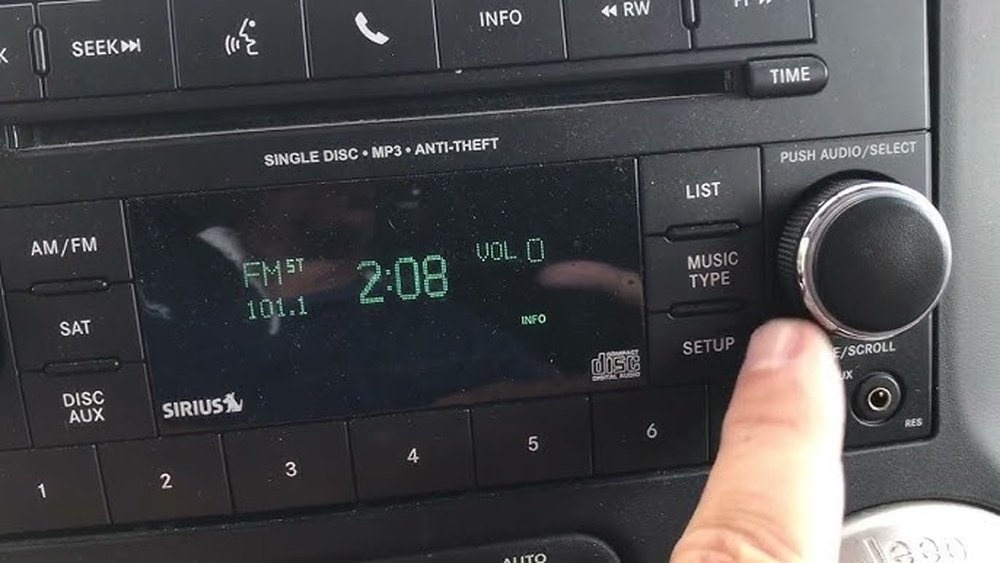
These models use physical buttons on the radio:
- Locate the clock button (usually marked “Clock” or “CLK”).
- Press and hold the button until the time display starts flashing.
- Use the seek or tune buttons to adjust the hour.
- Press the clock button again to switch to minutes.
- Adjust the minutes using the same seek/tune buttons.
- Press the clock button once more to confirm and exit.
Many drivers overlook that you must hold the button, not just tap it. This is a common mistake.
2. Mid-generation Wranglers (2011–2017)
Most of these models have a digital radio or basic touchscreen:
- Press the Menu button on your radio or infotainment system.
- Scroll to the Clock Settings option.
- Select Set Time.
- Adjust hours and minutes using the knob or touchscreen arrows.
- Save your changes by pressing “OK” or “Save.”
If your Wrangler has basic radio, the steps are similar to the older models, but you’ll see the time flash on the screen.
3. Newer Jeep Wranglers (2018–present)
The latest Wranglers use the Uconnect system, which is a full touchscreen:
- Tap the Settings icon on the Uconnect screen.
- Choose Clock & Date from the menu.
- Select Set Time.
- Adjust hours and minutes using the touchscreen sliders or plus/minus buttons.
- Tap Save or Set to confirm.
Some models automatically update time if GPS is active. If this feature is enabled, manual setting may not be necessary.
| Adjustment Method | Time Needed | Ease of Use |
|---|---|---|
| Physical Buttons | 2–3 minutes | Medium |
| Basic Touchscreen | 1–2 minutes | Easy |
| Uconnect Touchscreen | 1 minute | Very Easy |

Tips For Accurate Time Setting
Making sure your Jeep’s clock is correct is simple, but a few tips can help:
- Check AM/PM: Many digital systems default to 12-hour format. Double-check AM and PM settings.
- Daylight Savings: When clocks change, some systems do not auto-update. Adjust manually if needed.
- GPS Sync: If your Wrangler has GPS, enable time sync for automatic updates.
- Battery Disconnect: After battery changes, re-check your clock. It may reset to factory default.
A non-obvious insight: Many drivers forget that changing time zones on long road trips can make the clock inaccurate. If you travel across states, use the time zone setting in the Uconnect system.
Common Mistakes And How To Avoid Them
Even experienced drivers make simple mistakes when setting the clock:
- Not holding buttons long enough: For older models, you must press and hold, not just tap.
- Skipping the “Save” step: On touchscreens, changes are not saved automatically.
- Ignoring time format: Switching between 24-hour and 12-hour formats can confuse some users.
- Missing GPS updates: Some drivers turn off GPS sync and forget to update the time manually.
The biggest mistake is not checking the time after resetting the battery or after a software update. Always verify your clock after these events.

Jeep Wrangler Clock Vs Other Vehicles
Jeep Wranglers are known for their ruggedness, but their clock systems are simpler than many luxury cars. Here’s a quick comparison:
| Vehicle Type | Clock Adjustment | Automatic Update |
|---|---|---|
| Jeep Wrangler | Manual/Touchscreen | Optional (GPS) |
| Luxury Sedan | Touchscreen/Voice | Yes |
| Economy Car | Manual/Radio | No |
Jeep Wranglers require more manual steps, but the process is straightforward. This makes them easier to fix if something goes wrong.
Practical Example: Setting Time For A 2020 Jeep Wrangler
Suppose you drive a 2020 Jeep Wrangler with Uconnect. Here’s how you’d set the clock:
- Turn on your vehicle and access the Uconnect touchscreen.
- Tap Settings > Clock & Date.
- Select Set Time.
- Adjust the hour and minute using the touchscreen.
- Confirm by tapping Set.
If your Wrangler is equipped with GPS, you can enable auto-sync. This will keep your clock accurate even when crossing time zones.
For detailed instructions, you can visit the official Jeep website: Jeep Owners Manual.
Frequently Asked Questions
How Often Should I Check My Jeep Wrangler’s Clock?
Check your clock every time you change your battery, travel across time zones, or after daylight savings changes. For most drivers, twice a year is enough.
Can I Set The Time Using My Phone?
No, Jeep Wranglers do not sync their dashboard clock directly with your phone. Only GPS and Uconnect can auto-update.
What If My Clock Resets After Turning Off The Car?
This usually means a battery issue or software reset. Check your battery connections and update the clock manually.
Is There A Way To Switch Between 12-hour And 24-hour Format?
Yes, most Uconnect systems allow you to change the time format in the Clock & Date settings.
Does Gps Always Keep My Time Accurate?
GPS can update the time, but only if enabled. If you disable GPS sync, you need to adjust manually.
Setting the time on your Jeep Wrangler is a quick task, but it’s worth getting right. With these tips and clear steps, you won’t waste time on confusion or incorrect settings. Whether you have a classic Wrangler or a modern Uconnect system, keeping your clock accurate helps you stay on schedule and enjoy your drive.