Getting Bluetooth working in your Jeep Patriot can make your drives safer and more enjoyable. You can talk hands-free, stream your favorite music, and keep your focus on the road. But if you’ve never done this before, the process can feel confusing. The good news? Setting up Bluetooth in most Jeep Patriots is straightforward if you follow a few clear steps. This guide will help you connect your smartphone or device quickly and avoid common mistakes.
Understanding Your Jeep Patriot’s Bluetooth System
Not all Jeep Patriots have the same Bluetooth system. Most models from 2011 and later include Uconnect, Chrysler’s infotainment system that manages Bluetooth. Some earlier Patriots need an extra module or don’t support Bluetooth at all.
Check your vehicle’s manual or look for the Uconnect button (usually on the steering wheel or center console). If you see it, you’re ready to set up Bluetooth. If not, your Jeep may need an aftermarket kit.
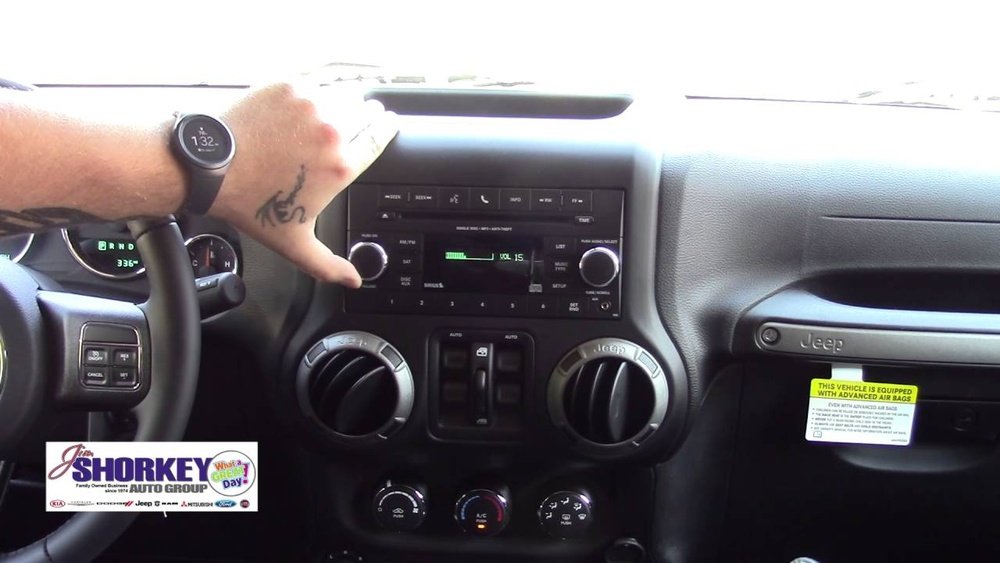
Here’s a quick comparison of Bluetooth availability by model year:
| Model Year | Bluetooth Standard | Factory Support |
|---|---|---|
| 2011–2017 | Uconnect Bluetooth | Yes (most trims) |
| 2007–2010 | None / Aftermarket | No |
Tip: If your Jeep Patriot is 2010 or older, consider a third-party Bluetooth adapter. These plug into your car’s audio system and work with most phones.
Preparing Your Phone And Jeep For Pairing
Before you start, make sure your phone’s Bluetooth is on and your Jeep is in park. Connecting while driving is unsafe and sometimes impossible.
Here’s what you need to do:
- Turn on your Jeep’s ignition. The radio and Uconnect system need power.
- Activate Bluetooth on your phone. Go to your phone’s Settings, find Bluetooth, and switch it on.
- Remove previous pairings. If your Jeep or phone was paired with another device, delete old connections to avoid confusion.
Many beginners forget to delete old pairings, which can cause connection errors. Another common mistake is trying to pair while the car is moving or the phone is in airplane mode.
Step-by-step: Pairing Bluetooth In Jeep Patriot
Now, you’re ready to connect your devices. The exact steps can vary, but most Jeep Patriots with Uconnect follow a similar process.
Using Uconnect To Pair
- Press the Uconnect button. It’s usually on the steering wheel or center console.
- Listen for the prompt. Uconnect will say, “Ready.” You can say, “Pair a device” or press the voice command button again.
- Phone search mode. Uconnect will tell you it’s searching and to begin pairing on your device.
- Find Uconnect on your phone. On your phone’s Bluetooth menu, look for “Uconnect” or a similar name.
- Enter the PIN. Uconnect will give you a 4-digit PIN (like “0000” or “1234”). Enter it on your phone if asked.
- Wait for confirmation. Uconnect will say, “Pairing complete,” and your phone will show as connected.
If you see a message like “Pairing failed,” double-check your PIN and try again. If your phone doesn’t find Uconnect, restart Bluetooth on both devices.
Common Pairing Issues
Even after following the steps, you might run into problems. Here’s a quick troubleshooting guide:
| Issue | Solution |
|---|---|
| Device not found | Restart both phone and Uconnect, make sure both are discoverable |
| Audio not working | Check that media audio is enabled in your phone’s Bluetooth settings |
| Connection drops | Remove old devices, keep phone near the Uconnect module |
Using Bluetooth Features
Once paired, you can make hands-free calls and play music. Here are some practical tips:
- To make a call, press the Uconnect button and say, “Call [name].”
- To stream music, open your favorite music app. Audio will play through the car’s speakers.
- Adjust volume using the car’s controls for best sound quality.
- To disconnect, turn off Bluetooth on your phone or say, “Disconnect phone” to Uconnect.
Some Jeep Patriots only support calls (not music streaming) through Bluetooth. If you don’t hear music, check your model’s features.

Upgrading Bluetooth In Older Jeep Patriots
If your Jeep Patriot doesn’t have factory Bluetooth, you still have options:
- Install a Bluetooth adapter. These connect to the AUX port or radio and cost around $20–$50.
- Replace the stereo. Aftermarket head units with Bluetooth can cost $100–$300 plus installation.
- Professional installation. For best results, have a technician add a Bluetooth kit that integrates with steering wheel controls.
A Bluetooth adapter is the fastest, cheapest option, but it may not support hands-free calling.
Here’s a comparison of upgrade options:
| Upgrade Method | Price Range | Features |
|---|---|---|
| Bluetooth Adapter | $20–$50 | Music streaming only |
| Aftermarket Stereo | $100–$300+ | Hands-free calling, music, better sound |
| OEM Uconnect Add-on | $150–$400 | Full integration, factory look |
Insight: Many Jeep owners overlook the importance of firmware updates. If your Uconnect is buggy, ask your dealer about software updates—they can fix many Bluetooth issues.
Practical Tips For Reliable Bluetooth Use
- Keep your phone’s software updated. New updates fix bugs and improve compatibility.
- Don’t connect too many devices to Uconnect. Stick to one or two for stable performance.
- Store your phone in a spot with good signal, not in the glove box or under metal objects.
- If you upgrade your phone, remove the old pairing from Uconnect to avoid confusion.
Hidden tip: Some features (like text-to-speech) need the Jeep parked or may not work with all phones. Always check compatibility before expecting advanced features.
For more details on Uconnect and troubleshooting, you can check the official Mopar Uconnect support page.

Frequently Asked Questions
Why Can’t My Phone Find Uconnect In My Jeep Patriot?
This often happens if Bluetooth isn’t enabled on one device, or if Uconnect is busy with another phone. Make sure no other phones are connected and both Bluetooth settings are on.
Does Bluetooth Support Music Streaming In All Jeep Patriots?
No, some older Uconnect systems only support phone calls, not music streaming. Check your owner’s manual or try playing music to see if it works.
How Many Phones Can I Connect To Uconnect?
Most Uconnect systems in the Jeep Patriot support up to seven paired devices, but only one can be active at a time.
My Calls Sound Bad Over Bluetooth. How Can I Fix This?
Poor call quality may be due to weak phone signal, interference, or an outdated Uconnect system. Try moving your phone closer, updating software, or deleting and re-pairing the device.
Can I Add Bluetooth To A Jeep Patriot Without It From The Factory?
Yes, you can use a Bluetooth adapter or install an aftermarket stereo. These solutions are affordable and work well for most drivers.
Setting up Bluetooth in your Jeep Patriot doesn’t have to be hard. With the right approach and a little patience, you’ll enjoy hands-free calls and streaming in no time. Remember to check your model’s features, follow the pairing steps, and keep your software up to date for the best results.
Safe driving!