If you own a 2017 Jeep Wrangler, connecting your phone or other device using Bluetooth can make your drives safer and more enjoyable. You can play music, answer calls hands-free, and use navigation right from your phone. But many owners find the Bluetooth setup confusing, especially if they’ve never done it before. This guide will walk you through every step, share practical tips, and help you avoid common mistakes.
Understanding Bluetooth In The 2017 Jeep Wrangler
The 2017 Jeep Wrangler usually comes with the Uconnect system, Jeep’s infotainment system. Most models have Uconnect 130, 430, or 430N. Not all base models include Bluetooth for hands-free calling or audio streaming. Check your owner’s manual or look for a phone button on your dash to confirm Bluetooth is supported.
Why Bluetooth Is Useful
- Hands-free calling keeps your attention on the road.
- Wireless music streaming means no messy cables.
- Access voice commands for easier control.
Steps To Connect Bluetooth In Your Jeep Wrangler
Follow these steps to pair your device with your Jeep’s system:
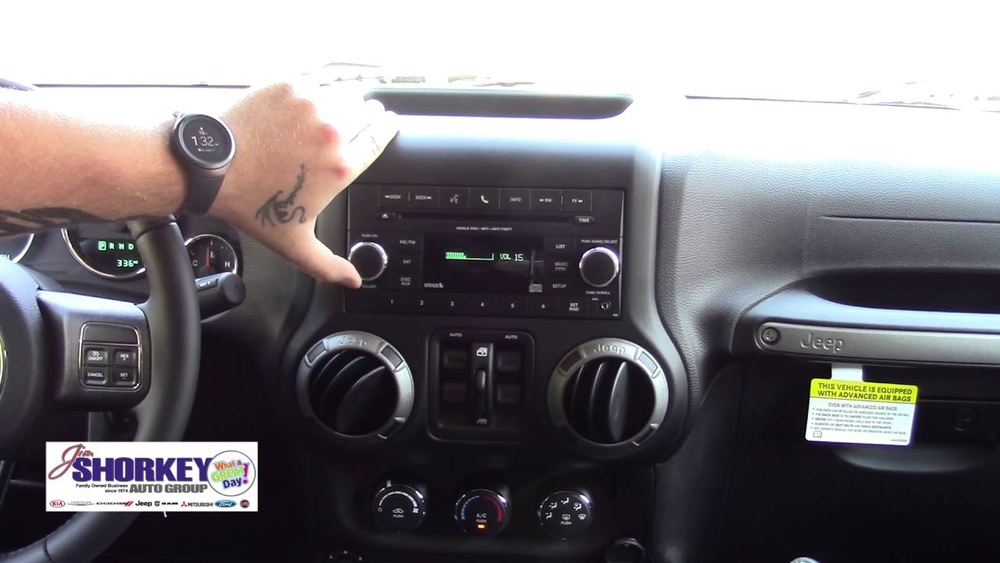
- Turn on your Jeep and Uconnect system. Make sure the vehicle is in Park.
- Enable Bluetooth on your phone. Go to your phone’s settings and turn on Bluetooth.
- Access the Uconnect phone menu. Press the Phone button on your Jeep’s dashboard.
- Start pairing process. The system will ask if you want to pair a phone. Select “Yes.”
- Search for devices. On your phone, look for “Uconnect” under available Bluetooth devices.
- Enter the PIN. The system will show a 4-digit PIN. Enter this PIN on your phone if prompted.
- Confirm pairing. Your phone and Uconnect will confirm the connection.
If pairing is successful, you’ll see a confirmation on the display. Your contacts and recent calls may start syncing.
Example: Pairing An Iphone
- Open Settings > Bluetooth on your iPhone.
- Wait for “Uconnect” to appear.
- Tap it and enter the PIN from your Jeep’s screen.
- Accept any permission requests.
Troubleshooting Common Issues
Sometimes, things don’t work as planned. Here’s how to solve the most common problems:
| Issue | Possible Cause | Solution |
|---|---|---|
| No Uconnect found | Bluetooth off or out of range | Check phone and Jeep Bluetooth settings |
| Pairing failed | Wrong PIN or timed out | Try pairing again, enter PIN promptly |
| Audio not working | Wrong audio source selected | Select “Media” or “Bluetooth” on Uconnect |
Pro Tip: If you change phones or update your system, you may need to remove the old device and re-pair.
Features You Can Use With Bluetooth
Once connected, the Uconnect system offers several features:
- Hands-free calling: Make and receive calls using buttons on the steering wheel.
- Text message support: Some phones allow you to listen to texts.
- Audio streaming: Play music, podcasts, or audiobooks wirelessly.
- Voice commands: Control calls and music using your voice.
Not all features work with every phone. Older phones may have limited support.

Tips For A Smooth Connection
- Keep your phone updated. Software updates fix many Bluetooth bugs.
- Disconnect unused devices. Too many paired devices can confuse Uconnect.
- Stay close during pairing. Bluetooth range is usually 30 feet or less.
- Restart after problems. If something isn’t working, try restarting your phone and Jeep.
Bluetooth Limits In The 2017 Wrangler
The 2017 Jeep Wrangler’s Uconnect system has some limits:
- Only a small number of devices can be paired at once (usually 7–10).
- Audio quality depends on your phone and system version.
- Some streaming services may not work perfectly.
Comparing Audio Sources In The Jeep Wrangler
You might wonder if Bluetooth is the best way to play audio. Here’s a quick comparison:
| Audio Source | Sound Quality | Convenience | Extra Cables Needed |
|---|---|---|---|
| Bluetooth | Good | Very High | No |
| AUX Cable | Excellent | Medium | Yes |
| USB | Excellent | High | Yes |
| CD | Excellent | Low | No |
Bluetooth is the most convenient for most drivers, even if AUX or USB can sound slightly better.

Resetting Bluetooth Connections
If your Jeep Wrangler refuses to connect, a reset can help.
- Delete old devices from Uconnect by going to the phone menu, selecting “Paired Phones,” and removing unused devices.
- Delete Uconnect from your phone’s Bluetooth list.
- Restart both your phone and Jeep.
- Repeat the pairing steps above.
This process often fixes stubborn connection issues. If you still have trouble, your dealer can check for Uconnect software updates.
Upgrading Bluetooth Capabilities
Some 2017 Jeep Wranglers lack advanced Bluetooth features. Aftermarket solutions like a Bluetooth adapter or a new Uconnect unit can add streaming support. These upgrades range from simple plug-in devices to complete system replacements.
A quick search on the official Jeep Uconnect site can show you more options.

Frequently Asked Questions
How Many Devices Can I Pair With My 2017 Jeep Wrangler?
You can usually pair up to seven or eight devices with the Uconnect system. However, only one device can be connected at a time for phone calls or music.
Why Won’t My Phone Connect To Uconnect?
Common reasons include Bluetooth turned off, too many paired devices, or an outdated phone software. Remove old connections and try pairing again. Restarting both your phone and the Jeep often helps.
Can I Stream Music Through Bluetooth In My 2017 Wrangler?
Most 2017 Wranglers with Bluetooth support wireless music streaming. If you can make calls but can’t play music, check if your Uconnect version supports audio streaming.
Is Bluetooth Safe To Use While Driving?
Yes, Bluetooth keeps your hands on the wheel and your eyes on the road. Use voice commands and steering wheel controls for safer operation.
Do I Need A Dealer To Fix Bluetooth Issues?
Most problems can be fixed at home with resets and updates. For persistent issues or if Bluetooth was never installed, a dealer visit may be needed.
Connecting Bluetooth to your 2017 Jeep Wrangler is simple once you know the steps. Following this guide will help you pair your devices quickly, enjoy hands-free features, and solve problems with confidence. Always check your manual for your specific Uconnect version, and don’t hesitate to ask your dealer for help if you need it. Safe driving!