If you own a Jeep Grand Cherokee, understanding how to turn off its lights is important for safety, battery life, and privacy. The Grand Cherokee has several types of lights—headlights, interior lights, fog lights, and daytime running lights. Each works differently, and turning them off can sometimes be confusing, especially for new owners or those unfamiliar with modern car systems. This guide helps you confidently handle every light switch, avoid common mistakes, and keep your Jeep’s battery safe.
Types Of Jeep Grand Cherokee Lights
Every Grand Cherokee has multiple lights, each serving a unique purpose. Knowing which light you’re dealing with is the first step.
- Headlights: Used for driving at night or in low-visibility conditions.
- Fog lights: Designed for foggy weather, often placed below the headlights.
- Daytime Running Lights (DRL): Stay on during the day for visibility.
- Interior lights: Illuminate the cabin when doors open or for reading.
- Tail lights: Show your position to other drivers behind you.
Some models have automatic systems that turn on lights without manual input, which can be confusing.
Turning Off Headlights
Headlights are the most used lights. If you want to turn them off, follow these steps:
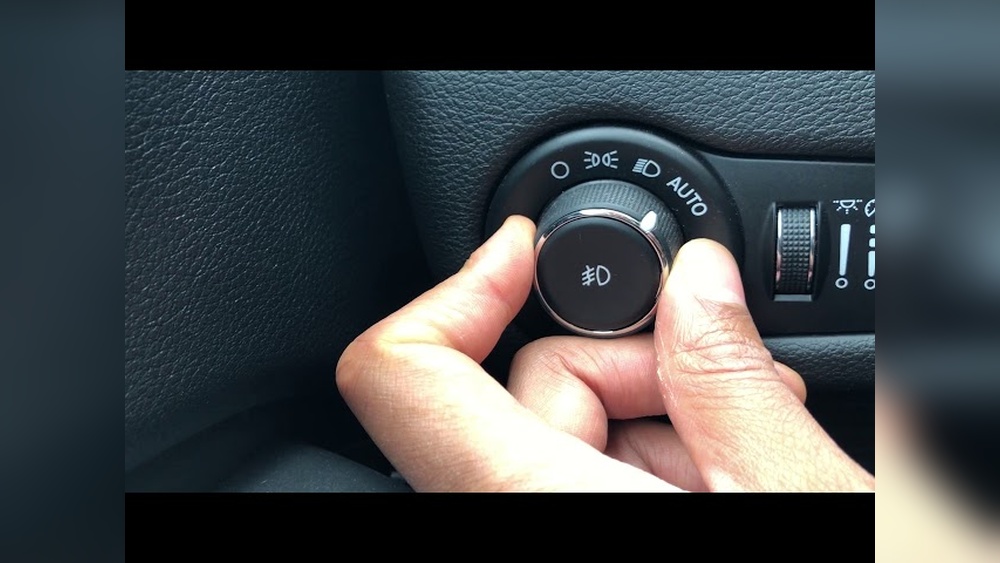
- Find the headlight control knob. It’s usually on the dashboard, left of the steering wheel.
- Rotate the knob to the “OFF” position. Some models label this as “0.”
- If your Jeep has automatic headlights, look for an “AUTO” mode. Switch it to “OFF” or “0” to take manual control.
- For newer models, the system may keep headlights on for a few seconds after locking. Wait and check if they turn off automatically.
Headlight Control Comparison
Here’s how the headlight controls differ between Grand Cherokee generations:
| Model Year | Control Location | Auto Feature | Manual Override |
|---|---|---|---|
| 2012-2015 | Dashboard knob | Yes | Rotate to “OFF” |
| 2016-2021 | Dashboard knob | Yes | Switch from “AUTO” to “OFF” |
| 2022-present | Touchscreen/knob | Yes (advanced) | Touchscreen or knob |

Turning Off Daytime Running Lights
Daytime Running Lights (DRL) are always on when driving. Many owners want to turn them off for privacy or battery saving.
Steps To Turn Off Drl
- Enter the settings menu on your dashboard touchscreen.
- Find “Lights” or “Exterior Lighting.”
- Look for the DRL option and deselect or turn it off.
- Some models require the parking brake to be engaged before DRL can be switched off.
Drl Deactivation Data
Different trims handle DRL settings differently:
| Trim Level | DRL Off Option | Steps Required |
|---|---|---|
| Laredo | Yes | Touchscreen menu |
| Limited | Yes | Touchscreen + parking brake |
| Overland | Yes | Touchscreen |
| Summit | Yes | Touchscreen |
Non-obvious tip: Some drivers don’t realize DRLs may come back on after restarting the car. Always check settings after each start.
Turning Off Interior Lights
Interior lights are often triggered by opening doors or using the map light buttons.
Manual Control
- Look for the map light buttons near the front seats.
- Press the button to turn off each light.
- If all doors are closed and lights stay on, check the dome light switch on the dashboard.
Automatic Shut-off
Many Grand Cherokees have an automatic shut-off feature. After closing all doors, interior lights turn off in about 30 seconds. If lights don’t turn off, check for:
- A stuck door switch
- The dome light switch set to “ON”
Interior Light Troubleshooting Table
| Problem | Possible Cause | Solution |
|---|---|---|
| Lights stay on | Door not fully closed | Check all doors |
| Lights won’t turn off | Dome switch “ON” | Switch to “OFF” |
| Lights flicker | Faulty door sensor | Repair sensor |
Turning Off Fog Lights
Fog lights are easy to switch off:
- Find the fog light button on the dashboard or near the headlight knob.
- Press or pull the button to turn off the fog lights.
- If fog lights stay on, check if headlights are in “ON” mode—some models link fog lights to headlight activation.
Expert tip: Fog lights can drain the battery if left on while parked. Always double-check before leaving the car.
Preventing Common Lighting Mistakes
Many drivers accidentally leave lights on, risking a dead battery. Here’s how to avoid this:
- Always check your lighting controls before leaving the car.
- Learn the meaning of dashboard light symbols—some look similar but are different.
- For automatic systems, read your owner’s manual to understand override options.
- If unsure, wait a minute after locking your car and check if all lights turn off.
Real-world Example
A 2020 Grand Cherokee owner reported the interior lights stayed on after closing all doors. The cause? The dome light switch was set to “ON. ” Switching it to “OFF” solved the issue immediately. This simple mistake is common, but easy to fix.
Useful Resources
If you want more details or need visuals, the official Jeep Grand Cherokee manuals are helpful. Also, visit Jeep Official Website for the latest information and troubleshooting guides.
Frequently Asked Questions
How Do I Turn Off The Headlights If My Jeep Grand Cherokee Has Automatic Lights?
Switch the headlight knob from “AUTO” to “OFF. ” For some models, you may need to use the touchscreen controls. If the headlights stay on after locking, wait a few seconds—they usually turn off automatically.
Why Won’t My Interior Lights Turn Off After Closing The Doors?
Check the dome light switch. If it’s set to “ON,” the lights will stay on. Also, make sure all doors are fully closed. A stuck door sensor can keep lights on.
Can I Turn Off Daytime Running Lights Permanently?
Most Grand Cherokee models allow you to turn off DRL in the touchscreen settings. But after restarting the car, some systems turn DRL back on. Always check settings after each start.
Will Leaving Fog Lights On Drain My Battery?
Yes, fog lights left on while parked can drain your battery quickly. Always turn them off before leaving your Jeep.
Where Can I Find My Light Controls In A Jeep Grand Cherokee?
Most controls are on the dashboard, left of the steering wheel. Some newer models use the touchscreen for advanced settings. Check your owner’s manual for exact locations.
Turning off your Jeep Grand Cherokee lights is simple once you understand the controls and automatic systems. Always double-check your settings, and you’ll keep your battery safe and your driving experience smooth. If you have trouble, visit your local Jeep dealer or check the official resources for help.