If your Jeep Cherokee key fob isn’t working as it should, a dead battery is usually the reason. Many drivers panic, thinking a dealership visit is needed. Actually, replacing the key fob battery is simple and can save you time and money. With a few tools and a little care, you can do it yourself in just a few minutes.
This guide will show you everything you need: the battery type, step-by-step instructions, common mistakes to avoid, and extra tips for making your key fob last longer.
Why Key Fob Battery Replacement Matters
A key fob does more than unlock your car. It helps you start the engine, open the trunk, or trigger an alarm. If the battery is weak, you may notice less range or need to press buttons harder. In some cases, your car won’t recognize the fob at all.
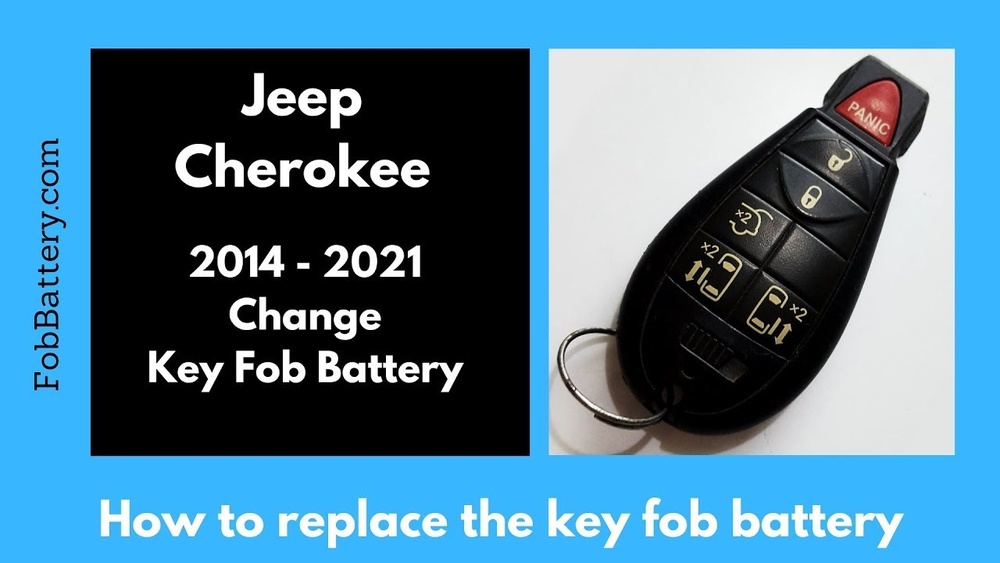
Most Jeep Cherokee key fobs use a CR2032 or CR2450 coin battery. These small batteries usually last 2-3 years, but frequent use or extreme temperatures can shorten their life.
Tools And Battery Type
Before you start, make sure you have the right tools and battery.
| Item | Purpose |
|---|---|
| CR2032 or CR2450 battery | Replacement power for the key fob |
| Small flathead screwdriver or coin | Opening the fob case |
| Clean cloth (optional) | Wiping inside contacts |
Check your owner’s manual or open your fob to confirm the right battery size.

Step-by-step Replacement Guide
Changing the Jeep Cherokee key fob battery is a straightforward process. Here’s how to do it:
- Remove the mechanical key: Slide the small switch on the back and pull the key out.
- Open the fob case: Look for a small notch. Insert the flathead screwdriver or coin and gently twist to separate the two halves. Go slowly to avoid damaging the plastic.
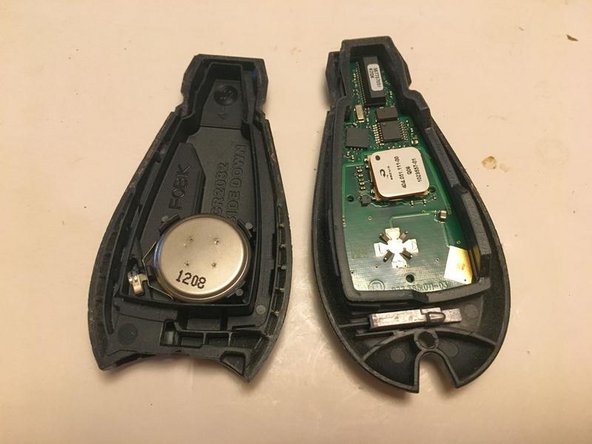
- Take out the old battery: Note which side is facing up. Usually, the positive (+) side faces you.
- Insert the new battery: Place the new CR2032 or CR2450 battery in the same orientation. Press it gently into place.
- Clean the contacts: If you see dust or corrosion, use a clean cloth to wipe the battery contacts.
- Snap the case shut: Align the two halves and press until you hear a click.
- Reinsert the mechanical key: Slide it back into place.
Most key fobs will work right away. If not, try pressing the lock and unlock buttons a few times, or stand closer to your Jeep.
When To Replace The Battery
It’s easy to miss the signs of a weak battery. Here’s how you know it’s time for a change:
| Sign | What It Means |
|---|---|
| Reduced range | You need to be closer for the fob to work |
| Delayed response | Buttons respond slowly or require multiple presses |
| Warning message | Dashboard may show “Key Fob Battery Low” |
| Complete failure | Nothing happens when you press any button |
Changing the battery as soon as you notice these signs can save you from getting locked out.

Common Mistakes To Avoid
Even a simple task like battery replacement can go wrong. Here are mistakes to avoid:
- Forcing the fob open can crack the case.
- Installing the battery upside down will stop the fob from working.
- Using the wrong battery size won’t fit or won’t supply enough power.
- Touching the battery contacts with your fingers can leave oil and reduce battery life.
- Not snapping the case fully shut may let moisture in.
A non-obvious tip: If your fob still doesn’t work after a new battery, check for a small reset button inside, or consult your manual. Some models need a quick re-sync with the car.
How To Make Your Key Fob Last Longer
A little care goes a long way. Here’s how to get more life from your key fob battery:
- Store your key fob away from electronics that may interfere with its signal.
- Avoid extreme temperatures—don’t leave your key fob in a hot car or outside in freezing weather.
- Use the manual key sometimes to reduce battery drain, especially if you don’t drive daily.
- Clean the contacts with a dry cloth during each battery change.
Most people miss that a weak battery can sometimes trigger a security lockout on newer Jeep Cherokees. Replacing the battery promptly helps avoid this annoyance.
How Key Fob Batteries Compare
Some Jeep Cherokees use CR2032, others use CR2450. Here’s a quick comparison:
| Battery Type | Diameter | Thickness | Typical Lifespan |
|---|---|---|---|
| CR2032 | 20 mm | 3.2 mm | 2-3 years |
| CR2450 | 24.5 mm | 5.0 mm | 2-4 years |
If your fob holds a larger battery, expect a bit more life from it.
When To Get Professional Help
If you’ve tried everything and your fob still doesn’t work, you might need expert help. The issue could be:
- Internal circuit board damage from drops or water.
- Reprogramming needed after battery replacement (rare, but possible).
- Car-side receiver issues, not the fob.
Most dealerships and locksmiths can test and fix key fob problems quickly. But for most battery swaps, you won’t need them.
Frequently Asked Questions
How Do I Know If My Jeep Cherokee Key Fob Needs A New Battery?
If your key fob works only when you’re very close to the car, or if you see a dashboard warning saying “Key Fob Battery Low,” it’s time to replace the battery.
What Battery Does A Jeep Cherokee Key Fob Use?
Most Jeep Cherokees use a CR2032 or CR2450 coin battery. Always check your manual or open the fob to confirm before buying.
Can I Use A Generic Battery, Or Do I Need A Specific Brand?
You can use any high-quality CR2032 or CR2450 battery. Well-known brands usually last longer, but generic batteries will work if they meet the size and voltage requirements.
My Key Fob Still Doesn’t Work After Changing The Battery. What Should I Do?
Try re-seating the battery and making sure it’s installed correctly. If that doesn’t work, check your car manual—some models need the fob to be re-synced. If problems continue, consult a professional.
Is It Safe To Open The Key Fob Myself?
Yes, with care. Use a small tool and gentle pressure. Avoid using sharp objects that could damage the case or internal circuit board.
Replacing your Jeep Cherokee key fob battery is a quick and simple task that can save you a trip to the dealership. With the right battery and a few minutes, you’ll have your key fob working like new. For more information about battery types and electronics, check out the Wikipedia page on coin cells for details. Taking a few moments now can save you from bigger problems down the road, helping you keep your Jeep safe and easy to use.