RGB rock lights are a popular upgrade for vehicles, especially trucks, Jeeps, and off-road cars. These small, colorful lights mount under your vehicle and shine down onto the ground, creating a vibrant glow. Today, most RGB rock lights come with Bluetooth control, letting you change colors, patterns, and brightness with your smartphone. But connecting these lights to Bluetooth can be confusing, especially if you’ve never done it before. This guide will walk you through the process, explain what you need, and share tips to avoid common mistakes.
What You Need Before Starting
Before you connect RGB rock lights to Bluetooth, make sure you have:
- RGB rock light kit with Bluetooth controller
- 12V power source (usually your car’s battery)
- Smartphone (Android or iOS)
- Compatible app for your rock light brand
Most kits include a Bluetooth controller, wiring, and mounting hardware. Check the box to ensure nothing is missing. Some brands have their own app, while others use popular third-party apps.
Step-by-step: Connecting Rgb Rock Lights To Bluetooth
Setting up your RGB rock lights with Bluetooth is straightforward if you follow these steps.
1. Install The Rock Lights And Controller
- Mount the lights: Place each light pod where you want under your vehicle. Use the provided screws or brackets.
- Run the wires: Route the wires neatly to the engine bay, avoiding hot or moving parts.
- Connect to the controller: Plug all lights into the Bluetooth controller unit.
- Power connection: Connect the controller’s power wires to your vehicle’s battery (red to positive, black to negative).
2. Download The App
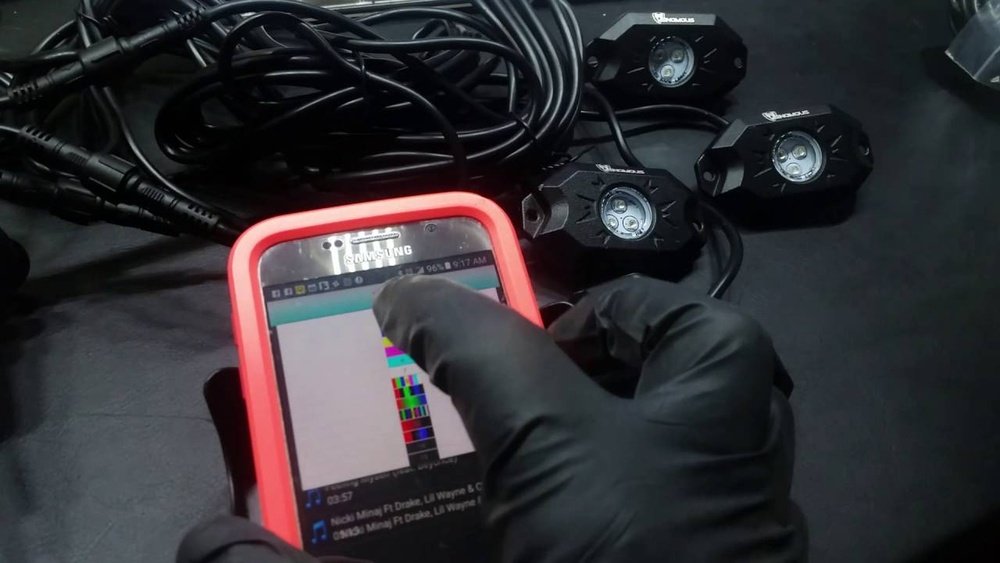
Look in your rock light kit instructions for the app name. Common apps include “HappyLighting” or “LED BLE. ” Download the app from Google Play or the Apple App Store.
3. Enable Bluetooth And Open The App
- Turn on your phone’s Bluetooth.
- Open the app.
- Many apps ask for location permissions. This is often required for Bluetooth scanning.
4. Pair With The Controller
- Power on your rock lights by turning on your vehicle or using a switch.
- The app should automatically scan for nearby devices. Look for a device name similar to your controller brand or model.
- Tap the device name to connect. It may take a few seconds.
5. Test The Lights
Once connected, use the app to change colors, brightness, or lighting modes. If nothing happens, check your wiring and power connections. Restart the app if needed.

Common Problems And Solutions
Even simple installations can run into issues. Here’s how to handle the most frequent problems.
Bluetooth Won’t Connect
- Check power: Make sure the controller is getting 12V power.
- Move closer: Stay within 20 feet of the controller.
- App permissions: Allow the app to use Bluetooth and location.
- Restart devices: Restart your phone and the controller.
Lights Not Responding
- Wiring check: Inspect all wiring for loose or disconnected plugs.
- Fuse check: Some controllers have an inline fuse. Replace if blown.
- App issues: Try uninstalling and reinstalling the app.
Multiple Devices Interference
If you have other Bluetooth devices running, they may interfere. Disconnect other devices or turn off their Bluetooth features.
Comparing Popular Rgb Rock Light Apps
Choosing the right app for your RGB rock lights can make a big difference in your experience. Here’s a comparison of popular apps:
| App Name | Platform | Main Features |
|---|---|---|
| HappyLighting | iOS/Android | Color change, music sync, timer |
| LED BLE | iOS/Android | Color modes, grouping, strobe |
| BLEDIM | iOS/Android | Custom color, brightness, effects |
Some kits only work with their own branded app, so always check compatibility before buying.

Why Bluetooth Control Is Better Than Remote
Many older RGB rock lights use a handheld remote, but Bluetooth brings new advantages:
| Feature | Bluetooth Control | Remote Control |
|---|---|---|
| Range | Up to 30 ft | Usually 15 ft |
| Customization | Unlimited colors, patterns | Limited options |
| Updates | Yes (via app) | No |
| Lost Device Risk | Low (phone) | High (small remote) |
Bluetooth is more convenient and offers more features, especially with music syncing and scene settings.
Practical Tips For A Smooth Installation
- Test before mounting: Connect everything and test the lights before final installation. This saves time if something doesn’t work.
- Seal connections: Use electrical tape or heat-shrink tubing to protect connections from water and dirt.
- Update the app: Sometimes, app updates fix bugs or add new features. Check for updates after installing.
- Label wires: If your kit has many wires, label them during installation to avoid confusion later.
One non-obvious tip: Some Bluetooth controllers support multiple zones, letting you control different sets of lights separately. Check your manual if you want advanced effects.
Another insight: If you plan to use the lights often, install a dedicated switch in your dashboard. This makes it easy to turn the system on or off without opening your hood.

Safety And Legal Considerations
While RGB rock lights are fun, they can be distracting or even illegal in some areas. Laws differ by state and country. For example, some places ban blue or red lights on public roads, as these colors are reserved for emergency vehicles.
Always check local regulations before using your lights in public.
Also, never operate the app while driving. Set your lighting before you start moving to avoid distraction and stay safe.
For more on automotive lighting laws, see the NHTSA Lighting Equipment Guide.
Frequently Asked Questions
Can I Connect Multiple Sets Of Rgb Rock Lights To One Bluetooth Controller?
Some controllers support multiple sets, but check the maximum number of lights allowed. Overloading can cause dim lights or controller failure.
What If My Bluetooth Connection Keeps Dropping?
Stay within the recommended range, remove interference from other devices, and make sure your phone’s Bluetooth is not connected to other accessories.
Do Rgb Rock Lights Drain My Car Battery?
They use little power, but leaving them on for hours with the engine off can drain your battery. Always turn them off when not in use.
Can I Use A Universal App With Any Rgb Rock Lights?
Not always. Many lights require their own app. Check your kit instructions for compatible apps before downloading.
Are Rgb Rock Lights Waterproof?
Most quality kits are rated IP67 or higher, meaning they can handle rain and splashes. Avoid submerging them or exposing them to pressure washers directly.
Connecting RGB rock lights to Bluetooth adds style and control to your vehicle. With careful setup and attention to safety, you can enjoy colorful lighting with just a tap on your phone.