If your Jeep Wrangler won’t start or you need to work on its electrical system, removing the battery is often the first step. While it’s a straightforward process, doing it safely and correctly is essential to avoid damaging your vehicle or hurting yourself. Whether you’re preparing for a battery replacement, cleaning terminals, or installing new electronics, understanding the proper steps can save you time and trouble.
Tools And Preparation
Before you begin, gather the necessary tools and take a few safety measures. Here’s what you’ll need:
- 10mm or 13mm wrench (check your Wrangler’s battery terminal size)
- Socket set (for battery hold-down clamp)
- Work gloves (to protect your hands)
- Safety glasses
- Rag or brush (for cleaning terminals)
- Battery terminal puller (optional, for stuck terminals)
Tip: Always work in a well-ventilated area and keep metal tools away from both terminals at once to prevent short circuits.
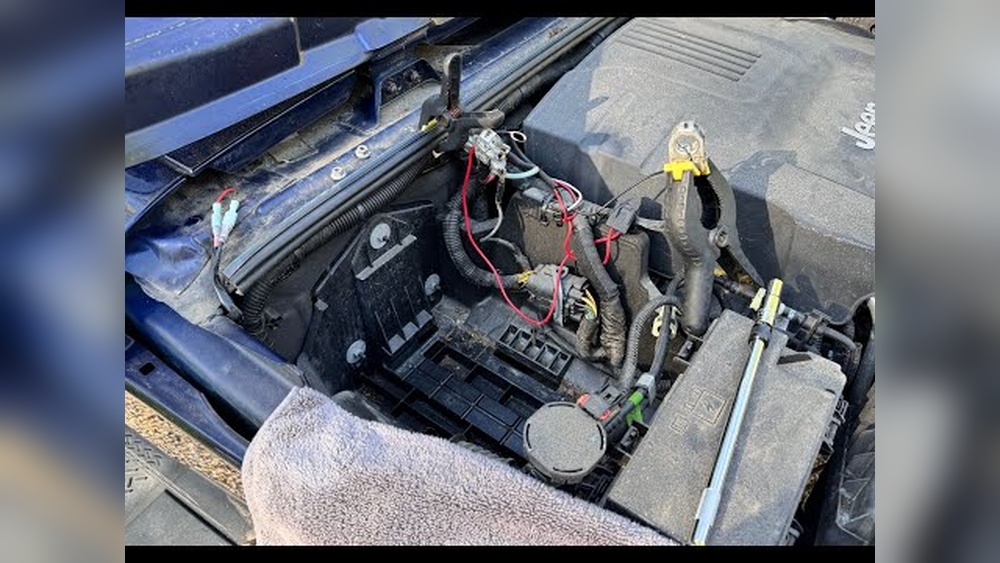
Where To Find The Battery In A Jeep Wrangler
The battery in most Jeep Wrangler models (including JK, JL, and older versions) is located under the hood on the passenger side. It sits in a plastic or metal tray, held in place by a clamp or bracket.
| Wrangler Model | Battery Location | Terminal Size |
|---|---|---|
| JK (2007–2018) | Engine Bay, Passenger Side | 10mm |
| JL (2018–Present) | Engine Bay, Passenger Side | 10mm |
| TJ (1997–2006) | Engine Bay, Passenger Side | 13mm |
Non-obvious insight: Some newer Wranglers (JL) have a second auxiliary battery used for stop/start systems. This article covers the main battery removal.
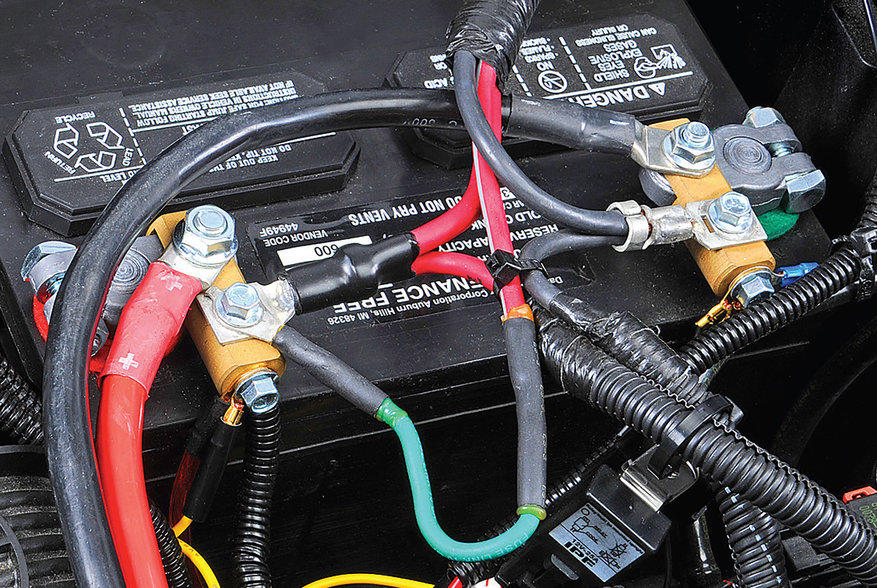
Step-by-step Guide To Removing The Battery
Follow these steps for a safe and smooth battery removal:
1. Turn Off The Vehicle
Make sure your Jeep is completely turned off. Remove the keys from the ignition and set the parking brake. This prevents accidental electrical surges.
2. Open The Hood And Locate The Battery
Release the hood latch. Use the prop rod to keep the hood open securely. Identify the battery and check for any corrosion or leaks.
3. Disconnect The Negative Terminal
Always remove the negative terminal (black, marked “-”) first. This reduces the risk of short circuits.
- Use your wrench to loosen the nut.
- Wiggle the terminal and lift it off the battery post.
- Push the cable aside, making sure it doesn’t touch metal parts.
4. Disconnect The Positive Terminal
Repeat the process for the positive terminal (red, marked “+”). Keep both cables clear of the battery.
5. Remove The Battery Hold-down Clamp
Most Wranglers use a metal or plastic clamp at the base of the battery.
- Use your socket set to remove the bolt(s).
- Set the clamp and hardware aside safely.
6. Lift Out The Battery
Batteries can weigh 30–50 lbs. Use both hands and proper lifting technique. If your battery has a handle, use it. Otherwise, grip from the sides.
Tip: If the battery is stuck, gently wiggle it or use a battery terminal puller.
7. Clean The Tray And Terminals
After removal, check for corrosion or debris. Use a brush or rag to clean the tray and cables. This helps prevent future electrical issues.
Safety Tips And What Not To Do
Batteries contain acid and can produce flammable gases. Always:
- Wear gloves and eye protection.
- Avoid touching your face after handling the battery.
- Keep sparks and flames away from the battery area.
Common mistake: Many people forget to remove the negative cable first. Doing so can lead to accidental sparks if you touch metal with your wrench.
| Action | Safe? | Why |
|---|---|---|
| Remove negative first | Yes | Prevents short circuits |
| Remove positive first | No | Increases risk of sparks |
| Lift with bare hands | No | Possible acid burns |

What To Do After Removing The Battery
If you are replacing the battery, compare the old and new batteries for size, terminal position, and voltage. Install the new battery by reversing the removal steps:
- Place the new battery in the tray.
- Secure it with the hold-down clamp.
- Attach the positive terminal first, then the negative.
- Tighten all connections.
Tip: Some newer Wranglers may require radio code re-entry or clock reset after battery replacement.
Signs Your Jeep Wrangler Battery Needs Replacing
Not sure if you really need to remove your battery? Here are some clear signs:
- Slow engine crank when starting
- Dim headlights and electrical issues
- Corroded terminals
- Battery warning light on the dashboard
- Battery age over 3–5 years
If your battery is leaking or swollen, it’s best to replace it immediately.
| Battery Age | Replacement Needed? | Common Symptoms |
|---|---|---|
| Less than 3 years | Maybe | Frequent short trips, high temperatures |
| 3-5 years | Likely | Slow crank, dim lights |
| 5+ years | Yes | Won’t start, leaks, swelling |

Frequently Asked Questions
How Long Does It Take To Remove A Jeep Wrangler Battery?
Most people can remove a Wrangler battery in 10 to 20 minutes if they have the right tools and follow safety steps.
Do I Need To Reprogram Anything After Replacing The Battery?
Usually, you may need to reset your clock or radio presets. Some newer models may require a radio code or minor computer reset.
Can I Remove The Battery Without Disconnecting Both Terminals?
No. Always disconnect both terminals for safety, starting with the negative. Leaving one connected is dangerous and can damage electrical parts.
What If The Battery Terminals Are Stuck?
Try wiggling the terminal gently or use a battery terminal puller. Avoid prying with sharp metal tools, as this can cause damage.
Where Can I Find Official Jeep Wrangler Battery Information?
For official specs and diagrams, visit the Jeep Official Website.
Removing your Jeep Wrangler’s battery is simple with the right steps and a bit of caution. Always prioritize safety and double-check your work. If you’re unsure, consult your owner’s manual or a professional mechanic. Taking the time to do the job right will protect your vehicle and keep you safe on the road.