Driving a Jeep Compass with 4 wheel drive offers more control, traction, and safety, especially on rough roads or during bad weather. Many owners are unsure how to properly engage the 4 wheel drive system. This guide explains each step, clears up common questions, and helps you use your Jeep Compass confidently. You’ll learn about the four main items involved: the drive mode selector, activating 4WD, monitoring system feedback, and disengaging the system. With the right knowledge, you can avoid mistakes and get the most out of your vehicle.
Understanding The Drive Mode Selector
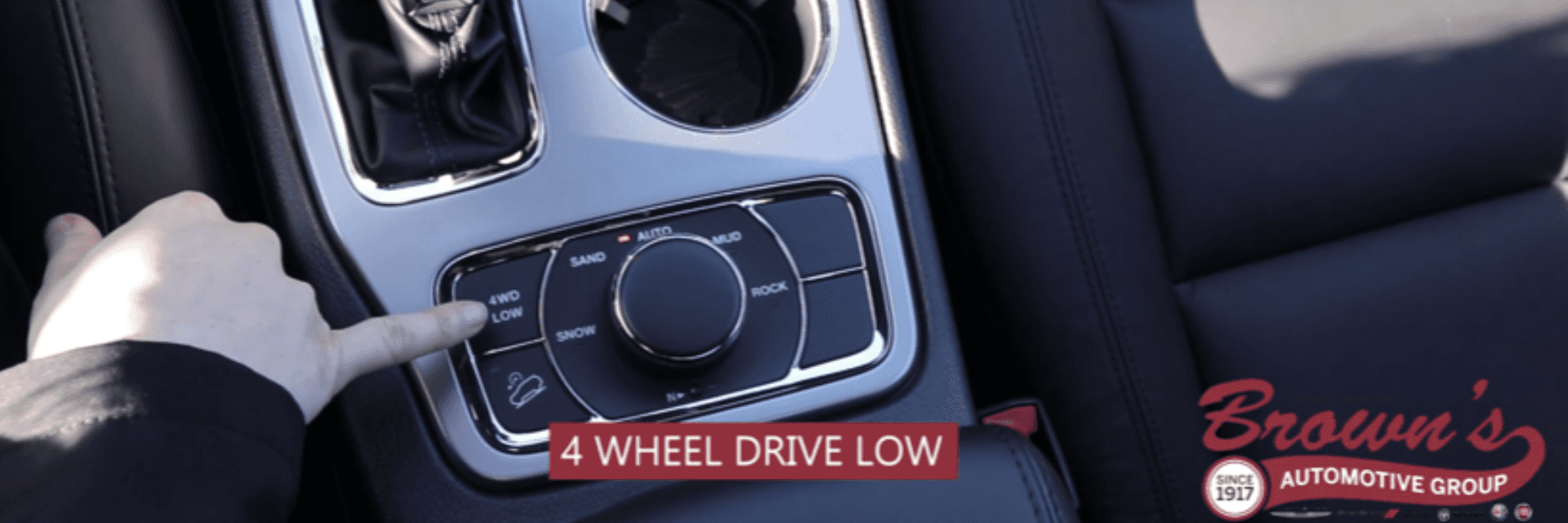
The Jeep Compass uses a drive mode selector for its 4 wheel drive system. This selector is usually found near the gear shift or on the center console. The modes include Auto, Snow, Sand, and Mud. Each mode adjusts the power sent to the wheels for different driving conditions.
- Auto: The system decides when to use 4WD, usually keeping the vehicle in 2WD for fuel efficiency.
- Snow: Increases traction on slippery surfaces, balancing power between all wheels.
- Sand: Provides more wheel spin for loose surfaces, preventing the vehicle from getting stuck.
- Mud: Maximizes grip and reduces wheel slip, helping you drive through soft or wet mud.
It’s important to select the right mode before you start driving in challenging conditions. For example, if you see snow ahead, switch to Snow mode before you enter the area.
| Mode | Best For | Wheel Power Distribution |
|---|---|---|
| Auto | Normal roads | Front-wheel drive, 4WD as needed |
| Snow | Slippery surfaces | Balanced to all wheels |
| Sand | Loose sand | More spin for all wheels |
| Mud | Wet/muddy terrain | Maximum grip, all wheels |
Many beginners forget to choose a mode before entering rough terrain, which can lead to loss of traction or even getting stuck.
Activating 4 Wheel Drive
Once you select the correct mode, it’s time to activate 4 wheel drive. In most Jeep Compass models, the system engages automatically when needed, but you can manually prompt it by using the selector.
- Stop or slow down: For best results, change modes when your vehicle is stopped or moving slowly. This prevents damage to the system.
- Turn the selector: Rotate the drive mode knob to your desired mode. Wait for the system to accept the change.
- Check dashboard indicators: A light will appear showing which mode is active. For example, a snowflake symbol means Snow mode is engaged.
- Test traction: Gently press the accelerator and see if the vehicle responds smoothly. If you feel slipping or jerky movement, double-check the mode.
Some drivers think 4WD is always on, but the Jeep Compass uses active 4WD. The system only powers all wheels when needed, saving fuel and reducing wear.
| Action | Recommended Speed | Dashboard Indicator |
|---|---|---|
| Select mode | 0–10 mph | Mode-specific icon |
| Engage 4WD | 0–20 mph | 4WD indicator light |
| Drive in 4WD | Up to 50 mph | Active mode icon |

Monitoring System Feedback
After activating 4WD, it’s crucial to monitor system feedback. The Jeep Compass shows important information through dashboard lights, messages, and sometimes sounds.
- Icons: Each mode displays an icon, such as a snowflake or mud splash.
- Messages: If there’s a problem, you may see warnings like “Service 4WD System.”
- Noises: Clicking or grinding sounds can signal mechanical issues.
Watch for signs that the system is struggling. For example, if you hear loud noises or the warning light stays on, stop and inspect the vehicle. Driving with a faulty 4WD system can cause expensive damage.
Beginners often overlook feedback, assuming everything is fine. Checking dashboard signals regularly prevents surprises and keeps your Jeep running smoothly.
| Feedback Type | Normal | Warning Sign |
|---|---|---|
| Dashboard icon | Active mode symbol | Flashing or red light |
| Message | None | “Service 4WD System” |
| Noise | Quiet | Grinding/clicking |
A non-obvious insight: sometimes, the system may temporarily disable 4WD if the vehicle overheats. Let the car rest if you notice performance issues.
Disengaging The System
After finishing your drive in tough conditions, it’s important to disengage 4 wheel drive. This protects your Jeep and improves fuel economy.
- Stop or reduce speed: Slow the vehicle before changing modes.
- Turn the selector to Auto: This returns the vehicle to normal 2WD, letting the system engage 4WD only when needed.
- Wait for confirmation: The dashboard should show the Auto mode icon.
- Listen for changes: The vehicle should feel smoother and quieter.
Avoid disengaging 4WD while driving fast or on slippery surfaces. This can cause loss of control. Always switch modes when you’re safe and stable.
Many people forget to switch back to Auto mode, leading to unnecessary wear and higher fuel use. Make this a habit after every off-road drive.

Real-world Example
Imagine driving your Jeep Compass on a snowy morning. You use the drive mode selector to switch to Snow mode before leaving home. The dashboard shows a snowflake, and you feel steady traction as you drive. After reaching clear roads, you switch back to Auto mode. Your Jeep runs smoothly, and you avoid wasting fuel. This simple routine keeps your vehicle reliable and safe.
Frequently Asked Questions
How Do I Know If 4wd Is Engaged In My Jeep Compass?
Check the dashboard indicator. It shows an icon for the active mode (such as a snowflake for Snow). If 4WD is engaged, you’ll also see the 4WD light. Some models may beep or display a message.
Can I Switch Drive Modes While Driving?
Yes, but it’s safest to switch modes at low speeds or when stopped. Changing modes quickly at high speed can cause system stress and reduce traction.
Is 4 Wheel Drive Always Active In The Jeep Compass?
No, the Compass uses active 4WD. It stays in 2WD until extra traction is needed. You control the system with the drive mode selector.
What Should I Do If I See A “service 4wd System” Warning?
Stop driving and check for obvious problems like stuck wheels or leaks. If the warning stays, contact a dealer or mechanic. Ignoring the warning can damage your vehicle. For more details, visit the Jeep official site.
Does Using 4wd Affect Fuel Economy?
Yes, 4WD uses more fuel. Always switch back to Auto mode when you don’t need extra traction. This saves money and reduces wear.
Using the Jeep Compass’s 4 wheel drive system is simple when you understand the steps. Choose the right mode, activate the system properly, monitor feedback, and disengage when finished. These actions protect your vehicle and give you confidence on any road.
With regular practice and attention, your Compass will handle tough conditions easily.