Owning a Jeep Grand Cherokee means enjoying advanced comfort and technology. One feature drivers love is the memory seat system. This lets you save your seat position, mirror angles, and sometimes steering wheel settings. If you share your vehicle or change your seating often, knowing how to save your seat settings saves time and improves your driving experience. Many owners, especially beginners, miss small details in setting up their memory seats. This guide explains each step clearly, with examples and tips to make your Grand Cherokee’s seat memory work perfectly for you.
Understanding Jeep Grand Cherokee Seat Memory
The seat memory feature in the Jeep Grand Cherokee is not just about the seat. It often includes the side mirrors and steering column adjustments, depending on the model year and trim. Most Grand Cherokees since 2011 have this system. Usually, you can save two seat profiles, ideal for two regular drivers.
Here’s a quick breakdown of what the memory system controls:
| Feature | Included in Memory | Manual Adjustment Needed? |
|---|---|---|
| Driver Seat | Yes | No |
| Side Mirrors | Yes (most trims) | No |
| Steering Wheel | Yes (higher trims) | No |
| Pedals | Sometimes (premium trims) | No |
| Climate Settings | No | Yes |
Knowing which settings are included helps you prepare before saving.
How To Save Seat Settings In Jeep Grand Cherokee
Saving your seat settings takes only a minute, but following the correct steps is important. Here’s how to do it:
- Adjust your seat: Move the seat to your desired position using the power controls. Set the seatback angle, height, and lumbar support.
- Set mirrors and steering wheel: Adjust the side mirrors for your view. If your Grand Cherokee has a power steering column, adjust it too.
- Turn the ignition on: The memory buttons only work if the ignition is ON or in ACC (accessory) mode.
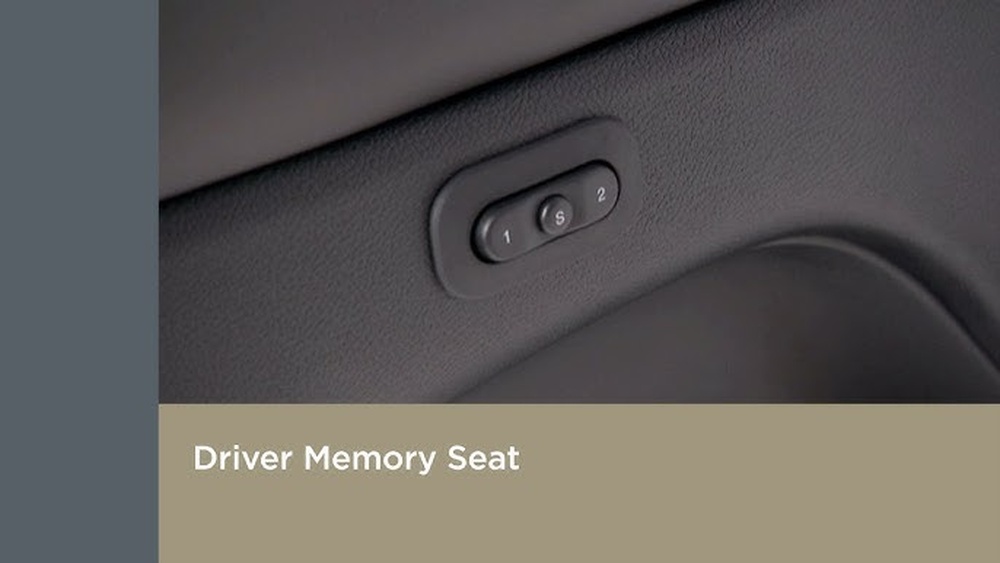
- Press the memory button: Find the “MEMORY” button on the driver’s door panel. Press and hold it.
- Select profile: While holding the “MEMORY” button, press either the “1” or “2” button (these represent two memory profiles). Hold both for a few seconds.
- Listen for a chime: The car will make a chime sound, confirming the settings are saved.
If you have key fobs programmed for each driver, you can link your seat memory to your key fob. This way, the car automatically adjusts when you unlock it.
Example: Saving Settings For Two Drivers
Let’s say you and your partner drive the same Jeep Grand Cherokee. You prefer the seat further back and mirrors angled differently. Your partner likes a higher seat and different mirror positions.
- You set your seat and mirrors, then press “MEMORY” + “1”
- Your partner sets their seat and mirrors, then presses “MEMORY” + “2”
Now, switching between “1” and “2” will change all positions instantly.

Linking Seat Memory To Key Fobs
Most newer Grand Cherokees allow you to link seat memory profiles to separate key fobs. This is useful if you have two main drivers.
To link a profile to a key fob:
- Save your preferred seat/mirror positions to “1” or “2”.
- With the ignition off, press and hold the “MEMORY” button, then press the desired profile button (“1” or “2”).
- Press the unlock button on your key fob within 10 seconds.
- Listen for a chime.
Now, when you unlock the car with your key fob, your seat and mirrors move to your saved settings.
| Model Year | Key Fob Linking Supported? | Profiles Available |
|---|---|---|
| 2011-2013 | No | 2 |
| 2014-2017 | Yes | 2 |
| 2018-2024 | Yes | 2 |
Practical Tips And Common Mistakes
Many Jeep owners don’t realize these seat memory features:
- Profiles are not automatic: You must select “1” or “2” manually unless linked to a key fob.
- Settings are not global: Memory profiles work only for the driver’s seat, mirrors, and steering wheel—not for passenger seats or climate controls.
- Battery resets erase memory: If your battery dies or is disconnected, you may need to re-save your settings.
Some practical tips:
- Set your seat and mirrors before saving memory. Small adjustments after saving will not update the profile.
- If you switch key fobs, the car may move to the wrong profile unless you have linked them correctly.
- Always wait for the chime before assuming your settings are saved.
Many beginners overlook the need to press both the memory and profile buttons at the same time. If you press only one, your settings won’t save.
| Action | Result | Common Mistake |
|---|---|---|
| Press only “1” or “2” | No change | Forgetting “MEMORY” button |
| Press “MEMORY” + “1” for 2 seconds | Settings saved | Releasing too early |
| Ignore chime | Uncertain if saved | Not listening for confirmation |

Troubleshooting Seat Memory Issues
If your seat memory isn’t working, try these solutions:
- Check if your Grand Cherokee has the memory feature (not all trims include it).
- Make sure the ignition is ON or in ACC mode.
- Re-save your settings after a battery change.
- Clean the memory buttons—they can get sticky or dirty.
- If linking to a key fob fails, try replacing the key fob battery.
If problems continue, consult your owner’s manual or your Jeep dealer. For more details, visit the official Jeep Grand Cherokee website.
Frequently Asked Questions
How Many Memory Profiles Can I Save In My Jeep Grand Cherokee?
Most Grand Cherokees allow you to save two memory profiles. Some older models may only support one.
Can I Save Passenger Seat Settings?
No, the memory feature only covers the driver’s seat. Passenger seat adjustments are manual.
What Happens If My Battery Dies?
If your battery disconnects or dies, seat memory settings may reset. You’ll need to re-save your positions.
Can I Link My Profile To My Key Fob?
Yes, most Grand Cherokees from 2014 onward let you link profiles to key fobs. This helps your car remember your settings when you unlock.
My Seat Isn’t Moving To The Correct Position. What Should I Do?
First, check if you pressed the correct memory button. If the problem continues, try re-saving your settings or check for sticky buttons. If needed, contact your Jeep dealer.
Enjoy your Jeep Grand Cherokee’s memory seat feature—it’s more than just convenience. It adds safety, comfort, and a touch of luxury to every drive. Remember these tips, and you’ll never waste time adjusting your seat again.