Resetting your Jeep radio can solve many problems, from a frozen touchscreen to lost Bluetooth connections or strange audio glitches. Even if you’ve never worked with car electronics, you can often reset the system yourself in just a few minutes.
This guide explains several ways to reset Jeep radios, what you should expect, and how to avoid common mistakes that might cost you time or even money.
Why Resetting Your Jeep Radio Matters
A radio reset is not just for emergencies. It’s useful when:
- The radio won’t turn on or off
- Touchscreen is unresponsive
- Bluetooth, GPS, or CarPlay features stop working
- Audio cuts in and out
- System updates have failed
Simple resets can often solve these issues before you need expensive dealer service. But different Jeep models and radio systems (Uconnect, basic AM/FM, or premium units) may require unique steps.
Quick Comparison: Jeep Radio Reset Methods
Here’s a fast look at the most common reset methods and when to use them.
| Reset Method | Applies To | Difficulty | Data Loss Risk |
|---|---|---|---|
| Soft Reset (Button) | Most Uconnect radios (2013+) | Easy | Low |
| Factory Reset (Menu) | Touchscreen Uconnect units | Moderate | Medium |
| Battery Disconnect | All Jeep radios | Moderate | High |
Not all radios have a reset button. Always check your owner’s manual or model details before starting.
Soft Reset: The Fastest Fix
A soft reset is the safest way to restart your radio. It won’t erase your presets, clock, or paired phones.
- Start your Jeep so the radio is fully powered.
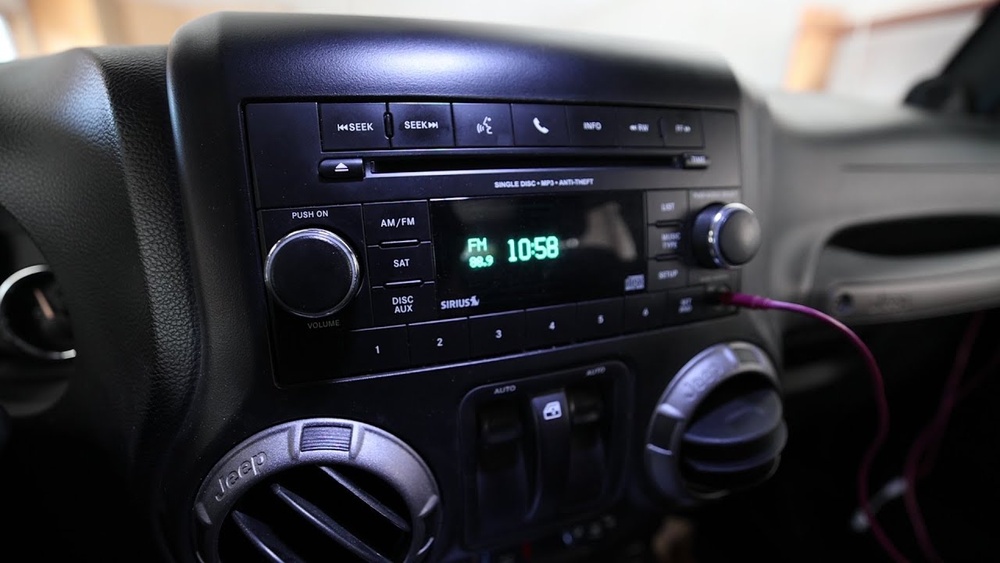
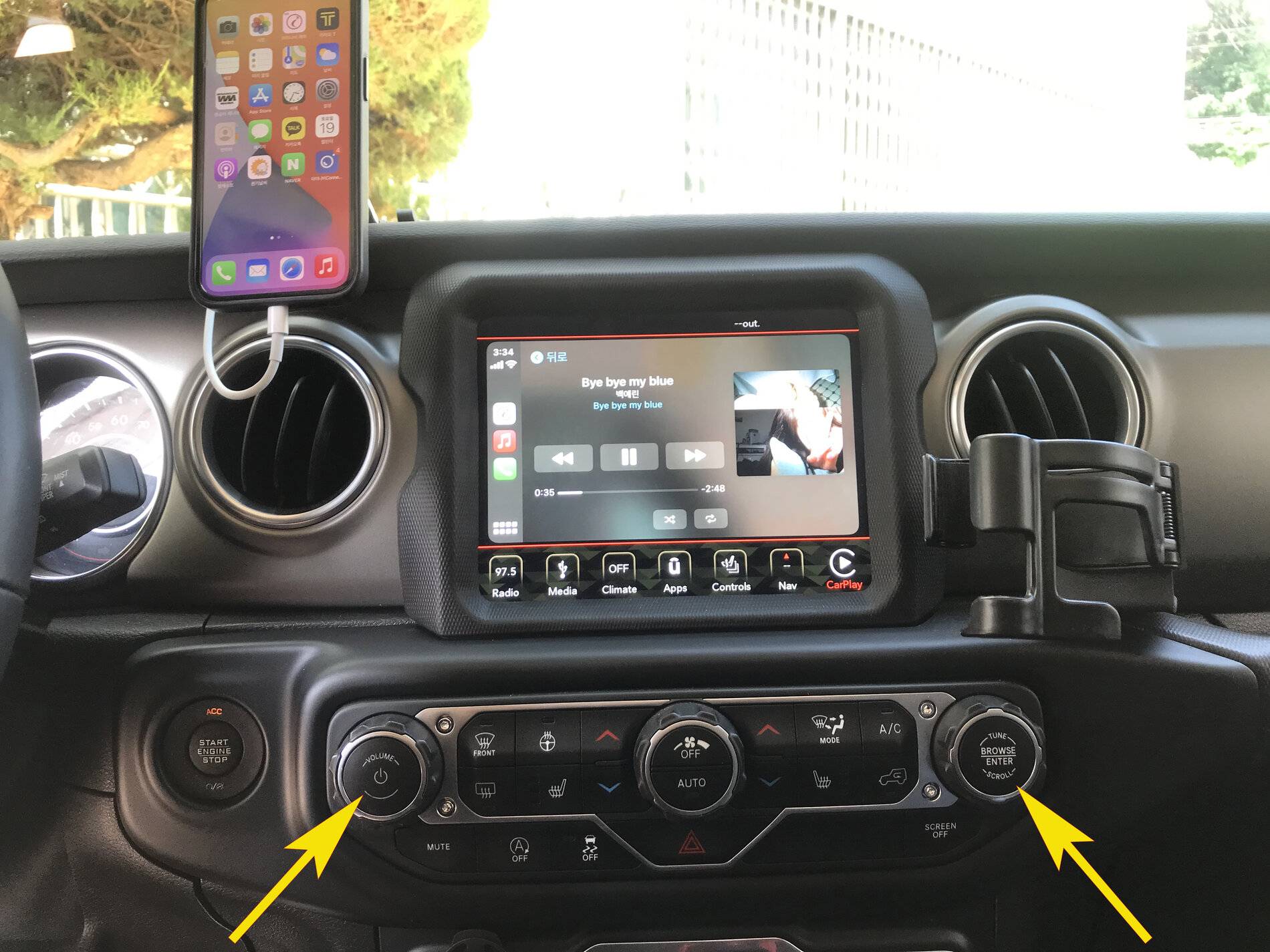
- For most Uconnect systems, press and hold the volume knob and tune knob at the same time.
- Hold for about 10 seconds, then release. The screen will go black, then show the Jeep logo as it restarts.
- For older models, you may need to press power and seek up buttons together instead.
If the radio is still frozen after a soft reset, try a factory reset.
Factory Reset: Restoring Default Settings
A factory reset erases all your settings and returns the radio to “out of the box” state. Use this if you’re selling the Jeep or if glitches continue after a soft reset.
- Go to Settings on the touchscreen.
- Tap System Information or Radio Setup (menu names can vary).
- Select Restore Factory Settings or Reset to Default.
- Confirm your choice. The system will reboot and you’ll need to set up your phone, presets, and preferences again.
Tip: Back up important data (like favorite stations or navigation addresses) before factory resetting.
Power Cycle: Disconnecting The Battery
If the touchscreen is totally unresponsive or the unit won’t reset by buttons, you may need to disconnect the battery.
- Turn off the Jeep and remove the key.
- Open the hood and find the negative battery terminal (usually marked “—”).
- Use a wrench to loosen the terminal. Remove the cable for about 5–10 minutes.
- Reconnect the cable and tighten it. Start your Jeep—the radio will reboot.
Warning: This method resets all vehicle electronics (clock, trip data, and sometimes alarm codes). Only use if other methods fail.
Data Table: Reset Impact On Jeep Radio Features
This table shows which features are affected by each reset type.
| Feature | Soft Reset | Factory Reset | Battery Disconnect |
|---|---|---|---|
| Radio Presets | No change | Erased | Erased (sometimes) |
| Bluetooth Pairings | No change | Erased | Usually erased |
| Navigation Data | No change | Erased | Erased |
| Software Updates | No change | No change | No change |
Most users are surprised that a battery disconnect can erase paired phones and navigation favorites. Always double-check before using this method.
Common Mistakes To Avoid
- Skipping the manual. Not all Jeep radios use the same reset steps. For example, the Uconnect 8.4 is different from the Uconnect 5.
- Holding buttons too short/long. If you release early, the reset may not work. If you hold too long, you could enter diagnostic mode.
- Not backing up data. Factory resets erase everything, including addresses and presets.
- Forgetting security codes. Some older radios need a code after battery disconnect. Make sure you have it.
When To Seek Professional Help
If the radio does not turn on after all reset methods, or if the screen stays black, it may be a hardware issue. Sometimes, water damage or a failed update causes permanent failure. In these cases, a Jeep dealer or certified auto electrician is your best option.
Non-obvious insight: Using the wrong reset method can sometimes lock your radio and require a dealer-only unlock procedure. If you see “anti-theft” messages, stop and call for help before making things worse.

Resetting Jeep Radios: Model Differences
Jeep has used several radio types since 2010. Here’s a quick overview:
| Model Year | Radio Type | Typical Reset Method |
|---|---|---|
| 2010–2013 | Basic AM/FM/CD | Battery disconnect |
| 2013–2020 | Uconnect 3/4/8.4 | Soft reset or menu reset |
| 2021–2024 | Uconnect 5 (Android-based) | Button or menu reset |
If you’re not sure which system you have, check your Jeep’s manual or the Uconnect website.
Practical Tips For Success
- Keep your vehicle in park and engine running during resets.
- Have your radio code handy if you drive an older model.
- Document your settings (photos or notes) before a factory reset, so you can restore favorites quickly.
- Update your software after resetting, if possible—outdated software can cause repeating glitches.
For more technical details, see the official Jeep Uconnect support page.

Frequently Asked Questions
How Do I Know Which Jeep Radio System I Have?
You can find the radio type by checking the screen’s startup logo, looking in your owner’s manual, or searching your Jeep’s year and model online. Common types include Uconnect 3, 4, 5, or basic AM/FM units.
A soft reset will not erase your data. Only a factory reset or battery disconnect will remove navigation addresses, Bluetooth pairings, and presets.
Why Does My Radio Ask For A Code After Battery Disconnect?
Some Jeep radios have an anti-theft feature. After a battery disconnect, you must enter a security code found in your manual or from your dealer.
My Radio Still Won’t Work After All Resets. What Should I Do?
If all resets fail, there may be a hardware problem. Common causes are blown fuses, water damage, or failed software updates. Visit a Jeep dealer or certified shop for diagnosis.
Is There A Way To Reset The Radio Without Losing My Presets?
Yes. A soft reset using the radio’s buttons will reboot the system without deleting your presets or phone pairings. Avoid factory and battery resets if you want to keep your settings.
Resetting your Jeep radio doesn’t have to be complicated. With the right method, you can fix most problems in minutes and avoid an expensive trip to the dealership. Always choose the simplest reset method first, and remember to back up your important data before deeper resets.