Getting your garage door opener to work with your Jeep Wrangler can make life easier. Imagine pulling into your driveway and opening your garage door with just a press of a button inside your Jeep. This guide will show you step-by-step how to program your garage door opener to your Jeep Wrangler, covering important details and common mistakes so you don’t get stuck. Whether you drive a newer model or an older one, you’ll learn how to connect your Jeep’s HomeLink system or universal remote to most garage door brands.
Understanding Your Jeep Wrangler’s Garage Door Opener System
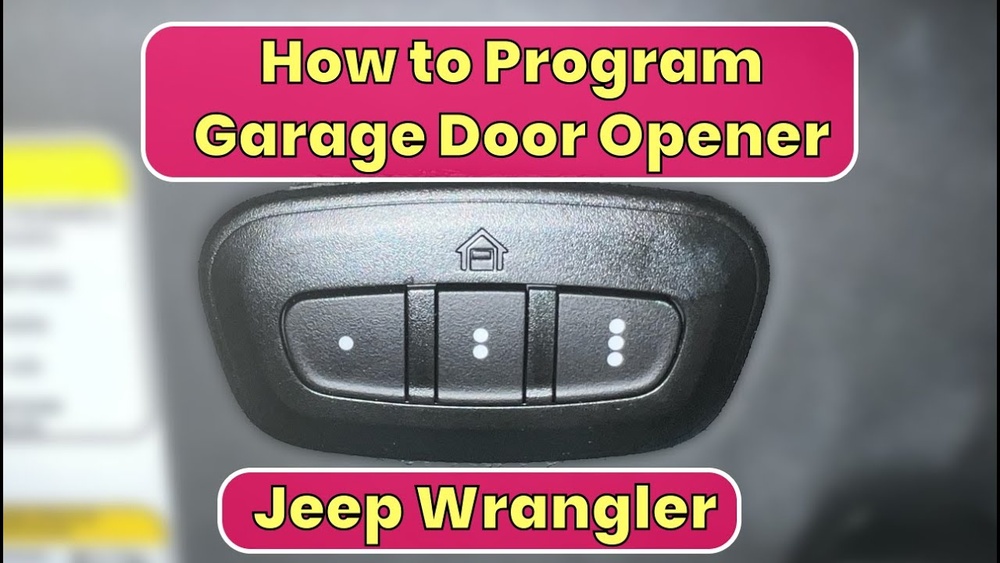
Most Jeep Wranglers from 2011 onward come with a HomeLink system, a built-in remote usually located on the overhead console. If your Jeep is older or doesn’t have HomeLink, you can use an aftermarket universal garage door remote.
Here’s a quick comparison between HomeLink and universal remotes:
| Feature | HomeLink (Built-in) | Universal Remote (Add-on) |
|---|---|---|
| Location | Overhead console | Visor or dashboard |
| Integration | Factory installed | Manual installation |
| Programming Process | Simple with most openers | Varies by model |
| Supported Openers | Major brands (Chamberlain, LiftMaster, Genie, etc.) | Depends on compatibility |
If you’re not sure which system you have, check your Jeep’s manual or look for HomeLink’s three buttons with a house icon.
What You Need Before Starting
Before you begin programming, gather:
- Your Jeep Wrangler with the ignition ON (but engine off)
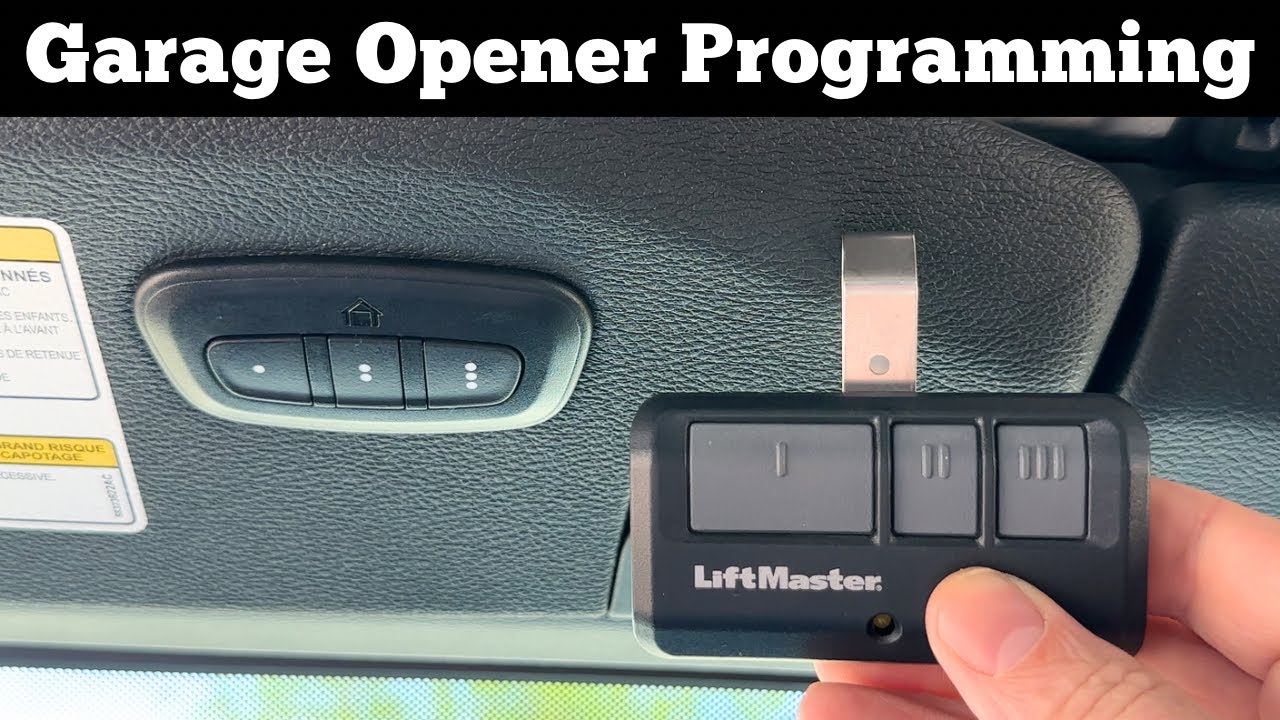
- Your garage door remote (original or universal)
- Access to your garage door opener’s “Learn” or “Program” button (usually on the opener unit in the garage)
- The garage door opener manual (recommended for troubleshooting)
A common mistake is trying to program without the garage remote or access to the opener’s “Learn” button. Make sure you have both.
Step-by-step Programming Instructions
1. Clear Existing Homelink Settings
If your Jeep’s HomeLink has been programmed before, clear it first. Press and hold the two outer HomeLink buttons for about 10 seconds until the indicator light starts blinking. Release the buttons. This resets the system.
- Hold your garage door remote close to the HomeLink buttons.
- Press and hold the desired HomeLink button (choose one of the three).
- At the same time, press and hold the button on your garage remote.
- The HomeLink indicator light will change from blinking slowly to rapidly. This means it’s learned the signal. Release both buttons.
3. Connect To The Garage Door Opener Unit
Many newer garage door openers use a “rolling code” for security. If your opener uses this, you need to connect HomeLink to the opener unit:
- Find the Learn or Program button on your garage opener (usually under a light cover).
- Press and release the Learn button. You have 30 seconds to complete the next step.
- Return to your Jeep and press the programmed HomeLink button three times, holding each press for about 2 seconds.
If your opener uses a fixed code, you can skip this step. Most openers made after 1996 use rolling codes.
4. Test The System
Press the programmed HomeLink button in your Jeep. The garage door should open or close. If it doesn’t, repeat the steps. Sometimes, holding the button longer helps.
Practical Tips For Smooth Programming
- Battery strength matters. Weak batteries in your remote can cause problems.
- If your opener is from Chamberlain, LiftMaster, or Genie, HomeLink usually works smoothly.
- Some older openers (pre-1996) may need a HomeLink repeater kit if the signal doesn’t match.
- Always check if your Jeep is parked outside the garage during programming. Metal inside the garage can block signals.
Here’s a quick comparison of common opener brands and their compatibility:
| Brand | Compatibility with HomeLink | Extra Steps Required |
|---|---|---|
| Chamberlain | Yes | Rolling code step |
| LiftMaster | Yes | Rolling code step |
| Genie | Yes | Sometimes repeater kit |
| Craftsman | Yes | Rolling code step |
| Older brands | Possible | May need repeater |

Troubleshooting Common Issues
If your HomeLink isn’t working, try these steps:
- Reprogram the button using the steps above.
- Check for interference from LED lights or nearby electronics.
- Make sure the opener’s antenna isn’t damaged.
- Try programming with a new battery in your remote.
It’s easy to miss the need to press the HomeLink button multiple times after hitting the Learn button—this step is crucial for rolling code systems.
Safety And Security Considerations
Programming your garage opener to your Jeep is convenient, but security is key. Always:
- Keep your Jeep locked, especially if parked outside.
- Do not share your HomeLink programming with others.
- If you sell your Jeep, clear HomeLink settings.
Some statistics show that over 70% of vehicle break-ins happen at home, so secure your remote system.
Frequently Asked Questions
How Do I Know If My Jeep Has A Homelink System?
Look for three buttons with a house icon on the overhead console. If you see them, your Jeep has HomeLink. If not, you’ll need an aftermarket remote.
Can I Program More Than One Garage Door To My Jeep?
Yes, you can use all three HomeLink buttons to program up to three garage doors or gates.
What If My Garage Door Opener Is Very Old?
Older openers may not work with HomeLink. You might need a repeater kit or use a universal remote. Check your opener’s manual for compatibility.
Yes. Hold the desired button until the indicator light blinks rapidly. This erases only that button’s programming.
Where Can I Find Official Instructions For My Jeep Wrangler?
Official instructions are in your Jeep’s owner manual or on the HomeLink website. For more details, see HomeLink Official Programming Guide.
Programming your garage door opener to your Jeep Wrangler is a simple way to add convenience and security to your daily routine. With clear steps and a bit of patience, you can make your Jeep a smarter part of your home. Always check compatibility and follow safety tips, and soon you’ll enjoy opening your garage with just a touch.