If your Jeep Cherokee’s Uconnect system starts acting up, you’re not alone. Uconnect is the heart of your SUV’s tech: it controls navigation, music, hands-free calling, and climate settings. But like any technology, it sometimes freezes, glitches, or stops responding. Luckily, you can reset it—often in just a few minutes. This article will guide you through safe ways to reset Jeep Cherokee Uconnect, explain why resets are needed, and point out some common mistakes drivers make.
Why Reset Your Jeep Cherokee Uconnect?
A Uconnect reset is sometimes necessary when you notice:
- The screen is stuck or frozen
- Bluetooth won’t connect or drops calls
- Navigation or apps don’t load
- The sound system malfunctions
- System is slow to respond
Most of these problems come from software glitches. A reset can clear temporary bugs and restore normal function. In rare cases, deeper hardware issues could be present, but resetting is a smart first step.
Basic Uconnect Reset Methods
There are several ways to reset your Jeep Cherokee Uconnect. The best method depends on your model year and the type of problem.
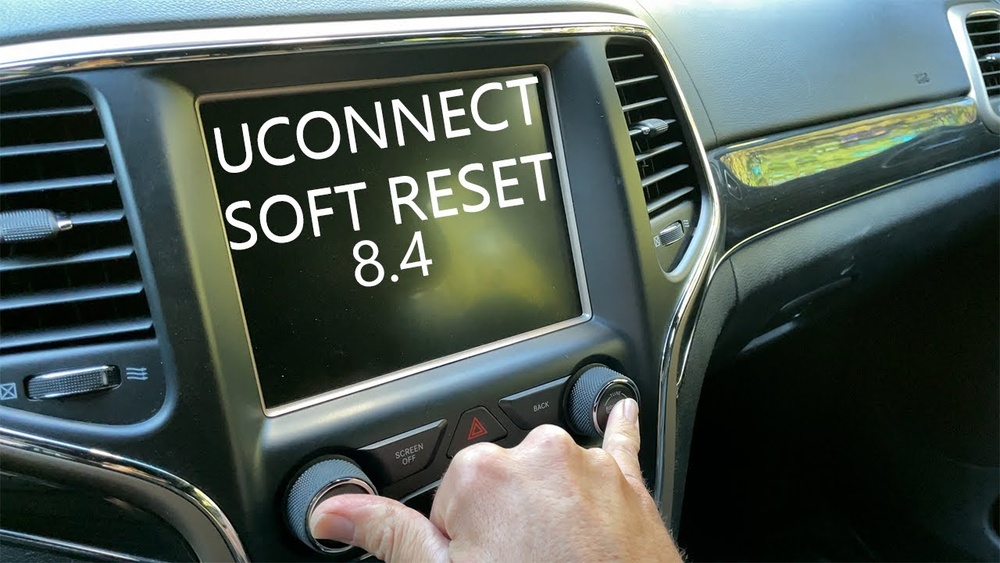
1. Soft Reset (most Common)
A soft reset refreshes the Uconnect system without erasing saved data like radio presets, paired phones, or navigation favorites.
Steps:
- Put your vehicle in “Run” mode, but do not start the engine.
- Press and hold both the Volume and Tuner/Scroll knobs at the same time.
- Keep holding them for about 10–20 seconds. The screen will go black.
- Release the knobs. The system should reboot automatically.
This works for most 2014+ Jeep Cherokees with Uconnect 4, 4C, or 8. 4 systems.
2. Hard Reset (factory Reset)
A hard reset wipes all personal data. Only use this if a soft reset fails.
Steps:
- Go to the Uconnect touchscreen.
- Tap “Settings.”
- Scroll to “System Information” or “Reset.”
- Select “Restore Factory Defaults.”
- Confirm your choice.
You’ll need to re-pair phones, reset radio stations, and re-enter preferences after this reset.
3. Disconnect The Car Battery (last Resort)
This is not the first method to try, but it can force a full system reboot.
Steps:
- Turn off the vehicle.
- Open the hood and disconnect the negative battery cable for at least 5 minutes.
- Reconnect the cable and restart your Jeep.
Always use caution when working with the battery.

Comparing Reset Methods
Here’s a quick look at how these reset methods stack up:
| Reset Method | Data Loss | Time Required | When to Use |
|---|---|---|---|
| Soft Reset | None | 1-2 minutes | Minor glitches |
| Hard Reset | All personal data erased | 3-5 minutes | Major software issues |
| Battery Disconnect | May reset some settings | 10+ minutes | System unresponsive |
Signs That A Reset Is Needed
Not sure if you need a reset? Look for these warning signs:
- Uconnect screen freezes on startup
- Buttons don’t respond or lag
- Bluetooth fails to pair with devices
- Apps crash repeatedly
- Navigation map does not update
If these problems happen often, a reset is usually safe and helpful.
Uconnect Versions In Jeep Cherokee
Understanding your Uconnect version helps you use the right reset method.
| Model Year | Common Uconnect Version | Reset Method |
|---|---|---|
| 2014–2018 | Uconnect 4 / 4C / 8.4 | Soft/Hard reset via knobs or screen |
| 2019–2021 | Uconnect 4C NAV | Same as above |
| 2022+ | Uconnect 5 | Soft reset via screen, some have new steps |
Check your owner’s manual if you’re unsure which version is installed.
What To Do After Resetting
Once your Uconnect system restarts, you may need to:
- Re-pair your Bluetooth devices
- Set favorite radio stations
- Re-enter navigation addresses
- Adjust display and sound preferences
It’s a good idea to keep a list of your common settings before performing a factory reset.

Common Mistakes To Avoid
Resetting is simple, but many drivers make small errors:
- Holding the wrong buttons: Only the Volume and Tuner/Scroll knobs work for a soft reset.
- Resetting while driving: For safety, always do this while parked.
- Forgetting to save settings: Back up important info before a hard reset.
- Disconnecting the battery too soon: Wait at least 5 minutes for a full reset.
- Ignoring software updates: Sometimes a reset won’t fix issues caused by outdated software. Check for updates after resetting.
Advanced Tip: Updating Uconnect Software
A reset can help with most problems, but sometimes your Uconnect needs a software update. New updates fix bugs and add features. You can check for updates by:
- Going to the Uconnect website and entering your VIN.
- Asking your Jeep dealer for the latest version.
Some updates require a USB drive or professional installation. Always use official sources to avoid damaging the system. For more details, see the official Jeep Uconnect Support.
Frequently Asked Questions
What Is The Easiest Way To Reset Jeep Cherokee Uconnect?
The easiest way is a soft reset using the Volume and Tuner/Scroll knobs. This works for most model years and does not erase your personal data.
Does Resetting Uconnect Delete My Apps And Contacts?
A soft reset will not delete apps or contacts. A factory (hard) reset will remove all saved settings, paired devices, and navigation data.
How Often Should I Reset My Uconnect System?
You should only reset Uconnect when you notice problems. Regular resets are not needed and will not improve performance unless there is an issue.
Will A Reset Fix All Uconnect Problems?
A reset fixes most minor software issues. If your problems continue after resetting, there may be a hardware fault or the system may need a software update.
Can I Reset Uconnect While Driving?
It is not safe to reset Uconnect while driving. Always park your Jeep before starting any reset process to avoid distractions and ensure safety.
Resetting your Jeep Cherokee Uconnect can solve many common tech headaches. With the right method, most glitches will be gone in minutes. If problems remain, consider updating your software or contacting your dealer. Remember, a quick reset is often all you need to get back to enjoying your drive.