Jeep Xj Cherokee Cd Player Install Guide: Easy Steps For A Perfect Stereo Setup
Upgrading the stereo in your Jeep Cherokee XJ can dramatically improve your driving experience. While many modern XJs might have a factory radio that handles CDs, older models or those with aftermarket units might be missing this feature, or perhaps the existing CD player is no longer functioning optimally.
Installing a new CD player might seem daunting, but with the right guidance, it's a project many Jeep owners can tackle themselves. This guide will walk you through the process step-by-step, ensuring you get a perfect stereo setup without unnecessary hassle.
We’ll cover everything from choosing the right head unit to making the final connections, making the process easy for beginners and experienced DIYers alike.
The Jeep Cherokee XJ, produced from 1984 to 2001, is a beloved vehicle known for its ruggedness and versatility. Its interior, while functional, often benefits from an updated audio system.
A new CD player not only allows you to enjoy your physical music collection but also often brings modern features like Bluetooth connectivity, USB ports, and improved sound quality.
This guide aims to demystify the installation process, breaking it down into manageable steps.
Why Upgrade Your Jeep Xj’s Cd Player?
Before diving into the installation, let’s consider why an upgrade is a good idea. The original factory stereos in XJs, especially those from the earlier production years, were basic.
They often lacked features we now consider standard, such as digital audio playback from various sources, hands-free calling, or even adequate power for better speakers.
Enhanced Audio Quality
Modern aftermarket CD players generally offer superior sound processing and higher output power compared to their vintage counterparts. This can lead to a noticeably clearer and more powerful sound from your existing speakers, or even better when paired with new ones. Many units also include built-in equalizers and sound-shaping tools, allowing you to fine-tune the audio to your preference.
Modern Connectivity Features
Beyond just playing CDs, most new head units offer a range of connectivity options. This includes:
- Bluetooth: For wireless music streaming and hands-free phone calls.
- USB Ports: For playing music from flash drives or charging your devices.
- Auxiliary Inputs: For connecting older audio devices.
- Smartphone Integration: Features like Apple CarPlay and Android Auto on higher-end models.
Improved User Interface
Newer stereos typically feature more intuitive controls and clearer displays, making them easier to operate while driving. This enhances safety and convenience.
Replacing A Faulty Unit
If your current CD player is broken, static-filled, or simply not working, replacing it is essential. A new unit will restore your audio functionality and bring the system up to modern standards.

Choosing The Right Cd Player For Your Jeep Xj
Selecting the correct head unit is the first crucial step. The Jeep XJ uses a standard single-DIN (1 DIN) or double-DIN (2 DIN) opening for its stereo. Most aftermarket CD players are single-DIN, measuring approximately 7 inches wide by 2 inches tall. Double-DIN units are twice as tall and offer larger screens, often with touch functionality.
Single-din Vs. Double-din
- Single-DIN: These are the most common and will fit directly into the XJ’s dash opening with a dash kit. They are generally more affordable and offer a wide variety of features.
- Double-DIN: These larger units provide a more modern look and a bigger display, which can be beneficial for navigation or viewing album art. Installing a double-DIN in an XJ usually requires a more involved dash modification or a specific dash kit designed for larger units. For ease of installation, especially for beginners, a single-DIN unit is often recommended.
Key Features To Consider
When browsing for a CD player, look for these features:
- CD/MP3/WMA Playback: Ensure it plays standard CDs and digital formats.
- Bluetooth: Essential for hands-free calling and wireless audio streaming.
- USB Input: Useful for playing music from a USB drive and for device charging.
- Auxiliary Input: A good backup if Bluetooth or USB isn’t available.
- Pre-amp Outputs: If you plan to add external amplifiers for better sound, look for units with multiple pre-amp outputs.
- Detachable Faceplate: This offers added security against theft.
- Display Type: Consider readability in sunlight and night-time glare.
Essential Installation Accessories
You’ll likely need a few extra parts to complete the installation smoothly:
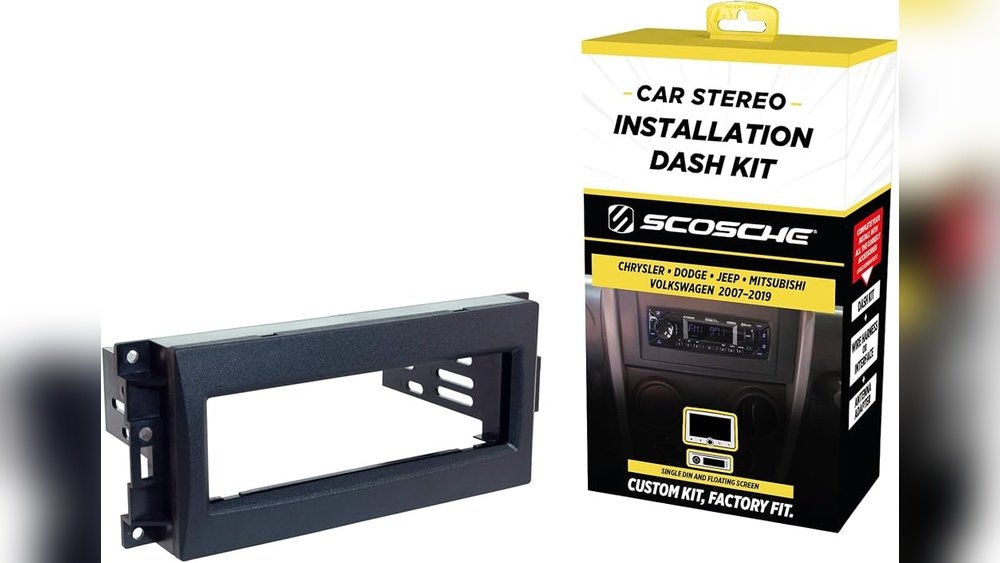
- Dash Kit: This mounting bracket fills the gap between your new stereo and the XJ’s dash opening, providing a clean, factory-like fit. Look for a kit specifically designed for the Jeep Cherokee XJ.
- Wiring Harness Adapter: This adapter plugs into your XJ’s factory wiring and provides standard connectors for your new stereo, eliminating the need to cut and splice factory wires. This is a critical component for a clean and reversible installation.
- Antenna Adapter: If your new stereo has a different antenna connector than the factory one, you’ll need this adapter.
Tools You’ll Need For The Installation
Gathering the right tools before you start will save you time and frustration. Most of these are common household tools or items easily found at an auto parts store.
- Phillips Head Screwdriver: For removing dash panels and mounting brackets.
- Flathead Screwdriver or Trim Removal Tool: For gently prying open dash panels without damaging them.
- Socket Set or Wrenches: You might need these for removing bolts securing the factory radio.
- Wire Strippers/Cutter: For preparing wires if you need to make custom connections.
- Wire Crimpers and Crimp Connectors (Butt Connectors): For securely joining wires.
- Electrical Tape or Heat Shrink Tubing: To insulate wire connections.
- Needle-Nose Pliers: Can be helpful for manipulating small connectors or wires.
- Multimeter (Optional but Recommended): Useful for testing wires if you don’t have a wiring harness adapter or to confirm power and ground.
Step-by-step Jeep Xj Cd Player Installation Guide
This guide assumes you have a single-DIN CD player and the necessary dash kit and wiring harness adapter.
Step 1: Disconnect The Battery
Safety First! Before touching any electrical components, you must disconnect the negative terminal of your Jeep’s battery. This prevents short circuits that could damage your new stereo, your Jeep’s electrical system, or cause injury. Use a wrench to loosen the nut on the negative battery terminal and pull the cable off the post. Tuck it away so it cannot accidentally touch the terminal.
Step 2: Remove The Factory Radio
Accessing the factory radio in a Jeep XJ typically involves removing a few dash panels.
- Locate Screws: Look for screws holding the trim pieces around the radio. These are often hidden behind small plastic caps or within the ashtray or storage compartments.
- Remove Trim Panels: Carefully use a trim removal tool or a flathead screwdriver to pry away the plastic trim pieces surrounding the radio. Start from the edges and work your way around. Be gentle; these panels can become brittle with age.
- Unscrew the Radio: Once the trim is off, you should see the factory radio secured by screws or bolts. Remove these.
- Pull Out the Radio: Gently pull the factory radio out of the dash cavity.
- Disconnect Wiring and Antenna: Behind the radio, you’ll find wiring harnesses and the antenna cable. Press the release tabs on the connectors and unplug them.
Step 3: Prepare The New Stereo
This step involves connecting the new stereo to the wiring harness adapter.
- Identify Wires: Lay out your new stereo’s wiring harness and the wiring harness adapter for your XJ. Match the wires by color and function. Most aftermarket stereos follow a standard color code:
- Yellow: Constant 12V (Memory)
- Red: Switched 12V (Accessory)
- Black: Ground
- Blue: Power Antenna / Amplifier Turn-on
- Orange: Dimmer/Illumination
- Speaker Wires: Typically paired (e.g., White/White-Stripe for Left Front, Gray/Gray-Stripe for Right Front, Green/Green-Stripe for Left Rear, Purple/Purple-Stripe for Right Rear).
- Connect the Harnesses:
- Using Crimp Connectors: Strip about half an inch of insulation from the end of each wire on both harnesses. Insert the stripped end of one wire into a crimp connector, then insert the corresponding wire from the other harness. Use crimpers to secure the connection. Repeat for all wires.
- Using Solder and Heat Shrink (Recommended for Durability): Strip wires, twist the corresponding wires together, solder the connection, and then slide heat shrink tubing over the joint and heat it to create a secure, insulated connection.
- Important Note: Not all aftermarket stereos use the exact same wire colors. Always refer to the wiring diagrams that came with your new stereo and the harness adapter. If you are unsure, a multimeter can help identify which wire is which. For example, a multimeter can confirm which wire provides 12V when the ignition is on (switched power) and which provides 12V constantly (memory).
Step 4: Wire The Dash Kit
Your new stereo will likely need to be mounted to the dash kit. This usually involves sliding the stereo into the kit and securing it with screws provided with the stereo or the kit.
Some kits have metal sleeves that slide into the dash opening and then the stereo slides into that sleeve.
Follow the instructions provided with your specific dash kit.
Step 5: Connect The New Stereo To The Jeep
- Plug in the Wiring Harness Adapter: Connect the wiring harness adapter (which is now wired to your new stereo’s harness) to the factory wiring harness plug(s) in your dash.
- Connect the Antenna: Plug the factory antenna cable into the antenna input on your new stereo. If you needed an antenna adapter, connect it here.
- Test the Stereo (Before Final Mounting): This is a crucial step. Temporarily reconnect the battery’s negative terminal. Turn on your Jeep’s ignition to the accessory position (or start the engine). Your new stereo should power on. Test basic functions:
- Radio reception
- CD playback
- Volume control
- Speaker output (ensure all speakers are working and wired correctly, if a speaker is out of phase or wired incorrectly, it might sound weak or distorted).
- Bluetooth pairing (if applicable).
If everything works, disconnect the battery again before proceeding. If something doesn’t work, re-check your wiring connections.
Step 6: Mount The New Stereo
Once you’ve confirmed the stereo is working correctly:
- Slide into Dash: Carefully tuck the wiring back into the dash cavity, ensuring no wires are pinched. Slide the new stereo (mounted in its dash kit) into the dash opening.
- Secure the Stereo: Secure the dash kit and stereo using the screws or mounting hardware provided. Ensure it’s flush and stable.
Step 7: Reassemble The Dash
- Replace Trim Panels: Carefully snap or screw the dash trim pieces back into place, reversing the removal process. Ensure all clips and screws are properly seated.
- Reconnect Battery: Reconnect the negative battery terminal and tighten it securely.
Step 8: Final Test
Turn on your ignition and test all functions of your new CD player again. Ensure everything is working as expected and that there are no rattles or loose parts.
Common Issues And Troubleshooting
Even with a good guide, you might encounter a few snags. Here’s how to address them:
No Power
- Check Battery Connection: Ensure the negative battery terminal is firmly connected.
- Check Fuses: Your new stereo likely has an inline fuse on its power wire, and your Jeep has fuses for the radio circuit. Check both and replace any blown fuses.
- Verify Wiring: Double-check the red (switched 12V) and yellow (constant 12V) wires are correctly connected to your Jeep’s corresponding power sources via the harness adapter. Use a multimeter to confirm power is present at these wires in the dash.
Stereo Powers On, But No Sound
- Check Speaker Wires: Ensure all speaker wires are correctly connected at both the stereo harness and the adapter harness. Check for loose connections or shorts.
- Check Mute Function: Some stereos have a mute button or a low-volume setting that might be engaged.
- Check Amplifier Turn-on (if applicable): If you have an external amplifier, ensure the blue remote turn-on wire from the stereo is connected to the amplifier.
Sound Only From Some Speakers
- Wiring Errors: This is usually a sign of miswired speaker connections (e.g., front left wired to rear right). Refer back to your stereo’s manual and the wiring diagram.
- Blown Speakers: If a speaker is completely dead, it might have blown. This is less common with a new stereo unless the output power is significantly higher than the speakers can handle.
Stereo Powers Off Intermittently
- Loose Connections: This often indicates a loose power or ground connection. Re-check the yellow (constant 12V) and black (ground) wires. A poor ground connection is a common culprit.
- Vehicle Voltage Issues: While less common, an unstable voltage supply from the vehicle can cause this.
Radio Reception Is Poor
- Antenna Connection: Ensure the antenna cable is fully plugged into the back of the stereo.
- Antenna Amplifier (if applicable): Some vehicles have an antenna amplifier that requires power. If your new stereo doesn’t have an antenna turn-on lead or it’s not connected, reception might suffer. This is less common for typical XJ installs.

Pro Tips For A Flawless Installation
- Take Photos: Before disconnecting anything, take pictures of the factory radio and its wiring. This can be a lifesaver if you get confused later.
- Use a Wiring Harness Adapter: Seriously, don’t skip this. It makes the installation much cleaner, faster, and reversible. It’s worth the small extra cost.
- Test Thoroughly: Don’t rush the testing phase. Make sure every function works before you put the dash back together.
- Secure Ground: A solid ground connection is critical for preventing noise and ensuring proper operation.