Upgrading your Jeep Wrangler TJ with a double DIN head unit can dramatically improve your audio experience and add modern features. However, the process isn't always straightforward.
The factory dash is designed for a single DIN unit, meaning you'll need specific dash kits and wiring harnesses to make a double DIN fit and function correctly.
This guide will walk you through everything you need to know to successfully complete a double DIN install in your TJ, from choosing the right parts to the installation steps.
Why Upgrade To A Double Din Head Unit?
A single DIN car stereo is the standard size for most older vehicles, measuring about 7 inches wide and 2 inches tall. A double DIN unit is essentially two single DIN units stacked, measuring around 7 inches wide and 4 inches tall. The benefits of this larger size are significant for modern car audio enthusiasts.
Firstly, screen size is a major advantage. Double DIN units typically feature larger touchscreens, often 6.5 inches or more. This makes them easier to use, especially when navigating menus, selecting music, or using navigation apps. The larger display also allows for better visibility of album art, song information, and system settings.
Secondly, modern features are more common on double DIN units. This includes:
- Apple CarPlay and Android Auto: These systems mirror your smartphone’s interface onto the head unit’s screen, giving you seamless access to navigation, music, calls, and messages via a familiar interface.
- Bluetooth connectivity: For hands-free calling and wireless audio streaming.
- Backup camera integration: Many double DIN units have dedicated inputs for backup cameras, greatly improving safety and parking ease.
- Higher resolution displays: Offering sharper images and a more premium look.
- More powerful processing: Leading to faster response times and smoother operation.
For a Jeep Wrangler TJ, which often sees off-road use or long road trips, features like GPS navigation and backup camera support can be particularly valuable. The ability to easily control music and calls without fumbling with small buttons is also a significant upgrade for any driver.
Choosing The Right Double Din Dash Kit
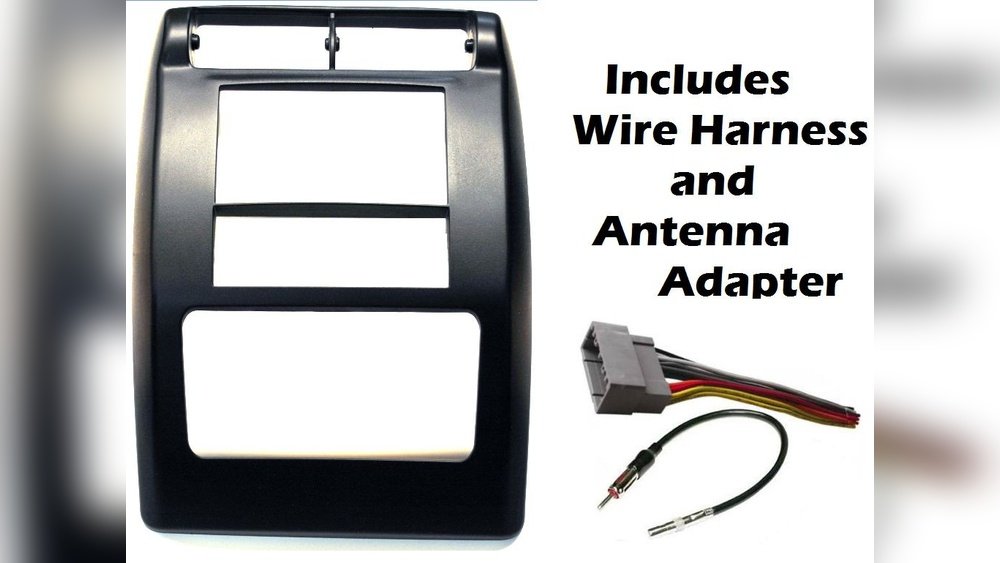
The biggest hurdle in installing a double DIN unit in a Jeep Wrangler TJ is the dashboard opening. The stock dash is not designed to accommodate the larger size. This is where a dash kit comes in. A dash kit is an adapter that bridges the gap between your vehicle’s dashboard and the aftermarket head unit.
For a Jeep Wrangler TJ, you’ll specifically need a double DIN dash kit. These kits are designed to:
- Modify the dashboard opening: They often include a new fascia panel or an adapter that fits into the existing dash cavity.
- Provide mounting points: Securely hold the new head unit in place.
- Maintain a factory look: Many kits are designed to match the color and texture of your TJ’s interior, ensuring a clean and integrated appearance.
When selecting a dash kit, consider these factors:
- Vehicle Compatibility: Ensure the kit is specifically designed for your Jeep Wrangler TJ model year. Minor differences between years can affect fitment.
- Material and Finish: Kits are typically made from ABS plastic. Look for a finish that closely matches your TJ’s dashboard, common colors include black, charcoal, or grey. Some kits offer a textured finish, while others are smooth.
- Double DIN Support: Confirm the kit explicitly states it supports double DIN units. Some kits might be for single DIN with a storage pocket, which won’t work for your goal.
- Included Accessories: Some kits come with wire ties, mounting brackets, or even antenna adapters, which can simplify the installation process.
Popular brands for Jeep TJ double DIN dash kits include Metra and Scosche. For example, Metra offers kits like the 99-4510 or similar models designed for Jeep Wranglers. Always double-check the product description and reviews to confirm it’s the correct fit for your specific TJ year.
Pro Tip: Before purchasing, search for installation photos or videos of the specific dash kit you’re considering. This will give you a good idea of how it looks and fits in a TJ dashboard.
Understanding Wiring Harnesses And Adapters
Connecting a new head unit involves more than just physically mounting it. You need to connect it electrically to your Jeep’s existing wiring. This is where wiring harnesses and adapters are crucial.
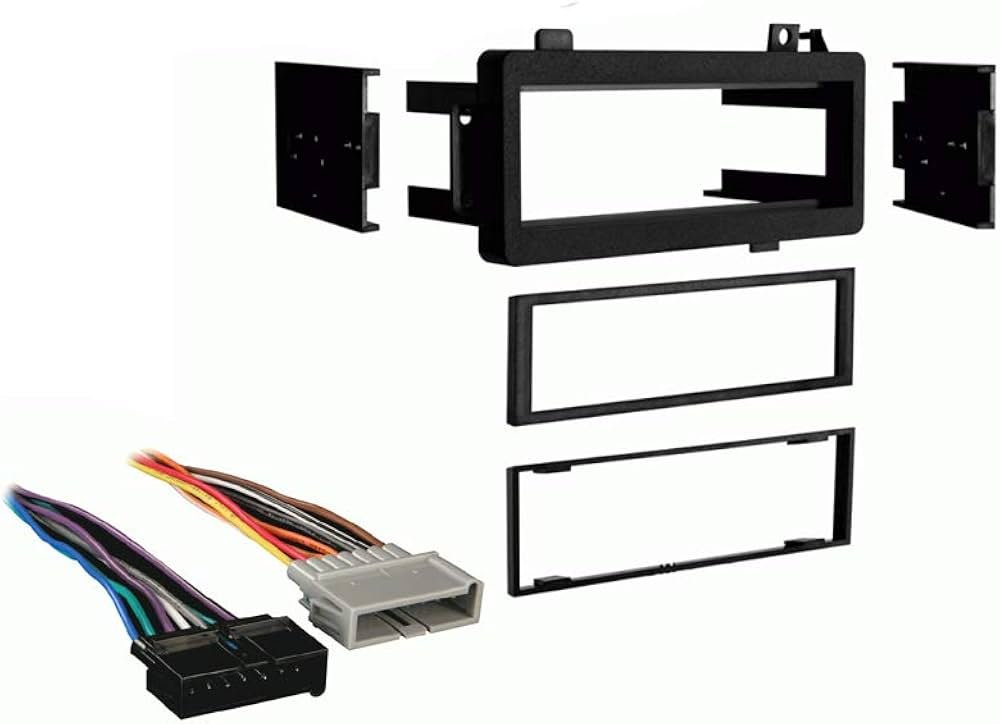
A wiring harness adapter (also known as an appliance plug or wiring connector) is a plug-and-play solution that connects your aftermarket stereo to your vehicle’s factory wiring harness without cutting or splicing factory wires. This is highly recommended as it preserves your vehicle’s original wiring and makes future stereo replacements much easier.
For a Jeep Wrangler TJ, you’ll typically need two main types of adapters:
- Aftermarket Radio Wiring Harness: This harness plugs into the back of your new double DIN head unit and has bare wires on the other end. These wires correspond to various functions like power, ground, speaker outputs, and accessory power.
- Vehicle-Specific Wiring Harness Adapter: This adapter plugs directly into your Jeep’s factory radio connector. The other end of this adapter will have connectors that match the wires on your aftermarket radio wiring harness.
When selecting a wiring harness adapter, ensure it is compatible with both your aftermarket head unit and your Jeep Wrangler TJ. Brands like Metra (e.g., 70-1771 for Jeep models) and Scosche are common choices.
Beyond the basic wiring harness, you might need additional adapters depending on your TJ’s specific features:
- Antenna Adapter: Factory antennas often have a different connector than aftermarket stereos. An antenna adapter ensures a proper connection.
- Steering Wheel Control Interface: If your TJ has factory steering wheel controls and you want them to work with your new head unit, you’ll need a steering wheel control interface module. Brands like Axxess (e.g., ASWC-1) and PAC Audio offer these. This module translates the signals from your steering wheel buttons into a format your new stereo can understand.
- Amplifier Bypass Harness: If your TJ has a factory amplifier, you might need a bypass harness to route the audio signals directly to your new head unit’s pre-amp outputs or to allow your new head unit to control the factory amp (though this is less common and often results in lower quality sound than a full aftermarket amp setup).
In my experience, not using the correct wiring harness adapter is the most common mistake people make. It leads to hours of frustration trying to match wires manually, often resulting in incorrect connections that can damage the new stereo or your Jeep’s electrical system. Always invest in the correct adapters.
Tools And Supplies You’ll Need
Successfully installing a double DIN head unit in your Jeep Wrangler TJ requires more than just the dash kit and wiring harnesses. Having the right tools and supplies will make the job smoother and ensure a professional finish.
Here’s a list of essential items:
- Socket Set and Wrenches: For removing trim panels and the original radio mounting brackets. Common sizes include 7mm, 10mm, and possibly others depending on your TJ.
- Screwdrivers: Phillips head and flathead screwdrivers are necessary for removing various dashboard components and trim pieces.
- Panel Removal Tools: These plastic tools are invaluable for gently prying off trim panels without scratching or damaging them. They are much safer than using a metal screwdriver for this purpose.
- Wire Strippers and Crimpers: If you need to make any custom connections or modify the wiring harness (though using adapters minimizes this need), these are essential.
- Electrical Tape or Heat Shrink Tubing: For insulating any wire connections securely. Heat shrink tubing offers a more durable and professional finish.
- Wire Connectors: Such as butt connectors or Wago connectors, for joining wires if necessary.
- Multimeter: Very useful for testing for power and ground connections, especially if you encounter any wiring issues.
- Drill and Drill Bits (Optional): Some dash kits might require minor drilling for mounting, though most are designed for direct fit.
- Zip Ties: To neatly secure the wiring harness behind the dash, preventing rattles and ensuring a clean installation.
- Gloves and Safety Glasses: Always protect yourself, especially when working with electrical components or potentially sharp edges.
Example: When removing the factory radio, you’ll likely encounter screws holding the trim bezel around the radio. You’ll also need to gently pry the bezel away from the dash. Using a quality set of plastic pry tools will prevent you from leaving marks on your dashboard, which can be difficult to repair.
Step-by-step Installation Guide
Installing a double DIN head unit in a Jeep Wrangler TJ involves several steps, from removing the old stereo to connecting the new one. While specific details can vary slightly based on your TJ’s year and the dash kit used, the general process remains consistent.
Step 1: Disconnect The Battery
Warning: Before starting any electrical work, it is crucial to disconnect the negative terminal of your Jeep’s battery. This prevents short circuits and protects both you and your vehicle’s electronics. Use a wrench to loosen the nut on the negative battery terminal and carefully remove the cable. Tuck it away so it cannot accidentally touch the terminal.
Step 2: Remove The Factory Radio And Trim
- Remove the Dash Bezel: Most TJ Wranglers require you to remove the entire center dash bezel that surrounds the radio, climate controls, and vents. This usually involves removing a few screws (often at the top, sometimes hidden under small covers) and then carefully prying the bezel away from the dashboard using your panel removal tools. Be gentle; these clips can be fragile.
- Unscrew the Factory Radio: Once the bezel is off, you’ll see the factory radio mounted in its bracket. It’s typically held in place by four screws. Remove these screws.
- Disconnect Wiring and Antenna: Carefully pull the factory radio out from the dash. You’ll find electrical connectors plugged into the back. There might also be an antenna cable. Press the release tabs on the connectors and pull them out. If your TJ has a factory amplifier or other components, you might find additional wiring to disconnect.
Step 3: Prepare The Dash Kit And New Head Unit
- Assemble the Dash Kit: Follow the instructions provided with your specific double DIN dash kit. Some kits require you to assemble a mounting frame or adapter plate that will hold your new stereo. This might involve snapping pieces together or using small screws.
- Mount the Head Unit: Slide your new double DIN head unit into the prepared dash kit frame. Secure it according to the dash kit and head unit manufacturer’s instructions. This often involves using brackets that attach to the sides of the head unit and then screw into the dash kit’s frame.
Step 4: Wire The New Head Unit
This is where your wiring harness adapters come into play.
- Connect the Aftermarket Harness to the Head Unit: Take the wiring harness that came with your new stereo and connect it to the back of the head unit. Match the connectors or solder/crimp the wires according to your head unit’s manual.
- Connect the Aftermarket Harness to the Vehicle Adapter: Now, take the vehicle-specific wiring harness adapter (the one that plugs into your Jeep’s factory connector) and connect it to the harness from your new stereo. If you’re using butt connectors or solder, this is the time to make those connections.
- Match Wire Colors: Generally, wire colors correspond between harnesses (e.g., yellow for 12V constant, red for accessory power, black for ground, blue for power antenna/amp remote, speaker wires usually have white, grey, green, and purple bases with stripe colors). Always consult the wiring diagrams provided with both your head unit and your vehicle-specific adapter.
- Ground Wire: Ensure the ground wire (usually black) from your new stereo’s harness is connected to a solid metal point on the Jeep’s chassis, or to the ground wire in the vehicle adapter harness if it’s properly wired.
- Accessory Power: The accessory power wire (often red) will turn your stereo on and off with the ignition.
- Speaker Wires: Connect all the speaker wires (front left, front right, rear left, rear right, and their grounds) correctly.
- Connect Other Adapters: If you are using a steering wheel control interface or an antenna adapter, connect them now according to their respective instructions.
Important: Use electrical tape or heat shrink tubing to insulate every connection thoroughly. Loose or exposed wires can cause shorts and damage components.
Step 5: Test The New Head Unit
Before fully reassembling everything, it’s crucial to test the new stereo.
- Reconnect the Battery: Temporarily reconnect the negative battery terminal.
- Turn on the Ignition: Turn your Jeep’s key to the accessory (ACC) or ON position.
- Check Functions:
- Does the head unit power on?
- Does the display work correctly?
- Do all buttons respond?
- Test AM/FM radio reception.
- Test Bluetooth pairing and audio playback.
- If you have a backup camera, check if it displays when in reverse.
- Crucially, test all four speakers to ensure they are wired correctly and producing sound. Play different audio tracks and listen for any distortions or missing channels.
If everything works, disconnect the battery again before proceeding. If something doesn’t work, re-check your wiring connections against the diagrams.
Step 6: Install The Head Unit And Dash Kit
- Route Wiring: Carefully tuck all the wiring and adapters behind the dash, ensuring no wires are pinched or stressed. Use zip ties to keep the wiring neat and prevent rattles.
- Mount the Dash Kit Assembly: Slide the assembled dash kit with the head unit installed into the dashboard opening. It should click or slide into place.
- Secure the Kit: Some dash kits have tabs that secure into the dash cavity, while others might require screws. Refer to your dash kit’s instructions.
- Reinstall Trim: Carefully align the center dash bezel and gently press it back into place. Ensure all clips engage. Reinstall any screws you removed earlier.
Step 7: Final Checks And Reassembly
- Reconnect the Battery: Reconnect the negative battery terminal and tighten it.
- Final Test: Turn the ignition on and perform another thorough test of all head unit functions, including speakers, Bluetooth, and any other features.
- Secure Loose Items: Double-check that all trim pieces are secure and that there are no loose wires causing rattles.
Congratulations, you’ve successfully installed a double DIN head unit in your Jeep Wrangler TJ!