If you own a Jeep Wrangler, you know the feeling of adventure and freedom. But sometimes, upgrading your radio system or fixing a wiring issue can be confusing.
The radio wiring harness is at the heart of this challenge. With the right diagram and guidance, you can confidently install a new stereo or troubleshoot electrical problems.
This article will guide you through everything you need to know about the Jeep Wrangler radio wiring harness diagram—from understanding the basics to practical steps and common mistakes.
What Is A Jeep Wrangler Radio Wiring Harness?
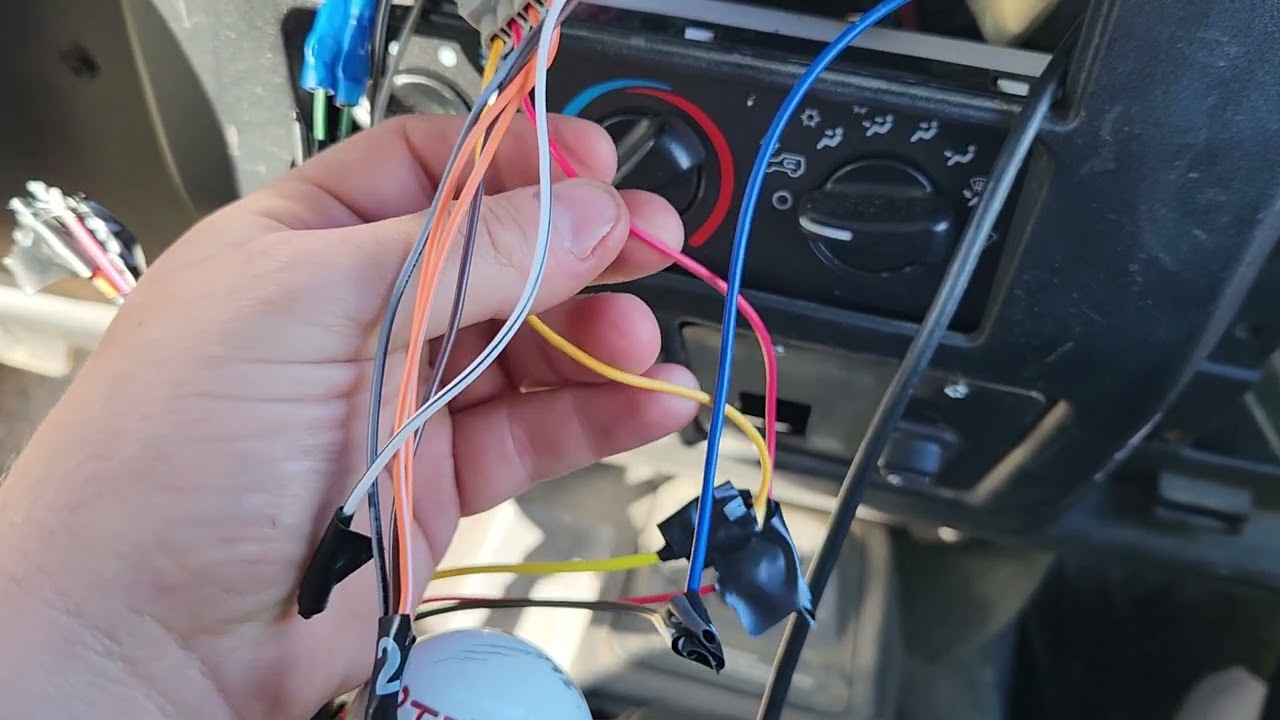
A radio wiring harness is a set of wires and connectors that link your Jeep’s radio to the vehicle’s electrical system. It carries power, sound signals, and sometimes extra features like steering wheel controls. The harness ensures all radio functions work smoothly, connecting to speakers, power sources, and sometimes amplifiers.
If you look behind your Jeep’s radio, you’ll see many wires in different colors. Each wire has a job—some supply power, others connect to speakers, and a few might handle the antenna or special controls. The wiring harness keeps these organized, making installation and repairs simpler.
Why Is The Wiring Harness Diagram Important?
A wiring diagram is a visual map that shows where each wire goes. Without a diagram, it’s easy to mix up wires, which can lead to malfunctioning radios, blown fuses, or even electrical damage.
The diagram saves time and prevents mistakes, especially when swapping out radios or diagnosing problems.
For Jeep Wrangler owners, using the right diagram is extra important because different model years and trims may have unique wiring layouts. A 2015 Wrangler’s harness could differ from a 2007 model.
Using the wrong diagram risks connecting wires incorrectly.
Key Parts Of The Wiring Harness Diagram
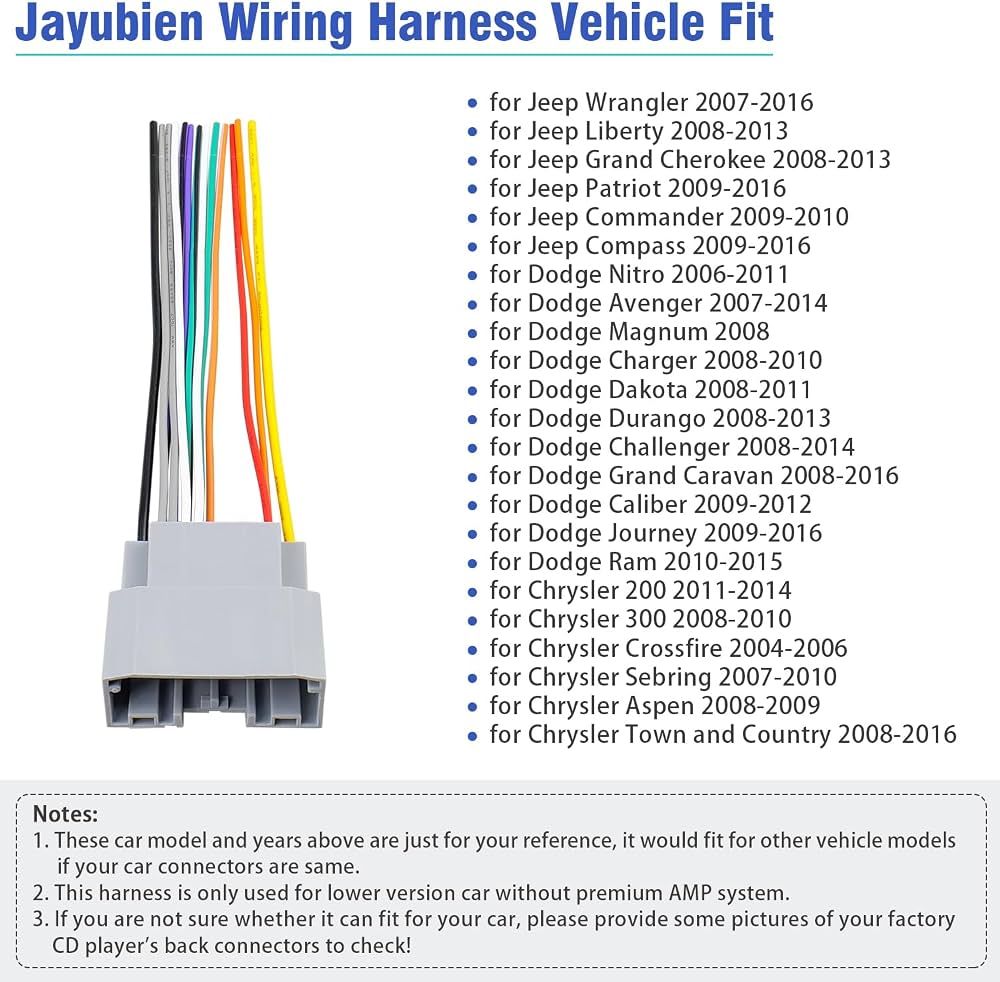
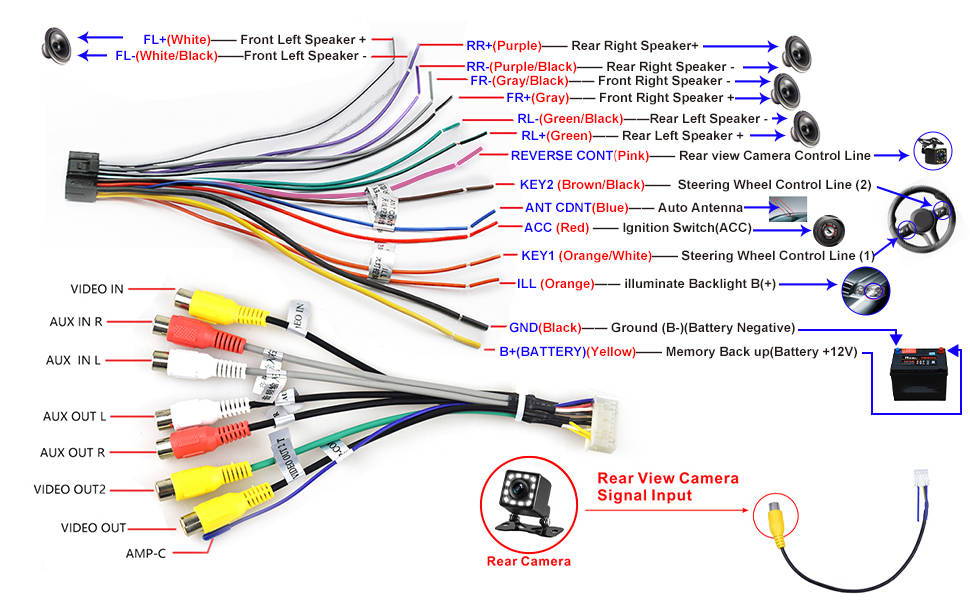
Understanding the main sections in the diagram is essential. Here are the common wires and their functions:
- Power wires: Usually colored red (switched power), yellow (constant power), and black (ground).
- Speaker wires: Often in pairs for each speaker, with colors like white, gray, green, and purple. Each pair usually has a solid color and a matching color with a stripe.
- Antenna wire: Typically blue or blue with a white stripe.
- Illumination wire: Sometimes orange or orange with a white stripe, connects to dashboard lighting.
- Accessory wires: For features like steering wheel controls or amplifiers.
Let’s look at a typical wiring layout for a Jeep Wrangler radio:
| Wire Color | Function | Description |
|---|---|---|
| Red | Switched Power | Turns radio on/off with ignition |
| Yellow | Constant Power | Keeps radio memory (clock, presets) |
| Black | Ground | Completes circuit, prevents shorts |
| White/White-Black | Front Left Speaker | Audio output to left front speaker |
| Gray/Gray-Black | Front Right Speaker | Audio output to right front speaker |
| Green/Green-Black | Rear Left Speaker | Audio output to left rear speaker |
| Purple/Purple-Black | Rear Right Speaker | Audio output to right rear speaker |
| Blue | Antenna/Remote | Power for antenna or amp |
| Orange | Illumination | Controls radio lighting |
Jeep Wrangler Radio Wiring: Year-by-year Differences
Not all Jeep Wranglers are wired the same. The wiring harness changed with new models and technology upgrades. Here’s a comparison of three popular Wrangler generations:
| Year Range | Connector Type | Speaker Layout | Extra Features |
|---|---|---|---|
| 1997–2006 (TJ) | Simple rectangular | 4 speakers | Basic wiring, no amp |
| 2007–2017 (JK) | Multi-pin | 6 speakers | Optional amp, steering controls |
| 2018–present (JL) | Modern plug | 8 speakers | Factory amp, navigation |
If you’re installing a new radio, check your Jeep’s year and trim. Using the wrong harness or diagram can lead to issues like missing sound from certain speakers or non-working controls.
How To Read The Jeep Wrangler Radio Wiring Harness Diagram
Many beginners find wiring diagrams overwhelming. Here’s a step-by-step guide to make it easier:
- Identify the diagram for your model year. Wrangler diagrams are not universal.
- Find the main connector shape in the diagram—rectangular for older, multi-pin for newer.
- Match wire colors listed in the diagram to the wires in your Jeep.
- Trace each wire from the connector to its labeled function (speaker, power, ground, etc. ).
- Check for extra wires for features like amps or controls. Not all harnesses have these.
A practical tip: Take a photo of your Jeep’s harness before starting. This helps if you lose track during installation.
Step-by-step Guide: Installing A New Radio Using The Harness Diagram
If you’re replacing your Jeep Wrangler’s radio, following the harness diagram is essential. Here’s how to do it safely:
- Disconnect the battery. This prevents electrical shorts.
- Remove the old radio using panel tools. Don’t force parts—Wrangler dashboards can crack.
- Locate the wiring harness. Compare the wires to your diagram.
- Connect wires:
- Match each wire color to the diagram.
- Use crimp connectors or solder for secure joins.
- Tape connections to prevent shorts.
- Plug in the new radio. Most aftermarket radios use a harness adapter for easy connection.
- Test the system:
- Turn the ignition.
- Check every speaker and function.
- Verify memory, antenna, and illumination.
- Reinstall dashboard panels.
A mistake many beginners make is ignoring the ground wire. If the ground isn’t connected well, the radio won’t work or may cause buzzing sounds.
Common Wiring Harness Problems And Solutions
Wiring harness issues can cause radio failures or poor sound. Here are some frequent problems:
- Loose connections: If wires aren’t joined tightly, the radio may cut out.
- Blown fuse: Accidentally connecting power wires can blow a fuse.
- Wrong wire pairing: Swapping speaker wires can cause sound to come from the wrong speakers.
- Missing ground: Radio won’t turn on or may have static.
How to fix these:
- Double-check wire colors and diagram before connecting.
- Use a multimeter to test for power and ground.
- Replace fuses as needed.
- If unsure, ask for help from a Jeep technician or experienced installer.
Practical Tips For Jeep Wrangler Radio Wiring
Here are some tips that most beginners miss:
- Buy a harness adapter: This device lets you connect aftermarket radios without cutting your Jeep’s original wires. It keeps your system reversible if you want to restore the factory radio.
- Label wires during installation: Use tape and write the function on each wire. This helps if you need to fix something later.
- Check for factory amplifier: Some Wrangler trims have a factory amp. You may need a special harness to connect to it.
- Upgrade speaker wires: If you want better sound, consider replacing thin factory wires with thicker ones.
- Avoid direct battery connection: Never connect radio wires directly to the battery. This can drain power or cause electrical fires.
Many people forget to check the illumination wire. Without this, your radio’s screen might not light up at night.
Jeep Wrangler Radio Wiring Harness Diagram Example
Here’s a simplified diagram for a 2010 Jeep Wrangler (JK):
- Red wire: Ignition power
- Yellow wire: Battery power
- Black wire: Ground
- White/White-Black: Front left speaker (+/-)
- Gray/Gray-Black: Front right speaker (+/-)
- Green/Green-Black: Rear left speaker (+/-)
- Purple/Purple-Black: Rear right speaker (+/-)
- Blue: Antenna/amp power
- Orange: Illumination
If your Jeep is a different model, check the diagram in your manual or at the manufacturer’s site. For official diagrams and part numbers, visit the Jeep website or trusted sources like Crutchfield.
Upgrading Your Jeep Wrangler Radio System
Many Jeep owners want to add features like Bluetooth, GPS, or better speakers. Upgrading is easier with the right harness and diagram. Here’s what to consider:
- Aftermarket radio compatibility: Make sure your new radio matches the harness adapter. Most adapters list compatible models.
- Speaker upgrades: Use the diagram to connect new speakers. Check if the factory amp needs a special harness.
- Extra features: Steering wheel controls, backup cameras, and GPS often need extra wires. Some harnesses have these built in.
If you add a subwoofer or amp, use the blue remote wire for power. Never use the speaker wires for amp power—they’re not strong enough.
| Upgrade Type | Required Harness Feature | Common Mistakes |
|---|---|---|
| Bluetooth radio | Accessory wire | Forgetting to connect accessory wire, losing Bluetooth power |
| GPS navigation | GPS antenna wire | Using wrong wire, poor signal |
| Amplified speakers | Remote/amp wire | Connecting amp to wrong wire, causing fuse blow |
Safety Precautions For Radio Wiring
Working on your Jeep’s radio wiring can be safe if you follow these rules:
- Always disconnect the battery before touching wires.
- Use proper tools—crimpers, wire strippers, and electrical tape.
- Avoid rushing. Double-check each wire before connecting.
- If you see sparks or smell burning, stop and check connections.
- Don’t leave exposed wires. Cover all joins to prevent shorts.
Many beginners skip battery disconnection, risking shocks or fried electronics.
Where To Find The Right Wiring Harness Diagram
For the best results, use diagrams from trusted sources. The Jeep owner’s manual usually has basic wiring info. Online resources like Jeep Official Site or specialist sites give detailed diagrams for each model year.
If you can’t find your diagram, ask at Jeep forums or parts shops. Some aftermarket harness kits include diagrams for easy installation.
Frequently Asked Questions
<!– wp:rank-math/faq-block {"questions":[{"id":"faq-question-382ae891e454","title":"What Does Each Wire Color Mean In A Jeep Wrangler Radio Harness?","content":"Each color represents a function:
n- nn
- Red: Ignition power nnn
- Yellow: Battery power nnn
- Black: Ground nnn
- White/Gray/Green/Purple: Speakers (front/rear, left/right) nnn
- Blue: Antenna/amp power nnn
- Orange: Illumination n
It’s possible but not recommended. Without a harness adapter, you must cut and join wires manually, which risks mistakes and makes it harder to restore the original radio later.
“,”visible”:true},{“id”:”faq-question-15d80f620ddf”,”title”:”What Happens If I Connect Wires Incorrectly?”,”content”:”Wrong connections can cause issues:
n- nn
- Radio won’t turn on nnn
- Speakers won’t work or sound wrong nnn
- Fuses may blow nnn
- Electrical damage in severe cases n
Check your trim or look for extra wires in the harness. Some Wranglers with premium sound systems have a factory amp. The owner’s manual or dealer can confirm.
“,”visible”:true},{“id”:”faq-question-5c4e57b83658″,”title”:”Where Can I Find An Official Jeep Wrangler Radio Wiring Harness Diagram?”,”content”:”The best sources are the Jeep owner’s manual, official Jeep websites, or trusted aftermarket parts sites like Crutchfield. Forums and shops may also provide diagrams for specific years.
Installing or upgrading your Jeep Wrangler’s radio is much easier when you understand the wiring harness diagram. With the right information and careful steps, you can enjoy better sound and new features without risking your vehicle’s electrical system.
Always double-check diagrams, use proper adapters, and don’t rush the process.
With these tips, your Wrangler’s radio will be ready for your next adventure.
“,”visible”:true}]} –>What Does Each Wire Color Mean In A Jeep Wrangler Radio Harness?
Each color represents a function:
- Red: Ignition power
- Yellow: Battery power
- Black: Ground
- White/Gray/Green/Purple: Speakers (front/rear, left/right)
- Blue: Antenna/amp power
- Orange: Illumination
Can I Install A New Radio Without A Harness Adapter?
It’s possible but not recommended. Without a harness adapter, you must cut and join wires manually, which risks mistakes and makes it harder to restore the original radio later.
What Happens If I Connect Wires Incorrectly?
Wrong connections can cause issues:
- Radio won’t turn on
- Speakers won’t work or sound wrong
- Fuses may blow
- Electrical damage in severe cases
How Do I Know If My Jeep Has A Factory Amplifier?
Check your trim or look for extra wires in the harness. Some Wranglers with premium sound systems have a factory amp. The owner’s manual or dealer can confirm.
Where Can I Find An Official Jeep Wrangler Radio Wiring Harness Diagram?
The best sources are the Jeep owner’s manual, official Jeep websites, or trusted aftermarket parts sites like Crutchfield. Forums and shops may also provide diagrams for specific years.
Installing or upgrading your Jeep Wrangler’s radio is much easier when you understand the wiring harness diagram. With the right information and careful steps, you can enjoy better sound and new features without risking your vehicle’s electrical system.
Always double-check diagrams, use proper adapters, and don’t rush the process.
With these tips, your Wrangler’s radio will be ready for your next adventure.