Upgrade Your Jeep Wrangler Jk: Pioneer Radio Install With Dash Kit And Wiring Harness
Installing an aftermarket stereo in your Jeep Wrangler JK can dramatically improve your driving experience. Whether you crave better sound quality, modern features like Apple CarPlay or Android Auto, or simply a sleeker look, a new head unit is the way to go.
However, the process might seem daunting, especially for those new to car audio. The good news is, with the right tools and a bit of guidance, installing a new Pioneer radio in your JK is a surprisingly straightforward DIY project.
This guide will walk you through the essential components, the dash kit and the wiring harness, and the steps involved in a successful installation.
Why Upgrade Your Jeep Wrangler Jk Stereo?
The factory stereo in many Jeep Wrangler JK models is functional but often lacks the features and audio fidelity that modern drivers expect. Upgrading to a Pioneer radio offers several compelling benefits:
- Enhanced Audio Quality: Pioneer is known for its excellent sound engineering. Aftermarket units offer clearer sound, more power, and better equalization options than most stock systems.
- Modern Connectivity: Features like Bluetooth for hands-free calling and audio streaming, USB ports for charging and media playback, and compatibility with smartphone integration systems (Apple CarPlay, Android Auto) are standard on most new Pioneer units.
- Improved User Interface: Touchscreens, intuitive menus, and customizable displays make operating your stereo much easier and more enjoyable.
- Advanced Features: Many Pioneer radios include features like satellite radio readiness, navigation options, and support for backup cameras.
- Aesthetics: A new stereo can significantly update the interior look of your Wrangler, giving it a more modern and personalized feel.
Understanding The Essential Components: Dash Kit And Wiring Harness
To successfully install an aftermarket stereo in your Jeep Wrangler JK, you’ll need two crucial adapter components: a dash kit and a wiring harness. These parts bridge the gap between the aftermarket radio and your Jeep’s factory electrical system and dashboard.
The Dash Kit: Making It Fit Perfectly
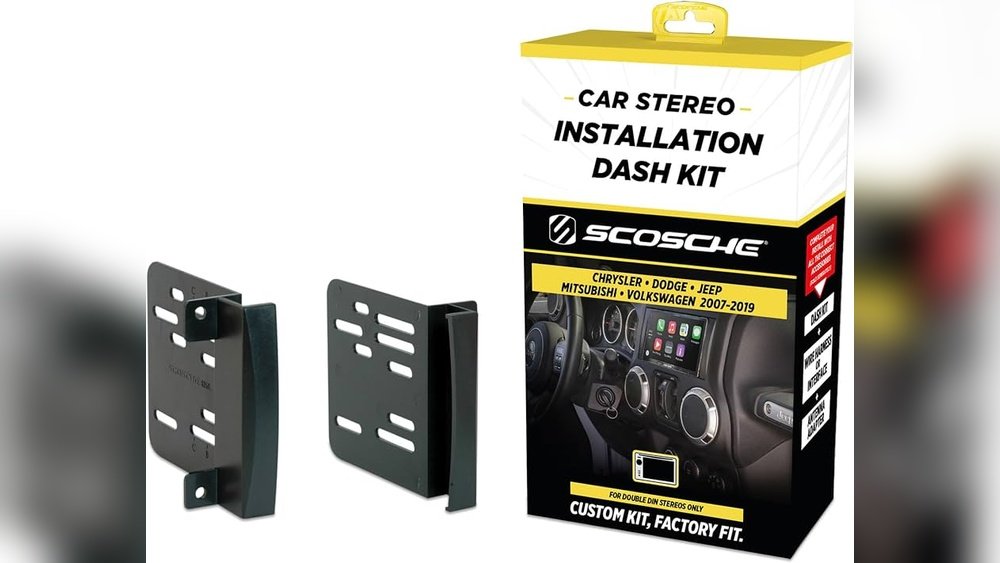
A dash kit, also known as a mounting kit or installation kit, is a specially designed piece of plastic that fills the gaps around your new aftermarket radio, making it look like it came from the factory. Without a dash kit, a single-DIN or double-DIN radio would leave unsightly gaps in your JK’s dashboard.
Key Functions of a Dash Kit:
- Fitment: It ensures your new radio sits securely and flush within the dashboard opening.
- Aesthetics: It provides a clean, professional look, matching the contours and color of your Jeep’s interior as closely as possible.
- Support: It offers structural support for the new radio, preventing rattling or movement.
Types of Dash Kits:
- Single-DIN Kits: For smaller, single-DIN radios (typically 2 inches tall). These kits usually include a storage pocket below the radio.
- Double-DIN Kits: For larger, double-DIN radios (typically 4 inches tall). These kits are designed to house the larger chassis of modern touch-screen units.
When purchasing a dash kit for your Jeep Wrangler JK, ensure it’s specifically designed for your model year. Minor changes in dashboard design can occur between model years, so compatibility is key. Reputable car audio brands like Metra and Scosche are well-known for producing high-quality dash kits for various vehicles, including the JK.
The Wiring Harness: Connecting Power And Sound
The wiring harness, often called an adapter harness or wiring adapter, is perhaps the most critical component for a smooth installation. It’s essentially a plug-and-play solution that connects your new Pioneer radio’s wiring to your Jeep’s factory wiring.
Why You Need a Wiring Harness:
- Avoid Cutting Factory Wires: Instead of cutting and splicing your Jeep’s original wiring (which can void warranties and lead to electrical issues), the harness connects directly to the factory connectors.
- Simplified Connections: The harness has a connector that plugs into your Jeep’s factory radio harness and another end with wires that match the wires on your new Pioneer radio’s harness.
- Correct Wiring: It ensures that power, ground, accessory, speaker, and antenna connections are made correctly, delivering optimal performance and preventing damage to your new stereo.
What to Look For in a Wiring Harness:
- Vehicle Specificity: The harness must be designed for your specific Jeep Wrangler JK model year.
- Pioneer Compatibility: While most harnesses are fairly universal in their wire colors, some may have specific plugs or require minor modifications for certain Pioneer models. However, most aftermarket harnesses are designed to work with any standard aftermarket radio.
- Retention of Factory Features: Some advanced harnesses can retain factory features like steering wheel controls (with an additional interface module) or premium sound systems.
Example Comparison of Wiring Harness Types:
| Feature | Basic Harness | Advanced Harness (with SWC interface) |
|---|---|---|
| **Power/Ground** | Yes | Yes |
| **Speaker Wires** | Yes | Yes |
| **Accessory/Ignition** | Yes | Yes |
| **Antenna Adapter** | May or may not be included | May or may not be included |
| **Steering Wheel Control** | No | Yes (requires separate module) |
| **Factory Amp Integration** | No | Yes (specific models) |
| **Cost** | Lower | Higher |
Pro Tip: Always double-check the product description to ensure the wiring harness is compatible with your Jeep Wrangler JK and that it includes any necessary adapters for your specific radio model.
Tools And Materials You’ll Need
Before you start, gather all the necessary tools and materials. Having everything ready will make the installation process much smoother and faster.
Essential Tools:
- Panel Removal Tools: Plastic pry tools are essential to safely remove dashboard trim panels without scratching or damaging them. Metal tools can cause significant damage.
- Screwdrivers: You’ll likely need Phillips head and possibly flathead screwdrivers in various sizes.
- Socket Set or Nut Drivers: To remove any bolts or nuts securing the factory radio.
- Wire Strippers: For preparing wires if any splicing is needed (though the harness aims to minimize this).
- Wire Crimpers and Connectors: If you need to make any custom connections or use butt connectors.
- Electrical Tape: For insulating any exposed wires.
- Zip Ties: To neatly secure wiring harnesses and prevent them from dangling or interfering with other components.
- Trim Removal Tool: A small flathead screwdriver can sometimes be used carefully for stubborn clips.
- Safety Glasses: Always protect your eyes when working on your vehicle.
Essential Materials:
- Pioneer Radio: Your chosen aftermarket head unit.
- Dash Kit: Specific to your Jeep Wrangler JK and the size of your new radio (single-DIN or double-DIN).
- Wiring Harness Adapter: Vehicle-specific for your Jeep Wrangler JK.
- Antenna Adapter: Sometimes required if the new radio’s antenna input differs from the factory plug.
- Steering Wheel Control Interface (Optional): If you want to retain steering wheel audio controls and your new radio supports it. Brands like ASWC-1 are popular.
- Wire Connectors: Such as butt connectors or Wago connectors for secure wire joining.
Step-by-step Installation Guide
Now, let’s get into the actual installation process. Remember to work patiently and carefully.
Step 1: Disconnect The Battery
Warning: Before you begin any electrical work, always disconnect the negative terminal of your Jeep’s battery. This prevents short circuits and protects both you and your vehicle’s electronics. Locate your battery, usually under the hood, and use a wrench to loosen the nut on the negative (-) terminal clamp. Remove the clamp from the battery post and secure it away from the terminal so it cannot accidentally make contact.
Step 2: Remove The Factory Radio And Trim Panels
This is where your panel removal tools come in handy.
- Center Console Trim: Start by carefully prying off the trim piece surrounding the gear shifter. This often reveals screws holding the main dash panel.
- Main Dash Panel: Locate and remove any visible screws securing the main dash panel that houses the factory radio and climate controls. These might be hidden after removing the console trim or under small plastic covers.
- Prying the Panel: Using your plastic pry tools, carefully work your way around the edges of the main dash panel. Gently pry outwards to release the clips holding it in place. Be patient, as some clips can be stubborn. The entire panel, including the climate controls and factory radio, should come loose.
- Accessing the Radio: Once the main panel is free, you may need to disconnect a few electrical connectors for the hazard lights, climate controls, or other switches attached to the back of the panel. Carefully pull them off.
- Removing the Factory Radio: The factory radio is typically held in place by four screws or bolts. Remove these, and you should be able to slide the factory radio out of its mounting location.
- Disconnecting Radio Harnesses: At the back of the factory radio, you’ll find the main wiring harness connector(s) and the antenna cable. Unplug these by pressing the release tabs.
Step 3: Prepare The New Pioneer Radio And Dash Kit
- Assemble the Dash Kit: Follow the instructions provided with your dash kit. It usually involves attaching side brackets or a sleeve to the new Pioneer radio, or fitting the radio into a frame that will then mount into the dash opening.
- Mount the Radio in the Kit: Slide your Pioneer radio into the assembled dash kit. Secure it using the screws provided with either the radio or the kit. Ensure it’s snug and doesn’t wiggle.
Step 4: Wire The New Radio Harness
This is where the wiring harness adapter and your Pioneer radio’s harness come into play.
- Identify Wires: Lay out both your Jeep’s wiring harness adapter and your Pioneer radio’s harness. You’ll see color-coded wires on both. Generally, the colors correspond to specific functions:
- Yellow: Constant 12V Power (for memory)
- Red: Switched 12V Power (Accessory/Ignition)
- Black: Ground
- Blue: Power Antenna / Amplifier Turn-On
- Orange/White: Illumination/Dimmer
- Speaker Wires: Typically come in pairs (e.g., White/White-Black for Front Left, Gray/Gray-Black for Front Right, etc.)
- Connect the Harnesses: You will need to connect the wires from your Pioneer radio’s harness to the wires on the wiring harness adapter. This is usually done using butt connectors or crimp connectors.
- Strip a small amount of insulation from the end of each wire you need to connect.
- Insert one wire into a butt connector and crimp it securely.
- Insert the corresponding wire from the other harness into the same connector and crimp it.
- Repeat for all necessary wires.
- Match colors as closely as possible. If colors don’t match perfectly, refer to the manuals for both your radio and the wiring harness adapter. For example, Pioneer’s “remote” wire (often blue with a white stripe) usually connects to the harness adapter’s “power antenna/amp turn-on” wire (often blue).
- Secure Connections: Ensure all connections are solid and insulated with electrical tape or heat shrink tubing if used.
- Optional: Steering Wheel Controls: If you’re using a steering wheel control interface, follow its specific wiring instructions. It typically connects between the factory harness, the aftermarket radio harness, and the interface module itself.
Example Wiring Connections (General Guide):
| Pioneer Wire Color | Function | Adapter Harness Wire Color | Function |
|---|---|---|---|
| Yellow | Constant 12V | Yellow | Constant 12V |
| Red | Switched 12V | Red | Switched 12V |
| Black | Ground | Black | Ground |
| Blue | Amp Turn-On / P.Ant. | Blue | Amp Turn-On / P.Ant. |
| Blue/White | Amp Turn-On (Alt.) | (Connect to Blue if needed) | (Connect to Blue if needed) |
| Orange | Illumination/Dimmer | Orange/White | Illumination/Dimmer |
| White | Front Left (+) | White | Front Left (+) |
| White/Black | Front Left (-) | White/Black | Front Left (-) |
| Gray | Front Right (+) | Gray | Front Right (+) |
| Gray/Black | Front Right (-) | Gray/Black | Front Right (-) |
| Green | Rear Left (+) | Green | Rear Left (+) |
| Green/Black | Rear Left (-) | Green/Black | Rear Left (-) |
| Purple | Rear Right (+) | Purple | Rear Right (+) |
| Purple/Black | Rear Right (-) | Purple/Black | Rear Right (-) |
*Note: Always refer to your specific Pioneer radio manual and the wiring harness adapter’s instructions for definitive color-to-function mapping.*
Step 5: Connect The Antenna Adapter And Install The Radio
- Connect Antenna: If your wiring harness didn’t include an antenna adapter, and your new radio has a different antenna input, connect the adapter now. Plug the factory antenna cable into the adapter, and then plug the adapter into the back of your new Pioneer radio.
- Connect Wiring Harness: Plug the wiring harness adapter (which is now connected to your Pioneer radio’s harness) into the factory radio connector(s) in your Jeep’s dashboard. Ensure it clicks securely into place.
- Test Connections (Pre-Mounting): Before fully mounting, it’s a good idea to temporarily reconnect the battery (carefully!) And turn on the ignition. Check if the radio powers up, plays sound through the speakers, and if the illumination works when headlights are on. If