The 2017 Jeep Wrangler is an iconic vehicle, known for its off-road prowess and rugged charm.
While many of its features focus on tackling tough terrain, steering wheel controls on the 2017 model offer a blend of convenience and functionality that enhances the driving experience, whether you're on a dusty trail or a highway commute.
These integrated buttons allow drivers to manage various vehicle systems without taking their hands off the wheel, a crucial safety feature that keeps attention focused on the road ahead.
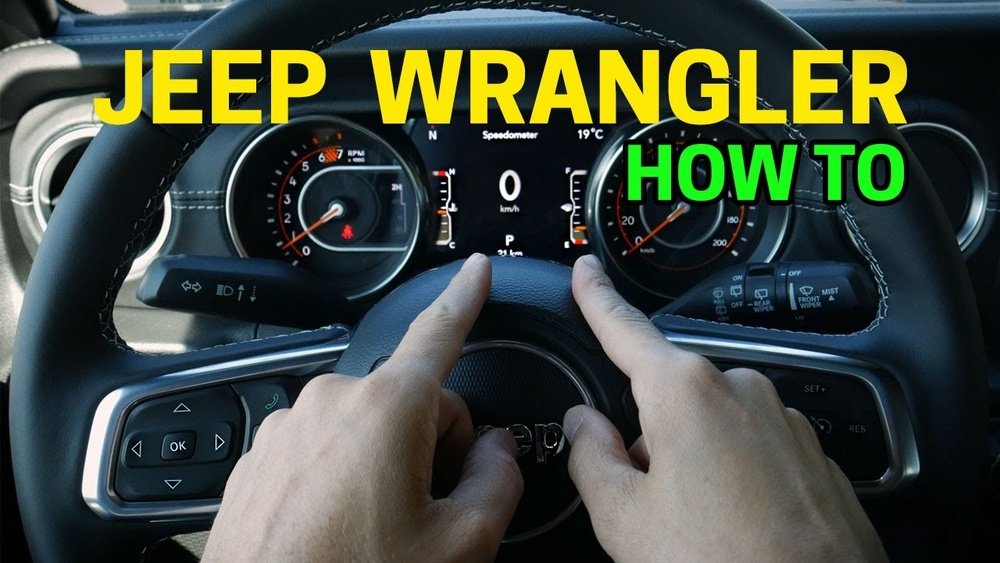
From adjusting audio volume and changing radio stations to managing cruise control and even answering phone calls, the steering wheel controls provide quick access to essential functions.
This article will explore the specific steering wheel controls found on the 2017 Jeep Wrangler, detailing their purpose, operation, and how they contribute to a more comfortable and connected drive.
We will break down each control, discuss its common uses, and offer practical insights for owners looking to maximize their utility.
Understanding Your 2017 Jeep Wrangler Steering Wheel Controls
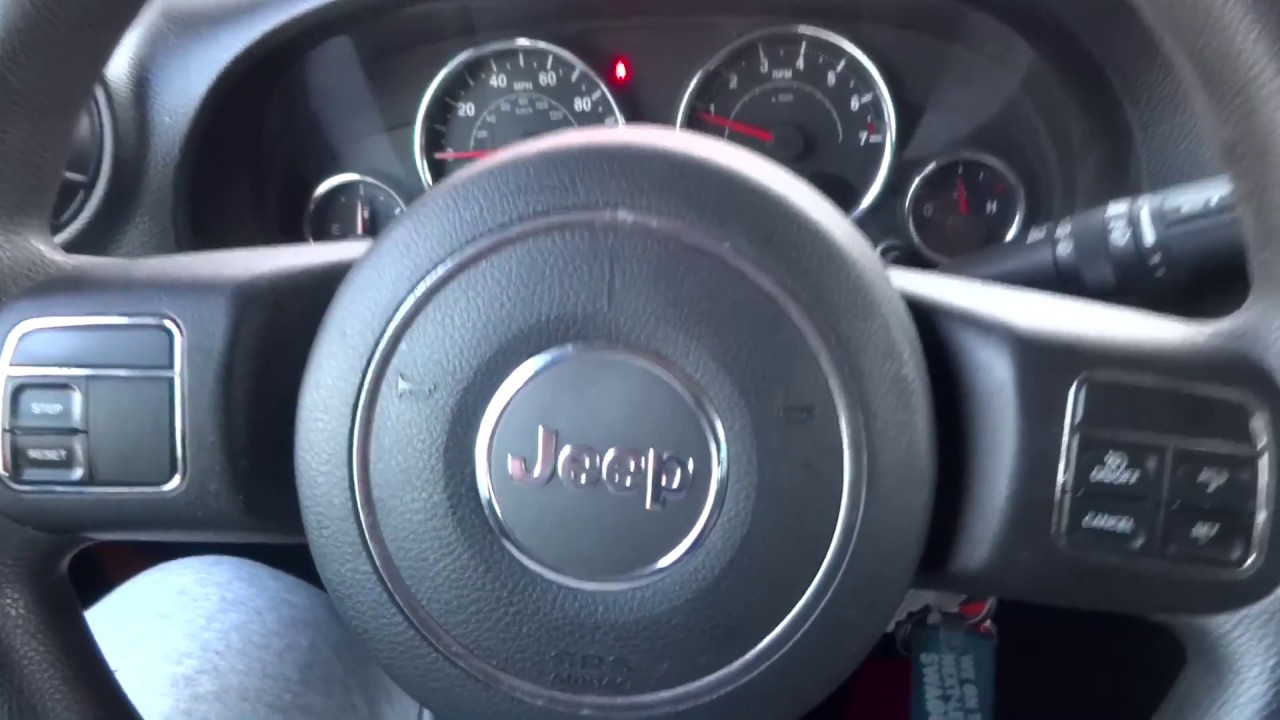
The 2017 Jeep Wrangler, particularly in its higher trim levels, came equipped with a comprehensive set of steering wheel controls designed to keep the driver engaged with the road while managing vehicle functions. These controls are typically located on the spokes of the steering wheel, divided between the left and right sides for intuitive access.
The primary goal is to reduce the need for the driver to reach for the center console or dashboard, thereby enhancing safety and convenience. Understanding each button’s function is key to leveraging their full potential.
On the left side of the steering wheel, you’ll commonly find controls related to the audio system. This includes buttons for adjusting the volume up and down, typically represented by ‘+’ and ‘-‘ symbols. There are also buttons to seek the next or previous radio station or track on an audio source, often marked with forward and backward arrow icons. Additionally, a ‘Mode’ or ‘Source’ button might be present, allowing you to cycle through different audio inputs like AM/FM radio, satellite radio, CD player, or auxiliary input. Some models also feature a ‘Mute’ button for quick silencing of the audio.
The right side of the steering wheel usually houses controls for cruise control and hands-free calling, if equipped with the Uconnect system. Cruise control buttons typically include ‘On/Off’, ‘Set’, ‘Resume’, and ‘Cancel’. These allow you to activate cruise control, set a desired speed, and adjust it without using the pedals. For vehicles with Bluetooth connectivity and the Uconnect system, you’ll find buttons for answering or ending calls, and possibly a voice command button to initiate calls or control other vehicle functions through voice prompts.
Audio System Controls
The audio system controls are arguably the most frequently used set of steering wheel buttons. They are designed for simple, one-touch operation, allowing drivers to make adjustments on the fly.
On the left side of the steering wheel, you’ll typically find the following audio controls:
- Volume Up/Down (+/-): This is straightforward. Pressing the ‘+’ button increases the audio volume, and pressing the ‘-‘ button decreases it. This allows for precise volume adjustments without looking away from the road.
- Seek/Scan (Forward/Backward Arrows): These buttons are used to change radio stations or tracks. Pressing the forward arrow typically scans for the next strongest station or skips to the next track on a CD or digital playback device. The backward arrow does the opposite, seeking the previous station or track. Some systems might have a ‘Scan’ function that briefly plays several stations before stopping on one.
- Mode/Source: This button allows you to switch between different audio sources. You can cycle through AM, FM, Satellite Radio (if equipped), CD player, Auxiliary input, or Bluetooth audio streaming. This is useful for quickly changing your listening experience.
- Mute: Some steering wheels include a dedicated mute button. Pressing this instantly silences the audio system. Pressing it again will restore the previous volume level.
Pro Tip: Many drivers find it most efficient to set their preferred volume level and then use the ‘Seek’ buttons to find stations. This minimizes the need to repeatedly adjust the volume.
Cruise Control System
For those who do a lot of highway driving, the cruise control system is a significant convenience. The buttons for this system are usually located on the right side of the steering wheel.
The typical cruise control buttons include:
- ON/OFF: This button activates or deactivates the entire cruise control system. When the system is on, an indicator light usually appears on the instrument cluster.
- SET: Once you have reached your desired speed, pressing ‘SET’ will lock in that speed. The system will then maintain it automatically.
- RESUME: If you have temporarily disengaged cruise control (by braking or pressing ‘Cancel’), pressing ‘RESUME’ will bring the vehicle back up to the previously set speed.
- CANCEL: This button temporarily disengages cruise control without turning the system off completely. This is useful for slowing down for traffic or during a brief need to control speed manually. The system can be easily re-engaged with the ‘RESUME’ button.
- ACCEL/COAST (or +/-): On some models, you can fine-tune your set speed using ‘ACCEL’ (to increase speed) and ‘COAST’ (to decrease speed) buttons, often integrated with the ‘SET’ function or as separate buttons. This allows for minor speed adjustments without using the pedals.
Important Note: Always remain attentive when using cruise control, especially in varying traffic conditions or on hilly terrain. It is a convenience feature, not a substitute for active driving.
Uconnect And Hands-free Calling
If your 2017 Jeep Wrangler is equipped with the Uconnect system, the steering wheel controls will also include features for managing phone calls and voice commands. This is a major safety enhancement, allowing you to interact with your phone without picking it up.
The Uconnect-related steering wheel controls typically include:
- Answer Call (Phone Icon): When a call comes in, pressing this button will answer it. The audio will switch to your vehicle’s speakers, and you can speak to the caller.
- End Call (Phone Icon): During an active call, pressing this button will end the conversation.
- Voice Command (Microphone Icon): This button activates the Uconnect voice recognition system. You can then use voice commands to make calls, control the audio system, or navigate the Uconnect interface. For example, you might say “Call John Smith” or “Play Music.”
- Previous/Next or Scroll: Some systems have buttons that allow you to scroll through contacts or menus on the Uconnect screen, or to select the previous/next contact or number to dial.
To use these features, your phone must first be paired with the Uconnect system via Bluetooth. Once paired, the system can often download your contact list, making hands-free dialing easier.
Example: When your phone rings, you’ll see an incoming call notification on the Uconnect screen. Simply press the ‘Answer Call’ button on the steering wheel to pick up without reaching for your phone.
Exploring Specific Control Layouts By Trim Level
The exact configuration of steering wheel controls can vary slightly depending on the trim level of the 2017 Jeep Wrangler. While the core functions remain the same, higher trims often include more advanced Uconnect features and thus more buttons.
Here’s a general overview of what you might find:
Sport And Sport S Trims
These base models might have a more limited set of steering wheel controls, primarily focusing on audio system functions. You can expect volume controls, seek/scan buttons, and a mode/source button. Cruise control might be an optional upgrade or standard on the Sport S. Hands-free Uconnect functionality is less common on these entry-level trims unless specifically optioned.
Sahara And Rubicon Trims
The Sahara and Rubicon trims typically come with a more robust set of steering wheel controls. These models are more likely to include the full Uconnect system, meaning you’ll have buttons for hands-free calling (answer/end call, voice command) in addition to the complete audio controls. Cruise control is almost always standard on these trims, complete with ON/OFF, SET, RESUME, and CANCEL functions.
Special Editions (e.g., Willys, Freedom, Rubicon Hard Rock)
Special edition models often mirror the features of the higher trims like the Sahara or Rubicon, meaning they will likely include the full suite of audio, cruise control, and Uconnect hands-free capabilities. The exact button layout might be consistent with the trim they are based on.
In my experience, checking your specific Wrangler’s owner’s manual is the best way to confirm the exact controls and their functions, as factory options and dealer add-ons can sometimes alter the standard configuration.

Integrating Steering Wheel Controls With Uconnect
The Uconnect system is the central hub for many of the advanced features accessible through the steering wheel controls. When your compatible smartphone is paired via Bluetooth, the steering wheel buttons become your gateway to a safer and more connected driving experience.
Pairing Your Phone
The initial step is pairing your phone. This is usually done through the Uconnect touchscreen interface.
- Navigate to the ‘Phone’ menu on the Uconnect screen.
- Select ‘Add Phone’ or ‘Pair Device’.
- On your smartphone, go to Bluetooth settings and search for available devices.
- Select your Jeep’s Uconnect system from the list (the name usually appears as ‘Uconnect’ followed by a number).
- Confirm the pairing code displayed on both the Uconnect screen and your phone.
- Grant necessary permissions for contacts and call history access if prompted.
Once paired, your phone will automatically connect whenever you start the vehicle and have Bluetooth enabled.
Using Voice Commands
The voice command button on the steering wheel is a powerful tool. After pressing the button and hearing a prompt tone, you can speak commands.
The system is designed to understand natural language to a degree.
Common voice commands include:
- “Call [Contact Name]”
- “Dial [Phone Number]”
- “Redial”
- “Last Number Called”
- “Volume [Number]” (e.g., “Volume 15”)
- “Next Track”
- “Play [Artist Name]” or “Play [Song Title]”
- “Tune to [Station Frequency]” (e.g., “Tune to 99.5 FM”)
- “Help” (to hear a list of available commands)
Warning: Always ensure you are in a safe location and conditions are appropriate before attempting to use voice commands, especially when learning them for the first time.
Managing Calls
Receiving and making calls is streamlined:
- Answering: Press the ‘Answer Call’ button when the phone rings.
- Rejecting: Press and hold the ‘End Call’ button to send the call to voicemail.
- Ending: Press the ‘End Call’ button during a conversation.
- Making Calls: Use voice commands or select a contact from the Uconnect screen and initiate the call.
System Updates And Compatibility
It's worth noting that the Uconnect system software can sometimes be updated. While steering wheel controls are generally stable, ensuring your Uconnect system is up-to-date can improve performance and compatibility with newer smartphones.
You can typically check for updates via the Mopar website or by visiting a dealership.
Phone compatibility can also change, so it’s wise to check the official Uconnect compatibility list if you encounter issues.
Maximizing The Utility Of Your Steering Wheel Controls
Beyond basic operation, there are ways to get the most out of your 2017 Jeep Wrangler’s steering wheel controls. Understanding their nuances and integrating them into your driving habits can significantly improve comfort and safety.
Ergonomics And Familiarization
Take the time to familiarize yourself with the placement and feel of each button. Most drivers develop muscle memory, allowing them to operate controls without looking. Spend a few minutes in a parked vehicle, pressing each button and observing the corresponding action on the dashboard or Uconnect screen.
Customization Options
While the 2017 Wrangler’s steering wheel controls offer limited direct customization, the Uconnect system itself allows for some personalization. For instance, you can set default audio sources, manage paired devices, and configure certain display settings that indirectly affect how you interact with the controls.
Safety First
The primary benefit of steering wheel controls is driver safety. By keeping your hands on the wheel and your eyes on the road, you reduce distractions. Always prioritize driving over fiddling with controls. If a particular function is proving difficult to manage, pull over to a safe location to adjust it.
Troubleshooting Common Issues
Occasionally, you might encounter issues with steering wheel controls. Common problems and their solutions include:
- Buttons Not Responding:
- Check Fuses: A blown fuse is a possible culprit. Consult your owner’s manual for the fuse box location and the specific fuse related to the steering wheel controls or audio system.
- Battery Disconnect: Sometimes, disconnecting the vehicle’s battery for a few minutes can reset electronic modules and resolve minor glitches.
- Wiring Issues: In rarer cases, there might be a loose connection or damaged wire within the steering column. This would likely require professional diagnosis.
- Uconnect Bluetooth Connectivity Problems:
- Re-pair Device: Remove your phone from the Uconnect system and then re-pair it.
- Update Phone Software: Ensure your smartphone’s operating system is up-to-date.
- Check Uconnect Version: As mentioned, ensure your Uconnect software is current.
- Cruise Control Not Engaging:
- Check Speed: Cruise control typically requires a minimum speed (often around 25-30 mph) to engage.
- Brake Pedal Switch: A faulty brake pedal switch can prevent cruise control from working, as the system needs to know when you are braking.
- Check Engine Light: If the check engine light is on, cruise control may be automatically disabled.
For persistent issues, consulting a qualified mechanic or a Jeep dealership is recommended.
Comparing Steering Wheel Control Functionality Across Audio Systems
The 2017 Jeep Wrangler offered different audio system options, and the steering wheel controls adapt to interact with them. Understanding these differences helps manage expectations.
Standard Audio System (basic)
This system typically includes AM/FM radio and a CD player. Steering wheel controls will focus on:
- Volume adjustment
- Seek/Scan for radio stations
- Track selection for the CD player
- Mode/Source selection (AM/FM/CD)
Example: On a long drive, you might use the ‘Seek’ button repeatedly to find a new radio station as you travel through different areas.