Turning on high beams in your Jeep Grand Cherokee is simple, but knowing when and how to use them can make driving at night much safer. Many drivers, especially those new to SUVs or the Jeep lineup, find the headlight controls confusing.
This guide breaks down everything you need—step by step instructions, key safety tips, and answers to common questions. By the end, you’ll know exactly how to use your high beams confidently and responsibly.
Understanding Headlight Controls In Jeep Grand Cherokee
Every Jeep Grand Cherokee model comes with a multi-function stalk on the left side of the steering wheel. This stalk is your main control for headlights, high beams, and turn signals. While the basic function is similar across model years, newer Grand Cherokees may add features like automatic high beam control or adaptive lighting.
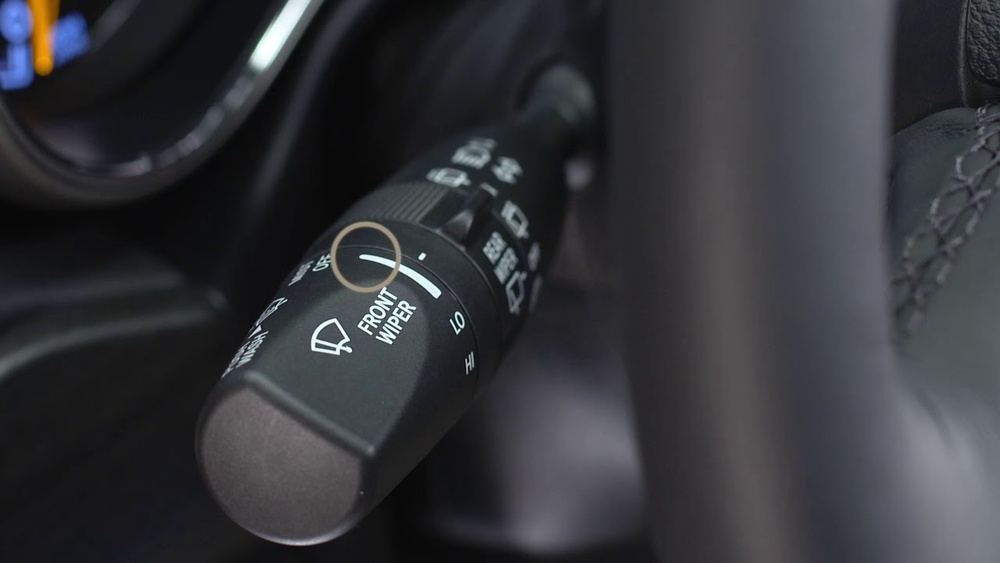
Here’s a quick overview of what you’ll find:
| Control | Location | Function |
|---|---|---|
| Multi-Function Stalk | Left of Steering Wheel | Headlights, High Beams, Turn Signals |
| Headlight Dial | Dashboard or Stalk Base | Switches Headlight Modes |
| Instrument Cluster | Behind Steering Wheel | Shows High Beam Indicator |
Tip: If you’re unsure about your model’s controls, check your owner’s manual or the Jeep website for diagrams.
How To Turn On High Beams: Step-by-step
Activating high beams is quick once you know the process. Follow these steps for most Grand Cherokee models (2011 and newer):
1. Start The Vehicle
Ensure your Jeep is in “Run” mode or the engine is on.
2. Turn On Headlights
Rotate the headlight dial to the “Auto” or “On” position. High beams cannot be activated in the “Off” or “Parking Light” modes.
3. Locate The Multi-function Stalk
This stalk controls both your turn signals and high beams.
4. Activate High Beams
Push the stalk away from you (toward the dashboard) until you feel a click. The blue high beam indicator will light up on your dashboard. This means high beams are on.
5. Deactivate High Beams
Pull the stalk back toward you to return to low beams. You can also “flash” high beams by pulling the stalk toward you briefly (helpful for signaling).
Example: 2020 Jeep Grand Cherokee
For the 2020 model, the process is identical. The headlight dial is on the dashboard to the left of the steering wheel, and the stalk is directly behind it.
The high beam icon (a blue headlight symbol with lines) will appear in the cluster when engaged.
Key Differences: Auto High Beams Vs Manual
Some newer Grand Cherokees (2017+) include automatic high beam systems. These use a camera to detect oncoming traffic and switch between high and low beams automatically.
Here’s a look at the main differences:
| Feature | Manual High Beams | Auto High Beams |
|---|---|---|
| How to Activate | Push/Pull Stalk | Switch in Menu + Stalk |
| Who Controls | Driver | Vehicle Sensors |
| Best For | All Conditions | Highway/Low Traffic |
Insight: Even with auto high beams, you can still override the system using the stalk. If you don’t want auto high beams, you can disable the feature in the vehicle’s settings menu.
When To Use High Beams
High beams are designed for dark, rural, or poorly lit roads where you need extra visibility. However, using them at the wrong time can blind other drivers and is illegal in many places.
Use high beams when:
- You’re on roads with no streetlights
- There’s little or no oncoming traffic
- You need to see further ahead (e.g., wildlife crossings)
Avoid high beams when:
- There’s oncoming traffic within 500 feet
- You’re following another car closely
- In fog, rain, or snow (light bounces back and reduces visibility)
Common mistake: Many drivers accidentally leave high beams on, especially in city areas. Always check the blue indicator light to avoid dazzling others.
Troubleshooting: If High Beams Don’t Work
Sometimes, high beams may not activate. Here’s how to troubleshoot:
1. Check Headlight Mode
Make sure headlights are fully on (not just daytime running lights).
2. Inspect Fuses And Bulbs
A blown fuse or bulb can cause failure. Your owner’s manual will show fuse locations.
3. Look For Settings Conflicts
In models with auto high beams, manual operation may be disabled if the system is malfunctioning.
4. Electrical Issues
Rarely, wiring issues or a faulty stalk can be the cause. In this case, seek professional help.
Non-obvious insight: Some Jeep Grand Cherokee trims use HID or LED headlights. These systems sometimes require a short delay (a fraction of a second) to activate high beams, especially in cold weather.
Safe Driving Tips For High Beam Use
- Dim your lights as soon as you see oncoming headlights or tail lights ahead.
- Use high beams only when safe—flashing your lights can communicate with other drivers but use this feature carefully.
- Keep headlights clean—dirt and snow can reduce their power, making high beams less effective.
- Adjust the angle if your headlights seem too high or low after loading cargo or towing.

Jeep Grand Cherokee High Beam Specs By Model Year
To understand how high beams have changed, here’s a comparison of key specs for recent models:
| Model Year | High Beam Type | Auto High Beams | Approx. Range (ft) |
|---|---|---|---|
| 2015 | Halogen | No | 350 |
| 2019 | LED | Optional | 400 |
| 2023 | Adaptive LED | Standard | 450 |
Note: Upgrading to LED or adaptive headlights can improve nighttime visibility by up to 30%.
Frequently Asked Questions
How Do I Know If My High Beams Are On?
A blue high beam indicator light will appear on the instrument cluster whenever high beams are active. If you see this symbol, your high beams are engaged.
Can I Use High Beams In Fog Or Rain?
No, high beams can reflect off water droplets in fog, rain, or snow, making it harder to see. Use fog lights or low beams in these conditions.
What If My High Beams Won’t Turn Off?
If high beams stay on, check the stalk position and try cycling it back and forth. If the problem continues, there may be a switch or electrical issue contact a certified Jeep mechanic.
How Do I Enable Auto High Beams In My Jeep Grand Cherokee?
Go to the Uconnect system menu (in your infotainment screen), navigate to “Lights,” and turn on “Automatic High Beams.” Refer to your owner’s manual or the official Jeep website for detailed steps.
Are High Beams The Same As “brights”?
Yes, “high beams” and “brights” are the same thing. Both terms refer to the headlight setting that gives you maximum forward illumination.
Using high beams correctly in your Jeep Grand Cherokee makes driving at night much safer. Once you’re familiar with your controls, you’ll find it easy to switch between low and high beams as needed.
Always remember to dim your lights for other drivers and check your owner’s manual for model-specific advice.
With these tips, you’re ready for any nighttime road ahead.