If you own a Jeep Grand Cherokee, you know its lights are smart, bright, and sometimes confusing. Whether you’re leaving your vehicle at night, camping, or just want to avoid draining your battery, understanding how to turn off the lights is important. Many Grand Cherokee models have automatic lighting systems and unique controls, which can surprise even experienced drivers. This guide explains all the ways you can turn the lights off, avoid common mistakes, and keep your Jeep’s lighting system working as it should.
Understanding The Lighting Controls
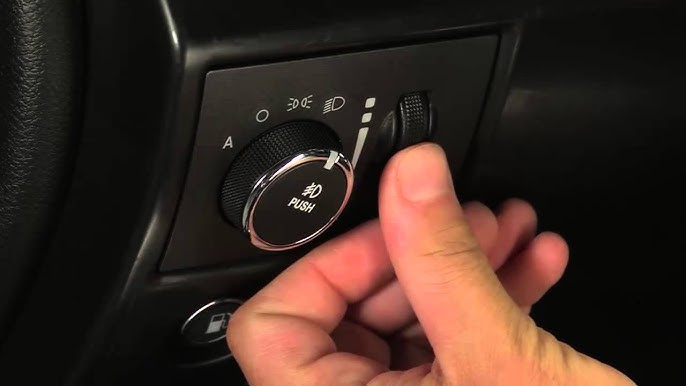
The Grand Cherokee’s light controls are usually found on the left side of the steering wheel. Most models have a rotary dial or a switch with different positions. Here’s a quick look at the most common settings:
| Dial/Switch Position | Function |
|---|---|
| Off (O) | Turns off all exterior lights |
| Auto | Lights turn on/off automatically depending on outside light |
| Parking Lights | Turns on only parking lights |
| Headlights | Turns on main headlights |
| Fog Lights | Pull or push for fog lights |
Tip: Not all trims or years have every option. Always check your owner’s manual for the exact controls.

Manual Ways To Turn Off The Lights
If you want to turn off all exterior lights manually, follow these steps:
- Locate the light control dial near the steering wheel.
- Turn the dial to the “O” or “Off” position.
- Wait a few seconds. Some models have a slight delay before lights go off.
For models with push-button start, make sure the ignition is fully off. If you leave it in accessory or run mode, some lights may stay on.
What About Interior Lights?
The Grand Cherokee’s interior lights can usually be controlled by pushing the individual light buttons or using the dome light switch. If the doors are open, interior lights may stay on for up to 10 minutes.
Quick tip: Accidentally turning the dial all the way up can activate the dome light override, making interior lights stay on. Turn the dial back down to fix this.

Automatic Light Features
Most new Grand Cherokees (2014 and up) come with automatic headlights. These are designed for convenience, but sometimes they don’t behave as you expect.
How Auto Headlights Work
- The system uses a sensor on the dashboard.
- When it gets dark, the lights come on automatically.
- When it’s bright, they turn off.
Sometimes, the auto setting can cause confusion, especially in tunnels, parking garages, or during storms.
How To Override Auto Headlights
If you want the lights completely off, switch the dial from “Auto” to “Off”. In some newer models, the system may not let you turn headlights off while driving for safety reasons. In that case, park the car and turn off the ignition; lights should go off after a short delay.
Daytime Running Lights (drl)
Most Grand Cherokees have Daytime Running Lights that stay on whenever the engine runs. These are for safety and can’t always be switched off manually.
| Model Year | Can DRL Be Turned Off? | How to Turn Off |
|---|---|---|
| 2011-2013 | Yes | Settings menu in dashboard |
| 2014-2021 | Usually No | Dealer/Tech tool required |
| 2022+ | No | Not possible without modification |
Insight: Many drivers don’t realize DRLs are a legal requirement in some states. Disabling them may not be allowed.
Special Scenarios
Parking Lights Stay On After Exiting
If your parking lights stay on after you leave the car:
- Double-check the light dial position.
- Some models have a “follow-me-home” feature; lights stay on for 30-60 seconds after locking the vehicle.
You can turn this feature off in the Uconnect touchscreen menu:
- Go to “Settings.”
- Select “Lights.”
- Adjust the “Headlight Off Delay” or “Approach Lighting.”
Remote Start And Lights
Using remote start can activate headlights and DRLs. To turn them off:
- After entering the vehicle, turn the ignition on fully.
- Adjust the light dial as needed.
Preventing Battery Drain
Leaving lights on can drain your battery. Most Grand Cherokees have a battery saver feature that turns off lights after a set time, even if you forget. However, if you notice dimming or slow starts, get your battery checked.
Non-obvious insight: Even when lights turn off automatically, aftermarket accessories or wiring changes can override factory settings, causing battery drain.
Common Mistakes And Myths
- Leaving the dial in “Auto” means lights are always off. (False: They turn on/off based on light conditions.)
- Locking the doors turns off all lights. (False: Some interior or parking lights may stay on.)
- Turning off the engine turns off headlights instantly. (False: There may be a delay or “headlight off timer.”)
- You can always turn off DRLs. (False: Not possible on most new models.)
When Lights Won’t Turn Off
If your lights stay on and none of the above fixes help:
- Check for open doors or the dome light dial being turned up.
- Make sure the dial isn’t stuck between positions.
- Try restarting the car and switching the settings again.
If the problem continues, a faulty relay, switch, or body control module may be to blame. In this case, visit a dealership or qualified mechanic.
Pro tip: Some Jeep forums and the official Jeep website offer troubleshooting guides. For deeper technical details, see the official Jeep Owner’s site.
Quick Comparison: Manual Vs. Automatic Light Control
Here’s a quick look at the main differences:
| Feature | Manual Control | Automatic Control |
|---|---|---|
| Driver Input Needed | Yes | No |
| Can Turn Off Anytime | Yes | Limited |
| Works with Remote Start | Usually | Always |
| Battery Drain Risk | Higher | Lower |
Frequently Asked Questions
How Do I Turn Off The Interior Lights In My Grand Cherokee?
Most interior lights turn off automatically, but you can switch them off by pressing the individual light buttons or adjusting the dome light dial near the headliner.
Why Do My Headlights Stay On After I Turn Off The Car?
This is likely the “headlight delay” or “follow-me-home” feature. You can adjust or disable this in the Uconnect menu under “Lights. ”
Can I Disable The Daytime Running Lights Myself?
On older models (2011-2013), you can turn off DRLs in the settings menu. On newer models, it usually requires a dealer’s help or isn’t possible.
Will Leaving My Lights On Drain My Battery?
Yes, leaving lights on can drain your battery. Most Grand Cherokees have an automatic shutoff feature, but it’s best to check the lights before leaving your vehicle.
What Should I Do If My Lights Won’t Turn Off At All?
First, check all door switches and the lighting dial. If the problem continues, there may be a faulty relay or module.
Visit a qualified mechanic or dealership for help.
Understanding your Jeep Grand Cherokee’s lighting system can save time, prevent battery issues, and make driving safer. With these tips and steps, you’ll feel more confident managing your vehicle’s lights in any situation.


















