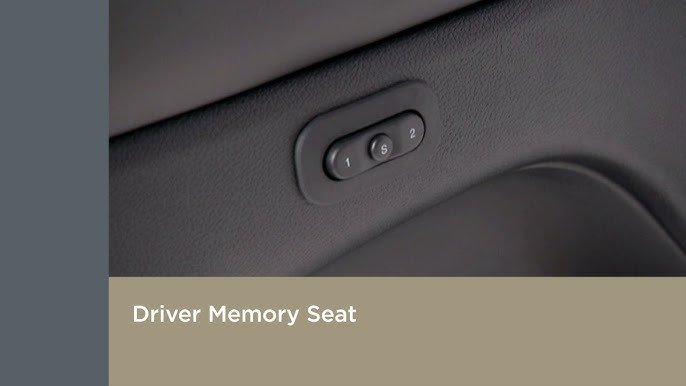
Getting your seat just right makes every drive more comfortable. The 2019 Jeep Cherokee offers a seat memory feature that remembers your preferred position. This simple system is especially helpful if multiple people use the vehicle. You can save your settings, so you never need to adjust the seat every time you drive. In this guide, you’ll learn how to set seat memory in your 2019 Jeep Cherokee, avoid common mistakes, and see how seat memory compares to similar SUVs. Whether you’re new to seat memory or want to fine-tune your settings, you’ll find clear steps and practical advice below.
Understanding Seat Memory In The 2019 Jeep Cherokee
Seat memory lets you save and recall your seat position, side mirror angles, and sometimes steering wheel tilt. The 2019 Jeep Cherokee usually includes this feature on higher trims like Limited, Overland, and Trailhawk. It supports two driver profiles, so two people can store their settings.
The system uses buttons on the driver’s door. These are labeled “1,” “2,” and “SET.
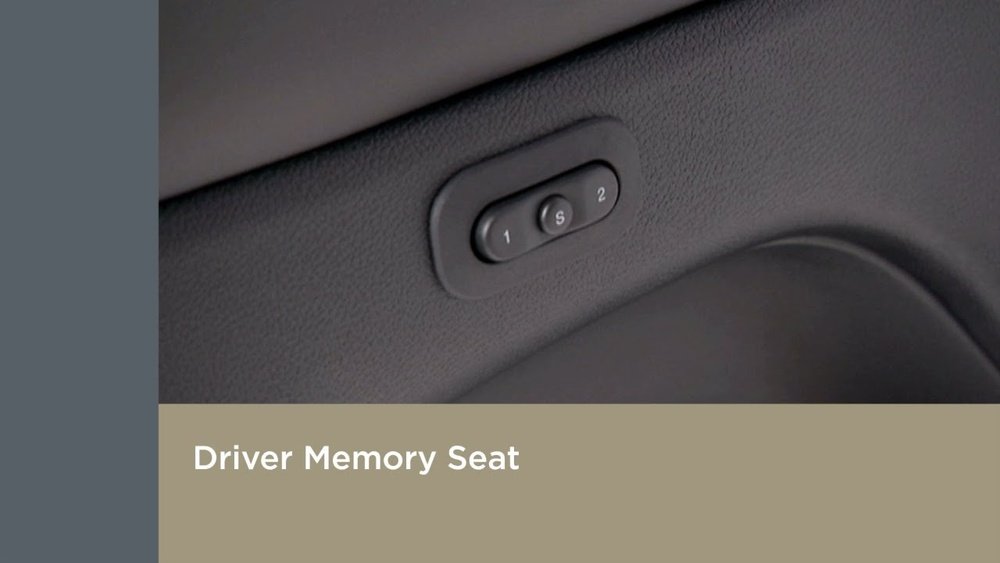
” When you press these, the car remembers your current seat and mirror settings. This makes switching drivers quick and easy.
Step-by-step: How To Set Seat Memory
Follow these steps to set seat memory in your Jeep Cherokee:
- Turn on the ignition. You don’t need the engine running, just the electrical system on.
- Adjust your seat. Move the seat forward/back, adjust height, tilt, and lumbar support to your liking.
- Set your side mirrors. Position each mirror for the best visibility.
- Press the SET button. Hold for about one second until you hear a beep.
- Press button 1 or 2. Within five seconds of pressing SET, press either “1” or “2.” Wait for another beep.
- Your settings are saved. Now, the seat and mirrors will return to your saved position when you press your chosen button.
If your Jeep has memory-linked key fobs, you can assign a profile to each fob. This means the car will recall your settings when you unlock with your fob.
Example
Suppose you like your seat high, mirrors tilted outward, and the lumbar support firm. Adjust everything, press SET, then “1.
” Next time you press “1,” your Jeep restores those settings instantly.
Common Mistakes And How To Avoid Them
Many drivers make small errors when using seat memory:
- Not pressing SET long enough. If you don’t hear a beep, your setting isn’t saved.
- Waiting too long after SET. You must press “1” or “2” within five seconds.
- Forgetting to adjust mirrors. Only seat and mirror settings are saved, not steering wheel position unless your trim supports it.
- Trying to set memory with the engine off. The ignition must be on.
If your seat memory doesn’t work, check your owner’s manual for trim-specific instructions or visit your Jeep dealer.
Comparing Seat Memory Features: Jeep Cherokee Vs Competitors
Seat memory is common in modern SUVs, but there are differences. Here’s a quick comparison:
| Model | Seat Memory Profiles | Mirror Memory | Steering Wheel Memory |
|---|---|---|---|
| 2019 Jeep Cherokee | 2 | Yes | Some trims |
| Honda CR-V | 2 | Yes | No |
| Toyota RAV4 | 2 | Yes | No |
| Ford Escape | 2 | Yes | Some trims |
Most competitors offer similar features, but only some include steering wheel memory. This makes the Jeep Cherokee a good choice for drivers who want more flexibility.

Data: How Often Drivers Use Seat Memory
Studies show that over 70% of drivers with seat memory use it every week. Families with multiple drivers use it even more. Drivers say seat memory saves time and makes the car feel more personal.
| Driver Type | Frequency of Use |
|---|---|
| Single Driver | Weekly |
| Multiple Drivers | Daily |
| Families | Daily |
Tips For Setting Seat Memory Perfectly
- Fine-tune lumbar support. Adjust it slowly for maximum comfort.
- Check mirror angles twice. Make sure you see blind spots.
- Try different seat heights. A higher seat helps visibility but lower can reduce glare.
- Assign key fobs to drivers. If your model supports this, each driver gets their own settings.
- Test your setting. Recall your memory profile and see if everything adjusts as expected.
A key insight: Many drivers forget to change settings seasonally. For example, in winter, you might want a slightly different seat position to see around snow. It’s smart to update your memory setting when your needs change.
Troubleshooting Seat Memory Issues
If your seat memory isn’t working:
- Check for software updates. Sometimes, Jeep releases updates for the system.
- Look for physical obstructions. Items under the seat can block movement.
- Reset the system. Try setting memory again from scratch.
- Consult the manual. Each trim level has small differences.
- Visit your dealer. If all else fails, a technician can diagnose the issue.
Frequently Asked Questions
How Many Seat Memory Profiles Can I Save?
You can save two profiles in the 2019 Jeep Cherokee. Each profile stores seat and mirror positions.
Does Seat Memory Work For The Passenger Seat?
No, the memory feature is only for the driver’s seat and mirrors.
Can I Assign Seat Memory To My Key Fob?
Yes, some trims allow you to link a profile to each key fob. This means your settings are recalled when you unlock the car.
Will My Seat Memory Save Steering Wheel Position?
Only some trims with power tilt/telescoping steering wheel offer this feature. Check your owner’s manual.
What Should I Do If Seat Memory Isn’t Working?
First, re-set the memory following the steps above. If it still doesn’t work, check your Jeep’s manual or contact your dealer. For more details, see the official Jeep manual.
Setting seat memory in your 2019 Jeep Cherokee is easy and makes every drive more comfortable. Take a few minutes to set it up, and you’ll enjoy a personalized experience every time you get behind the wheel.
It’s a small feature that saves time and brings convenience for years to come.