Removing the antenna from your Jeep Wrangler is a simple job, but it’s important to do it the right way. Many Jeep owners want to remove their antenna for off-roading, upgrading, or simply to improve the look of their vehicle.
But, if you’re not careful, you can damage the antenna mount or scratch the body. In this guide, you’ll learn the step-by-step process, common mistakes, and tips to make the job fast and safe.
Reasons To Remove Your Jeep Wrangler Antenna
Jeep Wrangler antennas stick out and can easily get caught on branches or obstacles when you’re off-roading. Some people replace the stock antenna with a shorter one for better looks or to avoid damage. Others remove it to install aftermarket accessories like light bars or roof racks.
Knowing why you want to remove the antenna helps you decide what tool to use and how careful you need to be.
Tools And Materials You’ll Need
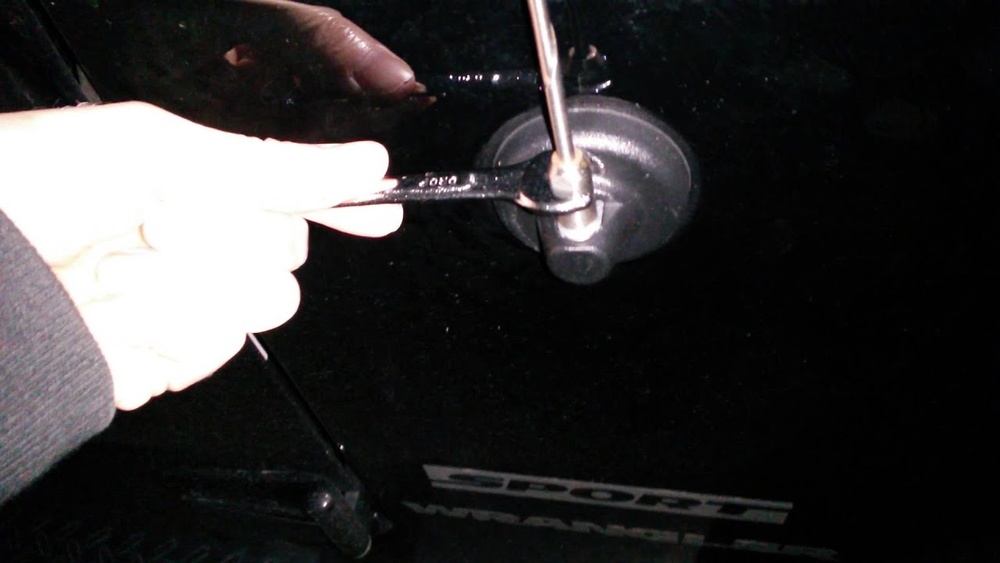
You don’t need many tools for this task. Most Jeep Wrangler antennas screw out by hand, but some require a wrench for stubborn removal.
- Small adjustable wrench or pliers
- Microfiber cloth (to protect the paint)
- WD-40 or similar lubricant (optional for stuck antennas)
- Replacement antenna (if you plan to upgrade)
- Thread locker (for securing new antenna)
Step-by-step Guide To Removing The Antenna
Follow these steps for a safe and quick removal:
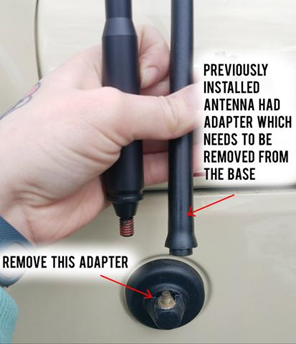
- Locate the antenna base: The antenna is usually on the passenger side, close to the windshield.
- Clean the area: Wipe the base with a microfiber cloth. Dirt or grit can scratch the paint if you slip.
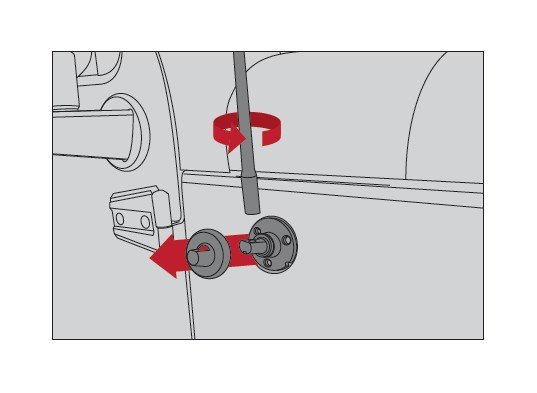
- Unscrew by hand: Hold the base steady and turn the antenna counterclockwise. Most stock antennas are easy to unscrew.
- Use a wrench if needed: If the antenna is stuck, wrap a microfiber cloth around the base to protect the paint, then use a wrench to loosen it gently.
- Apply lubricant: For tough antennas, spray a little WD-40 where the antenna meets the base. Wait a few minutes and try again.
- Remove the antenna: Once loose, pull it out gently. Don’t force it, as the base can break.
- Check for damage: Inspect the threads and the antenna mount. If they are dirty or rusty, clean them before installing a new antenna.
Example: Removing A 2020 Jeep Wrangler Antenna
On the 2020 Jeep Wrangler, the antenna is about 15 inches long and can usually be unscrewed by hand. If you need a wrench, use one with smooth jaws to avoid scratching.
Owners report that the job takes less than 10 minutes.
Comparing Stock Vs. Aftermarket Antennas
Many Jeep owners upgrade to shorter or flexible antennas. Here’s how stock and aftermarket antennas compare:
| Type | Length | Durability | Cost |
|---|---|---|---|
| Stock Antenna | 15 inches | Moderate | $20-$30 |
| Stubby Antenna | 4-6 inches | High | $25-$40 |
| Flexible Antenna | 9-14 inches | Very High | $30-$50 |
Shorter antennas are less likely to break off, but may have slightly reduced radio reception.
Common Mistakes And How To Avoid Them
Many beginners make simple mistakes that can lead to expensive repairs. Here are two mistakes to avoid:
- Forcing a stuck antenna: If it doesn’t turn easily, don’t force it. You can strip the threads or crack the mount.
- Using the wrong tool: Don’t use large pliers or tools with rough jaws. They can scratch the paint or crush the antenna base.
How To Prevent Thread Damage
Thread damage is a common issue when removing antennas quickly. Always turn gently and keep the threads clean.
If you see rust, clean it with a wire brush before installing a new antenna.
Upgrading And Installing A New Antenna
If you plan to install a new antenna, here’s what to consider:
- Check compatibility: Not all antennas fit every Jeep model. Look for ones that match your Wrangler’s year.
- Use thread locker: This prevents the new antenna from loosening over time.
- Test reception: After installation, check radio quality. Some aftermarket antennas reduce signal strength.
Antenna Upgrade Comparison
Here’s a quick comparison of popular aftermarket options:
| Brand | Type | Reception | Ease of Install |
|---|---|---|---|
| Rugged Ridge | Stubby | Good | Easy |
| CravenSpeed | Flexible | Excellent | Easy |
| Ronin Factory | Stubby | Moderate | Very Easy |
Choosing a stubby or flexible antenna depends on your needs. Off-roaders often prefer stubby antennas because they’re less likely to snap.
Practical Tips For Jeep Owners
- Store your antenna safely: If you plan to reuse it, keep it clean and avoid bending it.
- Protect the mount: Cover the mount with tape or a cap if you won’t install a new antenna immediately.
- Know your warranty: Some dealerships may void your warranty if you damage the mount while removing the antenna.
Jeep Wrangler Antenna Removal By Model Year
Different Jeep Wrangler models may have slightly different antenna mounts. For example:
| Year | Mount Type | Removal Difficulty |
|---|---|---|
| 2010-2017 | Threaded | Easy |
| 2018-2024 | Threaded (new base style) | Very Easy |
Older models sometimes have more corrosion, making removal harder.

Frequently Asked Questions
How Do I Know If My Jeep Antenna Is Threaded Or Fixed?
Most Jeep Wrangler antennas are threaded and can be unscrewed by hand. If yours does not turn, check your owner’s manual or look for a locking nut at the base.
Can I Remove The Antenna Without Any Tools?
Yes, many Jeep antennas can be removed by hand. If it’s stuck, use a wrench or pliers with a cloth to protect the paint.
Will Removing The Antenna Affect My Radio Reception?
Yes, without an antenna, your Jeep’s radio may lose signal or have poor reception. If you remove the antenna, consider replacing it with a stubby or flexible model.
Is It Possible To Upgrade To A Better Antenna?
Absolutely. Many aftermarket antennas are available for Jeep Wranglers. Choose one with good reception ratings and easy installation. For reviews and specs, visit Crutchfield.
What Should I Do If The Antenna Base Is Rusty?
If you notice rust or corrosion, clean the area with a wire brush and apply lubricant. This prevents further damage and makes installation easier.
Removing your Jeep Wrangler antenna is a quick job, but it requires careful handling. By following these steps and tips, you can avoid damage and get the best results, whether you’re upgrading or simply taking it off for off-roading.
Remember to check compatibility before buying a new antenna, and always protect your Jeep’s paint and threads.
With the right tools and approach, you’ll be ready to hit the trail or city roads with confidence.



















