Connecting your phone to your Jeep Grand Cherokee 2013 is much more than a convenience—it lets you talk hands-free, stream music, and access apps safely while driving. Many owners find the process confusing, especially if they’re not familiar with car tech. This guide explains every step in clear, simple language. By the end, you’ll know how to connect your phone, common problems to avoid, and tips for smooth use every day.
Understanding Your Jeep’s Connectivity Options
The 2013 Grand Cherokee offers two main ways to connect your phone: Bluetooth and USB. Most drivers use Bluetooth for wireless calls and music. USB is better for charging and sometimes gives extra features, like app integration. Knowing the difference helps you pick the best method for your needs.
Bluetooth Vs. Usb: Key Differences
| Feature | Bluetooth | USB |
|---|---|---|
| Wireless | Yes | No |
| Music Streaming | Yes | Yes |
| Phone Calls | Yes | Rarely |
| Charging | No | Yes |
| App Integration | Limited | More Options |
For most, Bluetooth is the easiest way to connect for calls and music. USB is useful for charging and sometimes better audio quality.
How To Connect Your Phone Via Bluetooth
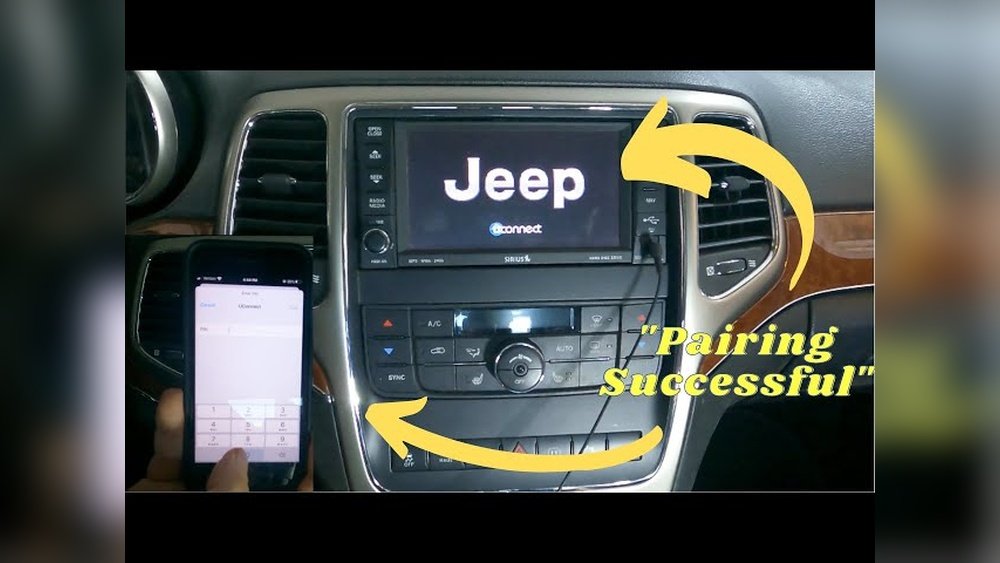
Pairing your phone with your Grand Cherokee’s Uconnect system takes just a few minutes. Follow these steps:
- Enable Bluetooth on your phone. Go to Settings > Bluetooth and turn it on.
- Start the car. Make sure the Uconnect system is powered up.
- Access the Phone menu on the Uconnect touchscreen. Tap “Phone” or the phone icon.
- Select ‘Add Device’ or “Pair a Device.” The system will search for nearby phones.
- Choose your Jeep on your phone’s Bluetooth menu. It may show as “Uconnect” or “Jeep.”
- Confirm the PIN. Both your phone and Uconnect will show a PIN code. Make sure they match, then accept or confirm on both.
- Allow permissions. Your phone may ask to share contacts or messages. Allow access for full features.
- Wait for confirmation. Uconnect will say the pairing is successful.
Most phones will now connect automatically each time you start the car.
Common Pairing Problems (and Solutions)
Some users run into issues. Here’s how to handle them:
- Phone not found: Restart Bluetooth on your phone and the Uconnect system. Try pairing again.
- PIN doesn’t match: Cancel and restart the pairing process.
- Audio but no calls: Make sure phone permissions are granted for calls and contacts.
If problems continue, check for Uconnect software updates at your dealership.

How To Connect Your Phone Via Usb
Using a USB cable is simple and reliable, especially for charging and playing music.
- Find the USB port in your Grand Cherokee. It’s usually in the center console or below the dashboard.
- Plug in your phone with a compatible USB cable.
- Select the media source. On the Uconnect screen, choose “Media” or “USB” as the source.
- Allow access on your phone if prompted.
Some phones may ask you to select a USB mode. Choose “Media Transfer” or “Audio Source” for best results.
Usb Vs. Bluetooth: Audio Quality And Speed
| Connection Type | Audio Quality | Charging Speed |
|---|---|---|
| Bluetooth | Good | No Charging |
| USB | Best | Fast Charging |
If you care about sound quality, USB is usually the better choice.
Practical Tips For A Smooth Connection
Here are a few tips that make daily use easier:
- Name your phone something unique so it’s easy to find in the pairing list.
- Keep software updated on both your phone and Uconnect for best compatibility.
- Limit paired devices in Uconnect. Too many can cause confusion—delete old phones you don’t use.
- Disconnect before selling your vehicle to protect your privacy.
An overlooked detail: Some apps (like navigation or podcasts) require extra permissions. Check your phone’s Bluetooth settings to make sure all permissions are enabled.

When Things Don’t Work: Troubleshooting Tips
Even with good instructions, things sometimes go wrong. Here’s what to try:
- Restart both devices. Turn off the car and your phone, then restart both.
- Delete and re-pair. Remove the Jeep from your phone’s Bluetooth list and remove your phone from Uconnect, then try pairing again.
- Check for interference. Other Bluetooth devices (like smartwatches) can cause problems. Turn them off temporarily.
- Try a different cable if USB doesn’t work—some cables are for charging only, not data.
If you still have trouble, your owner’s manual or a dealership can help. For extra support, check the official Jeep Uconnect website.
Can I Connect More Than One Phone To My Jeep Grand Cherokee 2013?
Yes, you can pair several phones. However, only one can be active for calls and music at a time.
You can switch between paired devices in the Uconnect menu.
Does My Jeep Support Apple Carplay Or Android Auto?
The 2013 Grand Cherokee does not support Apple CarPlay or Android Auto. These features came in later models. You can use Bluetooth or USB to play music and make calls.
Why Can’t My Phone Find The Jeep During Pairing?
Make sure Bluetooth is enabled and your phone is visible. Restarting both devices often helps.
If the problem continues, clear old devices from the Uconnect system.
Does Using Bluetooth Drain My Phone Battery?
Bluetooth uses a small amount of power, but it’s not a major drain. For long drives, connect via USB to charge while you drive.
Is It Possible To Update The Uconnect System?
Yes, but updates must usually be done at a dealership or with a USB drive if you download software from the Jeep website. Keeping Uconnect updated improves compatibility and fixes bugs.
Connecting your phone to your Jeep Grand Cherokee 2013 opens up safer, smarter driving. Whether you use Bluetooth or USB, following these steps makes setup simple. If you run into problems, the tips above should get you back on track fast. Safe travels and enjoy your connected ride!