Replacing the battery in your Jeep remote is a simple task, but many drivers worry they might damage the remote or choose the wrong battery. Your key fob controls locking, unlocking, and sometimes starting your Jeep.
If the battery dies, you might get stuck outside your vehicle. Learning to change the battery yourself saves time and money, and keeps your Jeep ready to go.
This guide shows you exactly how to do it, with clear instructions and practical tips. Even if your English is not perfect, you’ll understand every step.
Why Changing Your Jeep Remote Battery Matters
Most Jeep remotes use a small coin cell battery. When this battery is weak, the remote may only work sometimes. Sometimes, the remote won’t work at all. According to Jeep owner forums, battery failure is the number one reason for key fob problems. A new battery costs less than $5, while a replacement remote can cost over $100.
Here’s a quick comparison:
| Solution | Cost | Time Needed |
|---|---|---|
| Change battery | $2–$5 | 5–10 minutes |
| Buy new remote | $100–$250 | 1–2 days |
| Dealer service | $50–$80 | 1–2 hours |
As you see, changing the battery yourself is fast and cheap. Many Jeep owners do this once a year to avoid problems.
What You Need Before Starting
To replace the battery, you need just a few things:
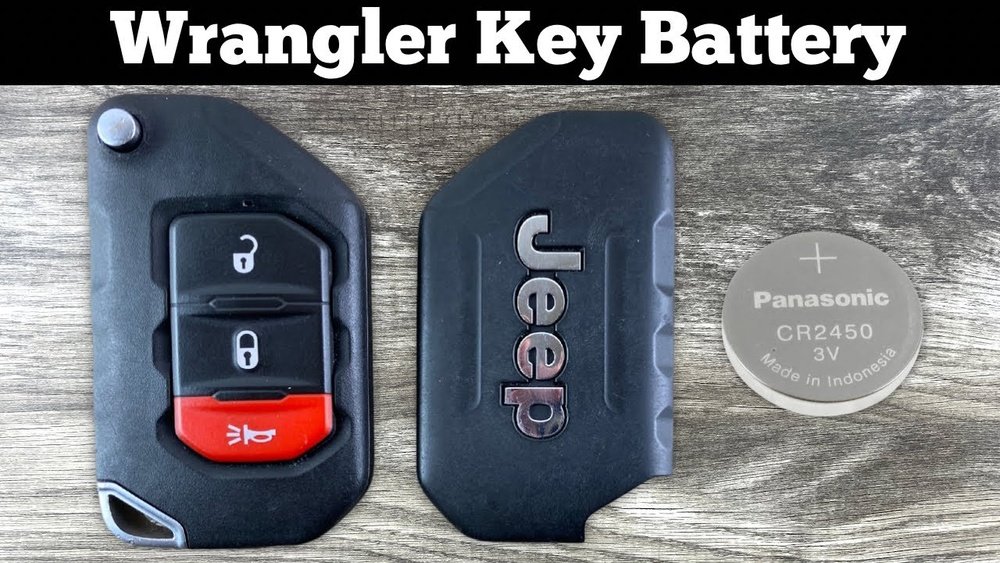
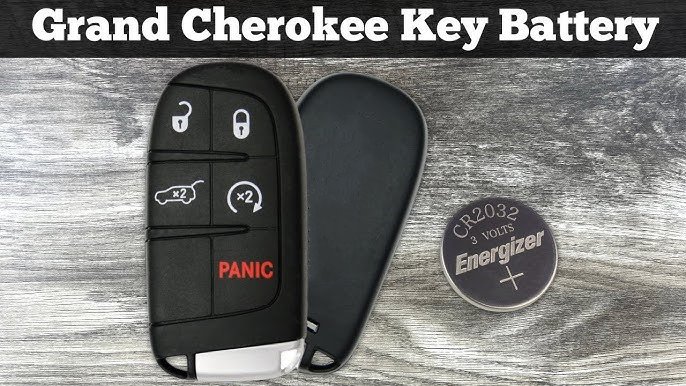
- New battery: Most Jeep remotes use a CR2032 coin cell battery. Check your owner’s manual or open the remote to confirm.
- Small screwdriver: Usually a flat-head. Some models need a Phillips screwdriver.
- Clean cloth: To avoid fingerprints or dust inside the remote.
Some Jeep remotes have different designs. Here’s a quick table showing battery types for popular models:
| Jeep Model | Year Range | Battery Type |
|---|---|---|
| Wrangler | 2010–2024 | CR2032 |
| Grand Cherokee | 2011–2024 | CR2032 |
| Compass | 2017–2024 | CR2025 |
| Renegade | 2015–2024 | CR2032 |
If your model is not listed, look inside your remote or check online.
Step-by-step: How To Change Battery In Jeep Remote
Changing the battery is easy. Here’s how to do it:
1. Open The Remote
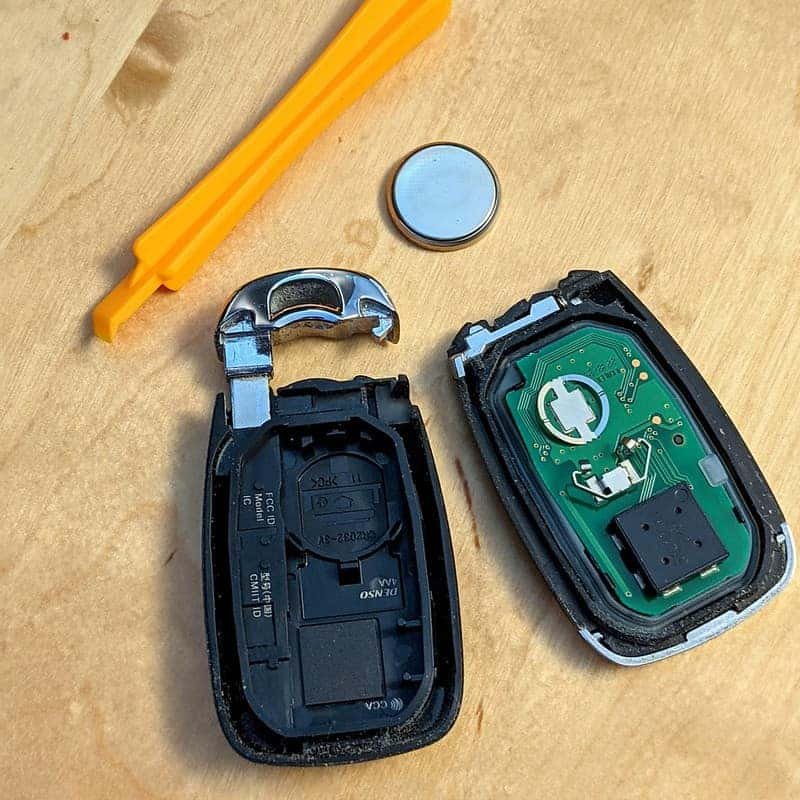
Find the small seam or notch on the side of the remote. Use your screwdriver to gently pry the remote apart.
Don’t use too much force. If you see screws, remove them first.
2. Remove The Old Battery
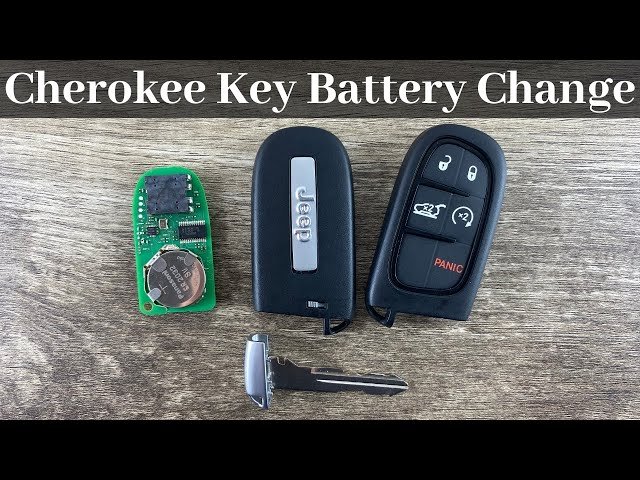
Once the remote is open, you’ll see the coin cell battery. Lift it out carefully. Note which side is facing up (usually the “+” sign).
3. Insert The New Battery
Place the new battery in the same position. The “+” side usually faces up. Make sure it fits snugly.
4. Close The Remote
Press the two halves of the remote together. If there are screws, put them back.
Make sure it clicks shut. Test the buttons to see if the remote works.
5. Clean And Check
Wipe the remote with a cloth. Check for any loose parts.
Try locking and unlocking your Jeep from different distances.
Practical Tips
- Buy a battery from a trusted brand. Cheap batteries often die faster.
- Don’t touch the battery contacts with your fingers. Oil from skin can affect performance.
- If your remote doesn’t work after replacing the battery, check that the battery is facing the right direction.
- Some Jeep remotes have a backup key inside. If you get stuck, use this key to unlock the door.
Mistakes To Avoid
Even simple jobs can go wrong. Here are common mistakes:
1. Using The Wrong Battery Type
Always check the battery model before buying. Putting the wrong battery can damage the remote.
2. Forcing The Remote Open
If you use too much force, you can break the plastic.
3. Touching The Circuit Board
Avoid touching the inside electronics. You might cause static damage.
4. Leaving The Remote Open Too Long
Dust or moisture can get inside. Work quickly and in a clean area.
5. Forgetting To Test The Remote
Always check the remote before leaving. Make sure it works for locking and unlocking.
How Long Does The Battery Last?
Jeep remote batteries usually last 1–2 years. If you use the remote often, or park in cold weather, the battery may drain faster. According to a survey by Consumer Reports, most key fob batteries last about 18 months in normal use. If you notice the remote working only at close distance, it’s time to replace the battery.
A quick comparison:
| Use Pattern | Battery Life |
|---|---|
| Daily use | 12–18 months |
| Occasional use | 18–24 months |
| Cold climate | 8–12 months |
Expert Insights
Many beginners think the remote must be reprogrammed after battery change, but that’s rarely true. Jeep remotes don’t lose programming when the battery is replaced. Another tip: If your remote still doesn’t work after a new battery, try cleaning the battery contacts with a cotton swab. Sometimes dirt or corrosion stops the connection.
If your remote is still dead after trying all steps, it may have a deeper problem. Visit a Jeep dealer or check the official Jeep Owners Site for help.
Frequently Asked Questions
How Do I Know Which Battery My Jeep Remote Needs?
Most Jeep remotes use a CR2032 battery, but some use CR2025. Check your owner’s manual or open the remote to see the exact type.
Can I Use Any Brand Of Coin Cell Battery?
Yes, but trusted brands like Energizer or Duracell last longer. Cheap batteries may drain fast or leak.
Will I Lose Remote Programming After Changing The Battery?
No, the remote keeps its programming. Just replace the battery and test the remote.
If it doesn’t work, check the battery direction.
What Should I Do If My Remote Still Doesn’t Work?
Try cleaning the battery contacts. Make sure the battery is installed correctly.
If it still fails, visit a Jeep dealer.
Is It Safe To Change The Battery Myself?
Yes, it’s safe if you work carefully. Don’t force the remote open or touch the circuit board.
Changing your Jeep remote battery is a quick way to keep your vehicle secure and ready. With just a few tools and careful hands, you’ll save money and avoid getting locked out. Remember to use the right battery and avoid common mistakes. This small job gives big peace of mind for every Jeep owner.



















