Opening a Jeep key fob seems simple, but many owners feel confused when it’s time to change the battery or fix a stuck button. If your Jeep key fob stops working, you might worry about breaking it or losing your settings.
Learning to open your key fob safely saves money and avoids stress. This article guides you step-by-step, explains key fob differences, and shares tips most new Jeep owners miss. Whether you have a classic Jeep Wrangler or a newer Grand Cherokee, you’ll find clear instructions and practical advice here.
Types Of Jeep Key Fobs
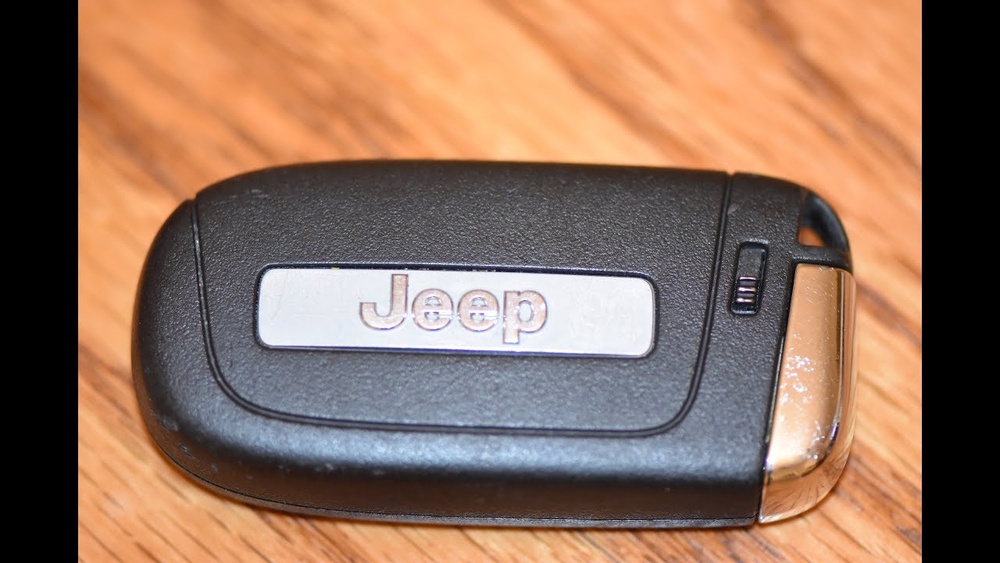
Not all Jeep key fobs are the same. Jeep models use different fob designs, so knowing your type helps you open it correctly.
| Jeep Model | Fob Type | Year Range |
|---|---|---|
| Wrangler | Standard Flip Key | 2007–2018 |
| Grand Cherokee | Smart Key (Proximity) | 2014–present |
| Renegade | Remote Keyless Entry | 2015–present |
Most Jeep key fobs fall into these three types:
- Standard Flip Key – Has a physical key inside and a plastic case.
- Smart Key – Looks sleek, usually no visible key; uses push-button start.
- Remote Keyless Entry – Simple rectangular fob, usually with 3–4 buttons.
Understanding your fob type means you won’t force open the wrong part and damage the electronics.
Tools You Need
You don’t need special tools, but using the right items makes opening your fob easier and safer.
- Small flathead screwdriver – Helps pry the fob open gently.
- Plastic pry tool – Avoids scratches on the plastic.
- Coin (optional) – Some fobs have a slot for twisting open.
- Clean cloth – Prevents static and keeps your hands clean.
Using plastic tools instead of metal reduces the risk of cracking the fob case.

Step-by-step Guide: Opening Your Jeep Key Fob
Let’s walk through the process for the most common Jeep key fobs.
Standard Flip Key (wrangler, Some Cherokee Models)
- Locate the seam – Find the line where the two halves meet.
- Insert screwdriver – Place the flathead into the seam and gently twist.
- Separate halves – Pry apart slowly. If resistance is high, switch to a plastic tool.
- Remove battery – Note the battery orientation for easier reassembly.
Smart Key (grand Cherokee, Newer Models)
- Release emergency key – Slide the release button and pull out the physical key.
- Find pry point – Look for a small notch near the keyhole.
- Use plastic tool – Insert and gently twist. Avoid metal tools—these can scratch.
- Open case – Pull apart the two sides. The battery is usually visible on one side.
Remote Keyless Entry (renegade, Compass)
- Check for visible screws – Some models have tiny screws; remove if present.
- Look for coin slot – Insert a coin and twist to pop open the case.
- Gently pry open – If no slot, use a plastic tool along the seam.
- Access battery compartment – Remove the battery and check for corrosion or dust.
Each Jeep model may have slight variations. If your fob doesn’t open as described, check your owner’s manual or search for your model’s exact instructions.
Common Mistakes And How To Avoid Them
Many Jeep owners damage their key fobs by rushing or using the wrong tools. Here are mistakes to watch out for:
| Mistake | Impact | Prevention |
|---|---|---|
| Using metal tools | Scratches or cracks | Use plastic pry tools |
| Forcing the case | Broken clips or electronics | Work slowly, apply gentle pressure |
| Touching battery contacts | Static damage | Use a clean cloth or gloves |
A tip most beginners miss: keep the battery orientation in mind. Many fobs stop working after battery changes because the new battery is installed backward.

Battery Replacement Tips
Opening your Jeep key fob usually means you’re changing the battery. Here’s how to do it right:
- Choose the correct battery – Most Jeep fobs use a CR2032 or CR2025 coin cell.
- Avoid touching battery surface – Oils from your fingers can shorten battery life.
- Clean contacts – Use a dry cloth to remove any dust.
- Test before closing – Press a button to see if the LED blinks.
If your fob still doesn’t work, check for corrosion or contact damage.
When To Replace Or Repair Your Fob
Sometimes, opening the fob reveals more problems than a dead battery. Here’s how to know if you need a new fob:
- Buttons not working after battery change
- Physical damage (cracked shell, broken clips)
- Water exposure – Moisture inside can ruin electronics
Repairing a fob costs less than replacing it. But for newer models, professional reprogramming may be required.
If your fob is beyond repair, visit a Jeep dealer or locksmith.

Extra Insights: What Most Owners Overlook
- Older Jeep fobs may require reprogramming after battery replacement. If your fob stops unlocking the car, check if it needs to be paired again.
- Some fobs contain hidden chips for immobilizers. Opening the case incorrectly can damage these chips and prevent your Jeep from starting.
Always check your owner’s manual for model-specific advice. If you lose your manual, official Jeep resources are available online.
Frequently Asked Questions
How Do I Know Which Battery My Jeep Key Fob Needs?
Most Jeep fobs use a CR2032 battery. Check the old battery or inside the battery compartment for the exact type. If unsure, your owner’s manual lists the correct battery.
Can I Open My Jeep Key Fob Without Damaging It?
Yes, if you use a plastic pry tool and work gently. Avoid metal tools and don’t force the case open. Take your time and follow the steps for your specific model.
What Should I Do If My Key Fob Stops Working After Battery Change?
First, check if the battery is installed correctly. If the fob still doesn’t work, try reprogramming it or visit your Jeep dealer.
Some models need to be paired again after battery changes.
Is It Safe To Use Third-party Batteries?
You can use high-quality third-party batteries, but avoid cheap brands. Poor batteries may leak or fail quickly. Stick to trusted brands like Energizer or Duracell.
Where Can I Find Official Instructions For My Jeep Key Fob?
You can find model-specific guides at the Jeep official website or through your dealer. For more details, visit Jeep Owner’s Manuals.
Opening a Jeep key fob is simple if you know the right steps and avoid common mistakes. With the proper tools and careful handling, you can change the battery, fix stuck buttons, and keep your fob working for years.
Taking time to understand your fob type and following this guide protects your investment and saves you from costly repairs.
Always check your owner’s manual for details, and don’t hesitate to ask a professional if you’re unsure.