Driving a Jeep Wrangler is an experience. It’s more than just getting from point A to point B; it’s about freedom, adventure, and a connection to the road, or lack thereof.
For many Wrangler owners, especially those new to the JK or JL models, the steering wheel can seem like a command center.
Among the various controls, you’ll find buttons on the back of the steering wheel. These aren’t just decorative; they serve important functions that can enhance your driving experience by keeping your hands on the wheel and your focus on the trail ahead.
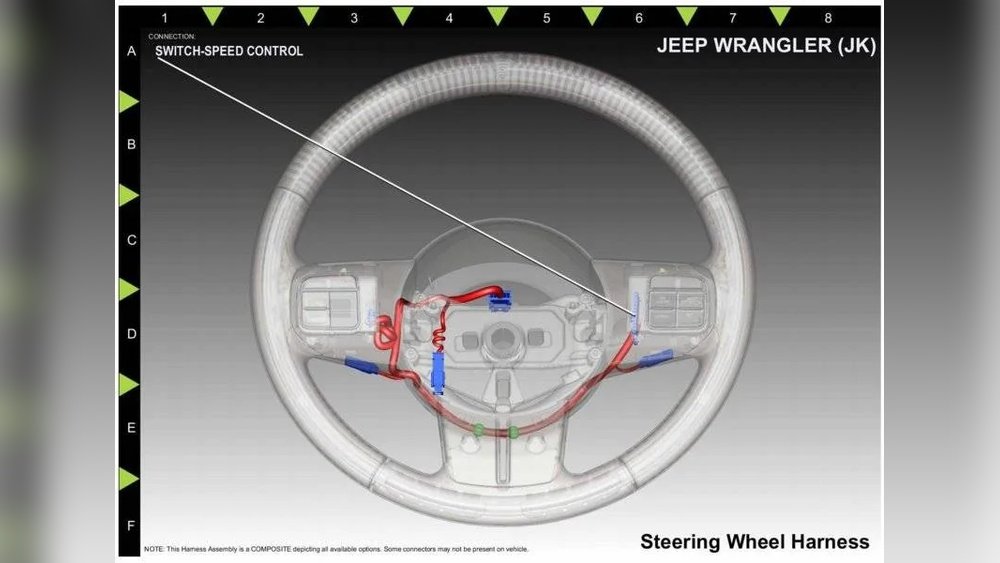
These rear steering wheel buttons are often overlooked or misunderstood. Many drivers might not even know they exist, or if they do, they might be unsure of their exact purpose.
This article aims to demystify these often-hidden controls. We’ll explore what they are, what they do, and how you can use them to your advantage.
Whether you’re a seasoned off-roader or a daily commuter, understanding these buttons will help you get more out of your Jeep Wrangler. We will cover the common functions, how they integrate with your infotainment system, and some tips for using them effectively.
The primary reason for placing buttons on the back of the steering wheel is driver convenience and safety. In any vehicle, especially one designed for varied terrains like the Jeep Wrangler, minimizing distractions is crucial. By putting frequently used controls within easy reach of your fingertips on the steering wheel, manufacturers allow drivers to adjust settings without taking their hands off the wheel. This is especially important when navigating challenging off-road conditions or simply dealing with traffic.
These buttons are typically integrated with the vehicle’s audio system and cruise control. They allow you to manage volume, change radio stations or tracks, answer or end phone calls, and set or adjust your cruise control speed.
For a vehicle like the Wrangler, which might be used for long highway drives to reach a trailhead, cruise control is a significant comfort feature.
Similarly, being able to adjust the music volume without looking away from the road when encountering unexpected terrain is a vital safety consideration.

The exact layout and functions of the buttons on the back of your Jeep Wrangler’s steering wheel can vary slightly depending on the model year and trim level. However, most JK (2007-2018) and JL (2018-present) Wranglers will have a similar set of controls.
On the left side of the steering wheel, typically behind the 9 o’clock position, you’ll often find buttons related to the audio system. These usually include:
- Volume Up/Down: A rocker switch or two separate buttons to increase or decrease the audio volume.
- Seek/Scan (Next/Previous Track): Buttons to cycle through radio stations or skip to the next/previous song on your media player.
- Mode/Source: A button to cycle through different audio sources (e.g., AM/FM radio, satellite radio, USB, Bluetooth).
On the right side of the steering wheel, usually behind the 3 o’clock position, you’ll find buttons for cruise control and potentially phone functions (if equipped with Bluetooth and the Uconnect system). These typically include:
- Cruise Control On/Off: A button to engage or disengage the cruise control system.
- Set: To set the desired speed once cruise control is on.
- Resume: To return to the last set speed after deactivating cruise control.
- Cancel: To temporarily disengage cruise control without turning it off completely.
- +/- (or Adjust Speed): To increase or decrease the set speed in increments.
- Phone/Voice Command Button: (Often on the right side, sometimes shared or near the cruise control buttons) To answer or end a call, or to activate the voice command system for hands-free operation.
It’s important to note that the Uconnect system, Jeep’s infotainment interface, plays a significant role in how these buttons function, especially for phone calls and media playback. The responsiveness and specific actions of these buttons are directly tied to the Uconnect system’s capabilities.
Audio Controls Explained
The audio controls on the left side are designed for intuitive operation. The volume rocker is often a long, curved button that makes it easy to find by feel. You simply press the top part to increase volume and the bottom part to decrease it. The seek/scan buttons usually allow you to quickly jump to the next preset station or the next track on your playlist. Holding them down might initiate a scan through frequencies. The mode button lets you seamlessly switch between your preferred audio sources without fumbling with the touchscreen or dashboard controls. This is incredibly useful when you’re driving and want to switch from listening to a podcast to your favorite music playlist.
Cruise Control And Phone Integration
The right-side buttons are dedicated to making highway driving more comfortable and safer. Engaging cruise control is as simple as pressing the ‘On’ button. Once engaged, you can press ‘Set’ to lock in your current speed. The ‘+/-’ buttons allow for fine-tuning, typically in 1 mph increments, so you can adjust without canceling the system. If you need to slow down momentarily, pressing the brake pedal or clutch (in manual transmissions) will disengage cruise control. You can then press ‘Resume’ to get back up to your set speed. The phone button is a real lifesaver for hands-free communication. A single press can answer an incoming call, and another press can end a call. Some systems also allow you to initiate calls using voice commands, further enhancing safety.
How They Work: Integration With Uconnect And Other Systems
The buttons on the back of the steering wheel are not standalone features. They are sophisticated inputs that communicate with various modules within your Jeep Wrangler. The most critical integration is with the Jeep Uconnect system, which serves as the central hub for infotainment, communication, and vehicle settings.
When you press a button, it sends a signal through the vehicle’s internal network (often the CAN bus system) to the appropriate control module. For audio controls, this signal goes to the radio or infotainment module. For cruise control, it signals the Powertrain Control Module (PCM) and the dedicated cruise control module. For phone functions, it communicates with the Uconnect hands-free module.
The Uconnect system is designed to interpret these signals and execute the corresponding command. For example, pressing the ‘Volume Up’ button on the steering wheel sends a digital signal that the Uconnect system receives and translates into an instruction for the audio amplifier to increase the sound output.
Similarly, when you press the cruise control ‘Set’ button, the Uconnect system relays this to the PCM, which then manages the engine throttle to maintain the selected speed.
The Role Of The Clock Spring
Behind the steering wheel, connecting the steering column to the rotating wheel, is a component called the clock spring (or spiral cable). This flexible, coiled ribbon cable carries electrical signals from the steering wheel buttons to the rest of the vehicle’s systems. It’s designed to allow the steering wheel to turn many times without breaking the electrical connections. If the clock spring fails, you’ll often lose the functionality of your steering wheel buttons, airbag, and horn.
Customization Options (jl Models)
For owners of newer JL Wranglers, there’s a degree of customization available through the Uconnect system’s settings. While the core functions of the buttons remain the same, some models might allow you to reassign certain secondary functions or adjust the sensitivity of controls.
This level of personalization means you can tailor the steering wheel controls to better suit your driving habits. Always check your owner’s manual for specific customization options available for your particular model year.

The advantages of having these controls integrated into the steering wheel are numerous, primarily revolving around enhanced safety and driver comfort.
Improved Safety
The most significant benefit is reduced driver distraction. When you can control your audio, phone, and cruise control without taking your hands off the wheel or your eyes off the road, the risk of an accident decreases. Imagine you’re driving on a busy highway and need to quickly turn down the music because you’re approaching a construction zone. Instead of reaching for the radio knobs or touchscreen, you can simply tap the volume button on the steering wheel. This seemingly small action can make a big difference in maintaining focus on the driving environment.
Increased Convenience
These buttons offer a level of convenience that significantly improves the driving experience. Long drives become less fatiguing when you can manage cruise control settings without constantly reaching for the dashboard. Similarly, answering a call or skipping a song without interrupting your grip on the wheel makes the overall operation of the vehicle smoother and more enjoyable. For off-road enthusiasts, this convenience is amplified. Navigating rough terrain requires both hands on the wheel, and having immediate access to essential controls means you can concentrate fully on steering and managing obstacles.
Better Ergonomics
The placement of these buttons is a deliberate ergonomic choice. They are positioned to be easily accessible by your index fingers and thumbs, allowing for natural hand placement on the steering wheel. This means you don’t have to adjust your grip or contort your hand to operate them. This thoughtful design contributes to a more comfortable and less stressful driving experience, especially over long distances or during demanding driving situations.
Tips For Effective Use
To maximize the benefits of your Jeep Wrangler’s steering wheel buttons, consider these practical tips:
- Familiarize Yourself: Before you need them in a critical situation, spend some time learning the layout and function of each button. Sit in your parked Jeep, start the engine, and experiment with each control. Change the volume, skip tracks, set cruise control, and practice answering calls. Knowing which button does what by feel alone is the ultimate goal.
- Keep Your Hands in the ‘Ready’ Position: For optimal safety and accessibility, try to maintain a hand position on the steering wheel that allows your fingers to naturally rest near the controls. For most people, this is a 9 and 3 o’clock or 10 and 2 o’clock position.
- Utilize Cruise Control Wisely: Cruise control is fantastic for highway monotony, but never use it in heavy traffic or slippery conditions. It’s designed for steady-speed driving on open roads. Remember to use the ‘Cancel’ button or tap the brake to disengage it when you anticipate needing to slow down or stop.
- Master Hands-Free Calling: If your Wrangler is equipped with Uconnect and Bluetooth, learn how to pair your phone and use the steering wheel buttons for calls. This is a crucial safety feature that allows you to stay connected without compromising your attention to the road.
- Customize if Possible: If you have a newer JL model, explore the Uconnect settings for any customization options related to steering wheel controls. You might be able to optimize them further for your personal preferences.
- Check Your Owner’s Manual: Every Wrangler is slightly different. Your owner’s manual is the definitive guide to the specific features and button layouts of your vehicle. It will provide detailed explanations and troubleshooting tips.
Non-obvious Insight: The Importance Of Tactile Feedback
One often-overlooked aspect of these buttons is their tactile feedback. Manufacturers design them to have a distinct feel, a satisfying click or a slight resistance, that confirms you’ve pressed the button. This physical confirmation is crucial. It means you don’t have to visually check if you’ve successfully engaged a function. In my experience, this subtle feedback is a key part of why these buttons are so effective at reducing distraction. You *know* you’ve pressed it, so you can immediately return your focus to driving.
Non-obvious Insight: Beyond Basic Audio Control
While most people use these buttons for standard audio functions, they can also be tied to more advanced features on certain trim levels or with aftermarket integrations. For instance, some systems might allow these buttons to control navigation voice prompts or even activate specific off-road display modes.
Always check your manual or consult with a dealership to understand the full potential of your specific setup.

Troubleshooting Common Issues
While generally reliable, steering wheel buttons can sometimes malfunction. Here are a few common issues and potential solutions:
- Check the Clock Spring: As mentioned earlier, a faulty clock spring is a common culprit. Symptoms include multiple steering wheel controls failing, along with the airbag light illuminating on the dashboard. This requires professional diagnosis and repair.
- Fuse Issue: A blown fuse related to the steering wheel controls or the Uconnect system could be the cause. Consult your owner’s manual to locate the relevant fuse and check if it needs replacement.
- Uconnect System Glitch: Sometimes, the Uconnect system itself can experience a temporary glitch. A system reset might resolve the issue. This often involves turning the vehicle off, opening and closing the driver’s door, and then restarting the vehicle. For more persistent issues, a full Uconnect system reboot might be necessary (consult your manual or dealer).
- Loose Connection: In rare cases, a wire connection behind the steering wheel might have become loose. This is a more complex issue that requires professional attention.
Cruise Control Not Engaging
- Brake Light Switch: The cruise control system is interlocked with the brake lights. If the brake light switch is malfunctioning, the cruise control may not engage. Check if your brake lights are working correctly.
- Speed Sensor Issue: The cruise control system relies on vehicle speed data. A faulty speed sensor can prevent it from functioning.
- Check Engine Light: If your Check Engine light is on, it can disable the cruise control system as a safety precaution. Address any engine codes first.
- Bluetooth Pairing: Ensure your phone is properly paired with the Uconnect system and that Bluetooth is enabled on both your phone and the vehicle.
- Microphone Issue: If you can’t make or receive calls, but the button seems to function (e.g., it initiates a dial tone), the issue might be with the vehicle’s microphone.
- Uconnect Software: Ensure your Uconnect system has the latest software updates. Outdated software can sometimes cause compatibility issues.
Pro Tip: Before assuming a button is broken, always try a simple restart of the vehicle. Many electronic gremlins in modern cars are resolved with a power cycle. If the problem persists, consult your owner’s manual or a certified Jeep mechanic.
While the core functionality remains consistent, there are subtle differences in the steering wheel button layout between the JK and JL generations of the Jeep Wrangler. Understanding these distinctions can be helpful, especially if you’re switching between models or considering an upgrade.
Jeep Wrangler Jk (2007-2018)
The JK generation introduced many of these steering wheel controls. The layout is generally straightforward:
- Left Side: Primarily dedicated to audio controls. You’ll typically find volume up