Setting up your phone in a Jeep Wrangler is more than just a modern convenience—it can make every drive safer and more enjoyable. Many drivers want to use hands-free calling, play their favorite music, or navigate with real-time maps. But getting your phone connected and mounted securely in a Wrangler has its own challenges.
Wrangler dashboards are unique, with rugged designs that look great but don’t always play nicely with standard phone mounts or cables. If you want to get the most out of your Jeep’s tech and keep your phone safe, this guide will walk you through everything you need to know.
Choosing The Right Phone Mount For Your Wrangler
Not every phone mount works well with the Jeep Wrangler’s dashboard. The Wrangler’s circular air vents, flat surfaces, and off-road vibrations mean you need something strong and reliable.
- Dash-mounted mounts: These stick to your dash using adhesive or screws. They keep your phone at eye level, but you must check your state’s laws about windshield obstructions.
- Vent mounts: These clip onto the air vents. In the Wrangler, vents are round and can be less secure than in other cars. Look for a mount designed for round vents.
- Grab handle mounts: Some mounts use the passenger grab handle. These are very stable and popular among Wrangler owners.
- CD slot mounts: If your Wrangler has a CD player, this is another option. However, newer models often lack CD slots.
Here’s a quick comparison of mount types:
| Mount Type | Stability | Ease of Install | Best For |
|---|---|---|---|
| Dash-mounted | High | Medium | Navigation, daily driving |
| Vent mount | Medium | Easy | Short trips |
| Grab handle | Very High | Medium | Off-roading |
| CD slot | Low | Easy | Older Wranglers |
Pro tip: Many Jeep owners prefer grab handle mounts for serious off-roading because they keep your phone steady even on bumpy trails.
Connecting Your Phone To Jeep Wrangler’s System
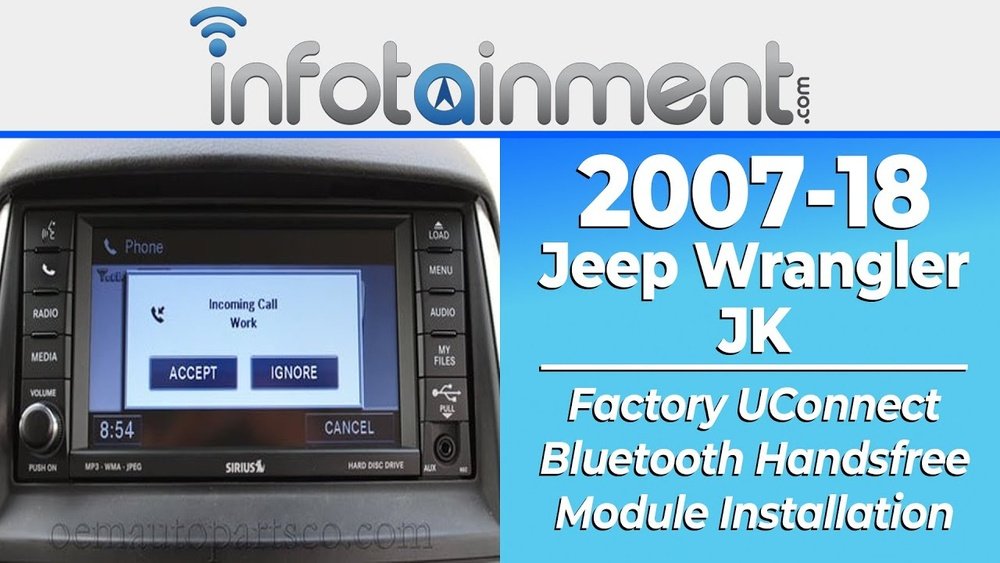
Modern Jeep Wranglers (especially 2018 and newer JL models) support Uconnect, a system that helps you link your phone for calls, music, and apps. If your Wrangler is older, you may need to use Bluetooth or an AUX cable.
Pairing Via Bluetooth
- Turn on your Jeep’s ignition.
- Enable Bluetooth on your phone.
- On the Uconnect screen, go to “Phone,” then “Add Device.”
- Select your Jeep from your phone’s Bluetooth list.
- Enter the PIN shown on the Jeep’s screen (if needed).
- Wait for the confirmation message.
Tip: If you have connection issues, try restarting both your phone and Uconnect system before repeating the steps.
Using Usb Or Aux
For music or charging, plug your phone into the USB port (usually found under the radio or inside the center console). Some Wranglers also have an AUX port for older devices.
Here’s how different Wrangler generations compare for connectivity:
| Wrangler Generation | Bluetooth | USB Support | Apple CarPlay/Android Auto |
|---|---|---|---|
| JK (2007-2018) | Optional | Yes (late models) | No |
| JL (2018+) | Yes | Yes | Yes (most trims) |
Setting Up Apple Carplay Or Android Auto
If your Wrangler supports Apple CarPlay or Android Auto, you can use apps like Maps, Spotify, or WhatsApp directly from the Uconnect screen. This is much safer than handling your phone while driving.
- Plug your phone into the Wrangler’s USB port.
- If it’s your first time, accept the permissions on your phone.
- The Uconnect screen should switch to the CarPlay or Android Auto menu.
- Use the touchscreen or steering wheel controls to operate your apps.
Non-obvious insight: Some older JL models require a specific USB port for CarPlay/Android Auto. If it doesn’t work, try the other USB slot.
Phone Settings For Safe Driving
Once your phone is physically mounted and connected, adjust your settings for a safer drive.
- Do Not Disturb: Turn this on to silence notifications while driving.
- Voice Assistant: Set up Siri or Google Assistant for hands-free control.
- Navigation: Download offline maps in case you lose signal during off-road adventures.
- Auto-connect: In Bluetooth settings, let your phone connect to your Jeep automatically.
Important: Always test your setup before driving. Make a test call, play some music, and check that your mount doesn’t block your view.
Common Problems And How To Solve Them
Even with the best setup, issues can happen. Here’s how to fix the most common ones:
- Phone won’t connect via Bluetooth: Delete the Jeep from your phone’s Bluetooth list, restart both devices, and try pairing again.
- Mount slips off the dash: Clean the surface with alcohol before installing adhesive mounts. For vent mounts, make sure the clip fits Wrangler’s round vents.
- CarPlay/Android Auto not working: Use a high-quality cable. Cheap cables often cause problems.
- Phone overheats: Avoid mounting near heat vents. On hot days, use windshield sunshades when parked.
Off-roading And Phone Setup
Jeep Wranglers are built for adventure, and off-roading brings extra challenges for your phone setup.
- Choose the most stable mount, such as grab handle or heavy-duty dash mounts.
- Keep charging cables short to avoid tangling.
- Download maps and playlists for offline use, since cell service can disappear off-road.
Hidden tip: Velcro strips can add extra security for your phone mount during extreme off-roading.

Security And Privacy
Don’t forget your phone holds a lot of personal data. When you sell or loan your Jeep:
- Remove your phone from the Uconnect or Bluetooth device list.
- Log out of apps connected through CarPlay or Android Auto.
- Wipe personal data if you’re trading in your Jeep.
For more on in-car technology and privacy, the Consumer Reports has an excellent resource.
Frequently Asked Questions
How Do I Connect My Phone To A Jeep Wrangler With No Touchscreen?
You can still pair your phone using the radio’s Bluetooth button and the phone’s Bluetooth menu. Follow the prompts on both devices. If Bluetooth isn’t available, use an AUX cable for calls and music.
What’s The Best Phone Mount For Off-roading In A Wrangler?
A grab handle mount or a heavy-duty dash mount is best. They hold your phone steady, even on rough trails.
Why Does My Phone Disconnect From Uconnect Randomly?
This often happens due to outdated software or low-quality cables. Update your phone and Uconnect system, and try a certified USB cable.
Can I Use Wireless Carplay Or Android Auto In My Jeep Wrangler?
Most Wranglers support wired CarPlay/Android Auto. Some newer models now offer wireless, but you may need an aftermarket adapter for older models.
Yes, but download maps offline and mount your phone securely. Cell signals can drop, so offline navigation is essential.
Setting up your phone in a Jeep Wrangler isn’t hard, but it pays to get it right. Choose a strong mount, connect your phone properly, and adjust your settings for safety. With the right setup, you’ll enjoy every drive—on and off the road—while keeping your hands (and eyes) where they belong.




