Setting the clock in your Jeep Wrangler might seem like a small detail, but it makes a big difference in everyday driving. Whether you just bought your Wrangler or the time changed for daylight saving, knowing how to adjust your clock quickly saves you from confusion on the road. Many drivers struggle with this simple task because Jeep clock controls can be a bit hidden, and the steps change with each model year. In this guide, you’ll get clear, step-by-step instructions for different Jeep Wrangler generations, plus practical tips to avoid common mistakes.
Understanding Your Jeep Wrangler’s Clock System
Jeep Wranglers use different clock systems depending on the model year and the type of radio or infotainment system installed. Most Wranglers from 2007 onward use either a basic radio, a touchscreen Uconnect system, or, in some cases, a digital instrument cluster. Knowing which system you have is the first step to setting your clock correctly.
| Model Year | Clock Setting Method | Common System |
|---|---|---|
| 2007-2010 | Manual buttons | Basic radio |
| 2011-2017 | Menu navigation | Uconnect (if equipped) |
| 2018-present | Touchscreen settings | Uconnect / Digital cluster |
If you’re unsure about your Wrangler’s year or system, check your owner’s manual or look at the radio display.
How To Set The Clock: Step-by-step By Model Year
Setting The Clock (2007–2010 Jeep Wrangler)
- Turn on the ignition. The radio must have power.
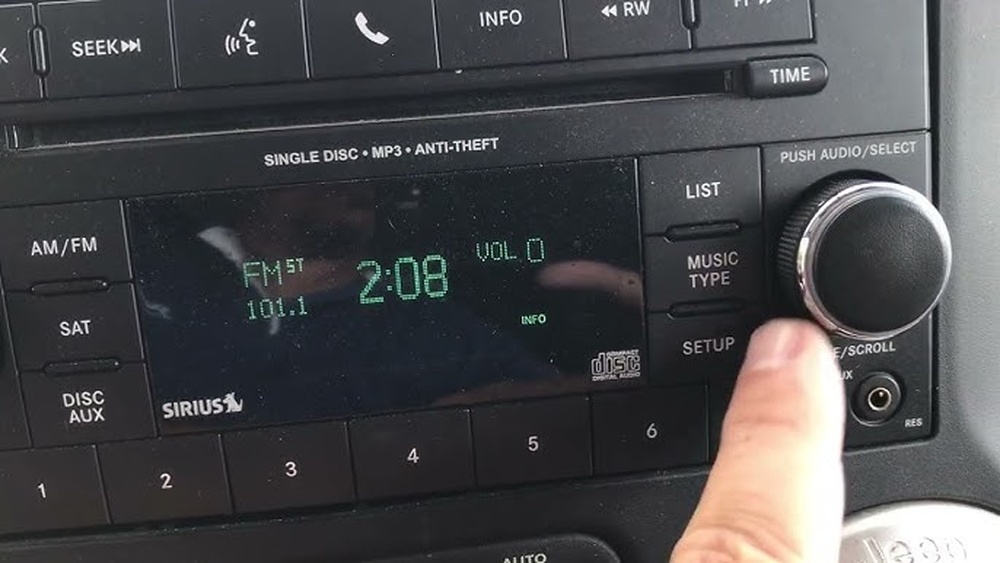
- Locate the ‘Time’ button. Usually, this button is labeled ‘Time’ or ‘Clock’ on the radio.
- Press and hold the button until the clock starts to blink.
- Use the ‘Seek’ or ‘Tune’ buttons to adjust the hours and minutes. One button changes hours; the other changes minutes.
- Press ‘Time’ again to confirm and exit.
Tip: If you skip a step or wait too long, the clock might stop blinking. Just repeat from step 2.
Setting The Clock (2011–2017 Jeep Wrangler)
Most Wranglers in this range have the Uconnect system.
- Turn on your Jeep and the radio.
- Press the ‘Menu’ button on the radio.
- Scroll to ‘Clock Settings’ using the ‘Tune’ knob or arrow buttons.
- Select ‘Set Time’ and use the knob to adjust hours and minutes.
- Press ‘OK’ or the menu button again to save your changes.
Insight: Uconnect radios sometimes sync with GPS. If your time resets, check your GPS settings.
Setting The Clock (2018–present Jeep Wrangler)
Recent Wranglers use a touchscreen system, making clock setting easier.
- Switch on your Wrangler and touch the ‘Apps’ icon on the display.
- Tap ‘Settings’, then ‘Clock & Date’.
- Toggle off ‘Sync with GPS’ if you want to adjust manually.
- Set your time and date using the on-screen arrows or entry fields.
- Press the back arrow to exit. Your changes save automatically.
Non-obvious tip: For automatic daylight saving time adjustment, keep ‘Sync with GPS’ turned on. Manual changes will overwrite GPS time until you reactivate syncing.
| System Type | Manual Setting? | GPS Sync Option? |
|---|---|---|
| Basic Radio | Yes | No |
| Uconnect (2011-2017) | Yes | Sometimes |
| Touchscreen (2018+) | Yes | Yes |
Common Issues And Troubleshooting
Even after following the steps, sometimes the clock won’t set or keeps changing. Here are some causes and solutions:
- Radio resets after power loss: If your battery was recently disconnected, the clock might reset. Repeat the steps above.
- Clock won’t save changes: This usually happens if you don’t confirm with the ‘OK’ or ‘Time’ button. Make sure you finish the sequence.
- Time keeps changing: Your Jeep might be syncing with GPS or an external signal. Check your system’s ‘Sync’ setting.
- Buttons unresponsive: If none of the clock buttons work, your radio might need a reset or there could be a fuse issue.
Practical tip: Always set the clock when the vehicle is in ‘Park’ for safety. Some settings are blocked while driving.
Special Features And Settings
Newer Jeep Wranglers offer more than just basic clock adjustments. Explore these features for better use:
- 12/24-hour format: In Uconnect, you can switch between AM/PM and 24-hour military time.
- Automatic daylight saving: With GPS sync, the clock updates automatically for daylight saving time changes.
- Multi-zone clocks: Some models allow displaying different times for driver and passenger screens.
- Custom date format: In the settings, you can often choose how the date appears.
Non-obvious insight: If you often cross time zones, keeping GPS sync active ensures your clock always matches local time.

What To Avoid When Setting The Clock
- Don’t adjust the clock while driving. It’s easy to get distracted.
- Don’t force the buttons. If a button sticks, it might break. Try gently or consult a mechanic.
- Don’t ignore repeated resets. If your clock resets every time you start the car, your battery or radio wiring could have a problem.
Experience tip: If you replace your Jeep’s radio with an aftermarket unit, check the manual for clock setting steps. Aftermarket systems often use completely different menus.
When You Might Need Professional Help
Most clock setting problems are easy to fix yourself. However, seek help if:
- The radio display is blank or flickering.
- None of the buttons respond, even after a reset.
- The clock loses time rapidly every day.
These might point to deeper electrical issues. A certified Jeep technician can quickly diagnose and repair these problems.
Frequently Asked Questions
How Do I Know If My Jeep Wrangler Has Gps Clock Sync?
Check your infotainment system’s clock settings. If you see an option for ‘Sync with GPS’ or ‘Automatic time’, your vehicle supports GPS syncing.
Why Does My Clock Keep Resetting When I Start My Jeep?
This often happens after a battery change or if there’s a wiring issue. If the problem continues, have your battery and radio wiring checked by a professional.
Can I Change The Clock Format To 24-hour Time?
Yes. In most recent Jeep Wranglers with Uconnect, go to Settings > Clock & Date and select the 24-hour format.
Does The Clock Update Automatically For Daylight Saving Time?
If your system has GPS sync enabled, the clock will adjust automatically for daylight saving changes. Otherwise, you’ll need to set it manually.
Where Can I Find Official Jeep Wrangler Manuals Online?
You can download official owner’s manuals from the Jeep Official Site for free.
Setting your Jeep Wrangler clock isn’t just about keeping time—it helps you stay organized and on schedule. With these steps, you’ll adjust your clock quickly and avoid common mistakes. If you ever run into trouble, your owner’s manual or a trusted Jeep dealer can always help you out.