Setting the right time on your Jeep Cherokee is more important than it seems. A correct clock helps you plan better, keeps you on schedule, and ensures your vehicle’s information systems work properly. Whether you’ve just adjusted for daylight savings, changed the car battery, or moved to a new time zone, resetting your Jeep Cherokee’s clock is a quick task that anyone can do.
Let’s walk through the process step by step for both older and newer Cherokee models, and highlight some helpful tips to avoid common mistakes.
Understanding Your Jeep Cherokee’s Clock System
The Jeep Cherokee has evolved over the years, and so has its clock system. Knowing your Cherokee’s model year is key, as the steps differ between older analog-style setups and newer touchscreen-based Uconnect systems.

| Model Year | Clock Type | Main Adjustment Method |
|---|---|---|
| 2013 and earlier | Manual/Analog or Basic Digital | Physical buttons/knobs |
| 2014 and later | Digital (Uconnect touchscreen) | Touchscreen controls |
Before starting, check your Jeep’s dashboard or infotainment center to identify your clock type.
How To Change Time On Jeep Cherokee (2013 And Earlier)
Older Jeep Cherokees use basic radios or analog clocks. The process is simple, but can trip up even experienced drivers if they miss a step.
- Turn the ignition to ACC or ON. You don’t need to start the engine, but the key must be in a powered position so the display lights up.
- Locate the clock adjustment buttons. These are often labeled as “H” (Hour), “M” (Minute), or sometimes “Clock” and are found near the radio display.
- Press and hold the “Clock” button if present. On some models, you may need to press and hold both the “H” and “M” buttons together for a few seconds to enter clock setting mode.
- Adjust the hour. Press or hold the “H” button until the correct hour appears. Be sure to note AM/PM if your display shows it.
- Adjust the minutes. Press or hold the “M” button to set the correct minutes.
- Save your settings. Usually, the time will save automatically after a few seconds, or you may need to press the “Clock” button again.
Pro Tip: If your vehicle’s battery has recently died or been replaced, the clock may reset to 12:00. Don’t forget to check and update it.
How To Change Time On Jeep Cherokee (2014 And Newer)
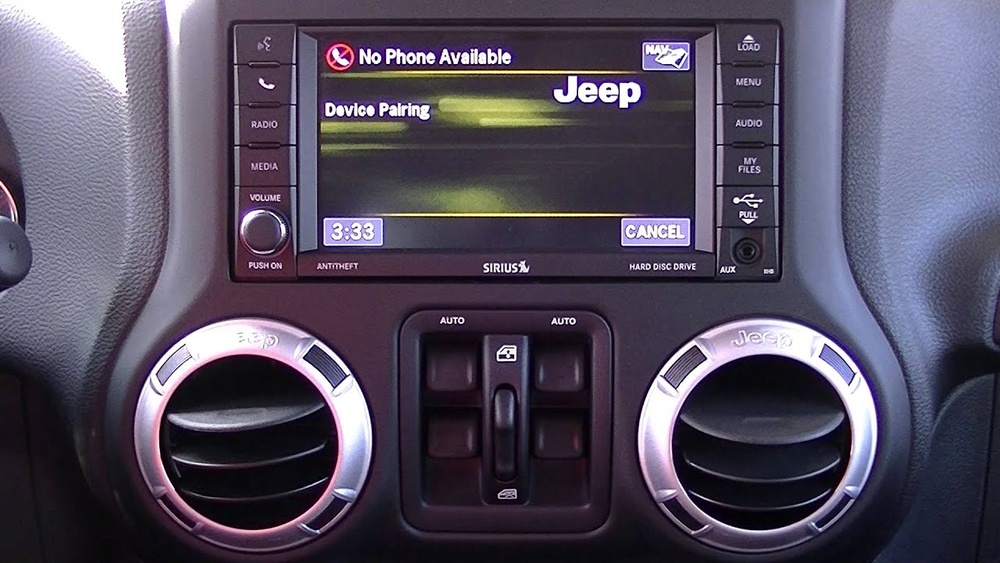
Starting with the 2014 model, the Jeep Cherokee features the Uconnect infotainment system with a touchscreen display. Setting the time here is even easier, but the menu structure can be confusing if you’ve never used it.
- Turn on the ignition.
- Tap the “Settings” icon on the Uconnect home screen.
- Scroll and select “Clock & Date.”
- Choose “Set Time.”
- Use the on-screen + and – buttons to set the hour and minutes.
- If needed, select AM/PM or switch between 12-hour and 24-hour formats.
- Tap “Save” or exit to confirm.
Some Uconnect systems also offer automatic time updates via GPS or cellular data. If your time keeps resetting, check if this setting is turned on or off. This can be useful, but in some areas with poor signal, it may not work reliably.
Uconnect System Comparison
Here’s a quick look at Uconnect versions used in recent Cherokees:
| Uconnect Version | Screen Size | Time Setting Method | Auto Time Update |
|---|---|---|---|
| Uconnect 5.0 | 5-inch | Manual | No |
| Uconnect 8.4 | 8.4-inch | Manual/Automatic | Yes |
If you’re unsure which Uconnect version you have, check your owner’s manual or look for the version in the “About” section on your touchscreen.
Common Problems And Solutions
Even experienced drivers can run into issues when adjusting the clock. Here’s how to handle the most frequent problems:
- Buttons not working: If the hour or minute buttons are unresponsive, the radio might be locked. Try turning the vehicle off and on, or consult your manual for a radio reset.
- Time not saving: Ensure you finish the process—some systems require you to press “Save” or exit settings to confirm.
- Wrong time zone: For Uconnect, select the correct time zone under the “Clock & Date” menu.
- Clock resets after every drive: This usually points to a weak battery or a blown radio fuse.
- Daylight Saving Time issues: Some Uconnect systems need manual DST adjustment. Look for a “Daylight Saving Time” toggle in the settings.
Insight: Many owners forget to check if the Uconnect’s automatic time update is enabled after a software update. This can cause the clock to drift or reset unexpectedly.

Tips For Keeping Your Jeep Cherokee’s Clock Accurate
- Update after battery changes. The clock will likely reset to the factory default.
- Check after software updates. Infotainment updates can change your clock or reset auto-update settings.
- Use the auto time feature if available. This uses GPS to keep your clock accurate as you travel.
- Double-check during daylight saving changes. Not all systems update automatically.
- Regularly verify your time zone setting. If you drive across zones, update it to match your location.
Quick Comparison: Manual Vs. Uconnect Clock Setting
| Feature | Manual Clock | Uconnect Clock |
|---|---|---|
| Adjustment Method | Physical buttons | Touchscreen menu |
| Time Zone Control | No | Yes |
| Automatic Updates | No | Yes (on some versions) |
| Common Issues | Button failure, fuse issues | Software glitches, GPS errors |

Why Setting The Clock Matters
A correct clock does more than tell time. The navigation system, scheduled maintenance reminders, and even some safety features use the clock to work correctly. For example, the automatic headlight function and remote start schedules rely on your Jeep knowing the exact time. If you often travel across time zones or areas with daylight saving time changes, a wrong clock can lead to missed appointments or confusion with scheduled vehicle features.
Frequently Asked Questions
How Do I Know If My Jeep Cherokee Has Uconnect?
If your dashboard has a touchscreen display with apps and settings, you have Uconnect. Most models from 2014 onwards include this system.
My Clock Keeps Resetting Every Time I Turn Off My Cherokee. What’s Wrong?
This usually points to a weak car battery or a blown radio fuse. It can also happen if the infotainment system needs a reset.
Can I Set The Clock Using Voice Commands On My Jeep Cherokee?
Some advanced Uconnect systems support basic voice commands, but clock setting often still requires manual adjustment through the touchscreen.
Does My Jeep Cherokee Automatically Update The Time For Daylight Saving?
Only some Uconnect systems support automatic DST updates. Check the clock settings menu for a “Daylight Saving Time” option and make sure it’s enabled.
Where Can I Find More Details About My Cherokee’s Clock System?
The best source is your owner’s manual or the official Jeep website. For more technical info and updates, you can visit the official Jeep Owners site.
Setting the time on your Jeep Cherokee is quick once you know how. Take a moment to check your clock after any battery change, software update, or time zone shift. Keeping your vehicle’s time correct helps everything run smoother—from navigation to reminders—making your drive safer and less stressful.