Setting the clock on your 2015 Jeep Wrangler may seem like a minor detail, but having the correct time helps with daily routines and planning. Inaccurate time can cause confusion, especially during long drives or when managing appointments. Luckily, adjusting the clock is simple once you know the steps. In this article, you’ll learn exactly how to set the clock, understand the dashboard buttons, and get tips to avoid common mistakes Jeep owners make. Even if you have never adjusted the clock before, you’ll find clear guidance here.
Understanding Your 2015 Jeep Wrangler Clock System
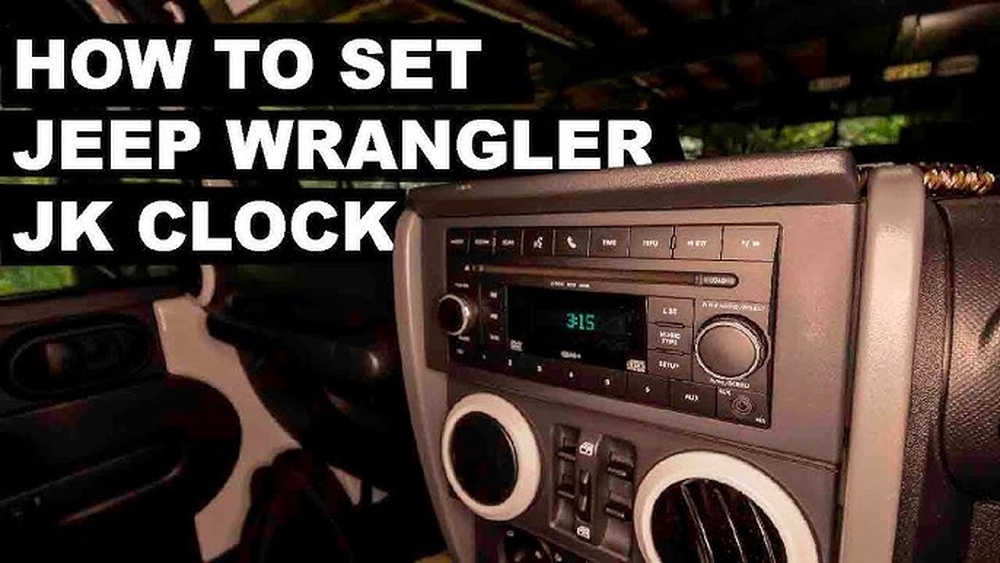
The 2015 Jeep Wrangler uses a basic digital clock system, typically integrated into the radio display. The process is similar on both standard radios and upgraded Uconnect systems, but small differences exist.
Standard radios have physical buttons labeled H (Hour) and M (Minute) or a “Clock” button. The Uconnect system, found on some trims, uses touchscreen controls. Knowing which system your Jeep uses helps you follow the correct steps.
Step-by-step: Setting The Clock On Standard Radio
Most 2015 Jeep Wranglers come with the standard radio. Here’s how to set the time:
- Turn on the ignition. The radio must be on, but the engine does not need to run.
- Locate the clock buttons. Look for buttons labeled H (Hour) and M (Minute). Sometimes, you must press and hold the “Time” or “Clock” button to access clock-setting mode.
- Press and hold the “Clock” button until the time display blinks.
- Set the hour by pressing the H button. Each press advances the hour by one.
- Set the minute by pressing the M button. Each press advances the minute by one.
- Finalize the setting. Either wait a few seconds or press the “Clock” button again to save.
Pro tip: If you accidentally go past the correct number, you must cycle through the numbers again—there’s no “back” button on most models.
Setting The Clock On Uconnect System
If your Jeep has the Uconnect touchscreen, the steps are a bit different:
- Turn the ignition to RUN and power on the radio.
- Tap the “Settings” icon on the main menu.
- Select “Clock & Date.”
- Choose “Set Time.”
- Adjust the hour and minute using the plus (+) and minus (-) icons.
- Confirm and exit. Your changes save automatically.
Some Uconnect systems allow you to select AM/PM or choose between 12-hour and 24-hour formats. Double-check these options to match your preference.
Key Differences: Standard Radio Vs. Uconnect
Here’s a quick comparison to help you know which instructions to use:
| Feature | Standard Radio | Uconnect System |
|---|---|---|
| Controls | Physical buttons (H, M, Clock) | Touchscreen navigation |
| Clock Format | 12-hour only | 12-hour or 24-hour |
| Reset Method | Manual only | Manual or automatic (if GPS equipped) |
Common Problems And How To Fix Them
Sometimes, Jeep owners face issues when setting the clock. Here are a few common ones:
- Buttons not responding: This usually happens if the radio is off or the vehicle is not in the “ON” position. Turn the key to “RUN.”
- Clock reverts to old time: If the battery was recently disconnected, the clock may reset. Repeat the setup process.
- Display won’t enter clock mode: Try holding the “Clock” or “Time” button longer—sometimes up to 5 seconds.
If the clock continues to malfunction, it could indicate a deeper electrical issue. In such cases, consult your Jeep dealer or a trusted mechanic.
Tips For Accurate Time Setting
- Set the time to the nearest minute. The display does not show seconds, so rounding up avoids confusion.
- Adjust for Daylight Saving Time. You must manually change the clock in spring and fall.
- Check after a battery change. The clock often resets after power loss.
- Use a smartphone or GPS as a reference for the most accurate time.
A small detail, like an accurate clock, helps keep your day running smoothly.
Why Accurate Time Matters
Many drivers overlook the importance of the dashboard clock. But in situations like scheduled maintenance, road trips, or coordinating with others, having the correct time is useful. Some insurance companies may even ask for trip logs, where time accuracy matters.
Table: When You Should Reset Your Jeep Wrangler’s Clock
| Event | Should You Reset? | Reason |
|---|---|---|
| Battery Replacement | Yes | Power loss resets the clock |
| Daylight Saving Time Change | Yes | Manual adjustment needed |
| Traveling Across Time Zones | Optional | For local accuracy |
| Radio System Upgrade | Yes | Settings may reset |

Non-obvious Insights For Jeep Owners
Many people do not realize that aftermarket radios often require different clock-setting steps. If your Jeep has a replaced stereo, check the specific manual. Also, if your vehicle’s battery is weak, the clock can lose time gradually—this subtle problem often goes unnoticed until the time is off by several minutes.
Another tip: Some Jeep Wranglers with Uconnect can sync the clock automatically if GPS is enabled, but you must activate this feature in the settings menu.
External Resource For More Details
If you want more information about your Jeep’s radio and clock features, visit the Jeep Official Owners’ Manuals page.

Frequently Asked Questions
How Do I Know If My Jeep Has The Uconnect System?
Look for a touchscreen display on your dashboard. If you see buttons only, you likely have the standard radio.
Does The Jeep Wrangler Clock Update Automatically With Gps?
Some Uconnect systems can update the time automatically if GPS is enabled and set up in the menu. Standard radios do not have this feature.
What If My Clock Changes By Itself After A Battery Change?
This is normal. A battery disconnect resets the clock. Simply follow the steps above to set the time again.
Can I Set The Clock While Driving?
For safety, it’s best to adjust the clock while parked. Some settings may be disabled while the vehicle is in motion.
My Radio Was Replaced. How Do I Set The Clock Now?
Check the manual for your aftermarket radio. The steps can differ from the original Jeep system.
Keeping your 2015 Jeep Wrangler’s clock accurate is easy with the right steps. A few minutes of attention now can save you confusion later and keep your driving experience smooth and stress-free.