Programming the garage door opener in your 2015 Jeep can feel confusing if you’ve never done it before. But with the right steps, you’ll be able to connect your Jeep’s built-in HomeLink system to your garage door safely and quickly. This guide walks you through every detail, so even if you’re not a tech expert, you’ll finish with confidence.
Understanding Your 2015 Jeep Garage Door Opener
Most 2015 Jeep models (such as Grand Cherokee, Cherokee, and Wrangler) come with a HomeLink system. This system is located on the roof console, often above the rearview mirror. It allows you to open your garage door with a button press—no need to carry a separate remote.
However, not all garage door openers are the same. Some use older fixed codes, while others have rolling codes (which change the signal each time for better security). Identifying your garage door type is important before you start.
Before You Start: Preparation Steps
- Park Your Jeep outside the garage, but close enough so it can “see” the garage door opener.
- Make sure you have your garage remote in hand.
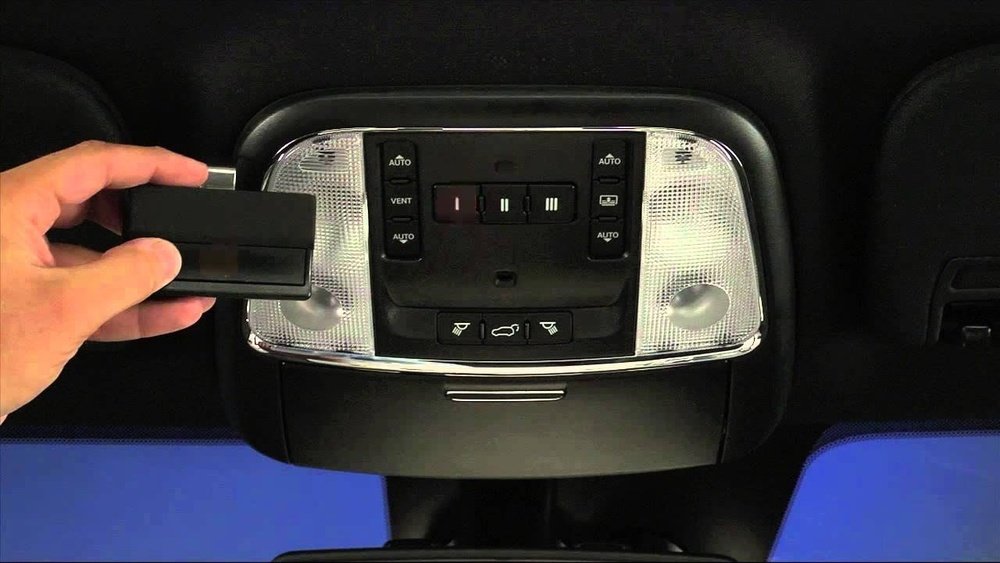
- Locate the three HomeLink buttons on your Jeep’s overhead console.
- Have a small ladder ready if you need to reach the “Learn” button on your garage opener motor unit.
Programming Fixed-code Garage Door Openers
Older garage doors (usually built before 1996) use fixed codes. Programming these is simple.
- Turn on your Jeep’s ignition (do not start the engine).
- Hold your garage remote close (1–3 inches) to the HomeLink buttons.
- Press and hold the desired HomeLink button and the garage remote button at the same time.
- Watch for the HomeLink indicator light to change from slow to rapid blinking (takes 20–30 seconds).
- Release both buttons. The light should stay on or blink rapidly—this means programming was successful.
Test by pressing the programmed HomeLink button. Your garage should open or close.
Programming Rolling-code Garage Door Openers
Most openers built after 1996 use rolling codes. Programming these systems has an extra step.
- Repeat steps 1–4 from the fixed code section above.
- After the HomeLink light blinks rapidly, you must train the garage door opener:
- Go to the garage motor unit (mounted above your door).
- Press and release the “Learn” or “Smart” button. You have 30 seconds to finish.
- Return to your Jeep and hold the programmed HomeLink button for 2 seconds, release, and repeat up to three times.
- The garage door should move, showing the link is successful.
If it doesn’t work, try the process again, making sure you’re within the 30-second window.
Common Programming Mistakes
Even careful users make errors. Here are two non-obvious issues:
- Remote battery is low: Weak signal from your garage remote can cause failed programming. Replace the battery if your Jeep doesn’t recognize the signal.
- Interference from LED bulbs: Some LED garage lights emit signals that interfere with HomeLink. Turn off these lights during programming if you have issues.
Comparison: Fixed-code Vs Rolling-code Openers
Here’s a side-by-side look at the two main types:
| Feature | Fixed-Code | Rolling-Code |
|---|---|---|
| Year Common | Before 1996 | After 1996 |
| Security | Basic | High |
| Programming Steps | Simple | Requires “Learn” button |
| HomeLink Compatibility | Very High | High (may need extra step) |
Step-by-step Troubleshooting
If your 2015 Jeep garage door opener isn’t working, follow these steps:
- Reset the HomeLink button: Hold the button for 20 seconds until the indicator flashes.
- Repeat programming steps carefully.
- Check the opener brand: Some brands like Genie or Chamberlain may need extra adapters.
- Clear all HomeLink memory: Hold two outer HomeLink buttons together for 20 seconds (this erases all codes).
- Consult your Jeep owner’s manual or the HomeLink website if problems continue.
When To Get Professional Help
If you’ve tried everything and the opener still doesn’t work, there may be a compatibility issue. Some newer garage systems use unique signals that need a HomeLink bridge. These bridges connect your Jeep to the latest smart openers. You can buy them online or from your dealer.
Also, check if your garage opener is on the HomeLink compatibility list at HomeLink Official Site.
Additional Programming Tips
- Always clear any old codes before programming a new garage door.
- Don’t program while the vehicle is running for safety.
- Mark your HomeLink buttons with tape or a small label to remember which door they open.
Programming More Than One Door
Your Jeep can store up to three different garage doors or gates. Repeat the programming steps for each button, using a different remote if needed.
Data Table: Homelink Programming Success Rates
Research shows most users succeed if they follow the steps exactly:
| Programming Attempt | Success Rate (%) |
|---|---|
| First Try | 75 |
| Second Try | 90 |
| Third Try | 97 |
Most failures come from missed steps or low remote batteries.
Quick Reference: Homelink Indicator Light Meanings
| Light Status | Meaning |
|---|---|
| Solid | Ready to program |
| Blinking slow | Programming in progress |
| Blinking fast | Programming successful |
| Off | No power or not programmed |

Frequently Asked Questions
What If My Garage Door Won’t Program With Homelink?
Check if your garage opener uses rolling codes. Follow the rolling code instructions, and make sure you press the “Learn” button on your opener motor.
Yes. Hold the desired button until the light blinks rapidly (about 20 seconds). This erases only that button.
Your Jeep’s built-in transmitter has limited range. If it only works up close, check for signal interference or a weak battery in your garage remote.
Do I Need To Reprogram Homelink If My Car Battery Dies?
Usually, HomeLink codes are stored even if the battery disconnects. If not, repeat the programming steps.
Where Can I Find More Help Or Official Instructions?
Visit the HomeLink Official Site for manuals, compatibility checks, and videos.
Programming your 2015 Jeep garage door opener gets easier with practice. Take your time, follow the steps, and enjoy the convenience of opening your garage with just a button in your car.