Setting up the garage door opener in your Jeep can make daily life much easier. No more fumbling for remote controls or worrying about lost clickers. Many Jeep models, especially newer ones, offer a built-in system called HomeLink. This feature lets you control your garage door, gates, and even home lighting with simple buttons inside your vehicle. But pairing your Jeep with your garage door isn’t always straightforward, especially for first-timers. This guide will walk you through the process, clear up common confusion, and help you avoid beginner mistakes.
Understanding Jeep Homelink
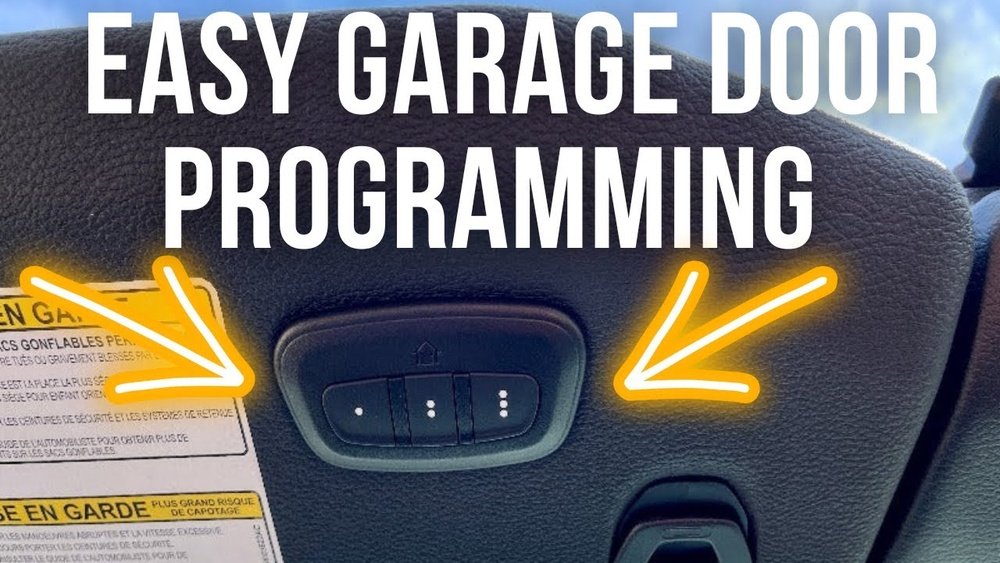
Most modern Jeeps, such as the Jeep Grand Cherokee, Jeep Wrangler, and Jeep Gladiator, come with a HomeLink system. You’ll find three small buttons, usually above the windshield or on the overhead console. These buttons can be programmed to control different devices.
HomeLink works with most garage door openers made after 1993, especially those with rolling codes. Older systems may need extra steps or might not be compatible.
Here’s a quick comparison of Jeep models and their HomeLink compatibility:
| Jeep Model | HomeLink Standard | Location of Buttons |
|---|---|---|
| Grand Cherokee | Yes | Overhead Console |
| Wrangler | Yes | Overhead Console |
| Compass | Optional | Rearview Mirror |
| Gladiator | Yes | Overhead Console |
Preparing For Setup
Before starting, gather these items:
- Your Jeep (with HomeLink)
- The original garage door remote
- Access to the garage door opener unit (usually in your garage ceiling)
- The vehicle’s manual (optional but helpful)
Check your garage door opener’s brand and model. Most brands like LiftMaster, Chamberlain, and Genie are compatible. If you aren’t sure, look for a “learn” or “program” button on your opener. This is needed for pairing.
Here’s a quick table comparing opener brands and their setup difficulty:
| Brand | Rolling Code | Setup Difficulty |
|---|---|---|
| LiftMaster | Yes | Easy |
| Chamberlain | Yes | Easy |
| Genie | Yes | Moderate |
| Craftsman | Some Models | Varies |
| Older Brands | No | Hard |
Step-by-step Programming Guide
1. Clear Existing Codes
If your Jeep’s HomeLink buttons were used before, you must clear them. Press and hold the first and third buttons together until the indicator light flashes (10–20 seconds). This resets the system.
Pick one of the HomeLink buttons to control your garage door. It’s smart to use the first button for your main garage, and others for gates or extra doors.
3. Hold Remote And Program
Sit inside your Jeep. Hold the garage remote 1–3 inches from the HomeLink button. Press and hold both the remote button and the chosen HomeLink button. The indicator light should change from slow to rapid blinking. This means the signal is accepted.
4. Connect To Garage Opener (rolling Code Models)
Go to your garage door opener unit. Press the “learn” or “program” button (usually a colored button). You’ll have 30 seconds to return to your Jeep and press the HomeLink button for two seconds. Repeat two times to finish pairing.
5. Test The System
Wait a few seconds. Press the HomeLink button in your Jeep. The garage door should move. If not, repeat steps 3–4.
Tips For A Smooth Setup
- Battery Check: Weak batteries in the remote can cause pairing failures. Change batteries if needed.
- Rolling Code Confusion: Many newer openers use rolling codes for security. Always use the “learn” button step, or the system won’t sync.
- Distance Matters: Keep the remote close to the HomeLink button during programming. Too far can block the signal.
- Multiple Doors: If you have more than one garage, each needs its own button and programming.
- Resetting: If you make mistakes, reset HomeLink and start over. This avoids mixed signals.
Common Mistakes And Solutions
- Wrong Button Used: Make sure you press the correct HomeLink button during setup.
- Skipping the Learn Button: Not pressing the opener’s “learn” button is a frequent error.
- Remote Signal Issues: Some remotes use unique frequencies. If the light never blinks rapidly, your remote may not be compatible.
- Waiting Too Long: The “learn” button times out quickly. Be ready to press the HomeLink button within 30 seconds.
Security And Convenience Benefits
Pairing your Jeep with your garage opener isn’t just convenient—it’s safer. HomeLink uses encrypted signals, making it harder for thieves to copy. You also reduce clutter, since you don’t need extra remotes.
According to a 2022 survey, over 80% of Jeep owners who use HomeLink say it makes their daily routine faster and easier. You can find more details about HomeLink technology at HomeLink Official Site.

Frequently Asked Questions
How Many Devices Can I Program With Jeep Homelink?
You can program up to three devices—typically garage doors, gates, or home lighting systems. Each button supports one device.
What If My Garage Door Opener Is Older Than 1993?
Older openers may not support rolling codes. Check your opener’s manual. Some older units require a special adapter or may not work with HomeLink at all.
No, you must reset all buttons at once. Press and hold the first and third buttons until the indicator light flashes. Then reprogram as needed.
Is Homelink Compatible With Smart Garage Systems?
Most smart garage systems like myQ are compatible, but some need extra steps. Always check your smart opener’s compatibility before programming.
What Should I Do If Homelink Doesn’t Work After Setup?
First, check your remote’s battery and repeat the programming steps. If it still fails, consult your Jeep’s manual or contact a Jeep dealer for support.
Setting up your Jeep garage door opener can seem tricky, but following these steps makes it much simpler. Remember to check compatibility, use fresh batteries, and don’t skip the “learn” button step. Once programmed, you’ll enjoy seamless entry and greater security every day.