If you drive a Jeep Patriot, you might wonder how to use its fog lights for safer driving in bad weather. Fog lights can help you see better when it’s foggy, rainy, or snowy. But many owners aren’t sure how to turn them on, especially if they’re new to the vehicle or bought it used. This guide will show you step-by-step how to activate your Jeep Patriot fog lights, explain common mistakes, and help you get the most out of your lights.
Why Use Fog Lights?
Fog lights are designed to improve your visibility when normal headlights struggle. They are placed low on the bumper and shine light close to the ground. This helps cut through fog, mist, or dust, reducing glare and letting you see road markings and obstacles. Unlike high beams, fog lights don’t reflect back into your eyes.
Here’s when fog lights are most useful:
- Heavy fog: Your regular headlights can create glare.
- Intense rain or snow: Fog lights improve ground visibility.
- Dusty roads: They help you see the edge of the road.
According to the National Highway Traffic Safety Administration (NHTSA), improper use of fog lights can distract other drivers or cause accidents. Always use them only when needed.
Locating Your Jeep Patriot Fog Light Controls
The Jeep Patriot uses a simple control for fog lights, but the exact location and method can vary by model year. Most Patriots from 2007 to 2017 have the fog light switch integrated with the headlight control.
Here’s how to find it:
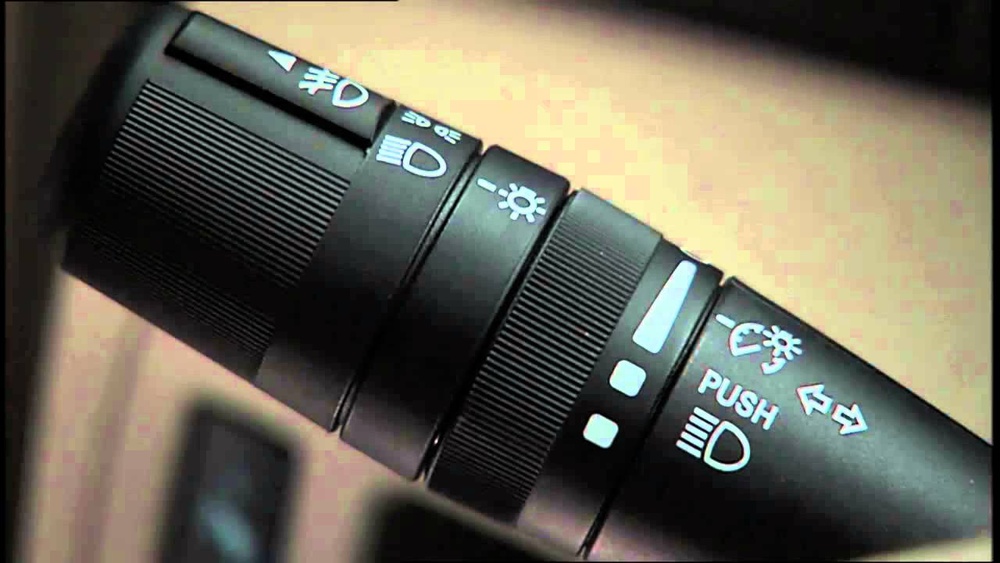
- Steering column: Look for the multifunction stalk on the left side.
- Headlight knob: Fog lights are usually controlled by a pull or push action on this knob.
If your model doesn’t have fog lights, you may see a blank space or dummy switch. Check your owner’s manual or look for the fog light symbol—a horizontal oval with three lines.

How To Turn On Jeep Patriot Fog Lights
Turning on your fog lights is simple once you know where the controls are. Follow these steps:
- Start your Jeep Patriot: Fog lights only work when the ignition is on.
- Turn on the headlights: Fog lights need the regular headlights (low beam) to be on first.
- Locate the headlight control knob: It’s on the left stalk, near the steering wheel.
- Pull the knob outward: For most Patriots, you pull the headlight knob toward you. This activates the fog lights.
- Check the dashboard: You should see a green indicator light with the fog light symbol.
If the fog lights don’t turn on, check if your model supports them or if the bulbs are working.
Here’s a comparison of the fog light activation process for different years:
| Model Year | Control Method | Indicator Light |
|---|---|---|
| 2007–2010 | Pull headlight knob outward | Green fog light symbol |
| 2011–2017 | Same as above | Green fog light symbol |
| No fog lights | Dummy switch | No indicator |
Common Mistakes And Troubleshooting
Many drivers make simple mistakes when using fog lights. Let’s look at the most common ones:
- Trying to turn on fog lights without headlights: Fog lights only work with low beams.
- Confusing fog lights with high beams: Fog lights are on the bumper, not inside the main headlight housing.
- Broken bulbs or fuse: If the indicator doesn’t light up, check the bulbs and fuse.
Troubleshooting tips:
- If fog lights don’t work, check the fuse box under the hood. The fog light fuse is usually labeled.
- Inspect the bulbs by removing the front bumper panel. Replace them with the correct type—most Patriots use H10 or 9145 bulbs.
- For persistent issues, consult a mechanic or your dealer.
Here’s a quick comparison of fog light bulb types:
| Bulb Type | Years Used | Lifespan (hours) |
|---|---|---|
| H10 | 2007–2017 | 500–1000 |
| 9145 | Some trims | 700–1200 |

Tips For Safe Fog Light Use
Fog lights are powerful, so use them wisely. Here are some expert tips:
- Turn off fog lights in clear conditions: Using them without fog can distract other drivers.
- Check regulations: Some states limit fog light use. For example, California allows fog lights only in poor visibility.
- Clean your fog lights: Dirt and mud block their effectiveness.
- Replace bulbs in pairs: This keeps brightness balanced.
A non-obvious tip: If you install LED fog lights aftermarket, make sure they don’t exceed legal brightness. Too bright fog lights can be unsafe.
Upgrading Your Jeep Patriot Fog Lights
If your Jeep Patriot doesn’t have fog lights or you want brighter lights, you can upgrade them. Many owners choose LED or halogen bulbs for better performance. Always choose bulbs that fit your Patriot’s housing and wiring.
Some aftermarket kits may require extra wiring or switches. If you’re not comfortable with electrical work, ask a professional. Upgraded fog lights can improve visibility by up to 40% compared to factory bulbs.
For detailed installation instructions, visit the official Jeep site or trusted automotive forums. Here’s an external resource: Jeep Owner’s Manuals.

Frequently Asked Questions
How Do I Know If My Jeep Patriot Has Fog Lights?
Look at the lower front bumper. If you see round lights separate from the main headlights, those are fog lights. You can also check your dashboard for the fog light symbol.
Can I Use Fog Lights Without Turning On The Headlights?
No. On the Jeep Patriot, fog lights only work when the low beam headlights are on. This is a safety feature to prevent misuse.
What Type Of Bulb Does My Jeep Patriot Fog Light Use?
Most Jeep Patriots use H10 bulbs, but some trims use 9145. Always check your manual or the old bulb before buying replacements.
Why Won’t My Fog Lights Turn On?
Common reasons include a blown bulb, a faulty fuse, or trying to turn them on without headlights. If none of these, there might be a wiring issue.
Are Led Fog Lights Better For The Jeep Patriot?
LED fog lights are brighter and last longer, but make sure they are not too bright for legal limits. Check fit and compatibility before installing.
Turning on your Jeep Patriot fog lights is easy once you know how. Use them only when visibility is poor, keep the bulbs and lenses clean, and upgrade if you want better performance. With proper use, fog lights can help you drive safely in tough weather.