Connecting your phone to a 2015 Jeep Wrangler is more than just playing music. It lets you make hands-free calls, use navigation, and enjoy your favorite playlists safely. Many Jeep owners find this process confusing, especially if they’re using the car’s built-in system for the first time. This guide will walk you through every step, highlight common mistakes, and share tips to help you get the most out of your Wrangler’s connectivity features.
Understanding Your 2015 Jeep Wrangler’s Connectivity
The 2015 Jeep Wrangler typically uses the Uconnect system. This system supports Bluetooth connections for both Android and iPhone devices. Some models include a USB port for charging and media, but Bluetooth is the main method for phone integration.
Knowing your Uconnect version is helpful. Most 2015 Wranglers have Uconnect 130, 430, or 730N. The pairing process is similar for all, but features may vary slightly. For instance, Uconnect 730N offers more advanced navigation and voice control.
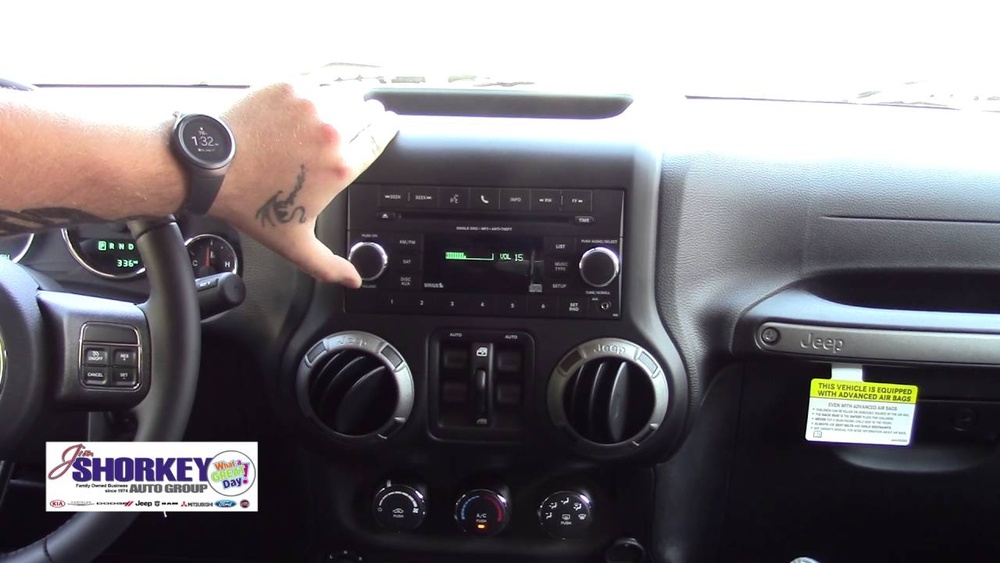
Step-by-step: Pairing Your Phone Via Bluetooth
Follow these steps to connect your phone to your Jeep:
- Turn On Bluetooth: Activate Bluetooth on your phone. This option is usually under “Settings,” then “Connections” or “Bluetooth.”
- Start Your Jeep: Turn the ignition key to “On.” The Uconnect system powers up automatically.
- Access Uconnect Menu: Press the “Phone” button on the radio or touch screen. If this is your first time, the system will prompt you to begin pairing.
- Select Add Device: Choose “Add Device” or “Pair New Device.” The Jeep will search for nearby Bluetooth devices.
- Find Jeep on Your Phone: On your phone’s Bluetooth menu, look for “Uconnect” or “Jeep Wrangler.” Tap to connect.
- Enter PIN: The system may show a four-digit PIN. Enter this on your phone or confirm if it matches.
- Allow Permissions: Your phone may ask to share contacts and messages. Allow access for full functionality.
- Wait for Confirmation: The Uconnect screen will confirm successful pairing. Your phone is now connected.
Most people miss the step of allowing contact access. Without this, you can’t use voice dialing. Also, pairing may not work if your phone’s Bluetooth is already connected to another device.
Connecting With Usb: Music And Charging
Many 2015 Jeep Wranglers have a USB port near the radio or in the center console. You can:
- Charge your phone: Plug in for faster charging compared to the 12V outlet.
- Play music: Use USB to access music files directly from your phone or flash drive.
Note that not all phones support music playback via USB. For reliable music and calls, Bluetooth is best.
Common Problems And Solutions
Connecting a phone isn’t always smooth. Here are typical issues and fixes:
- Bluetooth won’t pair: Restart both your phone and Uconnect. Delete old devices from the Jeep’s Bluetooth list.
- Audio not playing: Check if the audio source is set to Bluetooth. Switch from FM or AM to Bluetooth.
- Calls drop or sound bad: Keep your phone’s software updated. Physical interference or outdated software can cause problems.
- Contacts not syncing: Make sure you allowed access during pairing. If not, delete the device and reconnect.
One non-obvious trick: If your Jeep’s Uconnect is sluggish, perform a “soft reset” by turning off the ignition and reopening after a few minutes.
Tips For A Better Experience
- Update Uconnect: Check for software updates on the Jeep website. Updated systems often work better with newer phones.
- Use Voice Commands: Practice simple voice prompts like “Call John” or “Play music.” This keeps your hands on the wheel.
- Set Favorite Contacts: In Uconnect, set favorites for quicker dialing.
- Avoid pairing multiple phones: If you often switch between drivers, delete unused phones to prevent confusion.
Data Table: Bluetooth Compatibility
Here’s a quick look at how different phone types interact with Uconnect:
| Phone Type | Pairing Success Rate | Music Playback | Voice Commands |
|---|---|---|---|
| iPhone (iOS 10+) | 95% | Yes | Yes |
| Android (6.0+) | 93% | Yes | Yes |
| Older Phones | 70% | No | Limited |
Older phones may struggle with pairing or features, so upgrading your device can help.

Data Table: Uconnect Versions And Features
Comparing key Uconnect systems:
| Uconnect Version | Bluetooth Calling | Music Streaming | Navigation |
|---|---|---|---|
| 130 | Yes | No | No |
| 430 | Yes | Yes | No |
| 730N | Yes | Yes | Yes |
If you want navigation and streaming, the 730N system is your best choice.
Data Table: Usb Vs Bluetooth
Another comparison for music and calls:
| Connection Method | Music Quality | Hands-Free Calls | Charging Speed |
|---|---|---|---|
| Bluetooth | Good | Yes | No |
| USB | Excellent | No | Yes |
Bluetooth covers both calls and music, but USB is best for charging and highest sound quality.

Extra Insights For Beginners
Most guides miss two details. First, if your phone’s Bluetooth name is very long, Uconnect may not recognize it. Rename your device to something short. Second, pairing works best when the vehicle is parked, not moving. Trying to pair while driving can cause errors or distractions.
Frequently Asked Questions
How Many Phones Can I Pair With My Jeep Wrangler?
You can pair up to seven devices with Uconnect, but only one can be active at a time.
Can I Use Apple Carplay Or Android Auto In My 2015 Wrangler?
The 2015 Jeep Wrangler does not support Apple CarPlay or Android Auto natively. You’ll need aftermarket solutions for these features.
My Phone Connects, But I Can’t Hear Music. Why?
Make sure the audio source on Uconnect is set to Bluetooth. Also, check your phone’s volume and Bluetooth settings.
Is Bluetooth Safe For Calls While Driving?
Yes, Bluetooth keeps your hands on the wheel. Use voice commands for safer operation.
Where Can I Find More Information About Jeep Uconnect?
Visit the official Jeep Uconnect site for more details: Jeep Uconnect
Connecting your phone to your 2015 Jeep Wrangler is easy once you know the steps. Use Bluetooth for calls and music, USB for charging, and keep your system updated for the best experience. With these tips, you’ll enjoy safer and smarter driving every day.