Connecting Bluetooth in your Jeep Patriot 2016 can make driving safer and more enjoyable. You can take calls hands-free, stream music, and access voice commands without distractions. Many owners struggle with setting up Bluetooth, especially if they’re not familiar with car technology. This guide will help you connect your phone step by step, explain common issues, and compare Bluetooth features with other Jeep models. Whether you’re new to Bluetooth or want extra tips, you’ll get clear answers and practical advice here.
Checking Bluetooth Compatibility
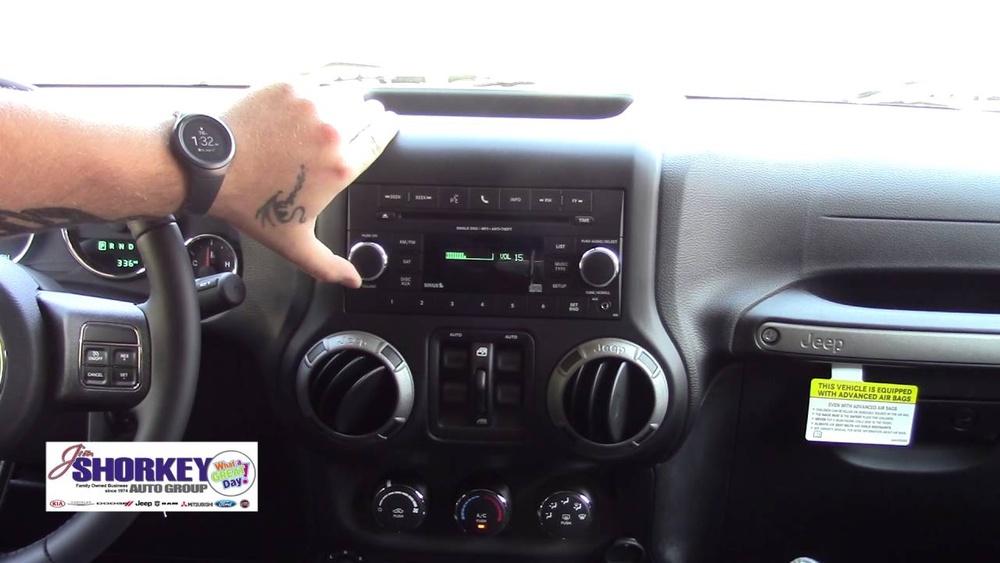
Before starting, make sure your Jeep Patriot 2016 has Bluetooth capability. Most Patriots from 2016 have the Uconnect system, which supports Bluetooth. Some basic models may only have radio or CD, not Bluetooth.
Check your dashboard for a Uconnect logo or a “Phone” button. If you see it, your vehicle supports Bluetooth. If not, you may need a Bluetooth adapter.
| Model Trim | Bluetooth Available | Uconnect System |
|---|---|---|
| Sport | No | No |
| Latitude | Yes | Uconnect 130/230 |
| High Altitude | Yes | Uconnect 230 |
If your trim does not support Bluetooth, consider a Bluetooth adapter. These plug into the AUX port and let you connect wirelessly.
Step-by-step: Connecting Bluetooth
Follow these steps to connect your phone to your Jeep Patriot’s Bluetooth.
1. Start The Vehicle
Turn on your Jeep and keep it in park. Bluetooth setup works best when the car is not moving.
2. Activate Bluetooth On Your Phone
Go to your phone settings, find Bluetooth, and turn it on. Make sure your phone is visible.
3. Access Uconnect
Press the Phone button on your Jeep’s dashboard or steering wheel. The system will say, “No phone connected. Would you like to pair a phone?”
4. Begin Pairing
Select “Yes. ” Uconnect will begin searching for devices.
5. Select Your Jeep On Your Phone
Your phone will show a list of available devices. Look for “Uconnect” or “Jeep Patriot. ” Tap to connect.
6. Enter Passkey
Uconnect will show a 4-digit PIN (often “0000” or “1234”). Enter this PIN on your phone.
7. Confirm Connection
The Uconnect screen will say “Pairing complete. ” Your phone may ask for permission to sync contacts and messages. Allow these for full features.
8. Test The Connection
Try making a call or playing music to check if everything works.
| Step | Action | Typical Time |
|---|---|---|
| 1 | Start Jeep | 1 minute |
| 2 | Enable phone Bluetooth | 2 minutes |
| 3 | Press Phone button | 1 minute |
| 4 | Pair devices | 3 minutes |
| 5 | Enter PIN & confirm | 1 minute |
Most people finish the process in under 10 minutes.

Common Problems And Solutions
Bluetooth pairing is usually smooth, but you may face issues. Here are solutions to common problems:
1. Device Not Found
If your phone doesn’t see Uconnect, turn Bluetooth off and on again. Restart the phone if needed.
2. Pin Doesn’t Work
Double-check the PIN on your Jeep display. If it’s wrong, cancel pairing and start again.
3. Connection Drops
Move your phone closer to the dashboard. Remove other paired devices from your phone’s Bluetooth list.
4. Audio Not Working
Make sure your phone is set to route audio through Bluetooth. Adjust volume on both Jeep and phone.
5. Contacts Not Syncing
Allow contact access when pairing. If contacts still don’t sync, check your phone’s Bluetooth settings for Uconnect and enable contact sharing.
Many beginners miss that Bluetooth only works for one phone at a time. If another phone is paired, disconnect it first.
Comparing Bluetooth Features: Jeep Patriot Vs. Other Models
The Jeep Patriot 2016 offers basic Bluetooth features. Here’s how it compares to other Jeeps:
| Model | Bluetooth Calling | Music Streaming | Voice Commands | Navigation Integration |
|---|---|---|---|---|
| Patriot 2016 | Yes | Yes | Basic | No |
| Cherokee 2016 | Yes | Yes | Advanced | Yes |
| Grand Cherokee 2016 | Yes | Yes | Advanced | Yes |
The Patriot’s Bluetooth is good for calls and music, but lacks advanced voice control and navigation features. If you need more, consider upgrading your system or using phone-based navigation.

Extra Tips For A Strong Bluetooth Connection
- Keep your phone’s software updated for best compatibility.
- Don’t overload your phone with many paired devices. Remove old ones.
- Use voice commands for hands-free calls. Say “Call John” after pressing the Phone button.
- Some music apps may not work smoothly. Try different apps if you have trouble.
- If you change your phone, delete the old pairing and start fresh.
Beginners often don’t realize that Bluetooth drains battery faster. Plug your phone into the car charger during long trips.
For more information about Uconnect and Bluetooth features, visit the official Jeep Uconnect page.
Frequently Asked Questions
How Many Phones Can I Pair With Jeep Patriot Bluetooth?
You can pair up to seven phones, but only one can be connected at a time. To switch, disconnect the current phone and connect the new one.
Can I Stream Music From Any App?
Most apps like Spotify and Apple Music work, but some older apps may not. If you have trouble, update the app or use a different one.
What Should I Do If The Bluetooth Connection Fails?
First, restart your phone and Jeep. If that doesn’t work, delete the pairing and start again. Make sure your phone’s Bluetooth is visible.
Does Bluetooth Work When The Car Is Off?
No. Bluetooth only works when the ignition is on or in accessory mode. Turn the key to accessory if you want to use Bluetooth without starting the engine.
Is Bluetooth Safe To Use While Driving?
Bluetooth is safer than holding your phone, but you should always focus on driving. Use voice commands and keep conversations short.
Connecting Bluetooth in your Jeep Patriot 2016 is simple once you know the steps. With the right setup, you can call, stream, and stay safe on the road. If you want advanced features, explore upgrades or newer Jeep models. Take advantage of Bluetooth to make every drive easier and more enjoyable.