Pairing your Jeep’s Bluetooth with Sirius can transform your driving experience. You can stream music, access calls, and enjoy hands-free controls. Many drivers struggle with the process, especially when dealing with different Jeep models or Sirius setups. This guide will show you step-by-step how to connect Bluetooth to your Jeep’s Sirius system, explain what to do when things go wrong, and help you understand key features and differences. You’ll also get practical tips that most beginners overlook.
Understanding Jeep Sirius And Bluetooth
Jeep Sirius refers to the SiriusXM radio system that comes installed in many Jeep vehicles. It offers satellite radio, streaming, and extra features. Most modern Jeeps also have Bluetooth integration, allowing you to pair your phone or other devices. When you connect Bluetooth to Sirius, you can stream audio from your phone or apps directly through your car’s speakers.
Not all Jeeps or Sirius systems work the same way. Some older Jeeps may need upgrades or adapters to support Bluetooth streaming. Newer models often have built-in Bluetooth that works with SiriusXM.
Here’s a quick comparison of Jeep models and their Sirius/Bluetooth compatibility:
| Jeep Model | Year Range | Bluetooth Built-in? | SiriusXM Ready? |
|---|---|---|---|
| Jeep Wrangler | 2011–2024 | Yes (2014+ standard) | Yes |
| Jeep Grand Cherokee | 2010–2024 | Yes | Yes |
| Jeep Compass | 2017–2024 | Yes | Yes |
| Jeep Patriot | 2011–2017 | Optional | Yes |
If your Jeep is older than 2012, check the owner’s manual for Bluetooth capability or look for an upgrade option.
Step-by-step: Connecting Bluetooth To Jeep Sirius
Connecting Bluetooth to your Jeep’s Sirius system is simple once you know the steps. Here’s a clear process:
- Start Your Jeep: Turn on the ignition. Make sure the SiriusXM radio and touchscreen are powered.
- Activate Bluetooth on Your Device: Go to Bluetooth settings on your phone. Make your device discoverable.
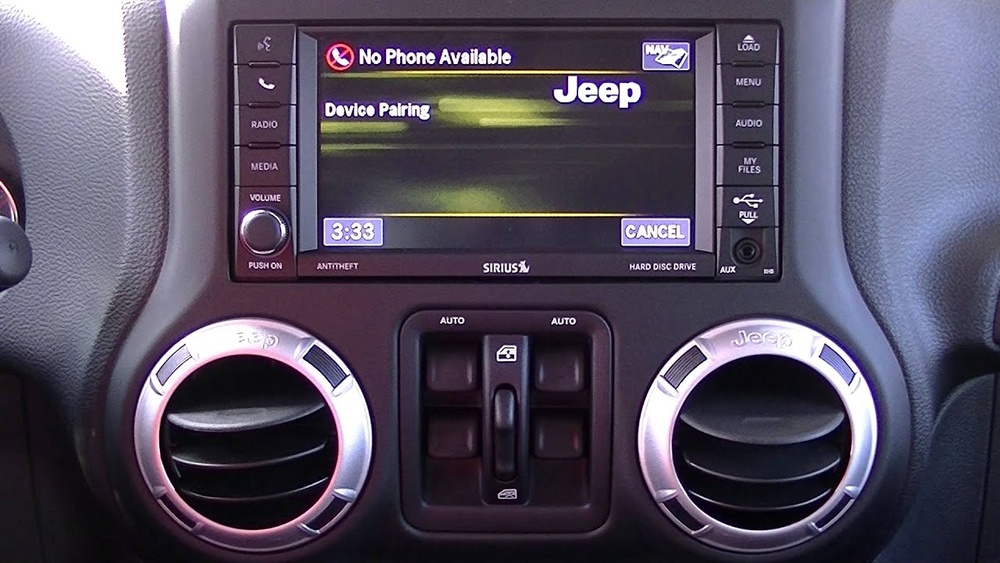
- Access Jeep’s Uconnect System: On the Jeep’s touchscreen, tap “Settings” or “Phone.” Select “Add Device” or “Pair Device.”
- Select Your Device: The screen will show available Bluetooth devices. Tap your phone’s name.
- Confirm Pairing: A code will appear on both the Jeep’s screen and your phone. Make sure they match, then accept on both.
- Choose SiriusXM as Audio Source: After pairing, press “Media” or “Source” and select “SiriusXM” or “Bluetooth Audio.”
- Test the Connection: Play music or audio from your phone. It should play through the Jeep’s speakers.
Here’s a comparison of steps between Uconnect 3 and Uconnect 4/5 systems:
| Step | Uconnect 3 | Uconnect 4/5 |
|---|---|---|
| Bluetooth Menu | Phone button, then Settings | Phone, then Add Device |
| Pairing Display | Small screen, may require manual entry | Touchscreen, shows code and device name |
| Audio Source Selection | Media button, scroll to Bluetooth | Source button, tap SiriusXM or Bluetooth |
Most Jeep owners forget to set their phone as “trusted” or “priority” in the Bluetooth menu. Doing this means you won’t need to repeat pairing every time.

Troubleshooting Common Bluetooth Issues
Connecting Bluetooth doesn’t always go smoothly. Here are solutions for the most common problems:
- Device Not Found: Make sure Bluetooth is enabled on both your phone and Jeep. Restart both if needed.
- Pairing Fails: Check that the codes match. If pairing fails, delete the device from the Jeep’s Bluetooth list and try again.
- Audio Not Playing: Confirm that SiriusXM or Bluetooth Audio is the selected source. Adjust volume on both phone and Jeep.
- Dropped Connection: Move your phone closer to the Jeep’s dashboard. Update your phone’s software and Jeep’s Uconnect system.
- Multiple Devices Interference: Unpair other devices temporarily. Set your main phone as the priority device.
Many drivers ignore software updates. Updating your Jeep’s Uconnect system and your phone’s Bluetooth software can solve many invisible bugs.
Extra Features With Bluetooth And Siriusxm
Pairing Bluetooth with SiriusXM lets you enjoy more than just radio:
- Streaming Music: Use apps like Spotify, Pandora, or Apple Music through your Jeep’s speakers.
- Hands-Free Calling: Answer and make calls safely while driving.
- Voice Commands: Control music, calls, and navigation by voice.
- Access SiriusXM App: If your phone has the SiriusXM app, you can stream exclusive channels not available on satellite.
Some Jeep models offer advanced features like wireless Apple CarPlay or Android Auto. These allow even more control and integration.
Here’s a quick look at extra features by Jeep model:
| Jeep Model | Wireless CarPlay/Android Auto | Voice Command Support | SiriusXM App Integration |
|---|---|---|---|
| Wrangler (2021+) | Yes | Yes | Yes |
| Grand Cherokee (2022+) | Yes | Yes | Yes |
| Compass | No | Yes | Yes |
| Patriot | No | No | No |
Many drivers do not realize that using the SiriusXM app over Bluetooth gives access to more channels and on-demand content than the built-in SiriusXM radio.

Tips For A Smooth Bluetooth And Siriusxm Experience
- Keep your phone’s Bluetooth updated.
- Set your main device as “priority” in Jeep’s Bluetooth menu.
- Avoid pairing too many devices; this can slow down the system.
- Use the SiriusXM app for extra content.
- If you get static or poor sound, move your phone away from other electronics.
- Check your Jeep’s manual for unique pairing steps.
For more in-depth information, you can visit the official SiriusXM Jeep guide.
Connecting Bluetooth to your Jeep’s Sirius system gives you the freedom to enjoy music, calls, and navigation hands-free. With the right steps and a few tricks, your ride becomes safer and more entertaining.
Frequently Asked Questions
How Do I Know If My Jeep Supports Bluetooth And Siriusxm?
Most Jeeps from 2011 onward support both features. Look for a Bluetooth symbol on your dashboard or check your owner’s manual. SiriusXM is usually standard in mid-level and high trims.
Can I Use Siriusxm Through Bluetooth If My Jeep Doesn’t Have Built-in Siriusxm?
Yes, you can stream SiriusXM using the app on your phone and play it via Bluetooth. You won’t get satellite radio, but you’ll have access to streaming content.
What Should I Do If Bluetooth Pairing Fails?
First, restart your phone and Jeep. Delete old devices from the Jeep’s Bluetooth list and try pairing again. Make sure codes match exactly.
Is Bluetooth Audio Quality As Good As Siriusxm?
Bluetooth audio quality depends on your phone and Jeep’s system. SiriusXM satellite is usually clearer, but streaming via Bluetooth can offer better sound if your phone uses high-quality apps.
Can I Pair Multiple Devices With My Jeep’s Bluetooth?
Yes, but only one device can play audio at a time. Set your main device as “priority” to avoid confusion. Unpair unused devices for faster connection.
Connecting Bluetooth to your Jeep’s Sirius system is easier than many drivers think. With the right steps and attention to detail, you can enjoy all the benefits of modern in-car entertainment.