Keeping your Jeep GPS navigation updated is essential for safe and stress-free driving. Roads change, new routes open, and old maps can lead you the wrong way. Many Jeep owners don’t realize how quickly out-of-date GPS maps can create problems, from missed turns to inaccurate arrival times. Updating your Jeep’s navigation system is not hard, but it does require a few specific steps. This guide walks you through the process and highlights key tips that most beginners overlook.
Why Updating Jeep Gps Matters
An updated GPS system provides accurate maps, reliable route suggestions, and the latest points of interest. For example, a 2020 study found that 65% of in-car navigation errors were due to outdated maps. Jeep’s built-in navigation uses data from providers like Garmin or HERE, which release new updates at least once a year.
When your GPS is current, you benefit from:
- New road layouts and traffic patterns
- Updated speed limits
- Latest gas stations, restaurants, and emergency services
- Fewer detours and less wasted time
If you use your Jeep for road trips or in unfamiliar areas, updated maps are even more important. Some insurance companies also consider GPS accuracy for claims and driving safety.
How To Check If Your Jeep Gps Needs An Update
Before updating, you need to confirm if your maps are out of date. Here’s how:
- Start your Jeep and turn on the Uconnect system.
- Go to the Navigation menu.
- Find the “Map Information” or “About” section.
- Check the map version and compare the date to the latest version on the official Jeep or map provider’s site.
If your map version is more than a year old, it’s time to update.
Methods To Update Jeep Gps
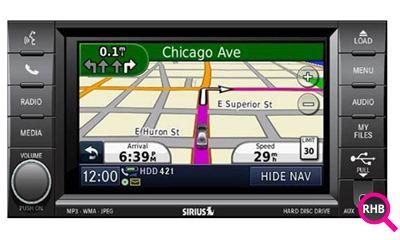
Jeep GPS updates are usually done in two main ways: using a USB drive or via over-the-air updates (for some newer models).
Usb Update (most Common)
Most Jeep models use a USB drive to install map updates. Here’s the process:
- Go to the official Jeep navigation update site, often run by providers like Garmin or HERE.
- Enter your Jeep’s Vehicle Identification Number (VIN) and the model year.
- Download the update file to your computer. The file is usually large (up to 8GB), so a fast internet connection helps.
- Format a USB drive (at least 16GB, FAT32 format).
- Move the update file to the USB drive.
- Start your Jeep and plug the USB into the designated port.
- Follow the on-screen instructions to install the update.
Important tip: Do not turn off your Jeep or remove the USB drive during the update. The process can take 30-60 minutes.
Over-the-air Updates
Some newer Jeep models (2021 and later) support over-the-air (OTA) updates. If your Jeep has this feature:
- Connect your Jeep to Wi-Fi.
- Go to Settings > System Updates in Uconnect.
- Download and install the update as prompted.
OTA updates are more convenient but may not be available on all models.
What You Need Before Updating
To avoid interruptions and errors, gather these items before you start:
- Your Jeep’s VIN (found on your dashboard or registration papers)
- A USB drive (at least 16GB, properly formatted)
- Access to a computer with internet
- Your Jeep’s Uconnect PIN or login (if required)
- At least 1 hour of time with the Jeep running or in “accessory” mode
Costs And Subscriptions
Updating Jeep GPS is not always free. Most map providers charge for updates, especially if your Jeep is more than a year old. Prices range from $99 to $149 per update. Some new Jeeps include one or more free updates as part of a Uconnect subscription.
Here’s a quick comparison of update costs for recent Jeep models:
| Jeep Model | Map Provider | Update Cost | Free Updates? |
|---|---|---|---|
| Grand Cherokee (2018+) | Garmin | $149 | First year only |
| Wrangler (2020+) | HERE | $129 | No |
| Compass (2019+) | TomTom | $99 | First update free |
Check with your dealer or on the official Jeep site for current pricing.
Common Problems And Solutions
Updating Jeep GPS is usually smooth, but a few issues can occur:
- Corrupt files: Always safely eject your USB from the computer before using it in your Jeep.
- Not enough power: If your battery is low, the update might fail. Run the engine or use a charger.
- Wrong file format: Double-check the USB is formatted as FAT32, not exFAT or NTFS.
If you see an error, reboot the system and try again. For persistent problems, contact your Jeep dealer.

Dealer Vs. Diy Updates
You can update the GPS yourself or have your Jeep dealer do it. Here’s a quick comparison:
| Method | Pros | Cons |
|---|---|---|
| DIY (USB/OTA) | Save money, update anytime | Takes time, risk of mistakes |
| Dealer | Expert help, warranty support | More expensive ($50–$100 extra) |
If you’re not comfortable with tech or have an older Jeep, the dealer option is safer.
Tips Most Owners Miss
- Back up your favorites: Custom points and recent destinations may be deleted during updates.
- Check for system updates: Sometimes, you need to update Uconnect software before updating maps.
- Use the right USB port: Some Jeeps have multiple ports; only one works for updates (usually labeled “Media”).
These details are often skipped in basic guides, but they can save you headaches.
Staying Informed About Future Updates
Sign up for email alerts from the Jeep navigation update provider or your dealer. This way, you’ll be notified when a new map is released for your vehicle. You can also find update instructions and support on the official Mopar website.
Keeping your Jeep GPS updated means safer, smoother journeys and less stress when driving somewhere new. The small investment of time and money is worth it for peace of mind.
Frequently Asked Questions
How Often Should I Update My Jeep Gps?
It’s recommended to update once per year, or whenever you notice map errors or missing roads.
Can I Use My Phone’s Gps Instead?
Yes, but built-in Jeep GPS works even without cell service and integrates with your dashboard for hands-free use.
What If The Update Fails Partway Through?
Restart your Jeep and try again. If it still fails, check your USB drive and file format. Contact your dealer if problems persist.
Do Updates Include New Features Or Just Maps?
Most updates focus on maps and points of interest. Major feature updates may require a separate system software update.
Where Can I Buy Official Jeep Gps Updates?
Get updates from your Jeep dealer, the official Jeep navigation website, or through trusted providers like Garmin, HERE, or TomTom. Avoid unofficial download sites to protect your system.